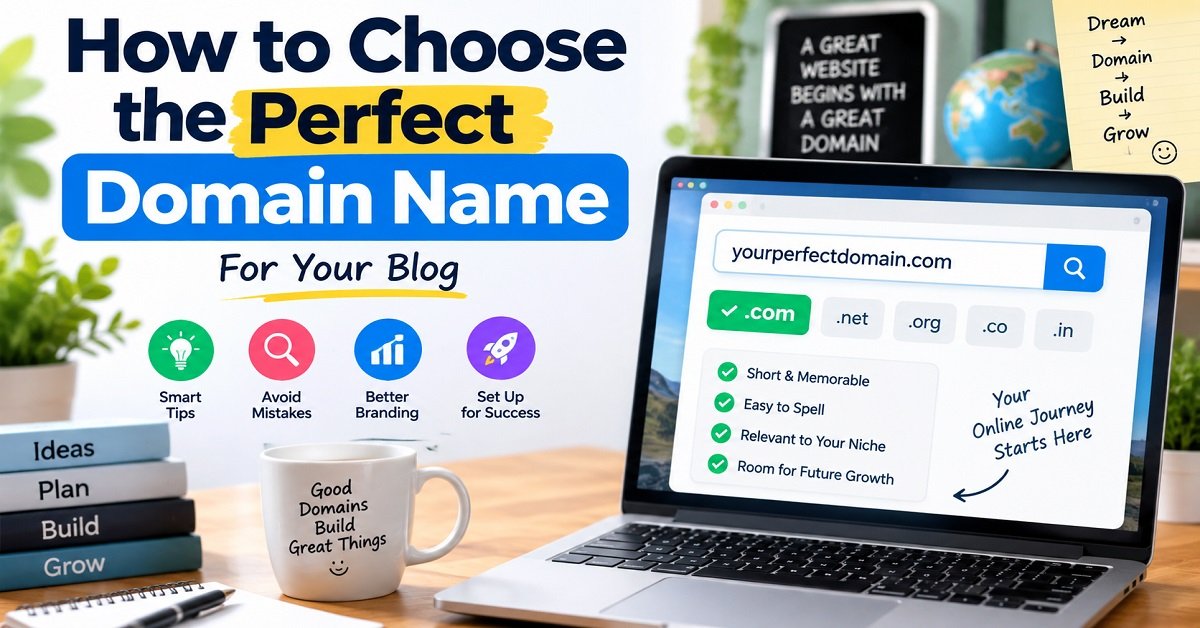
Choosing a domain name can feel surprisingly difficult.
You may have a great blog idea, a clear niche, and even a hosting plan ready. But when you try to register your domain, you suddenly face dozens of questions. Should you use your own name? Should the domain contain your keyword? Is .com better than .in? Should you add a hyphen if your first choice is unavailable?
The good news is that you do not need a complicated formula to choose a good domain name. You simply need to know what makes a domain easy to remember, easy to type, suitable for your brand, and flexible enough for your future plans.
In this guide, you will learn how to choose the perfect domain name for a blog or website, what mistakes to avoid, how to select the right domain extension, and what to check before spending your money. By the end, you should have a simple process you can use to shortlist and confidently choose your domain name.
What Is a Domain Name?
A domain name is the address people type into their browser to visit your website.
For example:
orbitelf.com
is a domain name.
When someone types that address into a browser, the domain helps direct them to the server where the website is hosted.
Think of it like your home’s address.
If you want someone to visit your house, you give them your address. In the same way, if you want people to visit your website, you give them your domain name.
There are three things beginners often confuse:
| Term | What it means | Simple example |
|---|---|---|
| Domain name | Your website’s address | orbitelf.com |
| Web hosting | The server where your website files are stored | Hostinger |
| Website | The actual pages, content, images and features visitors see | Your WordPress site |
You generally need both a domain name and web hosting to build a self-hosted website.
If you are completely new to this, our guide on How to Start a Blog in 2026 can help you understand the overall process of starting a blog.
Why Does Your Domain Name Matter?
A domain name is much more than something you type into a browser.
It can become part of your brand.
Imagine that you tell someone about your website while talking to them on the phone. If the name is short and easy to remember, they may be able to type it into Google or their browser later without asking you to repeat it.
Now imagine the opposite.
Suppose your domain is:
thebesttechnologytipsandtricksforbeginners2026.com
Even if the website itself is excellent, the domain is difficult to remember and communicate.
A shorter, clearer name is usually easier to work with.
Your domain can affect several practical areas of your website:
- Brand recognition
- Word-of-mouth sharing
- How easily visitors remember your website
- How professional your website appears
- Your future branding
- Email addresses
- Social media branding
- Offline marketing
- How easily you can expand your website into new topics
This does not mean that a perfect domain name will automatically bring traffic or rankings.
A great domain cannot replace useful content, good SEO, a fast website, or consistent work.
Think of your domain as the name of your online property. It gives your website an identity, but what you build on that property is what ultimately matters.
What Makes a Good Domain Name?
There is no single domain name formula that works for every website.
A domain for a personal blog can be completely different from a domain for an online store or an affiliate website.
However, most good domain names share some common characteristics.
A good domain is usually:
- Easy to remember
- Easy to spell
- Easy to pronounce
- Relatively short
- Brandable
- Relevant to the website
- Flexible enough for future growth
- Free from obvious trademark conflicts
- Easy to communicate verbally
You do not need every characteristic to be perfect.
For example, a domain might be slightly longer but still be a strong choice because it creates a memorable brand.
The goal is to find a name that makes sense for your particular website and future plans.
1. Keep Your Domain Name Short and Simple
One of the easiest rules to remember is this:
Shorter and simpler is usually better.
This does not mean you should try to create a three-letter domain at any cost.
Instead, remove unnecessary words.
For example, imagine someone wants to create a website about home gardening.
These could be possible ideas:
- bestgardeningtipsforhome.com
- homegardeningideas.com
- gardenwise.com
The first name explains the topic clearly, but it is long.
The second is shorter and descriptive.
The third is more brandable and gives the website more room to grow.
Which approach should you choose?
It depends on your goals.
If you plan to publish only detailed home gardening tutorials, a descriptive name might make sense.
If you eventually want to sell gardening products, publish gardening courses, or cover outdoor living more broadly, a brandable name may give you more flexibility.
The important thing is not to make your domain unnecessarily long.
2. Make It Easy to Spell
Imagine telling someone your domain name over the phone.
They should have a reasonable chance of typing it correctly without seeing it written down.
This is sometimes called the phone test.
For example, suppose your domain uses an unusual spelling such as:
phynixx.com
You may have a problem.
A person hearing the name might wonder:
“Is it Phoenix?”
“Is it Phynix?”
“Is there one X or two?”
That confusion can become a problem when people try to visit your website.
Creative spellings can work for some established brands, but they are generally harder for a new blogger to build around.
When possible, choose words that people already know how to spell.
3. Make It Easy to Pronounce
Your domain should ideally be easy to say.
Why?
Because people do not discover websites only through search engines.
Someone might recommend your website during:
- A YouTube video
- A podcast
- A conversation
- A social media discussion
- A WhatsApp message
- A conference or event
If people cannot understand the domain when they hear it, they may have difficulty finding it later.
For example, if your brand name contains several unusual letters or confusing spellings, you may repeatedly have to explain:
“That’s spelled with two Xs.”
“There’s a number in the middle.”
“There’s a hyphen between these two words.”
That is not ideal for a new brand.
4. Choose a Name People Can Remember
A domain does not have to describe everything your website does.
It simply needs to give people something they can remember.
Consider how brand names work in the real world.
A person can remember a short, distinctive name even if the name itself does not describe every product or service offered by the company.
The same principle can work for websites.
For example, if you are creating a technology blog, you could choose a highly descriptive name such as:
latesttechnologynewsandreviews.com
But a shorter brandable name could be easier to remember.
This is particularly useful if you plan to build your website for several years.
5. Think About Your Future Before Registering
This is one of the most important points when choosing a domain.
Ask yourself:
“Will I still be happy with this domain three or five years from now?”
Many beginners choose a domain based on their first few articles.
That can become a problem later.
Imagine you start a website called:
budgetsmartphonesonly.com
Initially, you publish smartphone articles.
After two years, you decide to cover laptops, headphones, smartwatches and other gadgets.
Your domain now limits your branding.
Visitors may assume that you only write about smartphones.
You could still expand, of course, but the domain creates an unnecessary restriction.
A more flexible technology-related brand could allow you to expand naturally.
This is why you should think about your future content direction, not just your first ten articles.
6. Do Not Stuff Keywords Into Your Domain
Many beginners believe that putting several keywords into a domain will automatically help their website rank higher in Google.
That is not a good reason to create a long, awkward domain.
For example:
bestcheapsmartphonesunder10000india.com
contains several relevant keywords, but it is difficult to remember and looks more like a search query than a brand.
A simpler domain can be easier to build into a recognizable website.
You can still target keywords through your:
- Article titles
- Headings
- Content
- Internal links
- Page titles
- Meta descriptions
- Image alt text
- Structured data where appropriate
Your domain does not need to carry your entire SEO strategy.
For more practical SEO guidance, you can also read our On-Page SEO Checklist.
7. Should Your Domain Include Your Main Keyword?
This is where things become slightly more interesting.
There is nothing wrong with including a relevant word in your domain.
For example, a website about gardening could use a name containing the word “garden.”
A website about photography could include “photo” or “photography.”
The problem starts when you force several keywords into the domain simply because you believe it will improve rankings.
Consider these two approaches:
Brand-focused:
gardenwise.com
Keyword-heavy:
bestgardeningtipsandgardeningideas.com
The first gives you a recognizable brand.
The second explains the topic but is harder to remember.
For a new website, I would generally focus on creating a clear and memorable brand, while using a relevant keyword only when it fits naturally.
Your content and overall website should make the topic clear.
8. Choose a Domain That Matches Your Audience
Think about who will visit your website.
Your domain should feel appropriate for those people.
For example, a website targeting Indian readers may consider a .in domain if that fits its brand and audience.
A website intended for a global audience may prefer .com if an appropriate name is available.
Neither choice automatically makes a website successful.
The important question is:
“Does this domain make sense for the audience I want to reach?”
Think about the audience before thinking about the domain extension.
9. Choose the Right Domain Extension
The part after the final dot is called the top-level domain, or TLD.
For example, in:
example.com
.com is the domain extension.
There are many extensions available today.
Some common examples include:
| Extension | Common association | Possible use |
|---|---|---|
.com | General commercial/web use | Businesses, blogs, brands |
.in | India | Indian-focused websites |
.org | Organizations | Nonprofits and organizations |
.net | Originally network-related | Technology and other websites |
.co | Business/brand use | Companies and startups |
.info | Information | Informational websites |
These associations are not absolute rules.
A website does not become trustworthy simply because it uses .com, and another website does not automatically become poor because it uses .in.
Choose an extension that fits your website, audience and branding.
10. Is .com Always the Best Choice?
You will often hear people say:
“Always buy a .com domain.”
There is some practical reasoning behind the popularity of .com.
It is widely recognized, familiar to many internet users, and commonly associated with businesses and websites.
But “always” is too strong.
Suppose your website is specifically designed for an Indian audience and your preferred .in domain is available.
Using .in can be a perfectly reasonable choice.
For example:
yourbrand.in
can make sense when India is an important part of the website’s identity.
On the other hand, if you are building a global brand and the .com version of your desired brand name is available at a normal registration price, you may prefer it for familiarity.
The key is to consider the brand and audience, rather than treating the extension as a magic SEO factor.
11. Avoid Hyphens When Possible
Hyphens are not forbidden.
But they can make a domain harder to communicate.
Imagine telling someone:
“My website is best dash blogging dash tips dot com.”
That is more work than simply saying:
“BestBloggingTips.com.”
Hyphens can also create confusion when people remember the name later.
If the non-hyphenated version is already owned by another website, do not automatically register the hyphenated version.
First check whether the existing domain belongs to an active brand or business.
You do not want your new website to look like a copy of someone else’s brand.
12. Be Careful With Numbers
Numbers can sometimes work well in domain names.
But they can also create confusion.
Suppose your domain is:
tech4you.com
When you tell someone the name verbally, they might wonder:
“Is it tech four you?”
“Is it tech for you?”
“Does the domain use the number 4 or the word ‘for’?”
That may seem like a small issue, but small sources of confusion can become annoying when you repeatedly promote your website.
If a number is an important part of your brand, it can still be used.
Just make sure people can easily understand and remember it.
13. Check for Trademark and Brand Conflicts
This is one step you should never skip simply because a domain appears available.
A domain being available for registration does not automatically mean you are free to use that name as a brand.
For example, imagine you find an available domain that contains the name of an established company or a distinctive trademark.
Registering it could create legal or branding problems.
Before purchasing a domain:
- Search Google for the name.
- Check whether an established business already uses it.
- Search relevant trademark databases.
- Check social media and business directories.
- Avoid names that deliberately imitate an existing brand.
- If you are building a serious business around the name, consider getting professional legal advice.
You do not need to become a trademark expert.
The basic idea is simple:
Do not choose a domain just because the registrar says it is available.
You also need to make sure the name is sensible to use.
14. Check Social Media Availability
You do not necessarily need the exact same username on every social platform.
However, it is useful to check whether your brand name is already strongly associated with another business or creator.
For example, suppose you want to build:
ExampleBrand.com
Before registering it, search for “ExampleBrand” on major social platforms.
If another established company has already built a large audience using that name, you may want to choose something different.
This is not only about getting the exact username.
It is about avoiding unnecessary confusion.
15. Use the 10-Second Domain Test
Here is a simple test you can use before buying a domain.
Show the domain to a friend for about 10 seconds.
Then hide it.
Ask them:
“What was the website name?”
If they can remember most of it, that is a positive sign.
Then ask:
“How would you spell it?”
If they immediately know how to spell it, even better.
Finally ask:
“What do you think this website is about?”
Their answer can reveal whether the name communicates your intended brand or creates confusion.
You do not have to reject a domain simply because someone cannot guess the niche.
Brandable names often do not explain everything.
But if people consistently struggle to remember or spell the name, it is worth reconsidering.
A Quick Checklist Before You Register
Before you put your money into a domain, run through this checklist:
| Question | What you want |
|---|---|
| Is it easy to remember? | Yes |
| Is it easy to spell? | Yes |
| Is it easy to pronounce? | Yes |
| Is it reasonably short? | Yes |
| Does it fit your website? | Yes |
| Can your website expand in the future? | Ideally |
| Does it avoid unnecessary numbers? | Preferably |
| Does it avoid unnecessary hyphens? | Preferably |
| Is it clearly different from established brands? | Yes |
| Have you checked trademarks? | Yes |
| Have you checked social media? | Yes |
| Have you checked renewal pricing? | Yes |
If you can answer “yes” to most of these questions, you are already ahead of many beginners.
The next step is to turn your ideas into actual domain names and compare them before choosing one.
How to Choose Between a Personal Name and a Brand Name
One of the first decisions you need to make is whether your domain should be based on your own name or a separate brand name.
Both approaches can work well.
The right choice depends mainly on what you want to build.
When a Personal Domain Makes Sense
Using your own name can be a good option when you are building a personal brand.
For example:
yourname.com
can work well for:
- Personal blogs
- Freelance websites
- Portfolio websites
- Consultants
- Coaches
- Authors
- Developers
- YouTubers
- Public speakers
The biggest advantage is flexibility.
You can change the topics you write about without changing your brand.
Imagine that you start by writing about blogging.
A few years later, you start writing about technology, freelancing and online business.
If your domain is your name, the change is easy.
Your audience is following you, rather than a specific topic.
When a Brand Name Makes More Sense
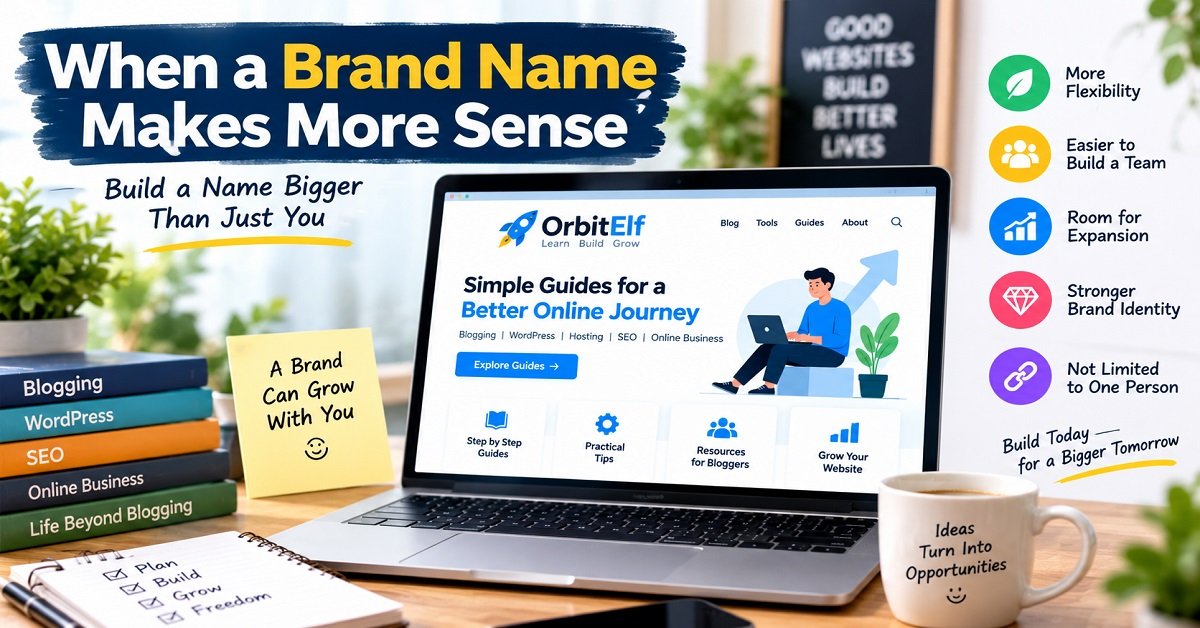
A separate brand name may be better if you want to build a website that could eventually become a larger business.
For example, imagine you want to create a website covering:
- Blogging
- WordPress
- Hosting
- SEO
- Website tools
- Online business
A brand name gives you room to cover all these subjects without tying the website to one individual.
This can also be useful if you eventually want other writers, editors or team members to contribute.
Personal Name vs Brand Name
| Factor | Personal name | Brand name |
|---|---|---|
| Personal branding | Excellent fit | Can work |
| Building a company | Possible | Often a natural fit |
| Changing topics | Very flexible | Depends on the name |
| Adding a team | Possible | Often easier |
| Selling the website later | May depend heavily on the person | Can be easier to separate from the owner |
| Building authority around an individual | Strong | Less personal |
| Creating a standalone media brand | Less direct | Strong fit |
There is no universally correct answer.
Think about what you want the website to become rather than what you are publishing today.
How to Generate Domain Name Ideas
Coming up with a good domain can be harder than understanding the rules.
A useful approach is to start with words related to your website and then combine them in different ways.
Suppose you want to create a website about blogging.
Start with a list such as:
Blog
Write
Content
Creator
Publish
Growth
Niche
Digital
Online
Guide
Learn
Now start combining ideas.
For example:
- Blog + Guide
- Content + Lab
- Digital + Writer
- Blog + Mentor
- Creator + Hub
- Write + Better
Some combinations will sound terrible.
That is normal.
The purpose of brainstorming is not to find the perfect name immediately. It is to create a large enough list that you can compare different ideas.
Use the “Brandable First” Approach
Instead of trying to describe your entire website in the domain, ask:
“Could this become a brand?”
For example, consider a fictional website called:
BlogNest
It does not explain everything about the website.
But it is short, easy to pronounce and potentially memorable.
Now compare it with:
BestBloggingTipsAndStrategiesForBeginners.com
The second name tells you exactly what the website is about, but it is difficult to remember.
A domain should not have to explain your entire business.
Your homepage, tagline, content and branding can do that work.
Try the “Two-Word Combination” Method
Combining two relevant words is one simple way to generate brand ideas.
For example:
Topic + benefit
- Blog + Growth
- Tech + Guide
- Money + Path
Topic + place
- Creator + Hub
- Blog + Lab
- Tech + Zone
Action + topic
- Learn + Tech
- Build + Blog
- Write + Better
You can also experiment with words that describe the feeling you want your brand to create.
For example:
- Simple
- Smart
- Fresh
- Clear
- Easy
- Quick
- Bright
- Practical
The final domain does not have to contain a keyword.
The important thing is that it sounds natural and fits the brand you want to build.
Avoid Making the Name Too Narrow
This is one of the most common mistakes new bloggers make.
Imagine someone starts a website called:
bestlaptopunder50000.com
At first, this may seem like a great idea.
The website can publish articles about laptops under ₹50,000.
But what happens if the creator later wants to cover:
- Premium laptops
- Gaming laptops
- Monitors
- Keyboards
- Headphones
- Smartphones
The domain suddenly feels restrictive.
A broader brand could have made that expansion easier.
Before choosing a domain, ask:
“What if my website becomes much bigger than I currently imagine?”
You do not have to predict the future perfectly.
Just avoid unnecessarily locking yourself into a very narrow topic.
Don’t Choose a Domain Only Because It Is Available
This is another important lesson.
You may search for a domain and find that it is available for ₹99 or ₹199 for the first year.
It can be tempting to think:
“It is cheap and available, so I should buy it.”
But domain availability is not a quality test.
An available domain can still be:
- Difficult to spell
- Too long
- Confusing
- Too narrow
- Similar to another brand
- Difficult to pronounce
- Expensive to renew
- Poor for long-term branding
Instead of asking:
“Is this domain available?”
first ask:
“Is this a domain I actually want to build a website around?”
Then check availability.
That small change in thinking can prevent many poor domain purchases.
What If Your Perfect Domain Is Already Taken?
This happens all the time.
You come up with a name you love, search for it, and discover that someone already owns the domain.
Do not immediately add random numbers to the name.
For example, if:
mybrand.com
is unavailable, avoid automatically choosing:
mybrand12345.com
That may technically solve the availability problem, but it can weaken your brand.
Instead, try meaningful variations.
Option 1: Add a Relevant Word
Suppose you want:
TechNest.com
and it is unavailable.
You might consider a meaningful variation such as:
TechNestHub.com
or:
TechNestGuide.com
provided the resulting name is actually suitable and does not conflict with an existing brand.
Option 2: Change the Word Order
Sometimes changing the order creates a better name.
For example:
DigitalCreator
could become:
CreatorDigital
Not every combination will work, but experimenting with word order can produce useful alternatives.
Option 3: Create a New Brand
This is often overlooked.
You do not have to force your original idea to work.
If a domain is taken and the owner has built an established brand around it, creating a different name may be much better than trying to stay as close as possible to the original.
Remember:
Your goal is to build a good brand, not to win a domain-name lottery.
Should You Buy a Premium Domain?
You may come across domains being sold for hundreds, thousands or even much more than normal registration prices.
These are often called premium domains.
For example, a short, memorable domain such as a common dictionary word may have considerable resale value.
But beginners should think carefully before paying a large amount.
A premium domain can make sense for an established business where the name has significant branding value.
For a new blog, spending a large amount on a domain is usually not necessary.
You can build a successful website with a normal domain registration.
Your budget may be better spent on things that directly help you build the website, such as:
- Quality hosting
- Useful tools
- Content creation
- Website design
- Research
- Photography or graphics
- Marketing
The domain name matters, but it is only one part of your website.
When Buying an Existing Domain Can Make Sense
Another option is buying a domain that someone already owns.
This is different from registering a new domain.
An existing domain may have:
- An established history
- Existing backlinks
- Previous content
- Brand recognition
- Existing traffic
That may sound attractive.
But it also creates risks.
An old domain could have been used for spam, low-quality content or completely unrelated purposes.
It may also have a history that you do not know about.
Before buying an existing domain, research its history carefully.
Check:
- Previous website content
- Domain history
- Backlink quality
- Previous ownership where available
- Search-engine visibility
- Spam signals
- Trademark issues
- Whether the old topic is relevant to your planned website
Do not buy an old domain simply because someone says:
“It already has backlinks, so your website will rank faster.”
Backlinks are not automatically valuable.
A domain with thousands of poor-quality or irrelevant links may be more trouble than it is worth.
Check the Domain’s History
Before purchasing an existing domain, try to understand what was previously hosted on it.
For example, imagine you want to build a website about blogging.
You find an old domain with a strong-sounding name and some backlinks.
But you discover that the domain was previously used for an unrelated gambling website.
That history should make you stop and investigate further.
The lesson is simple:
An old domain is not automatically a valuable domain.
If you are a beginner, registering a clean, appropriate domain can be much simpler than trying to understand a complicated domain’s history.
Check the Domain’s Renewal Price
This is something many beginners miss.
Registrars often advertise an attractive first-year price.
For example:
First year: ₹199
That sounds great.
But what happens in the second year?
The renewal price might be considerably higher.
This does not necessarily mean the registrar is doing anything wrong. Promotional pricing is common.
The important thing is to know the normal renewal price before you buy.
When comparing domain registrars, check:
| Cost or feature | What to check |
|---|---|
| First-year price | Promotional or regular price? |
| Renewal price | How much will you pay later? |
| Privacy | Is privacy protection included? |
| DNS management | Can you easily manage DNS records? |
| Transfer | Are there restrictions or fees? |
| Support | How can you contact support? |
| Auto-renewal | Is it enabled and configurable? |
| Additional services | Are unnecessary services added at checkout? |
A domain that costs slightly more initially may be cheaper over several years.
Don’t Forget Domain Ownership
When registering a domain, make sure the domain is registered using an account and email address that you control.
This sounds obvious, but it is important.
If someone else registers the domain on your behalf, make sure you understand who controls the registrar account and ownership details.
Your domain is an important part of your online business.
You should be able to:
- Access the registrar account
- Change DNS settings
- Renew the domain
- Transfer the domain when permitted
- Update contact information
- Manage security settings
Do not treat your domain registrar account as an unimportant login.
Protect it with a strong password and two-factor authentication when available.
Consider Your Domain Privacy
When registering a domain, you may see options related to domain privacy or WHOIS privacy.
The exact details depend on the registrar and domain extension.
The basic idea is that certain registration information may be protected from public display where privacy protection is available.
Before registering, check what privacy protection your registrar provides and whether it is included in the price.
This is another reason not to choose a registrar based only on the advertised first-year price.
Should You Register Multiple Domain Extensions?
Suppose you successfully register:
yourbrand.com
You may wonder whether you should also purchase:
yourbrand.in
yourbrand.net
yourbrand.co
There is no need to buy every possible extension.
For a small blog, buying several domains can simply increase your expenses.
However, purchasing another important extension can sometimes make sense if:
- Your brand is becoming established
- Another extension is important in your target market
- You want to protect your brand
- You expect people to commonly type a different extension
Think about the practical benefit before spending the money.
Should You Buy Common Misspellings?
Some businesses purchase common misspellings of their brand and redirect them to the main website.
For a new blogger, this is usually unnecessary.
If your domain is:
ExampleBrand.com
you generally do not need to purchase every possible spelling mistake people might make.
Instead, focus on choosing a domain that is naturally easy to spell in the first place.
Think About Your Email Address
Your domain will also become part of your professional email address.
For example:
looks much more connected to your website than a random free email address.
This is another reason to choose a domain that you will be comfortable using for years.
Imagine putting the email address on:
- Your business card
- Your YouTube channel
- Your LinkedIn profile
- Your website
- Client proposals
- Invoices
- Guest-post pitches
You want the domain to look natural in all these places.
A Practical 15-Minute Domain Selection Process
If you are currently trying to choose a domain, here is a simple process you can follow.
Step 1: Define Your Website
Write down what your website will mainly cover.
For example:
Blogging, WordPress, hosting and website building.
Step 2: Think About the Future
Ask yourself what you might cover two or three years from now.
Do not make the domain unnecessarily narrow.
Step 3: Create 20 Ideas
Do not stop after finding one name.
Write down at least 20 possibilities.
Some will be bad.
That is completely fine.
Step 4: Remove Difficult Names
Delete names that are:
- Too long
- Difficult to spell
- Difficult to pronounce
- Full of numbers
- Full of hyphens
- Too similar to existing brands
Step 5: Shortlist Five
Now choose your five strongest ideas.
Do not become emotionally attached to one name yet.
Step 6: Check the Brand
Search each name on Google and major social platforms.
Look for existing businesses, websites and creators using the same or very similar name.
Step 7: Check Trademarks
Before committing to a business name, investigate relevant trademark records and consider professional advice if necessary.
Step 8: Check Domain Availability
Now check whether your shortlisted domains are available.
Step 9: Compare the Costs
Check both the registration price and renewal price.
Step 10: Apply the 10-Second Test
Show your final choices to someone.
Ask them to remember and spell the name after seeing it briefly.
Step 11: Sleep on It
This may sound unnecessary, but it can help.
If you have been looking at domain names for two hours, everything starts to look good.
Take a break and look at your shortlist again later.
Step 12: Register the Domain
Once you are confident about the name and have completed your checks, register it through a reputable registrar.
A Simple Example
Let’s say you want to start a website about blogging.
You come up with these five ideas:
| Domain idea | Potential issue |
|---|---|
| BestBloggingTipsForBeginners.com | Too long |
| BloggingTips123.com | Number feels unnecessary |
| Blog-Guide.com | Hyphen |
| BlogGrowth.com | Short and descriptive |
| OrbitElf.com | Brandable and flexible |
The last two might be worth considering further.
But even here, the decision should depend on the actual brand, availability, existing businesses and your long-term plans.
The point of this exercise is to show that there is more to choosing a domain than simply finding an available keyword-rich name.
What If You Change Your Mind Later?
This is another reason to think carefully before registering.
Technically, you can change the domain associated with a website later.
But changing a domain is not something you should do casually.
A domain change can involve:
- Redirects
- Internal links
- Search-engine signals
- Email addresses
- Branding
- Social media profiles
- Backlinks
- Analytics and tracking
- Communication with existing visitors
It is much easier to choose carefully at the beginning than to rebuild your online identity later.
That does not mean you should spend six months trying to find a perfect name.
You simply want to make a thoughtful decision before you start building your website around it.
Domain Name Pros and Cons
If you are still undecided, here is a quick summary.
Pros of Choosing a Strong Domain Name
- Easier for visitors to remember
- Helps create a recognizable brand
- Easier to communicate verbally
- Can support professional email addresses
- Gives your website a clear identity
- Can remain useful as your website grows
Cons of Spending Too Much Time on the Domain
- You can delay launching your website
- You may become obsessed with finding a “perfect” name
- Premium domains can become expensive
- Most short dictionary-word domains are already registered
- Changing a domain later can be inconvenient
The important lesson is this:
Choose carefully, but do not wait forever for perfection.
A good domain with excellent content is much more valuable than a perfect-sounding domain with an empty website.
Your Domain Is the Beginning, Not the Whole Website
Once you register your domain, the real work begins.
You still need hosting, a website platform, useful content, a clear site structure and a way to attract visitors.
If you are planning to build a WordPress website, our guide on How to Build a WordPress Website from Scratch walks through the bigger process.
And if you are still deciding which platform to use, you can read WordPress.com vs WordPress.org before making that decision.
A domain gives your website an address.
It does not build the website for you.
The Final Domain Name Rule
If you remember only one thing from this guide, remember this:
Choose a domain that you will be comfortable building a brand around for years.
It does not need to contain every keyword.
It does not need to be extremely clever.
It does not need to be a premium one-word domain.
It simply needs to be clear, memorable, reasonably short, easy to spell and appropriate for your plans.
Once you find a name that satisfies those requirements, stop searching endlessly and start building.
That is where the real value of your domain begins.
How to Check a Domain Name Before You Buy It
You may have found a domain name that sounds perfect.
It is short.
It is easy to remember.
It fits your niche.
It is available for registration.
At this point, it can be tempting to click the “Buy” button immediately.
But wait for a few minutes.
There are several important checks you should complete before registering a domain. These checks can help you avoid choosing a name that creates problems later.
Let’s go through them one by one.
1. Search the Name on Google
The first thing to do is simply search for the domain name or brand name on Google.
Suppose you want to register:
ExampleBrand.com
Search for:
ExampleBrand
Look at the results.
Are there already businesses using the same name?
Is there a YouTube channel with a large audience?
Is there an established website?
Is the name associated with a completely different industry?
You are not necessarily looking for a name that has never appeared anywhere on the internet.
That would be unrealistic.
Instead, you want to identify obvious conflicts before you invest your time and money into the brand.
Why This Matters
Imagine you register a domain today and spend the next two years publishing hundreds of articles.
Then you discover that another company has been using the same brand name for years.
Even if the domain was available when you registered it, the branding problem did not disappear.
Doing a simple search before registration can help you spot such situations early.
2. Check for Trademark Conflicts
A domain name and a trademark are not the same thing.
A domain can be available for registration while the corresponding name may already be protected as a trademark in a relevant category or jurisdiction.
This is why checking only the domain registrar is not enough.
If you plan to build a serious business around your domain, search the relevant trademark databases before committing to the name.
For example, if you are based in India, you can investigate the Indian trademark records through the official trademark system.
If you plan to operate internationally, you may need to consider additional jurisdictions.
You do not need to become a legal expert to start a blog.
But if your domain is going to become the name of a company, product or commercial brand, professional legal advice can be worthwhile.
The basic principle is simple:
Domain availability does not automatically mean brand-name availability.

3. Check Social Media
Search your proposed brand name on the social platforms where you expect to promote your website.
You do not necessarily need the exact same username everywhere.
For example, if your brand is:
ExampleBrand
you may find:
- @ExampleBrand
- @ExampleBrandOfficial
- @TheExampleBrand
- @ExampleBrandHQ
The exact username is less important than understanding whether another established creator or business is already strongly associated with the name.
If a large existing brand already uses the same name, choosing another domain may save you from confusion later.
4. Say the Domain Out Loud
This is one of the simplest tests and one of the most useful.
Say your domain name out loud.
Then imagine telling someone:
“My website is…”
Can you say it naturally?
Would the other person understand how to spell it?
Consider a domain containing an unusual word.
You might need to say:
“That’s spelled with a Y, not an I.”
Or:
“There are two Ls.”
Or:
“Use the number 4.”
Every additional explanation creates friction.
This does not mean unusual brand names cannot succeed.
Many do.
But if you are starting from scratch, there is little reason to make the name unnecessarily difficult.
5. Type It Without Looking at the Screen
Try typing your domain from memory.
This is another simple test.
For example, look at your shortlisted domain for a few seconds.
Then close the page and type it.
Did you remember it correctly?
If you forgot where the hyphen goes or whether the name contains two words or three, that tells you something useful.
The test is not scientific.
It is simply a practical way to identify names that are difficult to remember.
6. Check How It Looks Without Spaces
Domains do not contain spaces.
That means some combinations of words can create an unintended reading.
For example, two ordinary words may look strange when placed together:
ExampleWords.com
Before buying, write the domain in lowercase and look at it carefully.
Ask yourself:
“Could someone read this in an unintended way?”
This is especially important when combining words that end and begin with similar letters.
A five-minute visual check can save you from an embarrassing branding problem.
7. Check the Renewal Price
Do not look only at the introductory registration price.
This is one of the most important financial checks.
A registrar might advertise:
Domain registration: ₹199
But the normal renewal price could be considerably higher.
If you plan to keep your website for five or ten years, the renewal cost matters more than the first-year discount.
Before registering, look for:
- First-year registration price
- Renewal price
- Transfer price
- Privacy cost
- Any additional fees
- Taxes
- Optional add-ons
Create a simple calculation if necessary.
For example:
| Cost | Year 1 | Later years |
|---|---|---|
| Domain registration | Promotional price | Renewal price |
| Privacy | Included/extra | Included/extra |
| Additional services | Optional | Optional |
| Taxes | Applicable | Applicable |
This gives you a more realistic picture of what the domain will cost.
8. Don’t Buy Unnecessary Add-Ons
When you register a domain, you may see several additional products during checkout.
You might be offered:
- Website builders
- Email services
- Security packages
- SEO products
- SSL-related products
- Additional domains
- Marketing services
Some of these may be useful.
But do not purchase them simply because they appear during checkout.
Understand what you actually need.
For example, if you are building a WordPress website with a hosting provider that already includes SSL, you may not need to purchase another SSL product separately.
The exact services you need will depend on your hosting and website setup.
The important rule is:
Know what you are buying before you pay for it.
9. Choose a Registrar You Can Trust
Your domain registrar is the company through which you register and manage your domain.
Do not choose a registrar only because it has the cheapest introductory price.
Look at the complete experience.
Check:
- Renewal pricing
- Account security
- DNS management
- Domain transfer process
- Customer support
- Privacy options
- Two-factor authentication
- Domain management interface
- Reputation
You want to be able to manage your domain easily.
A domain is not something you buy once and forget.
You may need to change DNS records when setting up:
- Hosting
- Cloudflare
- Verification records
- Website services
- Analytics tools
Good DNS management can make these tasks much easier.
10. Make Sure You Control the Domain Account
If you register the domain yourself, make sure the account belongs to you.
Use an email address you control and expect to keep for a long time.
This is particularly important for a business website.
Imagine building a successful website and then discovering that the domain is registered under an old employee’s account or an email address you can no longer access.
That creates unnecessary problems.
Your domain account should be treated as an important business account.
11. Turn On Two-Factor Authentication
If your registrar offers two-factor authentication, consider enabling it.
Your domain is valuable.
Someone who gains access to your registrar account may potentially be able to change DNS settings or other important domain configurations.
A strong password is important.
Two-factor authentication adds another layer of protection.
You should also avoid using the same password for your domain registrar and other important accounts.
12. Turn On Auto-Renewal Carefully
For an important domain, forgetting the renewal date can be disastrous.
Many registrars provide automatic renewal.
If you enable it, make sure:
- Your payment method is valid
- Your email address is current
- You know when the renewal will occur
- You understand the renewal price
Do not simply turn on auto-renewal and forget about the domain forever.
Check your account periodically.
An expired domain can eventually become available to someone else, depending on the registrar’s processes and applicable grace or redemption periods.
For a business website, losing the domain can be far more expensive than the renewal fee.
13. Keep Your Contact Information Updated
Your registrar account may contain important contact and ownership information.
Keep your email address and other required details up to date.
This matters because your registrar may need to contact you about:
- Renewals
- Transfers
- Security
- Verification
- Account changes
- Domain-related notices
An old email address can become a serious problem if you no longer have access to it.
14. Understand DNS Before You Need It
You do not need to become a DNS expert before starting a blog.
But you should understand the basic idea.
DNS is what helps connect your domain name with internet services.
For example, when you connect a domain to hosting, you may need to change DNS settings.
Later, you may also use DNS records for:
- Website verification
- Cloudflare
- Search tools
- Other online services
You do not need to memorize every type of DNS record.
Just understand that your domain registrar’s DNS settings are an important part of your website setup.
If you are using Hostinger, our guide How to Connect a Domain Name to Hostinger Step by Step can help you understand the connection process.
15. Don’t Change DNS Settings Randomly
This is especially important for beginners.
You may find tutorials telling you to change DNS records.
Before changing anything, understand:
What record am I changing?
Why am I changing it?
What should the new value be?
What service gave me this value?
A wrong DNS setting can cause your website or email to stop working.
If you are following a tutorial, use the exact values provided by the service you are connecting to.
Avoid copying random DNS values from unrelated websites.
What to Do Immediately After Buying Your Domain
Congratulations.
You now own a domain.
But you are not finished.
There are a few sensible steps to complete before you start publishing content.
Step 1: Confirm Your Registration
Log into your registrar account and confirm that the domain appears in your account.
Check:
- Domain name
- Expiration date
- Renewal settings
- Contact information
- Privacy settings
- DNS settings
Take a screenshot or keep the registration details somewhere safe if necessary.
Step 2: Enable Account Security
Set a strong unique password.
Enable two-factor authentication if available.
Make sure the recovery email address is accessible.
Step 3: Connect Your Domain to Hosting
If you are building a WordPress website, the next major step is connecting the domain to your hosting account.
This is where your domain and hosting work together.
For example:
Domain: yoursite.com
Hosting: Your hosting provider’s server
Once they are connected correctly, visitors who type your domain can reach your website.
If you are still deciding where to host your website, you can read Best Hosting for Beginners in 2026.
Step 4: Install WordPress
Once your domain is connected to hosting, you can install WordPress if you have chosen WordPress as your website platform.
WordPress gives you the tools to create:
- Blog posts
- Pages
- Navigation menus
- Categories
- Images
- Forms
- And much more
If you need help with the installation process, see How to Install WordPress.
Step 5: Set Up HTTPS
Your website should use HTTPS rather than plain HTTP.
You will commonly see this as:
rather than:
HTTPS encrypts the connection between the visitor’s browser and the website.
Most modern hosting providers provide SSL certificates, often at no additional cost.
After setting up HTTPS, check that your website loads correctly with the secure version.
Step 6: Create a Professional Email Address
Once your domain is active, you can consider creating a professional email address such as:
or:
This can make your website look more professional when communicating with:
- Readers
- Companies
- Affiliate networks
- Advertisers
- Potential clients
- Other bloggers
You do not necessarily need a separate paid email service immediately.
The best option depends on your hosting and email requirements.
Step 7: Build Your Website Structure Before Publishing Too Much
Do not immediately publish 50 random articles.
First think about your website structure.
Decide:
- What your main categories will be
- What type of readers you want to attract
- What topics you will cover
- Which pages you need
- How articles will connect to each other
For example, if your website is about blogging, you could create categories such as:
Blogging
WordPress
SEO
Hosting
Website Building
Tools
This makes it easier for readers and search engines to understand your website.
If you are still deciding what topic to build your website around, our guide How to Choose a Blogging Niche That Makes Money can help.
Don’t Build Your Website Around the Domain Alone
It is easy to become obsessed with domain names.
You can spend days searching for the perfect combination of words.
At some point, you need to stop researching and start building.
Consider two bloggers.
Blogger A
Spends three weeks looking for the perfect domain.
Registers several domains.
Changes their mind repeatedly.
Publishes nothing.
Blogger B
Chooses a simple, suitable domain in one evening.
Builds the website.
Publishes useful articles consistently.
Improves the website based on reader feedback.
After a year, Blogger B has built an actual website while Blogger A is still searching for the perfect name.
The domain matters.
But what you do after buying it matters much more.
A Domain Does Not Need to Describe Everything
One common mistake is trying to explain the entire business through the domain.
Suppose you want to create a website about helping beginners build websites.
You do not need a domain such as:
howtobuildyourfirstwebsiteandstartablog.com
It is descriptive, but it is difficult to remember.
A brandable name can provide much more flexibility.
Your tagline can explain what the website does.
For example:
BrandName
Simple guides for building and growing your website.
The domain creates the identity.
The tagline provides the explanation.
Your content provides the value.
Domain Name vs SEO: What Really Matters?
This is worth discussing because domain names and SEO are often misunderstood.
Some beginners believe that the domain itself is one of the biggest ranking factors.
That can lead them to create awkward keyword-heavy domains.
Instead, think about SEO as a much larger system.
Your website’s search visibility can depend on many factors, including:
- Helpful content
- Search intent
- Technical SEO
- Internal linking
- Site structure
- Page experience
- Relevance
- Links and mentions
- Website authority
- Content quality
Your domain is primarily your website’s identity.
Do not sacrifice a good brand simply to squeeze another keyword into the domain.
What About Exact-Match Domains?
An exact-match domain contains the exact phrase someone might search for.
For example, if people search for:
best blogging tools
an exact-match domain might resemble:
bestbloggingtools.com
That may sound attractive.
But you should not assume that having the exact phrase in your domain guarantees high rankings.
A website still needs useful content and a good overall experience.
If the exact-match domain is also a strong brand, it can be worth considering.
If it produces an awkward, overly long name, you do not need to force it.
Don’t Follow Domain Trends Blindly
Domain-name trends change.
At one point, certain extensions become popular.
Then short abbreviations become popular.
Then companies start creating invented words.
You do not need to follow every trend.
Ask whether the domain will still sound reasonable several years from now.
A domain is a long-term asset.
Choose something that fits your website rather than something that simply looks trendy today.
A Good Domain Should Make Your Life Easier
This is perhaps the simplest way to think about the entire decision.
A good domain should make it easier for you to:
- Tell people about your website
- Put the name on a YouTube video
- Create a professional email
- Print the name on a business card
- Mention it in a podcast
- Share it on social media
- Build a recognizable brand
- Expand your content later
If the domain constantly requires an explanation, you may want to reconsider it.
Your Pre-Purchase Domain Checklist
Before clicking the registration button, run through this final checklist.
| Check | Done? |
|---|---|
| I can remember the domain easily | ☐ |
| I can spell it without confusion | ☐ |
| I can pronounce it naturally | ☐ |
| It is not unnecessarily long | ☐ |
| It does not contain unnecessary numbers | ☐ |
| It does not contain unnecessary hyphens | ☐ |
| It fits my website | ☐ |
| It allows reasonable future expansion | ☐ |
| I searched the name on Google | ☐ |
| I checked major social platforms | ☐ |
| I checked for possible trademark conflicts | ☐ |
| I checked the renewal price | ☐ |
| I understand the registrar’s terms | ☐ |
| I know who controls the domain account | ☐ |
| I know how I will connect it to hosting | ☐ |
If most of these boxes are checked, you have done the important groundwork.
What Comes Next?
Once your domain is registered and your hosting is ready, you can begin building the actual website.
That includes choosing a theme, creating important pages, setting up navigation, publishing useful content and making sure visitors can easily find what they need.
If you are starting from zero, our guide How Much Does It Cost to Start a Blog? can help you understand the typical expenses involved.
You can then move into the actual website-building process rather than spending more time worrying about the domain.
Remember, your domain is the address of your website.
It is important.
But it is only the beginning.
The real value comes from what you build behind that address.
Common Domain Name Mistakes Beginners Should Avoid
By now, you probably have a good idea of what makes a domain name useful.
But knowing what to do is only half the process.
It is also important to know what not to do.
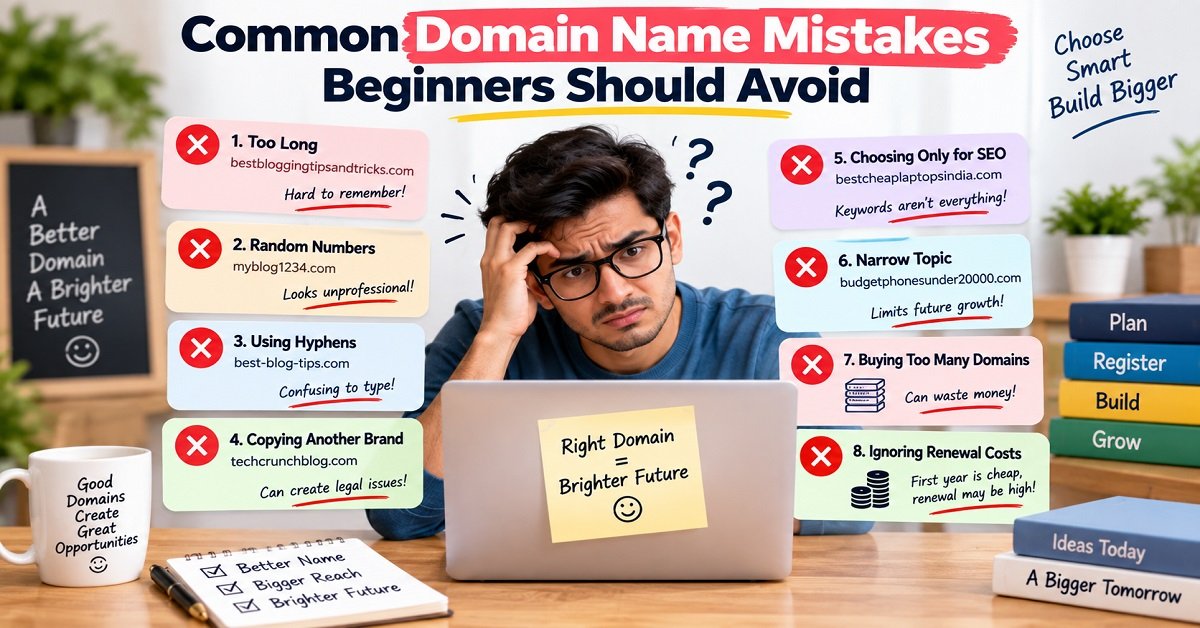
Here are some of the most common domain mistakes beginners make.
Mistake 1: Making the Domain Too Long
Trying to describe your entire website in the domain can result in a very long name.
For example:
bestbloggingtipsandwordpressguidesforbeginners.com
It may contain relevant words, but it is difficult to remember and type.
A shorter, more brandable name can usually give you more flexibility.
Mistake 2: Adding Random Numbers
If your preferred domain is taken, adding random numbers such as:
123
786
2026
or your birth year may seem like an easy solution.
Sometimes numbers are meaningful and work perfectly well.
But random numbers can make the domain harder to remember.
If you need to explain whether the number is part of the name every time you tell someone your domain, consider another option.
Mistake 3: Using Too Many Hyphens
A hyphen can make a domain look complicated.
For example:
best-blogging-tips-for-beginners.com
is harder to say and type than a simple brand name.
One hyphen does not automatically make a domain bad.
The problem is using several of them to force an unavailable name into existence.
Mistake 4: Copying Another Brand
You may find a successful website in your niche and think:
“That name works. I’ll create something similar.”
This can create confusion and potential legal problems.
Instead, study successful brands to understand what makes their names memorable, but create an identity of your own.
Mistake 5: Choosing a Domain Based Only on SEO
This is another common trap.
A keyword in your domain does not replace good content.
If you choose a terrible brand name simply because it contains your target keyword, you may regret the decision later.
SEO should be part of your overall website strategy, not the only factor used to choose your domain.
Mistake 6: Choosing a Very Narrow Domain
A domain such as:
bestbudgetphonesunder20000.com
may make sense if you genuinely intend to focus exclusively on that topic.
But if you eventually want to cover laptops, headphones and other electronics, the name may become restrictive.
Think about your possible future direction before committing.
Mistake 7: Buying Too Many Domains
You may become excited after discovering that several domain names are available.
Suddenly you own:
- Five domains
- Three extensions
- Several variations
- Multiple names you may never use
This can waste money.
For a new blogger, one good domain is usually more useful than ten unused domains.
Buy additional domains only when you have a clear reason for doing so.
Mistake 8: Ignoring Renewal Costs
A low introductory price can be attractive.
But your domain is not a one-year purchase if you plan to build a long-term website.
Always check the renewal price.
A domain that looks cheap initially may cost much more over several years.
Mistake 9: Choosing a Name You Cannot Own as a Brand
A domain can be technically available while being a poor choice from a branding perspective.
Before purchasing, search the name.
If another established company is already using a very similar name, reconsider your choice.
It is much easier to change your shortlist before launching than after building a brand around it.
How to Choose Between Two Good Domain Names
Sometimes the problem is not finding a domain.
It is choosing between two or three good options.
Suppose you have narrowed your choices down to:
BlogNest.com
and
BlogGrowth.com
Both sound reasonable.
How do you decide?
Use a simple comparison.
| Question | Domain A | Domain B |
|---|---|---|
| Easy to remember? | Yes | Yes |
| Easy to spell? | Yes | Yes |
| Easy to pronounce? | Yes | Yes |
| Broad enough for future topics? | Yes | Maybe |
| Strong brand potential? | Yes | Yes |
| Fits the audience? | Yes | Yes |
| Possible brand conflicts? | Check | Check |
| Renewal cost acceptable? | Check | Check |
Do not make the decision based on one factor.
Look at the complete picture.
You can even ask three people which name they remember more easily after seeing both.
You are not asking them to decide your business for you.
You are simply collecting useful feedback about how the names are perceived.
The One-Week Domain Test
If you are still unsure, try something simple.
Write your top three domain ideas somewhere you can see them.
For the next few days, use them when thinking about your website.
Imagine saying:
“Welcome to ___.”
“Read our latest article on ___.”
“Visit ___ for more blogging tips.”
“Contact me at hello@___.”
After a few days, one name may start feeling more natural.
This can be surprisingly useful because choosing a domain is partly a branding decision, not just a technical one.
Don’t Wait for a Perfect Domain
There is an important balance here.
You should not rush into a domain without checking it.
But you also should not spend months looking for something that does not exist.
There may be no domain that satisfies every single requirement.
Maybe your favorite name is unavailable.
Maybe the .com is taken.
Maybe another name is slightly longer.
Maybe the perfect brandable one costs more than you want to spend.
That is normal.
The goal is not to find a mathematically perfect domain.
The goal is to find a good domain that you can confidently build around.
Once you have one, start creating useful content.
A Simple Decision Formula
If you are still confused, use this five-question formula.
Ask yourself:
1. Can people remember it?
If yes, continue.
2. Can people spell it after hearing it?
If yes, continue.
3. Can I comfortably say it out loud?
If yes, continue.
4. Will it still make sense if my website grows?
If yes, continue.
5. Have I checked for obvious brand, trademark and ownership problems?
If yes, you are in a much better position to register it.
You do not need to make the process more complicated than this.
What Makes a Domain Name “Perfect”?
The word perfect can be misleading.
There may be no objectively perfect domain name.
A domain that is perfect for one person may be completely unsuitable for another.
For example:
A photographer may prefer a personal name.
A technology publication may prefer a brand name.
A local business may want a location-related domain.
A global company may want a short invented brand.
An individual freelancer may want their own name.
So instead of asking:
“What is the perfect domain name?”
ask:
“What domain name is the right fit for my website and long-term plans?”
That is a much better question.
Frequently Asked Questions About Choosing a Domain Name
How do I choose a good domain name?
Choose a domain that is easy to remember, spell and pronounce. It should fit your website and give you enough flexibility to grow in the future. Before registering it, search for existing brands, check possible trademark conflicts, review the renewal price and make sure you control the registrar account.
Should my domain name contain my main keyword?
It can, but it does not have to.
A relevant keyword can make the topic of a website clearer, but you should not create a long or awkward domain simply to include keywords.
A memorable brand name can be a better long-term choice.
Is a .com domain better than a .in domain?
Neither extension automatically makes a website successful.
.com is widely recognized and can be a natural choice for a global audience.
.in can make sense for a website primarily focused on India.
Consider your audience, branding and availability rather than assuming one extension is always correct.
How long should a domain name be?
There is no universal maximum length you must follow.
However, shorter and simpler names are generally easier to remember, type and communicate.
Instead of focusing on an exact number of characters, ask whether the name feels unnecessarily long.
Should I use hyphens in my domain?
You can, but avoid them when a cleaner alternative is available.
Hyphens can make domains harder to communicate verbally and easier to forget.
Should I use my own name as my domain?
A personal domain can be a good choice if you are building a personal brand, portfolio, freelance business or professional presence.
If you want to build a separate media or business brand, a brand-focused domain may make more sense.
What should I do if my preferred domain is already taken?
Do not immediately add random numbers or several hyphens.
Try meaningful variations, consider another suitable extension, or create a different brand name.
If the existing domain belongs to an established business, choosing a completely different name may be the safest approach.
Should I buy a premium domain?
It depends on your budget and business plans.
A premium domain may be valuable if it is short, memorable and strongly aligned with an established business.
For a new blog, however, you do not need an expensive premium domain to build a successful website.
Should I buy an old domain with backlinks?
Be careful.
An old domain may have useful history, but it may also have spam, irrelevant links or an unsuitable past.
Research its history and backlink profile carefully before buying it.
Do not assume that an old domain automatically gives you an SEO advantage.
Can I change my domain name later?
Yes, but changing a domain can require redirects, branding changes, updates to links, email changes and other technical work.
It is usually better to choose carefully at the beginning when possible.
Does my domain name affect SEO?
Your domain is part of your website’s identity, but choosing a keyword-heavy domain does not guarantee better search rankings.
Your overall SEO depends on many factors, including content quality, relevance, technical setup, site structure and how well your pages satisfy the searcher’s needs.
Can I use a domain name that contains a trademark?
Do not assume that you can.
Trademark rights can depend on the specific name, goods or services, jurisdiction and circumstances.
If you are building a commercial brand, check the relevant trademark records and consider professional legal advice when necessary.
Should I register multiple domain extensions?
You do not need to register every extension.
For most new bloggers, one suitable domain is enough to start.
Additional extensions can make sense when there is a specific branding or business reason to protect them.
What should I check before buying a domain?
At minimum, check:
- Domain spelling
- Pronunciation
- Length
- Future flexibility
- Google search results
- Existing businesses
- Trademark conflicts
- Social media presence
- Registration price
- Renewal price
- Privacy options
- Registrar reputation
These checks take little time compared with the amount of work you may eventually put into the website.
Domain Name Pros and Cons
Before we finish, let’s look at the bigger picture.
Pros of Choosing a Good Domain Name
- Creates a clear identity for your website
- Makes your website easier to remember
- Makes word-of-mouth sharing easier
- Can support a professional brand
- Works well with custom email addresses
- Can remain useful as your website grows
- Gives your content a recognizable home
Cons and Potential Challenges
- Good short domains can be difficult to find
- Popular names may already be registered
- Premium domains can be expensive
- Changing a domain later can be complicated
- Trademark conflicts can create problems
- Renewal costs continue after the initial registration
- Finding the right name can take time
The important thing is to understand these trade-offs before registering rather than after.
Your Final Domain Name Checklist
Here is the checklist you can save and use whenever you are choosing a domain.
Brand
- Is the name memorable?
- Does it sound natural?
- Does it feel like a brand?
- Does it fit my audience?
Simplicity
- Is it reasonably short?
- Is it easy to spell?
- Is it easy to pronounce?
- Does it avoid unnecessary hyphens?
- Does it avoid unnecessary numbers?
Future
- Can my website expand beyond its current topic?
- Will I still like this name several years from now?
- Would I be comfortable putting this name on a business card or YouTube channel?
Legal and Branding
- Did I search Google for the name?
- Did I check existing businesses?
- Did I check social media?
- Did I investigate possible trademark conflicts?
Money
- What is the first-year price?
- What is the renewal price?
- Are privacy features included?
- Are there additional charges?
- Am I buying anything I do not actually need?
Security and Ownership
- Do I control the registrar account?
- Is the account protected with a strong password?
- Is two-factor authentication available?
- Is my recovery email accessible?
- Is auto-renewal configured correctly?
If the answers look good, you have done the important work.
What Should You Do After Choosing Your Domain?
Once your domain is registered, do not spend another week thinking about whether you could have chosen a slightly better name.
Start building.
Your next steps will usually include:
- Connect the domain to your hosting.
- Install WordPress if you are using it.
- Configure HTTPS.
- Choose a suitable website theme.
- Create important pages.
- Set up your navigation.
- Create your categories.
- Publish useful content.
- Connect your website to relevant analytics and search tools.
- Start improving the website based on real visitors and search data.
If you are completely new to website building, Web Hosting Explained for Beginners can help you understand where hosting fits into the picture.
And once your basic website is ready, you can start working on your content strategy and SEO rather than continuing to worry about the domain.
Final Thoughts
Choosing a domain name is one of those tasks that looks simple until you actually try to do it.
You start with one idea.
Then you discover that it is already taken.
You try another.
It is too long.
Another one sounds good, but the social media name is already being used.
Then you find a short domain, only to discover that the renewal price is much higher than expected.
This is completely normal.
The solution is not to search forever.
Start with your website’s purpose and future direction. Create several possible names. Remove the names that are difficult to remember, spell or pronounce. Check Google, social platforms and relevant trademark records. Compare registration and renewal costs. Then choose a name that gives you confidence.
Most importantly, remember that your domain name is only the beginning of your online journey.
A memorable domain can help people recognize your website.
But useful content is what gives them a reason to return.
A clean website makes it easier to navigate.
Helpful articles build trust.
Good SEO helps people discover your content.
And consistent work is what turns a newly registered domain into a real website.
So choose your domain carefully, register it, and then start building something useful behind it.
The best time to stop searching for the perfect domain is when you have found a good, suitable domain that you can build a real brand around.