
Web Hosting Explained for Beginners starts with understanding one simple idea: every website needs a place to store its files so people can access it online.
Starting your first website is exciting. Whether you want to create a blog, business website, portfolio, or online store, one term you’ll come across almost immediately is web hosting.
For many beginners, this is where things become confusing.
You start seeing terms like server, bandwidth, SSD storage, uptime, SSL certificate, and control panel. Suddenly, building a website feels much more technical than you expected.
Because of this confusion, many beginners end up buying the wrong hosting plan. Some pay for features they don’t need, while others choose the cheapest option and later struggle with slow website speeds, downtime, or poor customer support.
The good news is that web hosting isn’t as complicated as it sounds.
Once you understand the basics, choosing the right hosting becomes much easier.
In this beginner-friendly guide, you’ll learn what web hosting is, how it works, why every website needs it, the different types of hosting available, and how to choose the right hosting for your goals. By the end of this article, you’ll have the confidence to make an informed decision without feeling overwhelmed by technical jargon.
If you’re completely new to website creation, you may also want to read our How to Start a Blog in 2026: The Complete Beginner’s Guide. It explains the entire blogging process from choosing a niche to launching your first website.
Affiliate Disclosure: Some links in this article are affiliate links. If you purchase a product through one of these links, we may earn a commission at no additional cost to you.
This Web Hosting Explained for Beginners guide is designed to answer the most common questions first-time website owners have before purchasing a hosting plan.
Web Hosting Explained for Beginners: What Is Web Hosting?
Web hosting is a service that stores your website’s files on a server and makes them available on the internet. Without web hosting, people can’t access your website when they enter your domain name into a web browser.
Think of web hosting as the place where your website lives. Every page, image, video, and file that makes up your website is stored on a hosting server.
What Is Web Hosting?
To understand web hosting, let’s use a simple example.
Imagine you’re building your dream house.
Your house represents your website.
Your home address represents your domain name.
The land your house is built on represents web hosting.
Without land, you can’t build a house.
Similarly, without web hosting, your website has nowhere to store its files and cannot be accessed by visitors.
If you’re wondering why you’ll also need a domain name and WordPress to build a complete website, our How to Build a WordPress Website from Scratch guide walks you through every step.
Every website on the internet needs a place to store its content. This includes:
- Web pages
- Images
- Videos
- Blog posts
- CSS files
- JavaScript files
- Databases
- WordPress files
These files are stored on a powerful computer called a server.
Unlike your personal computer, a server is designed to stay connected to the internet 24 hours a day, 7 days a week. Whenever someone visits your website, the server quickly delivers your website’s files to their browser.
This is why choosing reliable web hosting is important. A fast and dependable hosting provider helps your website load quickly and remain accessible to visitors at all times.
Why Do You Need Web Hosting?
Many beginners wonder if web hosting is really necessary.
The simple answer is yes.
If you want other people to visit your website online, you’ll need web hosting.
Without web hosting:
- Your website files have nowhere to be stored.
- Visitors can’t access your website.
- WordPress cannot be installed.
- Images, videos, and other content won’t be available online.
- Your domain name won’t display a website.
In other words, web hosting is one of the essential building blocks of every website.
Think of it like opening a physical shop.
You need a building where customers can visit you.
Similarly, your website needs a hosting server where visitors can access your content anytime they want.
Whether you’re starting a personal blog, a business website, a portfolio, or an online store, web hosting provides the space and technology required to keep your website running smoothly.
How Does Web Hosting Work?
Now that you know what web hosting is, let’s see what happens behind the scenes when someone visits your website.
Although the technology is complex, the process is surprisingly easy to understand.
Here’s what happens:
Step 1: A visitor enters your domain name
For example:
www.yourwebsite.com
or clicks a link to your website.
↓
Step 2: DNS finds your hosting server
The Domain Name System (DNS) acts like the internet’s address book. It connects your domain name to the server where your website is stored.
↓
Step 3: The hosting server receives the request
Once the correct server is found, it receives the visitor’s request and locates the necessary website files.
↓
Step 4: Website files are sent to the browser
The server sends your web pages, images, stylesheets, scripts, and other resources to the visitor’s browser.
↓
Step 5: The website appears on the screen
Within a few seconds, the visitor can see and interact with your website.
This entire process happens almost instantly, often in less than a second on a well-optimized website.
That’s why the quality of your hosting provider matters so much. A faster server can reduce loading times, improve the visitor experience, and even contribute to better search engine rankings.
In the next section, we’ll answer another question that confuses many beginners: What’s the difference between a domain name and web hosting? Understanding this distinction will make it much easier to choose the right services when launching your first website.
Domain Name vs Web Hosting: What’s the Difference?
One of the most common questions beginners ask is:
“Aren’t a domain name and web hosting the same thing?”
The answer is no.
Although they’re closely connected, they serve completely different purposes.
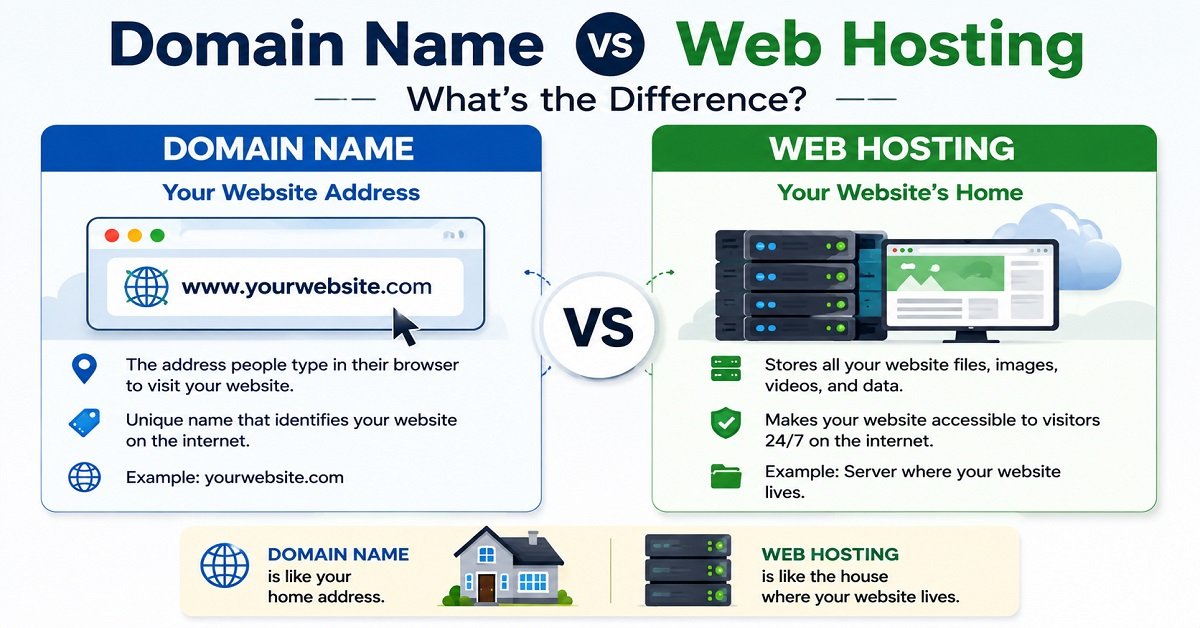
A domain name is your website’s address on the internet, while web hosting is where your website’s files are stored.
Think of it like sending a letter to a friend.
- The domain name is your friend’s home address.
- The web hosting is the actual house where your friend lives.
Without an address, people wouldn’t know where to go.
Without a house, there would be nothing to visit.
Your website needs both to be accessible online.
Domain Name vs Web Hosting
| Feature | Domain Name | Web Hosting |
|---|---|---|
| Purpose | Website address | Stores website files |
| Example | www.orbitelf.com | Server where OrbitElf is hosted |
| Required? | Yes | Yes |
| Renews | Usually every year | Monthly or yearly |
| Can You Change It? | Yes | Yes |
In simple terms:
- Domain Name = Address
- Web Hosting = Home
If you’re planning to build a website, you’ll usually purchase both at the same time. Many hosting providers even include a free domain name with selected hosting plans, making the setup process easier for beginners.
Types of Web Hosting
Not all websites have the same needs.
A personal blog with a few hundred visitors each month doesn’t require the same hosting as a large eCommerce store with thousands of daily customers.
That’s why hosting companies offer different types of hosting.
Let’s look at each one in simple terms.
1. Shared Hosting
Shared hosting is the most popular option for beginners.
As the name suggests, multiple websites share the same server and its resources.
Think of it like living in an apartment building.
Everyone has their own apartment, but they share the same building, parking area, and other facilities.
The same idea applies to shared hosting.
Your website shares server resources such as CPU, RAM, and storage with other websites.
Because the costs are shared, this is also the most affordable hosting option.
Advantages
- Affordable pricing
- Easy to set up
- Beginner-friendly
- One-click WordPress installation
- Suitable for new websites
Limitations
- Resources are shared with other websites.
- Performance may slow down if another website on the server experiences unusually high traffic.
- Less flexibility than higher-end hosting options.
Best For
- Personal blogs
- Portfolio websites
- Small business websites
- New affiliate websites
- Beginners starting their first website
For most first-time website owners, shared hosting offers the best balance between cost, performance, and simplicity.
2. VPS Hosting
VPS stands for Virtual Private Server.
Instead of sharing everything with other websites, a VPS divides one physical server into multiple virtual servers.
Each website receives dedicated resources, giving you better performance and more control.
Imagine living in a townhouse instead of an apartment.
You still share the overall property with others, but you have your own dedicated space and greater privacy.
Advantages
- Better performance than shared hosting
- Dedicated resources
- Greater customization
- Better handling of higher traffic
Limitations
- More expensive than shared hosting
- May require additional technical knowledge
- Some plans require server management
Best For
- Growing blogs
- Medium-sized business websites
- Websites receiving steady traffic
- Developers who need more control
If your website starts attracting thousands of monthly visitors, upgrading from shared hosting to VPS hosting can be a smart next step.
3. Cloud Hosting
Cloud hosting has become one of the fastest-growing hosting options in recent years.
Instead of relying on a single physical server, cloud hosting stores your website across multiple connected servers.
If one server experiences an issue, another server can continue serving your website.
This improves reliability and reduces downtime.
Imagine storing important documents in multiple secure locations instead of keeping everything in one cabinet.
Even if one location becomes unavailable, your files remain accessible.
Advantages
- Excellent reliability
- High uptime
- Easy to scale as traffic grows
- Better performance during traffic spikes
Limitations
- Usually costs more than shared hosting
- Pricing may vary depending on resource usage
Best For
- Growing businesses
- Popular blogs
- High-traffic websites
- Online stores
- Websites expecting future growth
Cloud hosting is an excellent option if you expect your website to grow steadily over time.
4. Dedicated Hosting
Dedicated hosting gives your website an entire physical server.
Unlike shared hosting or VPS hosting, no other websites use the same server.
Think of it as owning a private house instead of sharing a building with others.
Because all server resources belong to your website, you receive maximum performance and complete control.
Advantages
- Highest level of performance
- Complete control over the server
- Excellent security
- Ideal for resource-intensive websites
Limitations
- Expensive
- Requires technical expertise or server management
- Not necessary for most beginners
Best For
- Large businesses
- Enterprise websites
- High-traffic applications
- Large online stores
For someone creating their first website, dedicated hosting is usually unnecessary.
5. Managed WordPress Hosting
Managed WordPress hosting is specifically designed for WordPress websites.
Not sure whether you should use WordPress.com or the self-hosted version of WordPress? Read our WordPress.com vs WordPress.org: Which Should You Choose? guide before selecting your hosting plan.
The hosting provider takes care of many technical tasks, including:
- WordPress updates
- Security
- Backups
- Performance optimization
- Caching
- Server configuration
This allows website owners to focus on creating content instead of managing technical settings.
Advantages
- Optimized for WordPress
- Faster performance
- Automatic updates
- Enhanced security
- Expert WordPress support
Limitations
- More expensive than basic shared hosting
- Less flexibility than some unmanaged hosting plans
Best For
- Professional bloggers
- Business websites
- Agencies
- Content creators
- Website owners who prefer managed services
If you plan to build a long-term WordPress website and don’t want to handle server maintenance yourself, managed WordPress hosting can be a worthwhile investment.
Which Type of Web Hosting Is Best for Beginners?
With so many options available, it’s easy to feel overwhelmed.
Fortunately, the answer is simpler than you might think.
For most beginners, shared hosting is the best place to start.
It offers everything you need to launch your first website at an affordable price, including enough resources for personal blogs, portfolio websites, affiliate websites, and small business websites.
As your traffic grows, you can upgrade to VPS hosting or cloud hosting without rebuilding your website.
Starting with shared hosting allows you to keep costs low while learning how websites work.
You don’t need the most powerful hosting plan on day one.
Instead, choose a reliable hosting provider that offers good performance, strong customer support, automatic backups, free SSL certificates, and an easy upgrade path as your website grows.
Remember, the goal isn’t to buy the biggest hosting plan.
It’s to choose a hosting solution that matches your current needs while giving you room to expand in the future.
Important Features to Look for Before Buying Web Hosting
Not all hosting plans are created equal.
Two hosting providers may offer similar prices, but the features included can make a big difference to your website’s performance, security, and future growth.
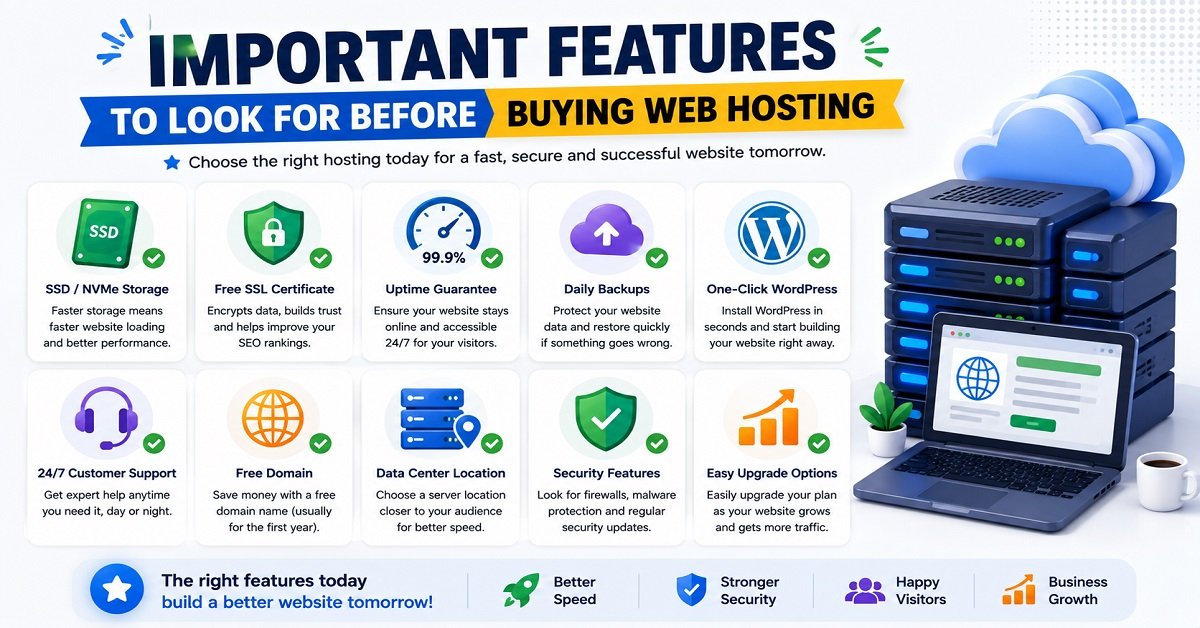
Before purchasing a hosting plan, here are the most important features you should look for.
SSD or NVMe Storage
Every hosting account stores your website’s files.
Older hosting plans often use traditional hard disk drives (HDDs), while modern hosting providers use SSD (Solid State Drive) or the even faster NVMe SSD storage.
Think of it like this:
- HDD = A regular road with moderate traffic.
- SSD = A modern highway.
- NVMe SSD = An expressway with much faster traffic flow.
Because SSD and NVMe storage can read and write data much faster, your website loads more quickly.
Since website speed affects both user experience and SEO, choosing a host that offers SSD or NVMe storage is a smart decision.
Recommendation: Choose SSD hosting at a minimum. NVMe SSD is even better if it’s available within your budget.
Free SSL Certificate
An SSL certificate encrypts the information exchanged between your website and its visitors.
You’ll know a website has SSL enabled when you see https:// and the padlock icon in your browser.
Besides improving security, SSL is also a ranking signal used by Google.
Today, almost every reputable hosting provider includes a free SSL certificate, so you shouldn’t need to pay extra for one.
Recommendation: Make sure free SSL is included with your hosting plan.
Uptime Guarantee
Imagine someone visiting your website only to find it’s unavailable.
Not a great first impression.
Uptime refers to the percentage of time your website remains online and accessible.
For example:
- 99% uptime means your website may experience several days of downtime each year.
- 99.9% uptime significantly reduces downtime.
- 99.99% uptime offers even greater reliability.
While no hosting provider can guarantee 100% uptime, choosing one with a strong uptime record helps ensure your visitors can access your website whenever they need to.
Recommendation: Look for providers offering at least a 99.9% uptime guarantee.
Daily Backups
Accidents happen.
A plugin update might fail.
A theme could become corrupted.
You might accidentally delete important files.
Daily backups allow you to restore your website quickly if something goes wrong.
Without backups, recovering your website can be difficult or even impossible.
Recommendation: Choose a hosting provider that includes automatic daily backups or offers affordable backup solutions.
One-Click WordPress Installation
Since most OrbitElf readers plan to use WordPress, installing it should be simple.
Fortunately, many hosting providers offer one-click WordPress installation, allowing you to launch your website in just a few minutes.
This eliminates the need for manual installation and makes the process much less intimidating for beginners.
Once you’ve purchased hosting, follow our How to Build a WordPress Website from Scratch tutorial to install WordPress and launch your website.
Recommendation: Look for hosting that includes one-click WordPress installation.
Customer Support
Even experienced website owners occasionally need help.
Whether you’re facing a technical issue or have questions about your hosting account, responsive customer support can save you a lot of time and frustration.
Look for hosting providers that offer:
- 24/7 customer support
- Live chat
- Email support
- Comprehensive knowledge base
- Helpful tutorials
Reading recent customer reviews can also give you a good idea of how quickly a provider responds to support requests.
Recommendation: Reliable customer support is just as important as price.
Free Domain Name
Many hosting providers include a free domain name for the first year with selected hosting plans.
This can help reduce your initial website setup costs.
However, always check the renewal pricing, as domain renewal fees may differ from the introductory offer.
A free domain is a nice bonus, but it shouldn’t be the only reason you choose a hosting provider.
Data Center Location
A hosting provider stores your website on physical servers located in data centers around the world.
Generally, the closer the server is to your visitors, the faster your website loads.
For example:
- If most of your visitors are in India, choosing a hosting provider with Indian or nearby Asian data centers can improve loading speeds.
- If your audience is primarily in North America or Europe, selecting servers in those regions often provides better performance.
Many premium hosting providers also use a Content Delivery Network (CDN) to deliver your website efficiently to visitors worldwide.
Easy Upgrade Options
Your website may start small today, but hopefully it won’t stay that way.
As your traffic increases, you’ll likely need additional server resources.
A good hosting provider allows you to upgrade your hosting plan without rebuilding or moving your website.
This makes scaling your website much easier as your audience grows.
Common Web Hosting Terms Explained
When comparing hosting plans, you’ll often come across technical terms that can seem confusing.
Let’s simplify the most common ones.
Server
A server is a powerful computer that stores your website’s files and delivers them to visitors over the internet.
Unlike a personal computer, servers are designed to run continuously, day and night.
Bandwidth
Bandwidth refers to the amount of data your website can transfer to visitors.
For example, every time someone loads one of your pages, downloads an image, or watches a video, your website uses bandwidth.
Most beginner hosting plans now offer generous or unmetered bandwidth, making it less of a concern for new websites.
Control Panel
A control panel is the dashboard used to manage your hosting account.
From here, you can:
- Install WordPress
- Manage files
- Create email accounts
- View backups
- Manage databases
- Configure domains
Many hosting providers use cPanel or offer their own custom control panel.
DNS
DNS stands for Domain Name System.
Instead of remembering long numerical IP addresses, DNS translates your domain name into the correct server address.
Think of DNS as the internet’s phone book.
CDN
A Content Delivery Network (CDN) stores copies of your website on multiple servers around the world.
When someone visits your website, the CDN delivers files from the server closest to them.
This improves loading speed, especially for international visitors.
Cache
Caching temporarily stores copies of your website so they can be delivered more quickly to returning visitors.
Good caching reduces server load and improves page speed.
Many hosting providers include built-in caching, while WordPress users can also install caching plugins.
How Much Does Web Hosting Cost?
One of the biggest questions beginners ask is:
“How much should I expect to pay for hosting?”
The answer depends on the type of hosting you choose.
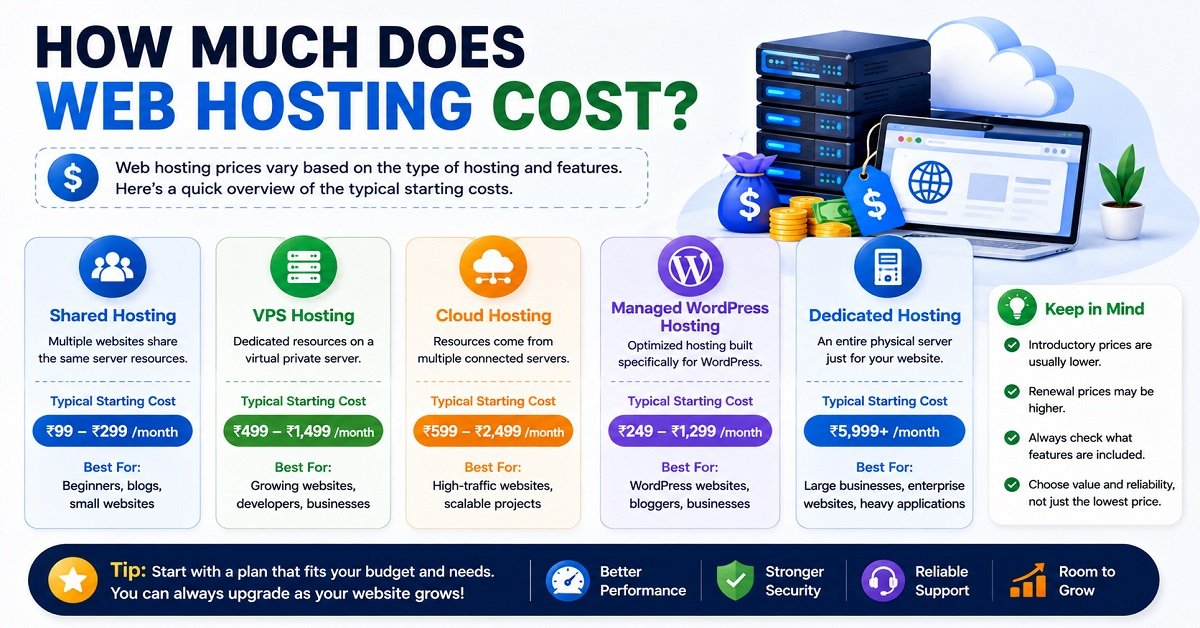
Here’s a general comparison:
| Hosting Type | Typical Starting Cost | Best For |
|---|---|---|
| Shared Hosting | Lowest | Beginners, blogs, portfolios |
| VPS Hosting | Moderate | Growing websites |
| Cloud Hosting | Moderate to High | High-traffic websites |
| Managed WordPress Hosting | Moderate to High | Professional WordPress sites |
| Dedicated Hosting | Highest | Large businesses and enterprise websites |
Keep in mind that many hosting providers offer discounted introductory prices for new customers.
However, renewal prices are often higher.
Before purchasing a hosting plan, always check:
- Introductory price
- Renewal price
- Money-back guarantee
- Included features
Choosing solely based on the lowest price isn’t always the best decision.
Reliable performance, responsive support, and long-term value are usually far more important than saving a small amount upfront.
How to Choose the Right Hosting Based on Your Goal
Every website has different requirements.
Instead of choosing the most expensive plan, choose one that matches your current needs.
| Your Goal | Recommended Hosting |
|---|---|
| Personal blog | Shared Hosting |
| Beginner WordPress website | Shared Hosting |
| Affiliate website | Shared Hosting |
| Small business website | Shared Hosting or Managed WordPress Hosting |
| Growing content website | Cloud Hosting |
| High-traffic blog | Cloud Hosting or VPS Hosting |
| Online store | Managed WordPress Hosting or Cloud Hosting |
| Enterprise website | Dedicated Hosting |
The good news is that you don’t have to predict your website’s future perfectly.
Most hosting providers allow you to upgrade your plan as your traffic grows.
For most beginners, starting with a reliable shared hosting plan is the smartest and most cost-effective decision. As your website attracts more visitors, you can easily move to VPS, cloud, or managed WordPress hosting without rebuilding your site from scratch.
Common Mistakes Beginners Make When Choosing Web Hosting
Buying web hosting isn’t difficult, but making the wrong choice can cost you time, money, and unnecessary frustration.
Here are some of the most common mistakes beginners make and how you can avoid them.
Choosing the Cheapest Hosting Without Comparing Features
It’s tempting to pick the lowest-priced hosting plan.
However, cheaper doesn’t always mean better.
Some budget hosting plans may have slower servers, limited customer support, fewer security features, or higher renewal prices.
Instead of looking only at the price, compare the overall value, including performance, support, backups, SSL, and ease of upgrading.
Ignoring Renewal Prices
Many hosting providers attract new customers with discounted introductory prices.
While these offers can save you money initially, the renewal price is often significantly higher.
Before buying any hosting plan, check both the introductory and renewal costs so there are no surprises later.
Buying More Resources Than You Need
Some beginners assume they need the most expensive hosting plan available.
In reality, a new website with little traffic rarely needs advanced hosting.
Starting with a reliable shared hosting plan is usually the smartest choice. You can always upgrade as your website grows.
Not Checking Customer Support
Even if your hosting provider has excellent technology, you’ll eventually need help with something.
Fast, knowledgeable customer support can make a huge difference, especially if you’re new to website management.
Before choosing a hosting provider, check reviews to see how quickly their support team responds.
Forgetting About Website Backups
No website is completely immune to mistakes or technical issues.
Having regular backups means you can restore your website quickly if something goes wrong.
Choose a hosting provider that includes automatic backups or make sure you have a separate backup solution in place.
Choosing a Hosting Plan That Doesn’t Fit Your Goals
Different websites have different requirements.
A personal blog doesn’t need the same resources as a busy online store.
Before purchasing hosting, think about where your website might be in one or two years.
Choosing a provider with an easy upgrade path will save you time if your traffic increases.
Pros and Cons of Web Hosting
Every hosting service has its advantages and responsibilities.
Understanding both will help you set realistic expectations before launching your website.
For most people, the benefits of having reliable web hosting far outweigh the disadvantages.
Frequently Asked Questions
What is web hosting in simple words?
Web hosting is a service that stores your website’s files on a server and makes them available online so people can visit your website using a web browser.
Can I create a website without web hosting?
If you want other people to access your website on the internet, you’ll need web hosting.
Some website builders include hosting as part of their service, but every public website is hosted somewhere.
Do I need both a domain name and web hosting?
Yes.
A domain name is your website’s address, while web hosting stores your website’s files. Both work together to make your website accessible online.
Which hosting is best for beginners?
For most beginners, shared hosting is the best choice because it’s affordable, easy to manage, and provides enough resources for a new website.
Can I change my hosting provider later?
Yes.
Most hosting providers allow you to migrate your website if you decide to switch in the future.
Many providers even offer free website migration services.
Is shared hosting good enough for a new website?
Yes.
Shared hosting is suitable for personal blogs, affiliate websites, portfolio websites, and most small business websites.
As your traffic grows, you can upgrade to VPS or cloud hosting.
Does web hosting affect SEO?
Yes.
Good hosting can improve your website’s loading speed, uptime, and reliability, all of which contribute to a better user experience. While hosting alone won’t guarantee higher rankings, choosing a reliable hosting provider supports your overall SEO efforts.
What happens if my hosting expires?
If you don’t renew your hosting plan, your website may become unavailable, and after a certain period, your hosting account and website files could be removed according to your provider’s policy.
It’s always a good idea to renew your hosting before it expires.
Is free web hosting a good idea?
Free hosting can be useful for learning or testing, but it’s generally not recommended for professional websites. It often comes with limited resources, slower performance, advertisements, or fewer customization options.
How much web hosting do I need?
For most beginners, a basic shared hosting plan is more than enough.
You can always upgrade your hosting later as your website grows and attracts more visitors.
We hope this Web Hosting Explained for Beginners guide has helped you understand the basics and feel confident about choosing the right hosting for your website.
Web Hosting Explained for Beginners: Final Verdict
If you’re planning to build your first website, understanding web hosting is one of the most valuable things you can learn.
Although terms like servers, bandwidth, SSL, and uptime may seem technical at first, they’re much easier to understand once you know how they fit together.
For most beginners, a reliable shared hosting plan offers the best combination of affordability, ease of use, and room for growth.
If you’re still planning your blogging journey, our How to Start a Blog in 2026: The Complete Beginner’s Guide is the perfect place to begin.
As your website expands, you can easily upgrade to VPS, cloud, or managed WordPress hosting without starting over.
The most important thing isn’t choosing the most expensive hosting plan.
It’s choosing one that matches your current needs while giving you the flexibility to grow in the future.
Conclusion
Web Hosting Explained for Beginners doesn’t have to be complicated.
Without it, your website can’t be stored, accessed, or shared with the world.
Now that you understand what web hosting is, how it works, the different types available, and the features to look for, you’re in a much better position to choose a hosting plan with confidence.
If you’re just beginning your website journey, don’t let the technical terms intimidate you. Start with a reliable hosting provider, focus on creating helpful content, and upgrade your hosting only when your website genuinely needs additional resources.
Building a successful website isn’t about buying the most expensive hosting. It’s about choosing the right foundation and consistently improving your website over time.
If you’re still planning your blogging journey, read our How to Start a Blog in 2026: The Complete Beginner’s Guide. Once you’ve chosen your hosting plan, follow our How to Build a WordPress Website from Scratch tutorial to launch your website step by step. If you’re deciding between the two WordPress platforms, our WordPress.com vs WordPress.org: Which Should You Choose? guide will help you make the right choice before you begin.