
Choosing a website platform is one of the first and most important decisions you’ll make before starting a blog or website. If you’ve done even a little research, you’ve probably come across WordPress.com and WordPress.org.
At first glance, they look almost identical. They even share the same name. This often makes beginners think they’re the same platform.
They’re not.
Choosing the wrong one can lead to unnecessary costs, limited customization, or even the need to rebuild your website later. That’s why understanding the difference before you begin is so important.
The good news is that the choice becomes much easier once you know how each platform works.
In this guide, you’ll learn the key differences between WordPress.com vs WordPress.org, their pricing, advantages, disadvantages, and which one is the better choice based on your goals. By the end, you’ll have the confidence to choose the platform that’s right for you.
WordPress.com vs WordPress.org at a Glance
If you don’t have time to read the full comparison, here’s the short answer.
| Choose… | If You Want… |
|---|---|
| WordPress.com | A simple website with minimal setup and maintenance. |
| WordPress.org | Complete control, better SEO, unlimited customization, and the freedom to grow your website. |
Our Recommendation
For most readers of OrbitElf, WordPress.org is the better choice.
Although it requires purchasing web hosting and a domain name, it gives you full ownership of your website. You can install any theme or plugin, optimize your site for search engines, monetize it however you like, and scale it as your traffic grows.
If your goal is to build a professional blog, business website, affiliate site, portfolio, or online store, WordPress.org is the platform you’ll rarely regret choosing.
What Is WordPress?
Before comparing the two platforms, it’s helpful to understand what WordPress actually is.
WordPress is the world’s most popular content management system (CMS). A content management system is software that lets you create, edit, and manage a website without needing to write code for every page.
Today, millions of websites, from personal blogs to large business websites, are built with WordPress because it’s flexible, beginner-friendly, and supported by a huge community.
One reason many beginners get confused is that there are two different platforms using the WordPress name:
- WordPress.com
- WordPress.org
Although both use the same core WordPress software, they are managed differently and are designed for different types of users.
Think of it like this.
Imagine buying a house.
With WordPress.com, you’re renting a fully managed apartment. Everything is maintained for you, but there are rules about what you can change.
With WordPress.org, you own the house. You decide how to decorate it, expand it, or even rebuild it. While you have more responsibility, you also have complete freedom.
This simple difference explains why many experienced website owners choose WordPress.org.
What Is WordPress.com?
WordPress.com is a fully hosted website platform operated by Automattic, the company founded by WordPress co-founder Matt Mullenweg.
With WordPress.com, the company takes care of technical tasks such as hosting, security, software updates, and backups. This allows beginners to create a website quickly without worrying about server management.
You can even start with a free plan, although it comes with several limitations, such as displaying WordPress branding, using a subdomain (for example, yourwebsite.wordpress.com), and offering limited customization.
As your needs grow, you can upgrade to paid plans that unlock additional features.
WordPress.com is a good choice if you:
- Want to create a simple personal blog.
- Don’t want to manage hosting or website maintenance.
- Prefer an easy setup process.
- Don’t need advanced customization.
However, as your website grows, you may find some restrictions frustrating, especially if you want to install custom plugins, use advanced SEO tools, or monetize your website freely.
We’ll cover these limitations in detail later in this guide.
What Is WordPress.org?
WordPress.org is the self-hosted version of WordPress.
Instead of using a hosted service, you download the WordPress software for free and install it on a web hosting account that you own.
This gives you complete control over every aspect of your website.
You can install any theme, use thousands of plugins, customize your site’s design, improve loading speed, optimize for SEO, and monetize your content however you choose.
This flexibility is one of the biggest reasons why WordPress.org powers so many successful blogs, business websites, online stores, and membership sites.
While you’ll need to purchase web hosting and a domain name, the extra freedom is worth it for most website owners.
If you’re planning to build a website that can grow over time, attract search traffic, and generate income, WordPress.org is generally the better long-term investment.
WordPress.com vs WordPress.org: Key Differences
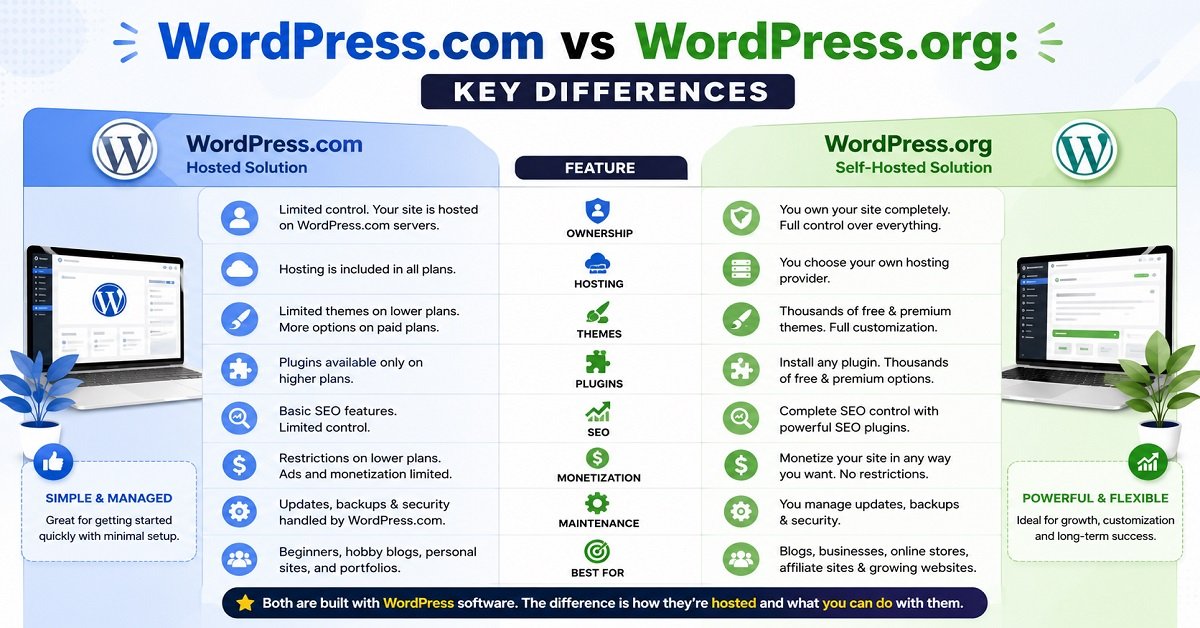
At first, WordPress.com and WordPress.org may seem very similar because both use the same WordPress software. However, they differ in several important ways that affect how much control you have, how much your website costs, and how easily it can grow.
The table below gives you a quick overview before we look at each point in detail.
| Feature | WordPress.com | WordPress.org |
|---|---|---|
| Hosting | Included | Choose your own hosting provider |
| Domain Name | Free subdomain on the free plan | Use your own custom domain |
| Ownership | Limited control | Full ownership |
| Themes | Limited on lower plans | Thousands of free and premium themes |
| Plugins | Available only on higher plans | Install any plugin |
| SEO | Basic on free plans | Full SEO control |
| Monetization | Restrictions on lower plans | Complete freedom |
| eCommerce | Limited unless on higher plans | Full WooCommerce support |
| Maintenance | Managed by WordPress.com | You manage updates and backups |
| Best For | Personal websites and hobby blogs | Professional blogs, businesses, and online stores |
Let’s look at each difference in more detail.
1. Ownership and Control
This is the biggest difference between the two platforms.
With WordPress.com, your website is hosted on WordPress.com’s infrastructure. While you own your content, your website operates under their terms of service. Certain features are restricted depending on your subscription plan, and the platform decides which server-level settings you can access.
With WordPress.org, you own your website completely. Since you choose your own hosting provider, you have full control over your files, database, themes, plugins, and website settings.
If you plan to build a website that can grow for years, having complete ownership gives you much more flexibility.
Winner: WordPress.org
2. Hosting
Hosting is where all your website files are stored.
With WordPress.com, hosting is already included. You simply create an account and start building your website.
With WordPress.org, you’ll need to purchase web hosting from a provider and install WordPress. Fortunately, many hosting companies now offer one-click WordPress installation, making the setup process much easier than it was a few years ago.
Although this requires one extra step, it gives you the freedom to choose a hosting plan that matches your budget and future growth.
Winner: Depends on your needs.
Choose WordPress.com if you want maximum simplicity.
Choose WordPress.org if you want flexibility and better long-term value.
3. Themes and Design Customization
Your website’s design creates the first impression for visitors.
WordPress.com offers a selection of themes, but customization options depend on your subscription plan. Some advanced design features are only available on higher-tier plans.
WordPress.org allows you to install thousands of free and premium themes from the WordPress Theme Directory or third-party developers. You can also customize almost every aspect of your website using page builders, custom CSS, or custom code if needed.
This level of flexibility is especially valuable if you want your website to stand out.
Winner: WordPress.org
4. Plugins and Features
Plugins add extra functionality to your website.
For example, plugins can help you:
- Improve SEO
- Speed up your website
- Create contact forms
- Add security features
- Build online stores
- Sell digital products
- Create membership websites
- Add backup and caching features
On WordPress.com, plugin installation is only available on eligible paid plans.
On WordPress.org, you can install thousands of free and premium plugins without these restrictions.
As your website grows, plugins become one of the biggest advantages of WordPress.org.
Winner: WordPress.org
5. SEO Capabilities
If you want people to find your website through Google, SEO matters.
WordPress.com includes basic SEO features, but advanced optimization tools depend on your plan.
With WordPress.org, you have complete control over your website’s SEO.
You can:
- Install SEO plugins like Rank Math.
- Create custom meta titles and descriptions.
- Optimize schema markup.
- Improve page speed.
- Add redirects.
- Customize URL structures.
- Generate XML sitemaps.
- Fine-tune technical SEO settings.
This extra control can make a significant difference as your website grows.
Winner: WordPress.org
6. Monetization Options
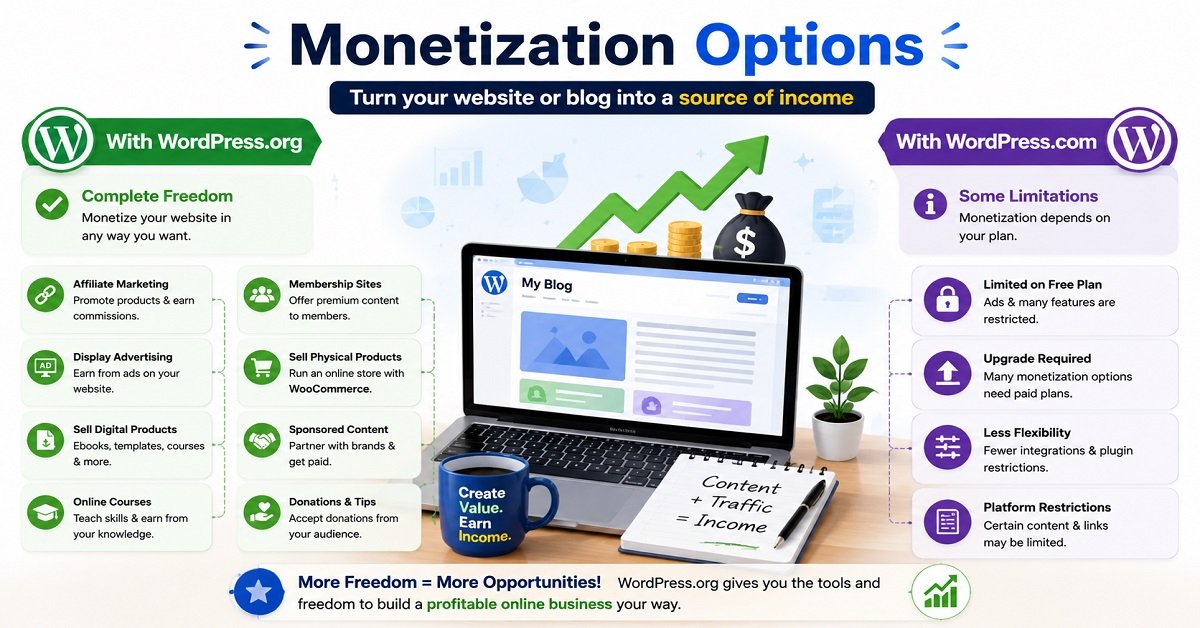
Many people start a website with the goal of earning money.
If that’s your goal, it’s important to understand how each platform handles monetization.
WordPress.com allows monetization, but some methods depend on your subscription plan.
WordPress.org gives you complete freedom to earn money however you choose.
For example, you can:
- Display display ads
- Join affiliate programs
- Publish sponsored content
- Sell online courses
- Offer digital downloads
- Create membership websites
- Build an online store
- Accept donations
- Sell services
You’re not limited by platform restrictions.
If building an income-generating website is one of your long-term goals, WordPress.org is the clear winner.
7. Security and Maintenance
Every website needs regular updates, backups, and security protection.
With WordPress.com, these tasks are handled automatically. This is convenient for beginners who don’t want to spend time on technical maintenance.
With WordPress.org, you’re responsible for maintaining your website. That includes updating WordPress, themes, and plugins, creating backups, and implementing security measures.
While this may sound intimidating, many hosting providers and plugins automate these tasks, making website maintenance much easier than most beginners expect.
Winner: WordPress.com for convenience.
Winner: WordPress.org for flexibility.
8. Scalability
Think about where you want your website to be two or three years from now.
If you’re only creating a small personal blog, WordPress.com may meet your needs.
However, if you expect your website to grow into a business, affiliate site, online store, or content platform with thousands of visitors, WordPress.org provides much more room to expand.
You can upgrade your hosting, optimize performance, add advanced features, and scale your website without changing platforms.
This makes WordPress.org a better long-term investment for most website owners.
WordPress.com vs WordPress.org Pricing
One of the biggest questions beginners ask is:
“Which option is cheaper?”
The answer depends on what kind of website you want to build.
WordPress.com Pricing
WordPress.com offers multiple plans, including a free option.
The free plan is suitable for learning or creating a simple personal website. However, it comes with limitations such as WordPress branding, a subdomain, and fewer customization options.
As your website grows, you’ll likely need to upgrade to a paid plan to unlock features like custom domains, additional storage, advanced design options, and plugin support.
WordPress.org Pricing
The WordPress software itself is completely free to download and use.
However, you’ll need a few essentials to launch your website:
| Expense | Typical Cost |
|---|---|
| Domain Name | Usually paid annually |
| Web Hosting | Monthly or yearly subscription |
| Premium Theme (Optional) | One-time or annual fee |
| Premium Plugins (Optional) | Depending on your needs |
The good news is that you can start with just a domain name and affordable hosting. Many beginners build successful websites using free themes and plugins before investing in premium tools.
While WordPress.org has an upfront cost, it often provides better long-term value because you’re paying for your own website instead of upgrading to unlock basic features.
Which Offers Better Value?
If you’re creating a hobby website with no plans to grow, WordPress.com’s free plan can be enough.
However, if your goal is to build a professional blog, business website, affiliate website, or online store, WordPress.org usually offers better value over time because you have complete ownership and far fewer limitations.
Which Platform Is Easier to Use?
If you’re completely new to building websites, ease of use is probably one of your biggest concerns.
The good news is that both WordPress.com and WordPress.org are beginner-friendly. However, the experience is a little different.
WordPress.com
WordPress.com is designed to get you online as quickly as possible.
Since hosting, security, backups, and updates are already taken care of, you simply create an account, choose a theme, and start publishing content.
This makes it a great option if you don’t want to deal with any technical setup.
WordPress.org
WordPress.org requires a few extra steps before your website is ready.
You’ll need to:
- Register a domain name.
- Purchase web hosting.
- Install WordPress.
Although that may sound complicated, most modern hosting providers offer one-click WordPress installation. The entire setup process usually takes only a few minutes.
Once your website is running, the dashboard is almost identical to WordPress.com.
If you’ve already read our guide on How to Build a WordPress Website from Scratch, you’ll find the setup process much easier than you might expect.
Which Is Easier?
If your only priority is getting a website online with the least amount of effort, WordPress.com is slightly easier.
However, the small amount of extra work required by WordPress.org gives you much more flexibility in the long run.
For most people, spending an extra 15 to 20 minutes on setup is worth the complete control you’ll gain.
Winner: WordPress.com for simplicity.
Winner: WordPress.org for long-term benefits.
Which Platform Is Better for Blogging?
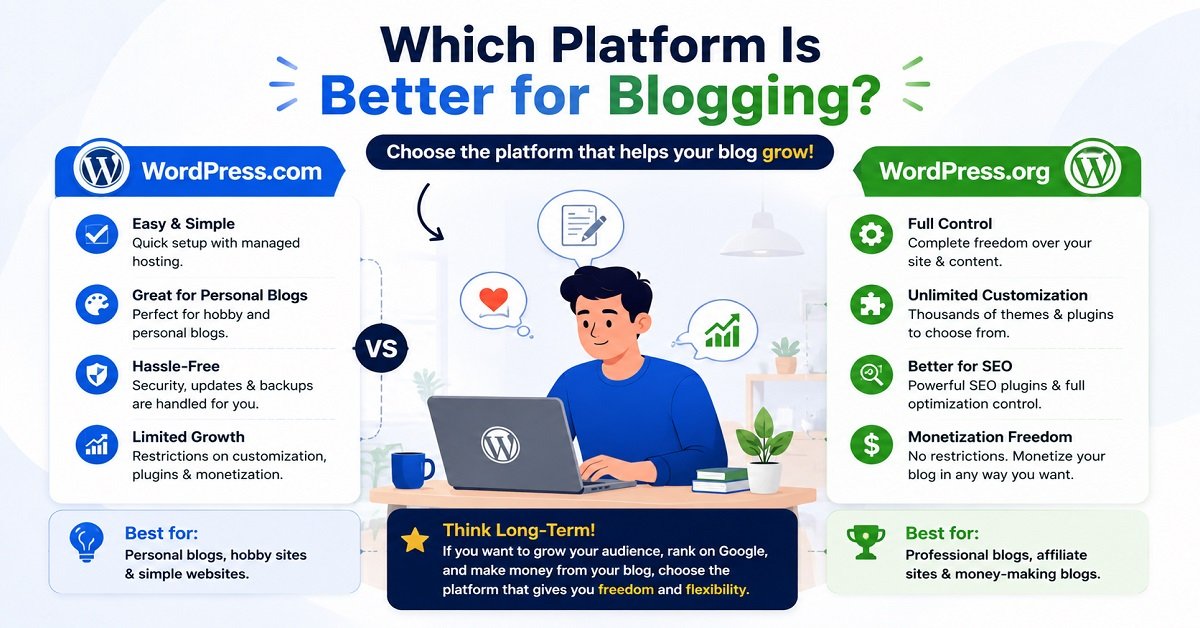
Both platforms let you publish blog posts, upload images, and organize content.
The difference lies in how much freedom you have as your blog grows.
Choose WordPress.com if you:
- Want a personal journal.
- Write occasionally as a hobby.
- Don’t plan to earn money.
- Prefer a maintenance-free platform.
Choose WordPress.org if you:
- Want to build a professional blog.
- Plan to attract visitors from Google.
- Want complete control over your design.
- Intend to make money through blogging.
- Expect your website to grow over time.
Many successful bloggers start with WordPress.org because it allows them to expand without changing platforms later.
If you’re still deciding what type of website to build, read How to Choose a Blogging Niche That Makes Money. Choosing the right niche before launching your website can make it much easier to attract readers and build a successful blog.
If your goal is simply to share personal thoughts with friends and family, WordPress.com may be enough.
But if you dream of building a blog that attracts thousands of readers each month, WordPress.org is the better choice.
Which Platform Is Better for SEO?
Search Engine Optimization (SEO) helps your website appear in search results when people look for information on Google.
If organic traffic is important to you, choosing the right platform matters.
SEO on WordPress.com
WordPress.com includes basic SEO features, especially on its paid plans.
You can customize page titles, meta descriptions, and a few other settings.
For small websites, these features are usually enough.
However, advanced SEO options are limited unless you’re on higher-tier plans.
SEO on WordPress.org
WordPress.org gives you complete control over every aspect of SEO.
You can install powerful SEO plugins like Rank Math, optimize your site’s speed, improve Core Web Vitals, create custom schema markup, manage redirects, optimize images, and fine-tune technical SEO settings.
You also have complete control over your hosting environment, which can significantly affect website performance and loading speed.
These factors become increasingly important as your website grows.
Why Does This Matter?
Imagine two bloggers writing equally helpful articles.
One has complete control over website speed, structured data, internal linking, redirects, and image optimization.
The other has only basic SEO controls.
Over time, the first blogger has more opportunities to improve search performance.
While great content should always come first, having advanced SEO tools gives you an additional advantage.
Our Recommendation
If your goal is to rank on Google and consistently grow organic traffic, WordPress.org is the better option.
Which Platform Is Better for Making Money?
Many beginners eventually want to earn money from their websites.
Whether it’s through affiliate marketing, advertising, selling products, or offering services, your platform should support your goals rather than limit them.
Ways You Can Monetize a Website
Some of the most popular methods include:
- Affiliate marketing
- Display advertising
- Sponsored content
- Selling digital products
- Online courses
- Membership websites
- Freelance services
- Coaching
- Consulting
- Selling physical products
Monetization on WordPress.com
WordPress.com supports monetization, but certain features depend on your subscription plan.
Some advanced monetization options require upgrading to higher-priced plans.
For hobby websites, this may not be a problem.
However, if you’re building a business, these restrictions can become limiting over time.
Monetization on WordPress.org
With WordPress.org, you decide how your website earns money.
There are no platform-imposed restrictions on the monetization methods you choose.
You can install plugins for:
- Affiliate link management
- Membership systems
- Online stores
- Learning management systems
- Payment gateways
- Digital downloads
- Email marketing
- Lead generation
As your business grows, you can continue adding new features without changing platforms.
Our Recommendation
If earning money from your website is even a possibility in the future, WordPress.org is the smarter choice.
Even if you don’t plan to monetize today, choosing WordPress.org now saves you from migrating your website later.
Which Platform Should You Choose?
There’s no single answer that fits everyone.
The right platform depends on your goals.
Let’s look at a few common situations.
Scenario 1: You Want to Start a Personal Blog
If you’re writing about your hobbies, travel experiences, or personal interests without worrying about customization or income, WordPress.com can be a simple solution.
Its managed environment lets you focus entirely on writing.
Recommended: WordPress.com
Scenario 2: You Want to Build a Professional Blog
If your goal is to attract readers through Google, build an audience, and grow your website over time, WordPress.org is the better investment.
You’ll have complete control over SEO, design, plugins, and monetization.
Recommended: WordPress.org
Scenario 3: You Want to Start an Affiliate Website
Affiliate websites depend heavily on SEO, performance, analytics, and conversion optimization.
You’ll likely need plugins for link management, caching, schema markup, and email marketing.
These are much easier to implement on WordPress.org.
Recommended: WordPress.org
Scenario 4: You Want to Create an Online Store
Running an eCommerce website requires payment gateways, inventory management, shipping options, and marketing integrations.
WordPress.org works seamlessly with WooCommerce and thousands of supporting plugins, making it the preferred choice for most online stores.
Recommended: WordPress.org
Scenario 5: You Want a Portfolio Website
If you simply want to showcase your work without many advanced features, either platform can work.
Choose WordPress.com if you want the easiest setup.
Choose WordPress.org if you expect your portfolio to grow or eventually include a blog, contact forms, booking systems, or digital products.
Recommended: Depends on your future plans.
Our Recommendation for OrbitElf Readers
For the vast majority of readers who visit OrbitElf, WordPress.org is the platform we recommend.
Here’s why:
- You own your website and content.
- You can choose any hosting provider that fits your budget.
- You have complete freedom to customize your site.
- You can install thousands of plugins and themes.
- You get full control over SEO.
- You can monetize your website without unnecessary limitations.
- Your website can grow alongside your goals.
WordPress.com is still a good option for hobby websites and personal blogs. But if you’re planning to build a website that attracts search traffic, generates income, or supports a business, WordPress.org offers the flexibility you’ll appreciate as your site grows.
Think of it as building a house. It’s usually better to start with a strong foundation than to outgrow a smaller one and move later.
WordPress.com Pros and Cons
Like any platform, WordPress.com has both strengths and limitations. Understanding these can help you decide if it’s the right fit for your needs.
WordPress.org Pros and Cons
WordPress.org offers much greater flexibility, but it also comes with a few additional responsibilities.
Fortunately, most hosting providers now automate updates, backups, and security, making these responsibilities much easier to manage than they were in the past.
Common Mistakes Beginners Make
Many first-time website owners choose the wrong platform simply because they don’t fully understand the differences.
Here are some of the most common mistakes to avoid.
Choosing a Platform Without a Long-Term Plan
Many people create a website as a hobby but later decide to turn it into a business.
If you think there’s even a small chance you’ll want to earn money, attract search traffic, or expand your website in the future, it’s often better to start with WordPress.org.
Assuming WordPress.com and WordPress.org Are the Same
The names are almost identical, which causes a lot of confusion.
Remember:
- WordPress.com is a hosted service.
- WordPress.org is self-hosted software.
Knowing this one difference can save you from making the wrong decision.
Focusing Only on the Initial Cost
A free plan may seem attractive at first.
However, if you later need advanced features, you may end up paying more than expected through plan upgrades.
Instead of looking only at today’s cost, think about what your website might need a year from now.
Ignoring SEO and Website Growth
If you plan to rely on Google Search for visitors, you’ll eventually need greater control over your website’s SEO, performance, and technical settings.
Starting with a platform that supports long-term growth can save you time and effort later.
Can You Switch from WordPress.com to WordPress.org Later?
Yes.
If you start with WordPress.com and later decide you need more flexibility, you can migrate your website to WordPress.org.
The process generally involves:
- Purchasing web hosting.
- Registering or connecting your domain name.
- Installing WordPress.
- Exporting your content from WordPress.com.
- Importing it into your new WordPress.org website.
- Testing your website and updating any necessary settings.
Although migration is possible, it still takes time and requires careful attention to avoid issues like broken links or temporary traffic drops.
If you’re already confident that you want to build a long-term website, starting directly with WordPress.org is usually the simpler option.
Frequently Asked Questions
Is WordPress.org really free?
Yes. The WordPress software is free to download and use. However, you’ll need to pay for web hosting and a domain name to make your website available online.
Is WordPress.com free?
Yes. WordPress.com offers a free plan, but it includes limitations such as WordPress branding, a subdomain, and fewer customization options.
Which platform is better for beginners?
If you only want a simple personal website with minimal setup, WordPress.com is easier.
If you’re willing to spend a little time learning and want complete flexibility, WordPress.org is the better long-term choice.
Which platform is better for SEO?
WordPress.org provides much greater control over technical SEO, plugins, website speed, and optimization, making it the preferred choice for most websites that rely on organic traffic.
Can I make money with both platforms?
Yes.
However, WordPress.org gives you complete freedom to monetize your website through affiliate marketing, advertising, online stores, memberships, digital products, and more.
Do I need coding knowledge to use WordPress.org?
No.
Modern themes, page builders, and plugins allow you to create professional websites without writing code.
Learning a few basics can be helpful, but it’s not required.
Which platform is better for small businesses?
Most small businesses benefit from WordPress.org because it offers greater flexibility, better SEO, and the ability to expand as the business grows.
Which platform do professional bloggers use?
Most professional bloggers, businesses, and affiliate marketers choose WordPress.org because of its complete control, scalability, and monetization opportunities.
Final Verdict
When comparing WordPress.com vs WordPress.org, neither platform is objectively better for everyone. The right choice depends on what you want your website to achieve.
Choose WordPress.com if you want a simple, low-maintenance website for personal use and don’t expect to need advanced features.
Choose WordPress.org if you’re building a professional blog, business website, portfolio, affiliate site, or online store. It gives you complete ownership, greater flexibility, stronger SEO capabilities, and the freedom to grow your website without unnecessary limitations.
For most OrbitElf readers who want to build a website that attracts visitors, generates income, or supports a business, WordPress.org is the platform we confidently recommend.
Starting with the right foundation today can save you time, money, and unnecessary migrations in the future.
Conclusion
Choosing between WordPress.com and WordPress.org doesn’t have to be confusing.
The key is to think beyond today and consider where you want your website to be in the future.
If you’re creating a personal website to share your thoughts with family and friends, WordPress.com may be all you need.
But if your goal is to build a website that can grow, rank on Google, and eventually generate income, WordPress.org offers the freedom and flexibility to make that possible.
No matter which platform you choose, the most important step is to start. You can always improve your website over time as your skills and goals evolve.
Ready to create your own website? Follow our How to Build a WordPress Website from Scratch guide for a step-by-step walkthrough. If you’re still planning your blogging journey, start with How to Start a Blog in 2026: The Complete Beginner’s Guide. And if you haven’t decided what to write about yet, don’t miss How to Choose a Blogging Niche That Makes Money to choose a niche with long-term growth potential.