

Starting a website sounds exciting until you reach the hosting part.
Then you see words like shared hosting, WordPress hosting, VPS, cloud hosting, NVMe storage, CDN, SSL, backups, bandwidth, and PHP. On top of that, every hosting company seems to claim that it offers the fastest and best service.
If you are starting your first blog or website, you may wonder which one you actually need.
The good news is that you don’t need to understand everything about web servers before launching a website. For most beginners, a simple and reliable hosting plan is enough to get started.
In this guide, we’ll compare some of the best hosting for beginners, explain what you actually need, show you what to avoid paying for, and help you choose a plan that fits your website instead of simply choosing the most expensive option.
Affiliate Disclosure: Some links in this article are affiliate links. If you purchase a product through one of these links, we may earn a commission at no additional cost to you.
Quick Answer: What Is the Best Hosting for Beginners?
For most beginners, Hostinger is one of the strongest options to consider, particularly if you want an affordable hosting plan with an easy management interface and features suitable for a new WordPress website.
Bluehost is another good option, especially for beginners who want a hosting provider with a strong WordPress focus.
SiteGround is worth considering if you are more interested in managed features and support and don’t mind paying more.
But there is no single hosting company that is best for everyone.
The right choice depends on what you are building.
| Your situation | Hosting to consider |
|---|---|
| Starting your first blog | Hostinger |
| Starting a small WordPress website | Hostinger or Bluehost |
| Building a personal portfolio | Hostinger |
| Starting a small business website | Hostinger or Bluehost |
| Want more managed features | SiteGround |
| Expecting heavy traffic from the beginning | Higher-tier or cloud hosting |
We’ll look at each option in detail later in this guide.
For now, let’s understand what you are actually buying when you purchase web hosting.
What Is Web Hosting?
A website needs somewhere to store its files.
These files can include your WordPress installation, images, blog posts, pages, themes, plugins, databases, and other website resources.
A web hosting company provides the server where these files are stored.
When someone visits your website, the hosting server sends the necessary files to that person’s browser so the website can load.
A simple way to understand the difference is:
Domain name = your website’s address
Web hosting = the place where your website lives
WordPress = the software you use to build and manage the website
For example, imagine that you want to start a cooking blog called mycookingblog.com.
You purchase the domain mycookingblog.com.
That gives your website its address.
Then you purchase hosting.
The hosting provides the server space where your WordPress website, recipes, images, and other files are stored.
Finally, you install WordPress and start publishing your content.
You can learn more about the overall expenses involved in this process in How Much Does It Cost to Start a Blog? A Realistic 2026 Breakdown.
What Makes Hosting Beginner-Friendly?
A hosting plan can have excellent technical specifications and still be frustrating for someone who has never built a website before.
For a beginner, ease of use matters almost as much as performance.
A good beginner hosting provider should make common tasks reasonably simple.
1. Easy website setup
You should be able to get your website online without needing to become a server administrator.
The hosting dashboard should make it reasonably easy to:
- Add or connect a domain
- Install WordPress
- Manage SSL
- Create email accounts
- Manage files
- Create or restore backups
- Manage databases
- Contact customer support
If you need to search through complicated server documentation just to perform basic tasks, the hosting may not be ideal for a first website.
2. WordPress support
If you are planning to build your website with WordPress, make sure the hosting provider supports WordPress properly.
Most beginner-focused hosting providers offer tools that make WordPress installation and management easier.
You can read our How to Install WordPress: Step-by-Step Beginner Guide if you are completely new to the process.
3. SSL included
SSL protects the connection between your website and its visitors.
When SSL is active, your website normally loads with HTTPS instead of HTTP.
For example:
rather than:
http://example.com
A beginner-friendly hosting plan should normally include SSL without requiring you to purchase a separate certificate just to run a basic website.
4. Backups
Backups are one of those things you may not think about until something goes wrong.
Imagine spending six months publishing articles and then accidentally breaking your website while changing a plugin or theme.
A recent backup can make recovery much easier.
However, don’t simply look for the word “backup” on a hosting plan.
Check how often backups are created and whether restoring a backup is straightforward.
5. Customer support
You will probably have questions when you start.
You might not know why your domain isn’t connected.
You might have trouble installing WordPress.
Your SSL certificate might not appear correctly.
You might accidentally change something you shouldn’t have.
Good customer support can save a beginner a lot of time.
6. Room to grow
You don’t need powerful hosting when your website has just started.
However, the hosting should give you a reasonable upgrade path.
For example, you may start with a basic shared hosting plan when you have very little traffic. Later, if your website grows and needs more resources, you should be able to move to a higher plan without rebuilding the entire website.
Do Beginners Need the Most Powerful Hosting?
No.
This is one of the most common mistakes beginners make.
You may see VPS, cloud, dedicated, or high-performance hosting plans and think:
“Should I buy this now so I don’t have problems later?”
Usually, no.
If you are starting a new blog that gets only a few visitors a day, you probably don’t need a powerful VPS or dedicated server.
A good shared hosting plan can be enough.
Think of it like renting a house.
If you are living alone, you don’t need to rent a huge building just because you might have more guests someday.
Start with what you need today and make sure you have room to upgrade when the need actually arrives.
What Should You Actually Compare?
When comparing beginner hosting plans, don’t look only at storage or the advertised monthly price.
Pay attention to:
- Number of websites allowed
- Storage
- Backup frequency
- SSL
- CDN
- WordPress support
- Customer support
- Server resources
- Domain registration or renewal
- Promotional price
- Renewal price
- Refund period
- Upgrade options
The cheapest plan isn’t automatically the best deal.
Likewise, the plan with the largest storage number isn’t necessarily the best choice.
What matters is whether the hosting provides the features your particular website needs.
Best Hosting for Beginners: Our Top Picks
Now that you know what to look for, let’s look at the hosting providers that make the most sense for a beginner.
We are not ranking these hosts simply by the cheapest advertised price.
A hosting plan can look extremely cheap at first and become much more expensive at renewal. Another provider may cost more but include features or support that are useful for your particular website.
So, instead of asking only “Which hosting is cheapest?”, think about this:
Which hosting gives me what I need without making website management unnecessarily complicated?
For most beginners, these three providers are worth considering.
1. Hostinger: Best Overall Value for Beginners
If you are starting your first blog, portfolio, small business website, or WordPress website and want to keep the initial cost under control, Hostinger is one of the first providers we would consider.
Hostinger specifically describes its shared hosting as user-friendly and suitable for beginners and small businesses. Its current hosting plans include features such as SSL, backups, CDN, and 24/7 support, depending on the plan.
One reason Hostinger stands out is its balance between simplicity and features.
You don’t have to start with a powerful VPS or cloud server. A beginner can start with shared hosting and move to a higher plan later if the website grows.
Why Hostinger is good for beginners
Hostinger’s hPanel is designed to put common website management tasks in one place.
Depending on your plan, you can manage things such as:
- Websites
- Domains
- WordPress
- SSL
- Backups
- Performance settings
- Security
- Website files
That matters when you’re new.
You don’t want to spend your first week learning server administration before you can publish your first article.
Hostinger also offers WordPress-specific hosting, where the company handles more of the technical side of running a WordPress website.
Hostinger pricing: Look beyond the advertised monthly rate
Hostinger’s current India pricing starts at ₹69/month on its displayed long-term promotional offer. However, this is based on a specific subscription term and should not be interpreted as the price you will pay every month indefinitely. The pricing page also shows higher renewal rates.
This is an important point for beginners.
Suppose you see:
₹69/month
It is easy to think:
“I can run my website for ₹69 every month.”
That’s not necessarily how the offer works.
The promotional monthly figure is based on the billing period you select, and the actual amount paid at checkout can be much higher because several months or years may be charged upfront.
Always check:
- Total amount charged today
- Promotional period
- Renewal price
- Domain renewal cost
- Features included in your selected plan
Which Hostinger plan should a beginner choose?
If you are building one very small website and want the cheapest starting option, the entry-level plan may be sufficient.
However, if you are serious about building a blog and expect the website to grow, don’t automatically choose the cheapest plan just because it has the lowest headline price.
Look at the number of websites allowed, storage, backups, performance resources, and upgrade options.
A slightly higher plan can sometimes provide better value if you intend to build your website for several years.
Best for
New bloggers, beginners, small websites, portfolios, and small businesses that want a good balance between price, features, and ease of use.
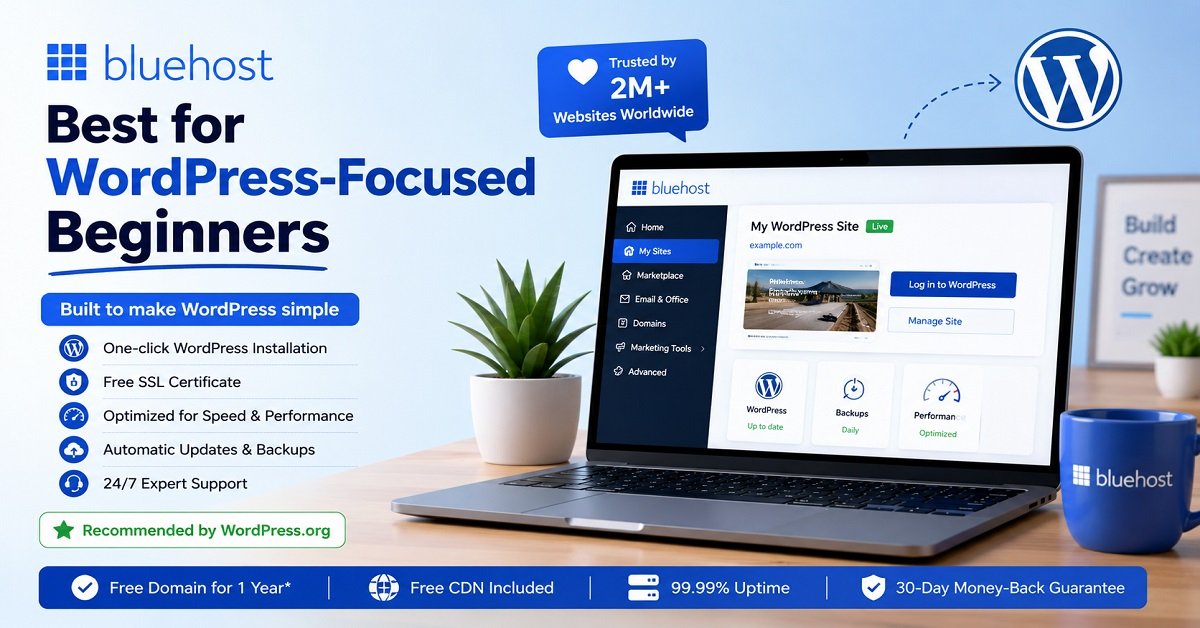
2. Bluehost: Best for WordPress-Focused Beginners
Bluehost is another strong option if you are planning to build your website with WordPress.
One thing that makes Bluehost particularly interesting for beginners is its long-standing relationship with the WordPress ecosystem. WordPress.org currently lists Bluehost among its recommended hosting providers and describes it as its longest-running recommended host.
Bluehost’s current hosting plans also include several features that can make WordPress management easier, including managed updates, SSL, CDN, backups, migration tools, and AI website creation tools, depending on the plan.
Why Bluehost is good for beginners
Imagine that you’ve never created a website before.
You don’t want to start by configuring a server manually.
You want something closer to:
Choose a plan → connect domain → install WordPress → choose a theme → start building
That’s the type of experience Bluehost is targeting.
Its current India offering also advertises 24/7 expert support, a 99.99% uptime SLA, free SSL, a free domain for the first year on eligible plans, and a 30-day money-back guarantee.
Bluehost also offers managed WordPress hosting options, which can take care of more routine WordPress management tasks for you.
Bluehost pricing
Bluehost currently advertises its India hosting from ₹199/month on its website. The actual price depends on the plan and subscription period, and the provider also shows higher renewal pricing.
Again, don’t compare this number directly with Hostinger’s ₹69 promotional figure.
The subscription terms and included features are different.
When comparing the two, look at the total amount you pay, the length of the initial term, renewal price, and features included.
Best for
Beginners who specifically want a WordPress-focused hosting experience and prefer Bluehost’s tools and ecosystem.
3. SiteGround: Best for Managed Features and Support
SiteGround is a little different from the first two options.
It is not the provider I would recommend simply because you want the cheapest possible hosting.
Instead, SiteGround makes more sense if you are willing to spend more for managed hosting features, support, security, and performance-focused tools.
SiteGround currently promotes features such as free SSL, CDN, backups, email, security tools, website migration, and 24/7 support across its hosting offering.
Why consider SiteGround?
Let’s say you don’t mind spending a little more because you want more help managing your website.
In that situation, SiteGround becomes more interesting.
Its WordPress hosting includes tools for installation, automated transfers, updates, CDN, caching, and support.
That can be useful for a small business owner who would rather spend time working on the business than dealing with technical hosting tasks.
The biggest thing to watch: renewal pricing
This is where beginners need to pay attention.
SiteGround’s promotional pricing can look attractive when you first visit the website, but the renewal price is considerably higher.
For example, its current StartUp offer is displayed at a promotional price of $2.99/month, while the listed renewal rate is $17.99/month. The promotional rate and terms can change, so check the current checkout price before purchasing.
This doesn’t necessarily make SiteGround a bad choice.
It simply means that you should choose it because its features and service are worth the long-term cost for you, not just because you saw the introductory discount.
Best for
Beginners and small website owners who value managed features, support, and performance tools more than getting the lowest possible hosting price.
Hostinger vs Bluehost vs SiteGround
If you are still confused, this table gives you a simpler way to look at the three options.
| Feature | Hostinger | Bluehost | SiteGround |
|---|---|---|---|
| Beginner friendly | Yes | Yes | Yes |
| WordPress support | Yes | Yes | Yes |
| Free SSL | Yes | Yes | Yes |
| CDN | Included on eligible plans | Included | Included |
| Backups | Included on eligible plans | Included on current plans | Included |
| 24/7 support | Yes | Yes | Yes |
| Free domain | Available on eligible plans | Available on eligible plans | Not the main selling point |
| Main strength | Value and simplicity | WordPress-focused setup | Managed features and support |
| Best suited for | New blogs and small sites | WordPress beginners | Users wanting a more managed experience |
| Main concern | Renewal price and plan limits | Renewal price and plan differences | Higher long-term cost |
Features and plan terms can change, so treat this table as a general comparison rather than a permanent specification sheet. Always verify the specific plan before purchasing.
Which One Would We Choose?
For a typical first-time blogger, our preference would be:
Hostinger for value and simplicity
Bluehost for a WordPress-focused alternative
SiteGround for a more managed, support-focused experience
That doesn’t mean Hostinger is automatically the right choice for everyone.
For example, if you already know that you want a more managed hosting environment and don’t mind paying more, SiteGround may make more sense.
Likewise, if you specifically prefer Bluehost’s WordPress tools and ecosystem, choosing Bluehost is perfectly reasonable.
The important thing is to match the hosting plan with your actual needs.
Don’t Choose Hosting Only by the Monthly Price
This deserves repeating because it is one of the easiest ways for beginners to make a poor decision.
Suppose three hosting companies show:
₹69/month
₹199/month
$2.99/month
At first glance, you may simply choose the cheapest number.
But that comparison isn’t fair.
You need to know:
- How long that price is available
- How much you pay upfront
- What features are included
- How many websites you can host
- What the renewal price is
- What the domain costs after the first year
- Whether backups are included
- Whether email is included
- What support is available
The cheapest headline price can sometimes become a more expensive choice later.
The best hosting deal is the one that gives you the features you need at a cost you are comfortable paying both today and at renewal.
A Simple Example
Imagine two beginners starting websites.
Rahul wants to create a personal blog and expects fewer than 1,000 visitors per month.
Priya wants to create a small business website and plans to host two websites.
Rahul probably doesn’t need an expensive high-resource hosting plan.
A basic shared hosting plan may be perfectly adequate.
Priya, on the other hand, should pay more attention to the number of websites allowed and the resources included.
Both are beginners.
But their hosting requirements are different.
That’s why there is no universal “best hosting plan.”
The best plan is the one that fits the website you are actually building.
What Type of Hosting Should a Beginner Choose?
Choosing the hosting company is only half the decision.
You also need to choose the type of hosting.
This is where beginners often get confused because hosting companies may offer several options on the same website:
- Shared hosting
- WordPress hosting
- Managed WordPress hosting
- VPS hosting
- Cloud hosting
- Dedicated hosting
The names can make these options sound much more complicated than they really are.
For a new website, you usually don’t need the most powerful option.
Let’s look at what each type means and when you should consider it.
Shared Hosting: The Best Starting Point for Most Beginners
Shared hosting is usually the simplest and most affordable way to start a website.
Your website is hosted on a server that also hosts other websites. The server’s resources are shared between those websites.
That sounds like a disadvantage, but it isn’t necessarily a problem.
If you’re starting a new blog with relatively low traffic, you probably won’t need a large amount of server resources.
For example, imagine that you’ve just launched a food blog.
You have 20 articles, a few hundred visitors each month, and optimized images.
You don’t need a dedicated server sitting there waiting for thousands of visitors.
A good shared hosting plan can handle a website like this.
Who should choose shared hosting?
Shared hosting is a good starting point for:
- New bloggers
- Personal websites
- Portfolio websites
- Small business websites
- Simple informational websites
- New affiliate websites
- Small WordPress websites
The main advantage is simplicity and affordability.
The main limitation is that your website shares server resources with other websites.
As your website grows, you may eventually need to move to a higher hosting plan.
WordPress Hosting: A Convenient Option for WordPress Users
WordPress hosting is designed around WordPress websites.
Depending on the provider, a WordPress hosting plan may include tools such as:
- One-click WordPress installation
- Automatic updates
- WordPress security features
- Caching
- Backups
- WordPress-specific support
- Website migration tools
If you already know that you are going to use WordPress, choosing a hosting plan designed for WordPress can make the setup process easier.
However, don’t assume that every plan labelled “WordPress hosting” is automatically better than every shared hosting plan.
Look at what the plan actually includes.
Sometimes a company’s WordPress hosting and shared hosting packages can have very similar underlying infrastructure, with differences mainly in the management tools and included services.
Managed WordPress Hosting: More Convenience, More Cost
Managed WordPress hosting goes one step further.
The hosting company handles more of the routine technical work involved in keeping your WordPress website running.
Depending on the provider and plan, this may include:
- WordPress updates
- Security monitoring
- Backups
- Performance optimization
- Caching
- Staging
- WordPress-specific support
This can be useful if you don’t want to spend much time dealing with technical maintenance.
For example, a small business owner may be happy to pay more for managed hosting because their time is more valuable than the difference in hosting cost.
But if you’re a beginner blogger who enjoys learning how WordPress works, you may not need all those services immediately.
VPS Hosting: Powerful, But Usually Unnecessary at the Start
VPS stands for Virtual Private Server.
A VPS gives your website a more isolated environment and generally provides more control and resources than basic shared hosting.
That sounds attractive.
But more control also means more responsibility.
Depending on the service, you may need to understand things such as:
- Server configuration
- Security
- Operating systems
- Resource management
- Software updates
- Server monitoring
Some managed VPS services reduce this technical burden, but they generally cost more.
For a brand-new blog, VPS hosting is usually unnecessary.
Consider it when your website has grown enough that shared hosting no longer provides the resources or control you need.
Cloud Hosting: For Growing Websites
Cloud hosting uses a distributed infrastructure rather than relying on a traditional single-server setup.
It can provide more flexibility and scalability for websites that need additional resources.
For example, suppose your website has grown from a few hundred monthly visitors to hundreds of thousands.
Your website may have:
- More database activity
- More simultaneous visitors
- More images and files
- More plugins or applications
- More demanding workloads
At that stage, cloud hosting can become more interesting.
But don’t buy cloud hosting just because the word “cloud” sounds more advanced.
A beginner with very little traffic doesn’t automatically benefit from paying for resources they aren’t using.
Dedicated Hosting: Almost Never Necessary for a New Website
Dedicated hosting means an entire physical server is dedicated to your website or organization.
It provides substantial control and resources.
But it also comes with a much higher cost and more technical responsibility.
For a normal new blog or small website, dedicated hosting would be excessive.
Think about it this way:
If your website is a small shop, you don’t need an entire shopping mall.
Start with what you need.
Shared vs WordPress vs VPS vs Cloud
Here’s the simple version:
| Hosting type | Difficulty | Cost | Best for beginners? | Typical use |
|---|---|---|---|---|
| Shared hosting | Easy | Low | Yes | New blogs and small websites |
| WordPress hosting | Easy | Low to medium | Yes | WordPress websites |
| Managed WordPress | Easy | Medium to high | Yes | Users wanting less technical work |
| VPS | Medium to advanced | Medium to high | Usually no | Growing websites and technical users |
| Cloud | Medium | Medium to high | Sometimes | Growing or resource-heavy websites |
| Dedicated | Advanced | High | No | Large websites and demanding workloads |
For most people starting their first website, shared hosting or beginner-focused WordPress hosting is the sensible place to start.
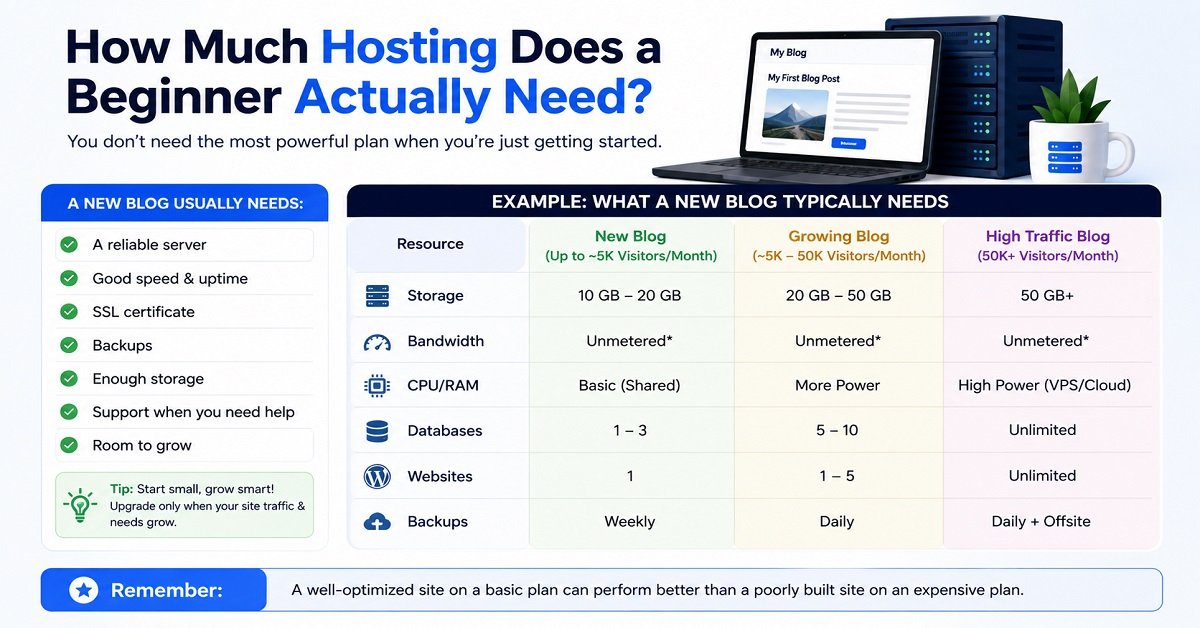
How Much Hosting Does a Beginner Actually Need?
This is another area where beginners often spend more than necessary.
You don’t need to predict exactly how much traffic your website will receive five years from now.
Instead, think about your expected needs over the next year or two.
A typical new blog might start with:
- A few dozen articles
- Optimized images
- A lightweight WordPress theme
- A reasonable number of plugins
- A few hundred or a few thousand visitors per month
A basic hosting plan can often handle this type of website.
The exact limits depend on the provider and plan.
Don’t buy hosting for traffic you don’t have yet
Imagine your new blog currently gets 100 visitors a month.
Buying an expensive plan designed for 100,000 visitors doesn’t automatically make Google send you more traffic.
It simply means you’re paying for resources you may not currently need.
Instead:
Start reasonably. Monitor your website. Upgrade when necessary.
That’s a much more practical approach.
Storage Isn’t the Only Thing That Matters
Hosting companies often highlight storage because it is easy to understand.
You might see:
10 GB
50 GB
100 GB
and assume the plan with 100 GB must be better.
Not necessarily.
For a typical blog, storage is only one part of the picture.
You should also consider:
- CPU resources
- RAM
- PHP workers
- Database limits
- Number of websites
- Inodes or file limits
- Backup availability
- CDN
- Caching
- Email limits
- Traffic or bandwidth policies
For example, a website containing mostly text and compressed images may use very little storage.
A photography website with thousands of high-resolution images can use much more.
So don’t buy a hosting plan based only on the largest storage number.
What Are CPU, RAM and PHP Workers?
You don’t need to become a server expert, but understanding these terms can help you compare plans.
CPU
The CPU handles processing tasks.
When WordPress needs to execute PHP code, process requests, or perform other tasks, CPU resources are involved.
RAM
RAM is temporary working memory.
Web applications need RAM to perform tasks while they are running.
PHP workers
PHP workers process PHP requests from your WordPress website.
If your website receives many simultaneous requests and has too few PHP workers, visitors may have to wait for requests to be processed.
You don’t need to calculate the exact number of PHP workers required for a new blog.
Just understand that resource limits matter more than storage alone.
What About Bandwidth?
Bandwidth refers to the amount of data transferred between your website and visitors.
Every time someone loads a page, your website sends files such as:
- HTML
- Images
- CSS
- JavaScript
- Fonts
The more visitors you have and the larger your pages are, the more data your website transfers.
This is another reason image optimization matters.
A page containing a few properly compressed images consumes much less data than a page filled with several huge, uncompressed photographs.
For a new blog, bandwidth usually isn’t something you need to obsess over.
Just check the hosting provider’s current limits and avoid uploading unnecessarily large files.
Does Server Location Matter?
Yes, but probably not as much as you think.
If most of your visitors are in India, hosting infrastructure that is geographically closer to your audience can reduce network latency.
However, your hosting location isn’t the only factor affecting website speed.
A CDN can deliver static files such as images, CSS, and JavaScript from locations closer to your visitors.
Your theme, plugins, image sizes, caching, database, and server configuration also affect performance.
So don’t choose a host simply because its data center is in your country.
Look at the complete performance setup.
Should You Choose a Hosting Company With a Free Domain?
A free domain for the first year can be useful.
It can reduce the initial cost of starting a website.
But don’t make the hosting decision based entirely on this offer.
You should also check what happens after the first year.
The domain will normally need to be renewed, and the renewal price can be different from the initial offer.
For example, a hosting company might give you a domain free for the first year but charge a regular renewal price afterward.
That’s perfectly normal.
Just know the cost before you commit.
Don’t Buy Every Add-On at Checkout
This is one of the easiest ways for a beginner to spend more money than necessary.
When you reach the checkout page, you may see additional products such as:
- Premium SSL
- Security packages
- SEO tools
- Website backup services
- Email upgrades
- Privacy services
- Website builders
Some of these products can be useful.
But don’t assume you need all of them.
First check what your hosting plan already includes.
For example, if your hosting plan already provides SSL, buying another SSL certificate for a basic WordPress website may not be necessary.
The same applies to backups and other services.
Understand the included features before buying additional products.
Promotional Price vs Renewal Price
If there is one pricing lesson I want every beginner to remember, it is this:
The promotional price is not necessarily the price you will pay forever.
Hosting companies often offer a discounted price for the initial subscription period.
After that period ends, the plan normally renews at a higher regular price.
For example, a plan may be advertised as:
₹99/month
but require you to pay for 12, 24, or 48 months upfront.
Then, at renewal, the price may increase.
This isn’t necessarily a problem.
Promotional pricing is common in the hosting industry.
The problem is when a buyer doesn’t notice the renewal price before purchasing.
Before buying, write down these four numbers
1. Monthly promotional price
2. Total amount charged today
3. Promotional period
4. Renewal price
This takes less than a minute and can prevent an unpleasant surprise later.
Which Hosting Is Best for Different Types of Websites?
Your website type should influence your hosting choice.
New Blog
If you’re starting a normal blog, shared hosting is usually enough.
You don’t need a VPS just because you plan to publish regularly.
Focus on reliability, WordPress support, backups, speed, and the ability to upgrade later.
Personal Portfolio
A portfolio website is usually relatively simple.
It may contain:
- About page
- Resume
- Project pages
- Images
- Contact form
A basic hosting plan is generally enough.
Small Business Website
A business website may need:
- Several pages
- Contact forms
- Business email
- Appointment functionality
- Analytics
- Security
- Backups
Choose a plan that gives you enough room for the features you actually plan to use.
Affiliate Website
An affiliate website can often start with shared hosting.
The hosting doesn’t need to be special simply because the website contains affiliate links.
What matters more is that the site loads reliably, handles your traffic, and gives you enough resources as the content library grows.
Online Store
An online store is more demanding.
It may involve:
- Product databases
- Shopping carts
- Payment gateways
- Customer accounts
- Order processing
- Security requirements
- More database activity
A small store may start with a suitable shared or managed WordPress/WooCommerce plan.
A larger store may eventually require more powerful hosting.
High-Traffic Website
If your website already receives large amounts of traffic, basic shared hosting may not be enough.
At that point, you may need:
- More CPU
- More RAM
- More PHP workers
- Better database performance
- Cloud hosting
- VPS
- Managed infrastructure
- A scalable CDN setup
The important word here is already.
Don’t buy high-traffic hosting simply because you hope your website will become popular.
Upgrade when your website actually needs it.
Do You Need Email Hosting?
It depends on what you are doing.
If you want an address such as:
hello@example.com
you need to check whether your hosting plan includes email.
Some hosting providers include email accounts with certain plans.
Others may encourage you to use a separate email service.
For a small personal blog, this may not be a major concern.
For a business website, professional email can be much more important.
So check the exact plan before purchasing.
Do You Need a CDN?
A CDN, or Content Delivery Network, stores copies of certain static website files on servers distributed across different locations.
When a visitor loads your website, the CDN can serve some of those files from a location closer to the visitor.
This can improve loading performance, particularly when your visitors are spread across different geographical regions.
Many beginner hosting plans now include CDN services or provide easy integration with a CDN.
It is a useful feature, but it shouldn’t be the only reason you choose a hosting provider.
Do You Need Daily Backups?
Backups are important, but you need to understand exactly what the hosting company means by “backup.”
Check:
- How often backups are created
- How long backups are retained
- Whether databases are included
- Whether files are included
- How restoration works
- Whether restoration costs extra
For a website you are serious about, having an independent backup strategy is also sensible.
Your hosting provider’s backup should not necessarily be your only copy of important website data.
A Practical Rule for Choosing Your First Hosting Plan
If you’re still unsure, use this simple rule:
Choose the simplest plan that provides everything your website needs today and gives you a reasonable upgrade path.
You don’t need to predict your exact traffic three years from now.
You don’t need to buy the most powerful server.
You don’t need every optional feature.
You simply need a reliable starting point.
As your website grows, your hosting requirements will become clearer.
And when that happens, upgrading your hosting is usually much easier than trying to build a successful website while constantly worrying about whether you bought too much or too little server capacity.
What Should You Do After Buying Hosting?
Choosing your hosting plan is only the beginning.
Once you’ve purchased hosting and connected your domain, you still have to build the website.
If you’re starting a WordPress website, the basic process usually looks like this:
Buy hosting → connect domain → install WordPress → configure website → publish useful content
Don’t feel that you need to complete everything on the first day.
A simple, properly configured website is better than a complicated website filled with features you don’t understand.
1. Connect your domain
If you purchased your domain and hosting from the same company, the connection may be handled automatically.
If your domain is registered somewhere else, you may need to change the domain’s DNS or nameserver settings.
This can sound technical, but hosting providers generally provide instructions for doing it.
2. Install WordPress
Most beginner-friendly hosting companies provide a guided WordPress installation process.
Once WordPress is installed, you can access the WordPress dashboard and start configuring your website.
If you’re completely new to WordPress, don’t install dozens of plugins immediately.
Start with the essentials.
3. Enable HTTPS
Check that your website loads using HTTPS.
For example:
rather than:
http://yourwebsite.com
Most modern hosting providers include SSL certificates with their hosting plans, but you should still verify that SSL is active after connecting your domain.
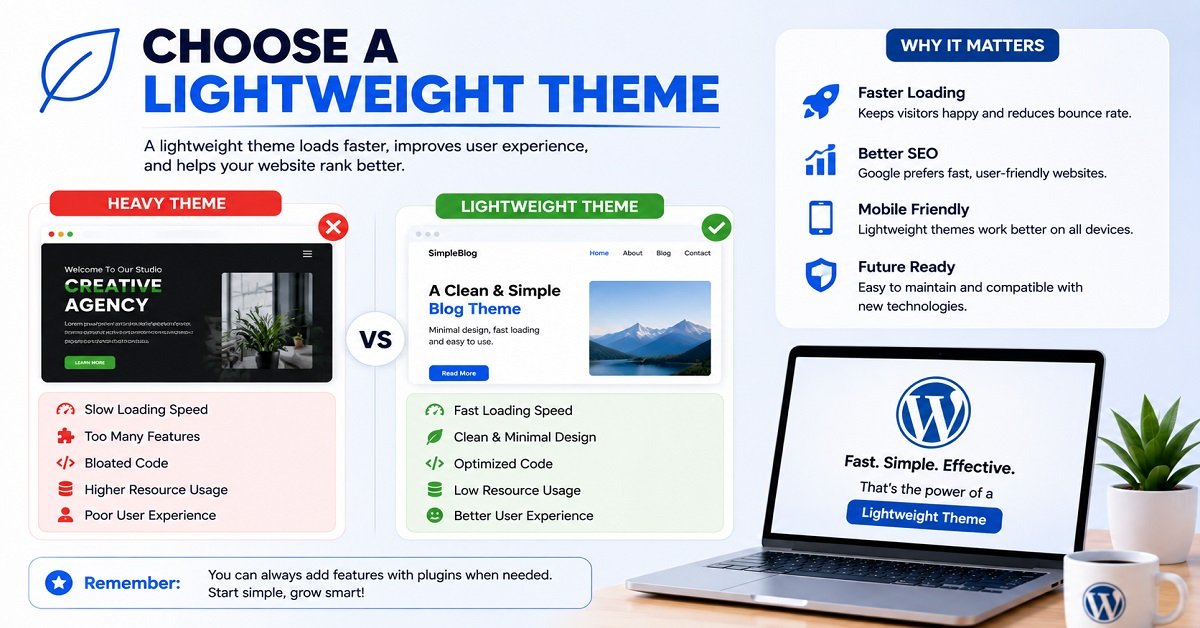
4. Choose a lightweight theme
Your theme controls much of the visual appearance of your WordPress website.
Don’t choose a theme simply because it has hundreds of animations and visual effects.
For a blog, a clean and lightweight theme is often a better starting point.
Your readers came to your website for information.
They shouldn’t have to wait several seconds for unnecessary animations to load before they can read it.
5. Create important pages
Before publishing dozens of articles, create the basic pages your website needs.
Depending on your website, these may include:
- About
- Contact
- Privacy Policy
- Terms and Conditions
- Disclaimer
- Affiliate Disclosure
These pages also help visitors understand who operates the website and how it works.
6. Set up backups
Don’t wait until your website breaks before thinking about backups.
Check what your hosting plan provides and understand how to restore a backup.
If the website becomes important to your business or income, keeping an additional independent backup is a sensible precaution.
7. Start publishing
This is where many new website owners lose focus.
They spend weeks changing themes, adjusting colors, installing plugins, comparing hosting plans, and watching tutorials.
Meanwhile, the website has almost no useful content.
Your hosting is simply the infrastructure.
Your content is what gives people a reason to visit.
Once the technical foundation is ready, spend more time helping your readers.
How Hosting Can Affect Website Speed
Your hosting provider can affect website performance, but it isn’t the only factor.
A slow website can result from many things, including:
- Slow server response
- Large images
- Too many plugins
- Poorly coded themes
- Excessive JavaScript
- Poor caching
- Unoptimized databases
- Third-party scripts
- Poorly configured CDN
- Heavy page builders
This is why buying a more expensive hosting plan isn’t always the solution to a slow website.
Imagine two websites.
Website A uses affordable shared hosting but has:
- Optimized images
- A lightweight theme
- Good caching
- Few unnecessary plugins
Website B uses expensive hosting but has:
- Huge images
- Dozens of plugins
- Heavy animations
- Poorly optimized scripts
Website A can potentially provide a better experience.
So, if your website is slow, find the cause before immediately upgrading your hosting.
Common Hosting Mistakes Beginners Should Avoid
Choosing the right host is important, but avoiding common mistakes can save you just as much money and frustration.
Mistake 1: Choosing only by the lowest price
A low price can be attractive.
But the cheapest plan may have limitations that become frustrating later.
Always compare the complete package.
Mistake 2: Ignoring renewal prices
A promotional price may last for the first subscription period only.
Before purchasing, find the regular renewal price.
This is especially important if you plan to keep the website for several years.
Mistake 3: Buying a very long plan without thinking
Long-term hosting plans often have lower promotional monthly prices.
But you may have to pay the entire amount upfront.
If you aren’t sure whether you will continue with your website, a shorter commitment may be worth considering even if the monthly rate is higher.
Mistake 4: Buying VPS hosting too early
A VPS gives you more power and control.
But if your website has only a few visitors, you may be paying for resources you don’t need.
Start small and upgrade when the website actually requires it.
Mistake 5: Ignoring backups
A website can break for many reasons.
A plugin update can cause a conflict.
A theme change can create an error.
A security incident can damage files.
A backup gives you a way to recover.
Mistake 6: Installing too many plugins
Plugins are useful, but every plugin adds another piece of software to your website.
Install plugins because you need their functionality, not simply because someone recommended them.
Regularly remove plugins you no longer use.
Mistake 7: Buying every add-on during checkout
Hosting checkout pages can contain several optional products.
Before purchasing one, ask:
Do I need this right now?
If the answer is no, leave it out.
You can often add a service later if you discover that you actually need it.
Mistake 8: Spending more time choosing hosting than building the website
This is surprisingly common.
A beginner can spend days comparing hosting companies and still have no website.
There is a point where additional research stops being useful.
Choose a sensible provider, get the website online, and start building.
Is Cheap Hosting Bad?
Not necessarily.
Affordable hosting can be perfectly suitable for a new website.
The problem isn’t necessarily the price.
The question is whether the hosting plan provides enough resources, support, reliability, and features for your website.
A small blog doesn’t need the same infrastructure as a busy online store.
So instead of asking:
“Is cheap hosting bad?”
ask:
“Is this hosting plan suitable for my website?”
That is a much better question.
Should You Buy Hosting for One Month or Several Years?
There is no universal answer.
A longer plan can reduce the promotional monthly price, but it requires more money upfront.
For example, a hosting company might offer a much lower monthly figure when you purchase three or four years at once.
That can make sense if:
- You are committed to the website
- You have compared the provider carefully
- You are comfortable paying upfront
- You understand the renewal price
A shorter plan may make more sense if:
- You’re experimenting with an idea
- You’re not sure whether you’ll continue
- You want to test the provider first
- You don’t want a large upfront expense
Don’t choose a long-term plan simply because the monthly number looks impressive.
Look at the total amount you are committing to pay.
What If Your Website Outgrows Your Hosting?
This is normal.
Your website may start small and become much larger over time.
For example:
Year 1: 500 visitors per month
Year 2: 5,000 visitors per month
Year 3: 50,000 visitors per month
Your hosting requirements may change as traffic grows.
You may eventually need:
- More CPU
- More RAM
- More PHP workers
- Better database resources
- Advanced caching
- Cloud hosting
- VPS hosting
- A more powerful WordPress plan
That’s not a failure of your original hosting plan.
It means your website has grown.
A good hosting company should provide an upgrade path so you can move to a more powerful plan when necessary.
A Simple Hosting Decision Guide
If all the information in this guide still feels overwhelming, use this simple decision process.
Choose Hostinger if:
You want a beginner-friendly hosting provider with competitive introductory pricing, WordPress support, and a good combination of features for starting a blog or small website.
Choose Bluehost if:
You want a WordPress-focused hosting provider and prefer its setup, tools, and WordPress ecosystem.
Choose SiteGround if:
You are willing to pay more for managed features, support, security, and performance-focused tools.
Choose VPS or cloud hosting if:
Your website has already grown enough to need more resources, scalability, or server control.
For a completely new website, start with shared or beginner-focused WordPress hosting unless you have a specific reason to choose something more powerful.
Best Hosting for Different Beginners
Here’s an even simpler way to decide.
| If you’re building… | What to consider |
|---|---|
| Your first blog | Hostinger |
| A personal website | Hostinger |
| A portfolio | Hostinger |
| A small business website | Hostinger or Bluehost |
| A WordPress-focused website | Bluehost or Hostinger |
| A growing affiliate website | Hostinger or Bluehost |
| A website where managed support is important | SiteGround |
| A large online store | Higher-tier WordPress, cloud, or specialized hosting |
| A high-traffic website | Cloud or VPS when resources require it |
These aren’t strict rules.
Your actual requirements should always take priority over a generic recommendation.
Beginner Hosting Checklist
Before purchasing your hosting plan, go through this checklist.
- Does the plan support my website platform?
- Does it support WordPress if I need WordPress?
- Is SSL included?
- Are backups included?
- How often are backups created?
- Can I easily restore a backup?
- Is a CDN included?
- How many websites can I host?
- How much storage is included?
- What server resources are available?
- Is email included if I need it?
- Is a domain included?
- What is the domain renewal price?
- What is the promotional hosting price?
- How much will I pay upfront?
- What is the regular renewal price?
- What is the refund period?
- Is customer support available when I need it?
- Can I upgrade later?
- Can I migrate my website if I change providers?
If you can answer these questions before buying, you are much less likely to choose a hosting plan simply because of an attractive advertisement.
Pros and Cons of Beginner-Friendly Hosting
These limitations aren’t necessarily reasons to avoid beginner hosting.
They’re simply things you should understand before purchasing.
Frequently Asked Questions
What is the best hosting for beginners?
For most beginners, Hostinger is a strong choice because it combines beginner-friendly website management with competitive introductory pricing and features suitable for new websites. Bluehost is another good option for WordPress users, while SiteGround is worth considering if managed features and support are more important than the lowest price.
Is shared hosting good for beginners?
Yes.
Shared hosting is usually the most practical starting point for a new blog, portfolio, personal website, or small business website.
You can move to a higher hosting plan when your website grows.
Is Hostinger good for beginners?
Yes.
Hostinger offers beginner-focused hosting with tools for managing WordPress, domains, SSL, backups, performance, and other website functions. Its current hosting plans are designed to make getting a website online easier. (hostinger.com)
Is Bluehost good for a first WordPress website?
Yes.
Bluehost is a reasonable option for beginners who want a WordPress-focused hosting provider. WordPress.org currently lists Bluehost among its recommended hosting providers. (wordpress.org)
Is SiteGround good for beginners?
Yes, especially if you value managed features and customer support.
However, you should carefully compare the introductory and renewal prices because the regular renewal cost can be considerably higher.
How much does web hosting cost for a beginner?
There is no single price.
The cost depends on the provider, plan, billing period, promotional offer, and features.
Some providers advertise very low introductory rates when you commit to a longer term, while the renewal price can be substantially higher.
Always check the total amount charged at checkout and the future renewal cost.
Do I need VPS hosting for my first website?
Usually not.
A new blog or small website can generally start with shared hosting or beginner-focused WordPress hosting.
Consider VPS or cloud hosting when your website actually needs additional resources or server control.
Can I change my hosting provider later?
Yes.
You can migrate your website to another hosting provider.
However, migration can involve moving website files, databases, email, and DNS settings.
Choosing a suitable provider from the beginning can reduce unnecessary migration work later.
Does web hosting include a domain name?
Some hosting plans include a domain for the first year.
Others don’t.
Even when a domain is included initially, you should check its renewal price because the domain normally becomes a paid renewal after the promotional period.
Does WordPress include hosting?
It depends on which WordPress service you mean.
WordPress.org provides the WordPress software, but you normally purchase hosting separately.
WordPress.com is a hosted platform where hosting is included with the service.
These are different products, so don’t confuse them when comparing hosting.
How much storage does a beginner need?
Most new blogs don’t need a huge amount of storage.
A website with optimized images and normal WordPress content can start with a relatively modest amount of storage.
Don’t choose a plan simply because it offers the largest storage number.
Look at the complete set of resources and features.
Should I buy hosting for several years?
A long-term hosting plan can offer a lower promotional monthly price, but it usually requires a larger upfront payment.
If you’re confident that you will continue building the website, a longer term can make sense.
If you’re only testing an idea, a shorter commitment may be more appropriate.
Compare the total upfront cost and renewal price before deciding.
Final Verdict: Which Hosting Should a Beginner Choose?
Choosing your first hosting provider doesn’t have to be complicated.
If you’re starting a normal blog, portfolio, small business website, or WordPress site, you probably don’t need expensive VPS or dedicated hosting.
A good shared or beginner-focused WordPress hosting plan is usually enough.
For most beginners, Hostinger is our first choice for overall value, ease of use, and a useful combination of features.
Bluehost is a strong alternative, especially if you want a WordPress-focused hosting experience.
SiteGround is a better fit for someone who is willing to pay more for managed features, support, and performance-focused tools.
But the most important recommendation is this:
Don’t choose hosting based only on the cheapest monthly price.
Check what you get.
Check how much you pay upfront.
Check the renewal price.
Check the backup policy.
Check the number of websites allowed.
Check whether the plan gives you enough room to grow.
Then choose the simplest option that meets your actual needs.
Your hosting provider is important, but it isn’t what makes a website successful.
Once your website is online, your attention should shift toward creating useful content, making the site easy to use, understanding what visitors need, and improving the website over time.
A new website doesn’t need perfect hosting.
It needs reliable hosting that gets out of your way so you can build the website.
About the Author
Hari Itham is the founder of OrbitElf. He writes beginner-friendly guides about blogging, WordPress, web hosting, SEO, AI tools, and website building, with a focus on explaining technical topics in simple language.
Editorial Note
Hosting prices, discounts, included features, resource limits, and renewal rates can change. The pricing and feature information in this article should be checked on the hosting provider’s website before making a purchase.
If OrbitElf is approved for a relevant hosting affiliate program in the future, affiliate links should be added naturally to appropriate provider mentions, with the required affiliate disclosure. Until then, the article should not use referral links as a substitute for approved affiliate links.