
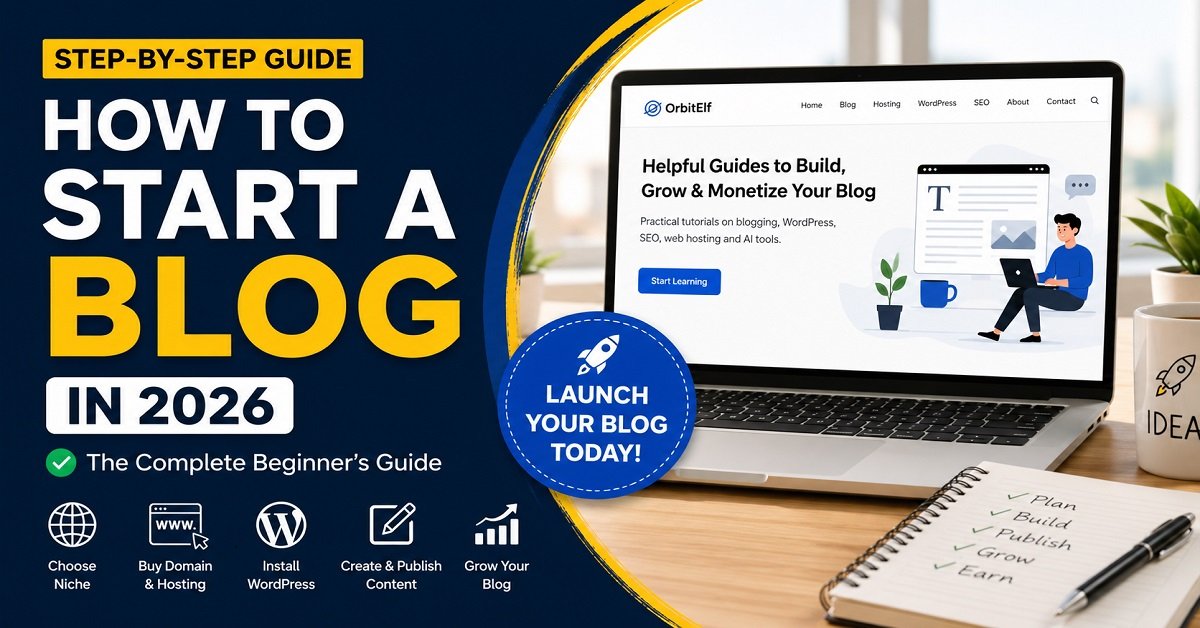
Have you been thinking about starting a blog but don’t know where to begin?
Maybe you’ve watched dozens of YouTube videos, read countless articles, and still feel confused. One guide recommends one platform, another suggests something completely different, and before you know it, you’re overwhelmed.
The truth is that starting a blog in 2026 is easier than ever. You don’t need to know programming. You don’t need to hire a web developer. You don’t even need years of technical experience.
What you do need is a clear roadmap.
This beginner’s guide will walk you through every important step, from choosing a profitable niche and registering your domain name to installing WordPress, publishing your first article, and growing your blog over time.
Whether you want to blog as a hobby, build a personal brand, share your expertise, or create an online business that earns passive income, this guide will help you start the right way.
Let’s begin with the basics.
Quick Answer
Starting a blog in 2026 involves choosing a niche, registering a domain name, buying reliable web hosting, installing WordPress, selecting a theme, publishing helpful content, and promoting your blog consistently. While the setup can be completed in a few hours, building a successful blog requires patience, consistency, and creating valuable content for your audience.
What Is a Blog?
A blog is a website where you regularly publish articles to share information, experiences, tutorials, opinions, or helpful advice on a specific topic.
For example:
- A food blog shares recipes and cooking tips.
- A travel blog shares destination guides.
- A fitness blog publishes workout plans.
- OrbitElf teaches blogging, WordPress, SEO, AI tools, and web hosting.
Unlike social media posts that disappear quickly, blog articles can continue bringing visitors from search engines like Google for months or even years after they’re published.
Think of every blog post as a long-term asset. One useful article can answer thousands of people’s questions and continue attracting readers while you work on creating new content.
Today, many successful bloggers don’t just write articles. They also build communities, create email newsletters, recommend useful products, sell digital products, and offer online services through their blogs.
Why Start a Blog in 2026?
Some people believe blogging is no longer worth it because of social media, YouTube, or AI tools.
That’s far from the truth.
Blogging has changed, but it is far from dead.
In fact, people search Google billions of times every day looking for answers, tutorials, product recommendations, and solutions to their problems. High-quality blogs continue to appear in those search results because they provide detailed, trustworthy information that users are looking for.
Starting a blog today offers several benefits.
Share your knowledge
Everyone has something valuable to teach. Whether you’re passionate about technology, gardening, photography, finance, education, or cooking, a blog allows you to help others while building your online presence.
Build a personal brand
A blog showcases your expertise. Over time, it can help you establish credibility in your niche and create new opportunities, such as freelance work, consulting, speaking engagements, or collaborations.
Earn passive income
Many bloggers generate income through affiliate marketing, display advertising, sponsored content, digital products, online courses, memberships, or services.
While blogging isn’t a quick-rich scheme, a well-maintained blog can become a long-term income source.
Own your content
Unlike social media platforms, where algorithms frequently change and accounts can be restricted, your blog is your own digital property. You control your website, your content, and your audience.
Learn valuable skills
Running a blog teaches you practical skills such as:
- Writing
- SEO
- Website management
- Digital marketing
- Content strategy
- Email marketing
- Basic design
- Analytics
These skills are valuable whether you’re building a business, freelancing, or advancing your career.
Can You Still Make Money Blogging in 2026?
Yes.
Thousands of bloggers continue earning money every month by creating helpful content that solves real problems.
However, the approach has changed.
Years ago, simply publishing short articles filled with keywords was often enough to rank in search results. Today, search engines prioritize content that demonstrates experience, expertise, authority, and trustworthiness.
Successful bloggers now focus on creating genuinely useful, people-first content rather than trying to manipulate search rankings.
There are several common ways bloggers earn money.
Affiliate Marketing
You recommend products or services you genuinely trust. If someone purchases through your referral link, you earn a commission at no extra cost to the buyer.
For example, a blogging website may recommend:
- Web hosting providers
- WordPress themes
- SEO tools
- Email marketing platforms
- AI writing tools
This is one of the primary monetization strategies we’ll gradually implement on OrbitElf.
Display Advertising
Once your blog receives consistent traffic, you can display ads through networks such as Google AdSense or premium ad platforms. You earn revenue whenever visitors view or interact with those ads.
Selling Digital Products
Many bloggers create and sell ebooks, templates, checklists, printable resources, online courses, or premium guides. Since digital products don’t require inventory or shipping, they can become a scalable income source.
Offering Services
If you have expertise in areas like SEO, WordPress, web design, content writing, or consulting, your blog can help you attract clients and generate service-based income.
Sponsored Content
As your blog grows in authority, companies may pay you to review products, publish sponsored articles, or feature their services.
Is Blogging a Good Long-Term Business?
Absolutely, but only if you’re willing to be patient and consistent.
Most successful blogs don’t become profitable overnight. They grow steadily by publishing high-quality content, building trust with readers, and improving over time.
Instead of chasing shortcuts or viral tricks, focus on creating content that genuinely helps people. That’s the approach Google rewards, readers appreciate, and sustainable blogging businesses are built on.
Step 1: Choose Your Blog Niche
One of the biggest mistakes beginners make is trying to write about everything.
You might want to write about travel, technology, food, fitness, finance, movies, and personal experiences all on the same website. While that sounds exciting, it usually confuses both your readers and search engines.
Instead, choose one main topic and build your blog around it.
That topic is called your niche.
A niche is simply the specific subject your blog focuses on.
For example:
- OrbitElf focuses on blogging, WordPress, SEO, web hosting, AI tools, and website building.
- A travel blog focuses on destinations, itineraries, and travel tips.
- A personal finance blog focuses on saving money, investing, and budgeting.
- A fitness blog focuses on workouts, nutrition, and healthy living.
When readers know exactly what your website is about, they’re much more likely to return, subscribe to your newsletter, and trust your recommendations.
Google also prefers websites that consistently publish content around a particular subject because they demonstrate topical expertise.
How to Choose the Right Niche
Choosing a niche doesn’t mean picking the topic with the highest search volume. Instead, look for a balance between three important factors.
1. Your Interest
You’ll likely spend months or even years creating content.
If you don’t enjoy the topic, you’ll eventually lose motivation.
Ask yourself:
- What topics do I enjoy learning about?
- What do friends often ask me for help with?
- What could I write about every week?
Passion alone isn’t enough, but it helps you stay consistent.
2. Audience Demand
People should actually be searching for information about your topic.
Use free tools like:
- Google Search
- Google Trends
- Google’s “People Also Ask”
- Rank Math Keyword Research
- Google Keyword Planner
For example, if you’re planning a WordPress blog, search for phrases like:
- How to install WordPress
- Best WordPress themes
- WordPress SEO
- WordPress plugins
The more questions people ask, the more content opportunities you’ll have.
3. Monetization Potential
If your goal is to earn money, your niche should have products or services people buy.
For example:
Blogging
- Web hosting
- Premium themes
- SEO tools
- Email marketing software
Photography
- Cameras
- Lenses
- Editing software
Fitness
- Equipment
- Supplements
- Online coaching
Technology
- Laptops
- Smartphones
- Software
- Accessories
This makes affiliate marketing much easier later.
Popular Blogging Niches
Some evergreen niches include:
- Blogging
- WordPress
- Web Hosting
- SEO
- AI Tools
- Personal Finance
- Health & Fitness
- Food
- Technology
- Education
- Digital Marketing
- Home Improvement
- Parenting
- Gardening
- Travel
Choose a niche because you enjoy it and can genuinely help readers, not just because someone claims it’s profitable.
OrbitElf Tip: It’s perfectly fine to start with one niche and expand gradually as your website grows. That’s exactly the strategy we’re following with OrbitElf.
Step 2: Pick a Blog Name
Once you’ve chosen your niche, it’s time to give your blog a name.
Your blog name is your brand. It’s what readers will remember, recommend to others, and associate with your content.
While it’s important, don’t spend weeks trying to find the “perfect” name.
Many successful brands started with simple names that became memorable because they consistently delivered value.
Tips for Choosing a Good Blog Name
A good blog name should be:
- Short
- Easy to pronounce
- Easy to spell
- Easy to remember
- Relevant to your niche
- Suitable for long-term growth
Avoid names that are:
- Too long
- Difficult to type
- Full of numbers or hyphens
- Limited to one narrow topic if you plan to expand later
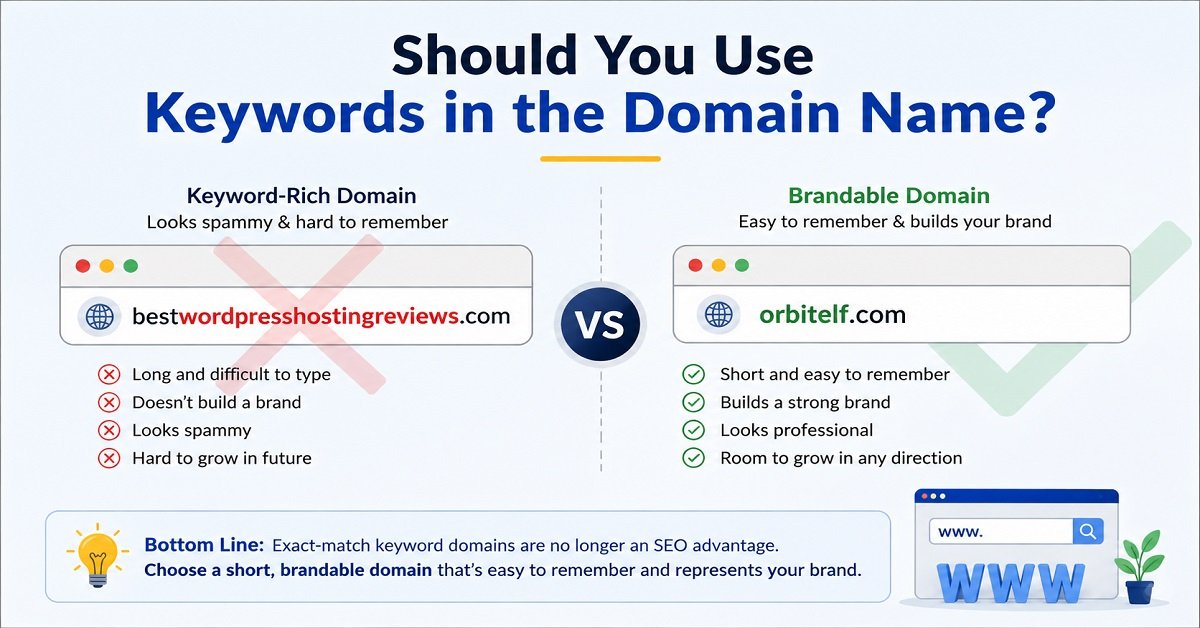
For example:
Instead of:
bestwordpressplugins2026tips.comChoose something more brandable like:
OrbitElf.comA brand name gives you room to grow beyond one topic.
Should You Use Keywords in the Domain Name?
Years ago, exact-match domains such as:
bestwebhostingreviews.comhad an SEO advantage.
Today, that’s no longer necessary.
Google cares much more about the quality of your content than whether your keyword appears in your domain name.
A memorable brand is usually a better long-term choice.
Check Domain Availability
Before finalizing your name, make sure the domain is available.
The most popular extension is:
- .com
If .com isn’t available, you may consider:
- .net
- .org
- .in (for India-focused websites)
Whenever possible, choose the .com version because it’s the easiest for people to remember.
Step 3: Buy a Domain Name
A domain name is your website’s address on the internet.
For example:
- orbitelf.com
- audiopick.in
- wordpress.org
Instead of remembering complicated IP addresses, visitors simply type your domain name into their browser.
How Much Does a Domain Cost?
Most domains cost between ₹800 and ₹1,500 per year, depending on the extension and registrar.
Many web hosting companies also include a free domain for the first year with their hosting plans.
Where Can You Buy a Domain?
You can register your domain through trusted companies such as:
- Hostinger
- Namecheap
- GoDaddy
- Porkbun
- Cloudflare Registrar (for transfers)
Choose a reputable registrar that offers:
- Domain privacy (WHOIS protection)
- Easy DNS management
- Competitive renewal pricing
- Two-factor authentication for security
Tips Before Registering Your Domain
Before purchasing:
- Double-check the spelling.
- Avoid trademarked names.
- Keep it simple and memorable.
- Purchase it for multiple years if possible.
- Enable domain privacy if available.
Your domain is your online identity, so choose carefully.
Step 4: Choose Reliable Web Hosting
If your domain name is your home’s address, web hosting is the actual house where your website lives.
Every image, article, page, and file is stored on your hosting server.
Without hosting, your website cannot be accessed online.
What Makes Good Web Hosting?
Beginners often choose the cheapest hosting plan they can find.
Unfortunately, cheap hosting can lead to:
- Slow website speed
- Frequent downtime
- Poor customer support
- Security issues
A reliable hosting provider should offer:
- Fast loading speeds
- Good uptime
- Free SSL certificate
- Daily or weekly backups
- Easy WordPress installation
- Responsive customer support
Types of Hosting
Shared Hosting
Best for beginners.
Your website shares server resources with other websites.
Advantages:
- Affordable
- Easy to use
- Beginner-friendly
Suitable for:
- New blogs
- Personal websites
- Small business sites
VPS Hosting
A Virtual Private Server provides more resources and greater control.
Suitable for:
- Growing websites
- Higher traffic
- Advanced users
Cloud Hosting
Cloud hosting distributes your website across multiple servers.
Advantages include:
- Better reliability
- Scalability
- High performance
This option is ideal for websites expecting significant growth.
Which Hosting Should Beginners Choose?
For most new bloggers, a quality shared hosting plan is more than enough.
As your traffic grows, you can always upgrade later without changing your domain name or website.
OrbitElf Tip: Don’t choose a hosting provider based only on the lowest price. Reliable uptime, fast loading speeds, and good customer support are worth paying for.
Step 5: Install WordPress
Now comes the exciting part.
It’s time to build your website.
WordPress is the world’s most popular content management system (CMS), powering over 40% of websites on the internet.
It allows you to create and manage your website without writing code.
Why Choose WordPress?
There are many website builders available today, but WordPress remains the top choice for bloggers because it’s:
- Free
- Flexible
- Beginner-friendly
- SEO-friendly
- Highly customizable
- Supported by thousands of themes and plugins
Whether you’re starting a personal blog or building a large online business, WordPress can grow with you.
Important: This guide refers to WordPress.org, the self-hosted version that gives you full control over your website. It’s different from WordPress.com, which has more limitations unless you pay for higher-tier plans.
Installing WordPress
Most modern hosting providers offer a one-click WordPress installation.
The process typically involves:
- Log in to your hosting account.
- Open your hosting control panel.
- Click Install WordPress.
- Select your domain name.
- Create an administrator username and password.
- Click Install.
Within a few minutes, your website will be live.
You’ll then be able to access your WordPress dashboard by visiting:
yourdomain.com/wp-adminFrom there, you’ll manage your website, publish articles, install themes, add plugins, and customize your blog.
Congratulations! At this stage, you’ve officially built the foundation of your blog.
Step 6: Choose a WordPress Theme
Now that WordPress is installed, your website is live, but it probably doesn’t look the way you imagined.
That’s completely normal.
Every new WordPress installation starts with a basic theme. The good news is that you can completely change your website’s appearance without losing your content.
A WordPress theme controls your website’s:
- Layout
- Colors
- Typography
- Header and footer
- Blog post design
- Overall user experience
Think of a theme as the design of your house. The furniture (your content) stays the same, but the look and feel can change completely.
Free vs Premium Themes
When you’re starting out, a free theme is more than enough.
Many excellent free themes are:
- Fast
- Mobile-friendly
- SEO-friendly
- Regularly updated
As your website grows, you can always upgrade to a premium version if you need additional customization options.
What Should You Look for in a Theme?
Before installing any theme, make sure it is:
- Lightweight and fast
- Mobile responsive
- Regularly updated
- Compatible with the latest version of WordPress
- Compatible with popular plugins
- SEO-friendly
Avoid themes that include unnecessary animations or dozens of built-in features you’ll never use. They often slow down your website.
Recommended Themes for Beginners
Some popular beginner-friendly themes include:
- GeneratePress
- Astra
- Kadence
- Blocksy
- Neve
These themes are trusted by millions of WordPress users and provide an excellent foundation for almost any type of website.
OrbitElf Tip: OrbitElf itself is built using GeneratePress, a lightweight theme that prioritizes speed, simplicity, and clean design. It’s an excellent choice for beginners and experienced bloggers alike.
How to Install a Theme
Installing a WordPress theme takes just a few minutes.
- Log in to your WordPress Dashboard.
- Go to Appearance → Themes.
- Click Add New Theme.
- Search for your preferred theme.
- Click Install.
- Click Activate.
Your site’s appearance will update immediately, and you can customize it further using the WordPress Customizer.
Step 7: Install Essential WordPress Plugins
One of WordPress’s biggest strengths is its plugin ecosystem.
Plugins add extra features to your website without requiring any coding.
Need a contact form?
Install a plugin.
Want better SEO?
Install a plugin.
Need backups?
Install a plugin.
There are thousands of plugins available, but that doesn’t mean you should install dozens of them.
Too many plugins can slow down your website and create compatibility issues.
Essential Plugins for Every Beginner
Here are a few plugins worth installing on a new blog.
Rank Math SEO
Helps optimize your content for search engines.
Features include:
- XML sitemaps
- Meta titles and descriptions
- Schema markup
- SEO analysis
- Redirect management
This is one of the first plugins you should install.
LiteSpeed Cache (or another caching plugin)
Caching improves your website’s loading speed by storing optimized versions of your pages.
Faster websites provide a better user experience and may perform better in search results.
Choose the caching plugin recommended by your hosting provider.
WPForms
Allows visitors to contact you using a professional contact form.
It’s beginner-friendly and easy to customize.
UpdraftPlus
Creates backups of your website.
If something goes wrong, you can restore your site without starting from scratch.
Wordfence Security
Protects your website against malware, hackers, and brute-force login attempts.
Security should never be an afterthought.
Avoid Plugin Overload
Many beginners install 30 or 40 plugins simply because they look useful.
Don’t do that.
Only install plugins you genuinely need.
A smaller number of well-maintained plugins is usually better than dozens of unnecessary ones.
OrbitElf Tip: Before installing any plugin, check when it was last updated, how many active installations it has, and its user ratings.
Step 8: Create Important Pages
Before publishing your first article, your website should include a few essential pages.
These pages help visitors understand who you are and also improve your website’s trustworthiness.
At a minimum, create the following pages.
About Page
Tell readers:
- Who you are
- Why you started your blog
- What readers can expect
- Your mission
People are more likely to trust a real person than an anonymous website.
Contact Page
Give readers an easy way to reach you.
Include:
- Contact form
- Email address
- Response expectations
A Contact page also signals legitimacy to search engines.
Privacy Policy
Explains how your website collects and uses visitor data.
This page is essential if you:
- Use Google Analytics
- Display ads
- Collect email addresses
- Use cookies
Disclaimer
Clarifies that your content is provided for informational purposes and that readers should make their own decisions.
This is especially important for blogs covering topics like finance, health, legal advice, or technology.
Affiliate Disclosure
If you recommend products through affiliate links, you should clearly disclose that you may earn a commission when readers make purchases.
Being transparent builds trust and helps comply with legal guidelines.
Editorial Policy
Explain how you research, write, review, and update your content.
This shows readers that you care about accuracy and quality.
AI Usage Policy
If you use AI tools as part of your content creation process, explain how they’re used.
For example:
- Brainstorming ideas
- Improving grammar
- Assisting with outlines
Also clarify that every article is reviewed and edited by a human before publication.
OrbitElf Tip: Having these pages in place before publishing your first article demonstrates professionalism and supports Google’s E-E-A-T principles.
Step 9: Publish Your First Blog Post
Everything is now ready.
It’s time to publish your first article.
Many beginners spend weeks perfecting their website without publishing anything.
Don’t fall into that trap.
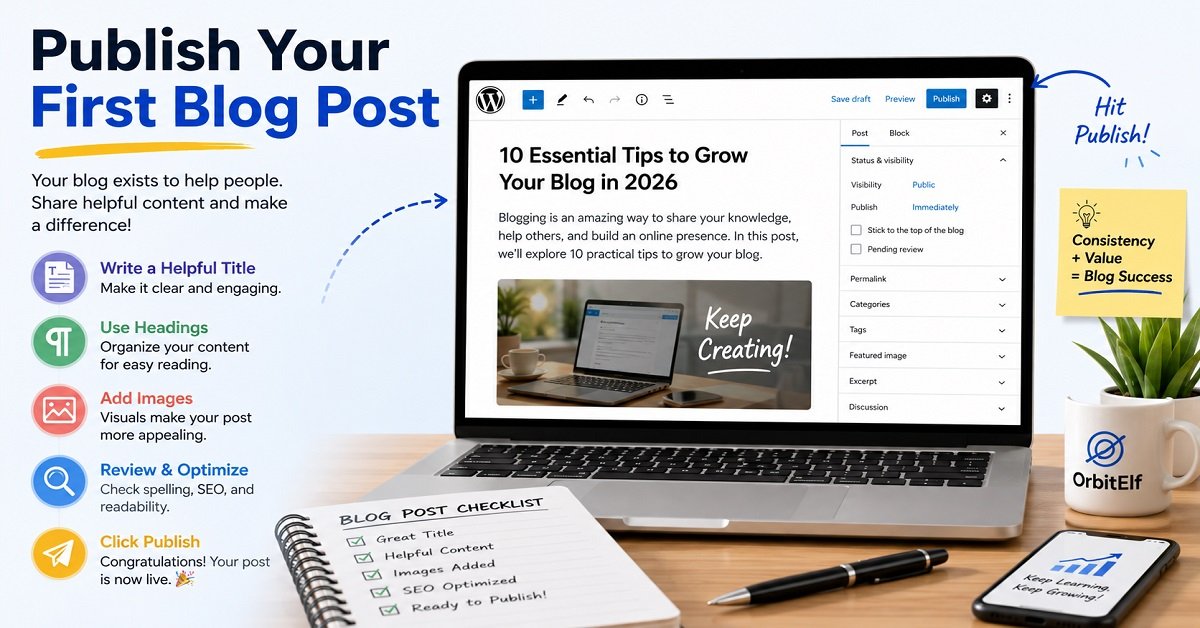
Your blog exists to help people through useful content.
The sooner you start publishing, the sooner you’ll begin gaining experience and attracting readers.
What Should Your First Post Be About?
Choose a topic that answers a specific question your audience is searching for.
Instead of writing:
“My Thoughts on Blogging”
Write something more helpful, such as:
- How to Choose the Right Blog Niche
- What Is WordPress?
- How to Register a Domain Name
- Best Free WordPress Themes
- Common Blogging Mistakes Beginners Make
Helpful content always performs better than vague personal opinions.
Writing Tips
When creating blog posts:
- Write naturally.
- Use simple language.
- Break content into short paragraphs.
- Add headings every few paragraphs.
- Include examples.
- Answer readers’ questions directly.
Imagine you’re explaining the topic to a friend who has no prior experience.
That’s usually the best writing style.
Add Images
Visuals make your content easier to understand.
Include:
- Screenshots
- Diagrams
- Charts
- Photos
- Infographics
Always compress images before uploading them to improve page speed.
Proofread Before Publishing
Before clicking Publish:
- Check grammar.
- Fix spelling mistakes.
- Verify links.
- Preview the article on mobile and desktop.
- Read it aloud once.
Small improvements often make a big difference.
Step 10: Learn Basic SEO
Publishing great content is only part of the process.
People also need to find it.
That’s where Search Engine Optimization (SEO) comes in.
SEO is the practice of making your website easier for search engines like Google to understand and rank.
The goal isn’t to trick Google.
The goal is to make your content genuinely helpful and easy to discover.
Basic SEO Tips for Beginners
Here are a few simple practices every new blogger should follow.
Write for People First
Always create content that answers readers’ questions.
Don’t write articles just to include keywords.
Google rewards helpful content.
Use One Main Keyword
Every article should focus on one primary topic.
For example:
How to Start a Blog
Other related keywords will naturally appear throughout the article.
Write a Good Title
Your title should clearly explain what readers will learn.
Compare these:
❌ Blogging Tips
✅ How to Start a Blog in 2026: The Complete Beginner’s Guide
The second title is much clearer and more likely to attract clicks.
Use Headings
Organize your content using:
- H1
- H2
- H3
This improves readability for both users and search engines.
Optimize Images
Before uploading images:
- Compress them.
- Use descriptive filenames.
- Add meaningful alt text.
This improves accessibility and may help images appear in Google Image Search.
Link Related Articles
Whenever you publish new content, link to other relevant articles on your website.
This helps readers explore more content and helps search engines understand your site’s structure.
As OrbitElf grows, internal linking will become one of our most effective SEO strategies.
Keep Updating Your Content
SEO isn’t a one-time task.
Successful blogs regularly:
- Update outdated information.
- Improve articles.
- Add new examples.
- Refresh screenshots.
- Expand sections based on reader questions.
Keeping your content current helps maintain its usefulness over time.
OrbitElf Tip: Focus on solving real problems for readers. Helpful, well-organized content consistently outperforms articles written solely to target keywords.
Step 11: Promote Your Blog
Publishing an article is only the beginning.
If nobody knows your content exists, it won’t receive traffic.
Many beginner bloggers think Google will automatically send visitors after publishing a few posts.
Unfortunately, that’s not how it works.
While Google can eventually discover your content, promoting your blog helps you reach readers faster and build momentum.
Share Your Articles on Social Media
Whenever you publish a new post, share it on platforms where your audience spends time.
Good places to start include:
- X (formerly Twitter)
- LinkedIn (for business-related topics)
Don’t just drop a link.
Write a short, interesting caption that explains what readers will learn.
Build an Email List Early
One of the biggest mistakes beginners make is waiting until they have thousands of visitors before collecting email subscribers.
Start from day one.
Even if only five people subscribe this month, those five readers are yours to reach whenever you publish something new.
As your blog grows, your email list becomes one of your most valuable assets.
Join Blogging Communities
Connect with other bloggers in your niche.
Participate in:
- Facebook Groups
- Reddit communities
- Quora
- Online forums
- Blogging communities
Focus on helping people rather than promoting yourself.
Helpful answers naturally attract interested readers.
Publish Consistently
Google and your readers appreciate consistency.
Instead of publishing ten articles in one week and disappearing for months, aim for a realistic schedule.
For example:
- One article per week
- Two articles per week
- Four articles per month
Choose a schedule you can maintain over the long term.
Consistency beats intensity.
Step 12: How to Make Money From Your Blog
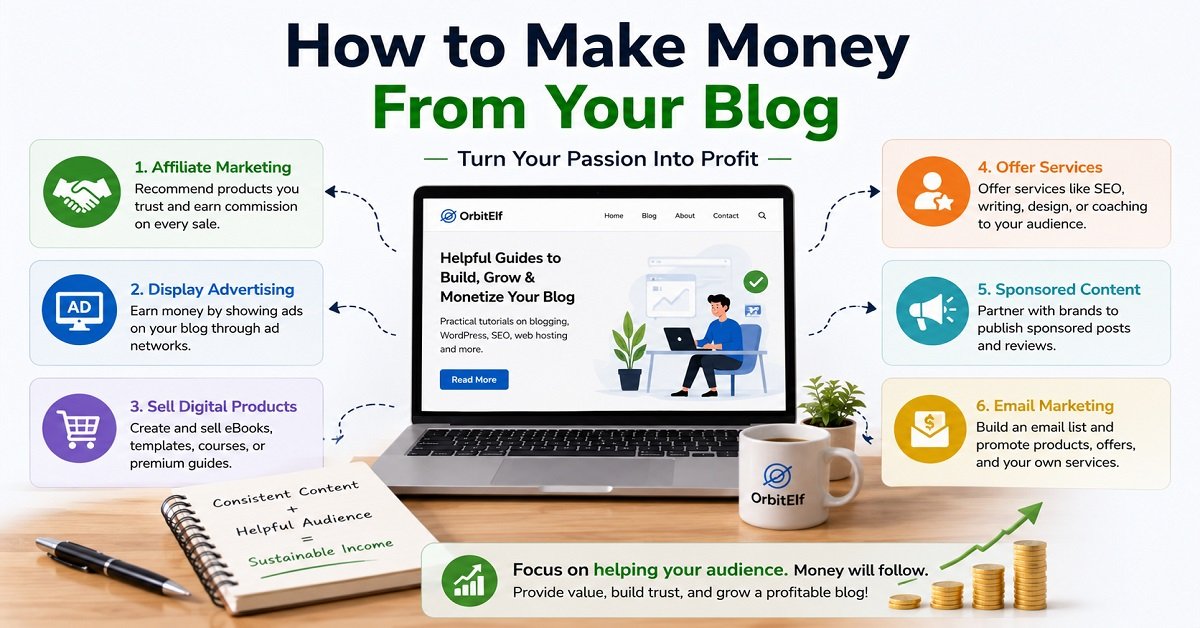
One of the best things about blogging is that there are multiple ways to earn income.
However, don’t expect overnight success.
The blogs that earn the most usually spend months building trust before focusing on monetization.
Here are the most common ways bloggers make money.
Affiliate Marketing
This is one of the easiest ways for beginners.
You recommend products or services you genuinely trust.
If someone purchases through your affiliate link, you earn a commission at no additional cost to the buyer.
Examples include:
- Web hosting
- WordPress themes
- Plugins
- AI tools
- SEO software
- Online courses
This is the primary monetization strategy used by many successful blogging websites.
Display Ads
Once your blog starts receiving consistent traffic, you can display advertisements.
Popular options include:
Ad income usually increases as your traffic grows.
Sell Digital Products
Digital products often provide higher profit margins than advertisements.
Examples include:
- eBooks
- Checklists
- Templates
- WordPress resources
- Blogging courses
- Printable planners
Once created, digital products can generate income repeatedly.
Offer Services
Many bloggers also earn by providing services such as:
- Website setup
- SEO consulting
- Freelance writing
- Coaching
- WordPress maintenance
Your blog acts as a portfolio that demonstrates your expertise.
Sponsored Content
As your authority grows, brands may pay you to review products or publish sponsored articles.
Always disclose sponsored content to maintain transparency with your audience.
OrbitElf Tip: Focus on building trust first. Readers are much more likely to purchase products you recommend after you’ve consistently provided valuable content.
Common Blogging Mistakes Beginners Should Avoid
Almost every blogger makes mistakes in the beginning.
The goal isn’t to avoid every mistake. It’s to learn from them quickly.
Here are some of the most common ones.
Waiting for Perfection
Many people spend months choosing logos, colors, and fonts without publishing a single article.
Your content matters far more than having the perfect design.
Launch first.
Improve later.
Choosing a Topic You Don’t Enjoy
If you dislike writing about your niche, you’ll probably quit before seeing results.
Choose a topic you can imagine discussing for years.
Ignoring SEO
Even the best articles need basic SEO to reach readers.
Learn the fundamentals early and apply them consistently.
Publishing Low-Quality Content
Don’t publish articles just to increase your post count.
One genuinely helpful article is worth far more than ten shallow ones.
Giving Up Too Soon
Many blogs are abandoned after only a few months.
Blogging takes patience.
Traffic usually grows gradually, not overnight.
The bloggers who succeed are often the ones who simply kept going.
Beginner Blogging Checklist
Before launching your blog, make sure you’ve completed these essential steps.
✔ Chosen a blogging niche
✔ Selected a memorable blog name
✔ Registered your domain name
✔ Purchased reliable hosting
✔ Installed WordPress
✔ Chosen a lightweight theme
✔ Installed essential plugins
✔ Created your About page
✔ Created your Contact page
✔ Added Privacy Policy and Disclaimer pages
✔ Published your first article
✔ Submitted your sitemap to Google Search Console
✔ Set up Google Analytics
✔ Created social media profiles
✔ Started building an email list
If you’ve completed everything on this list, congratulations. Your blogging journey is officially underway.
Frequently Asked Questions
Is blogging still worth starting in 2026?
Yes.
People continue searching for information every day, and businesses still rely heavily on content marketing. While competition has increased, there is still plenty of opportunity for bloggers who publish genuinely helpful, high-quality content.
How much does it cost to start a blog?
You can usually start a professional WordPress blog for around $30 to $100 per year, depending on your hosting provider, domain registration, and whether you purchase premium tools.
Can I start a blog without technical knowledge?
Absolutely.
Modern WordPress hosting providers handle most of the technical setup, making blogging accessible even to complete beginners.
How long does it take to make money from blogging?
It varies.
Some blogs earn their first income within a few months, while others may take a year or longer. Success depends on content quality, consistency, SEO, niche selection, and promotion.
How often should I publish new articles?
Quality is more important than quantity.
Publishing one excellent article every week is usually more effective than publishing several rushed articles.
Should I use WordPress or another blogging platform?
For most beginners, WordPress.org is the best long-term choice because it gives you complete control over your website and offers thousands of themes and plugins.
Final Thoughts
Starting a blog may seem overwhelming at first, but once you break it into small steps, it’s much easier than most people expect.
You don’t need to be a web developer.
You don’t need years of experience.
And you certainly don’t need a huge budget.
What you do need is the willingness to learn, publish consistently, and genuinely help your readers.
Every successful blogger started with an empty website.
The difference is that they took the first step and kept improving over time.
If you’re serious about building an online presence, there’s no better time to start than today.
Launch your blog, publish your first helpful article, learn from every post, and keep moving forward.
Your future readers are already searching for the answers you can provide.