
If you publish a blog post and simply wait for Google to rank it, you may be missing several important things.
A well-written article still needs a clear structure, useful headings, a good title, relevant internal links, optimized images, and other on-page elements that help both readers and search engines understand the page.
The good news is that most of these things are within your control.
This On-Page SEO Checklist will help you review a blog post before and after publishing. Instead of focusing on keyword stuffing or trying to achieve a perfect SEO plugin score, you will learn how to make a page genuinely useful, easy to understand, and properly optimized for search.
What Is On-Page SEO?
On-page SEO means optimizing the elements on your web page so that search engines can better understand the content and users can get a good experience from it.
These elements include things such as:
- The page title
- Headings
- Main content
- Keywords and related terms
- URL
- Meta description
- Images
- Internal links
- External links
- Content structure
- Readability
- Mobile experience
- Page speed and other technical elements that affect the page
For example, imagine you write an article targeting the search query “best hosting for beginners.“
Writing the phrase “best hosting for beginners” 30 times throughout the article is not good on-page SEO.
Instead, you would want to understand what someone searching for that term actually wants. They may want to know which hosting providers are beginner-friendly, how much they cost, what features they offer, which one is easiest to use, and which option is suitable for their particular situation.
You then organize the article around those needs, use a descriptive title, create useful headings, add relevant internal links, optimize your images, and make the page easy to read.
That is much closer to what good on-page SEO should look like.
Google’s current guidance continues to emphasize creating unique, useful content for people rather than content created primarily to manipulate search rankings.
On-Page SEO vs Off-Page SEO vs Technical SEO
These three terms are often mixed together, especially when you are new to SEO.
Here is a simple way to understand them:
| SEO type | What it mainly deals with | Example |
|---|---|---|
| On-page SEO | Elements on your page | Title, headings, content, images, internal links |
| Off-page SEO | Signals outside your website | Links and mentions from other websites |
| Technical SEO | How your website can be crawled, indexed and accessed | Indexing, canonical URLs, site structure, mobile usability |
There can be some overlap between these areas.
For example, page speed can be discussed as part of technical SEO, while the overall page experience also affects how people interact with your content.
For this checklist, our main focus is on-page SEO, but we will also cover a few important technical checks that bloggers should not ignore.
Why Is On-Page SEO Important for Bloggers?
Think about Google as trying to answer one basic question:
“Which pages are most useful for this search?”
Your job is not to trick Google into thinking your article is relevant.
Your job is to make the relevance and usefulness of the page clear.
Suppose two websites publish articles about choosing a web host.
The first article has a keyword-heavy introduction, dozens of repeated phrases, vague headings, poor formatting, and copied information.
The second article explains the differences between hosting types, gives real examples, compares suitable options, explains pricing and limitations, and helps a beginner decide what to choose.
Even before discussing individual ranking signals, the second page is clearly more useful to the person searching.
That people-first approach is important. Google also warns against producing large amounts of unoriginal content primarily to manipulate search rankings.
On-page SEO helps you make that useful content easier to understand, navigate and discover.
The Complete On-Page SEO Checklist
You don’t have to optimize a page by following a complicated SEO formula.
Instead, think of this checklist as a final inspection before you publish.
You can go through each item and ask yourself:
“Have I done this properly, and does it genuinely help the reader?”
1. Understand the Search Intent Before Writing
This is probably the most important step in the entire checklist.
Before choosing headings, keywords or writing the introduction, understand why someone is searching for your target keyword.
Search intent simply means the reason behind a search.
For example:
| Search query | Likely intent |
|---|---|
| What is shared hosting? | Learn |
| Best hosting for beginners | Compare and choose |
| Bluehost pricing | Find specific information |
| How to install WordPress | Complete a task |
| Bluehost vs Hostinger | Compare two options |
Notice how these searches require different types of content.
Someone searching for “what is shared hosting?“ probably needs an explanation.
Someone searching for “best hosting for beginners“ probably wants recommendations and comparisons.
Someone searching for “how to install WordPress“ needs a step-by-step guide.
If you misunderstand the intent, even an otherwise excellent article may fail to satisfy the visitor.
A simple search-intent test
Before writing your article, ask:
“If I were searching this exact phrase, what information would I expect to find?”
Then look at the pages already appearing for the query.
Don’t copy them.
Instead, study what type of information searchers appear to expect.
Look for:
- The type of content ranking
- Common questions being answered
- Topics that appear repeatedly
- Information that seems important to the searcher
- Areas where existing results are weak or incomplete
Then think about how your article can provide something genuinely useful.
This is also where you can add your own experience, examples, testing, screenshots, comparisons or explanations.
That is much more valuable than simply rewriting what is already available online.
2. Choose One Primary Focus Keyword
Once you understand the search intent, choose the main search term you want the page to target.
For this article, the primary focus keyword is:
On-Page SEO Checklist
You can also have related phrases around it, such as:
- on-page SEO checklist for beginners
- SEO checklist for blog posts
- on-page SEO factors
- on-page SEO optimization
- blog post SEO checklist
- how to optimize a blog post for SEO
You don’t need to force every variation into the article.
The purpose of identifying related terms is to understand the broader topic and make sure your content covers it naturally.
Don’t confuse keyword targeting with keyword repetition
This is a common mistake.
If your focus keyword is “on-page SEO checklist,” you don’t need to write:
On-page SEO checklist is important. This on-page SEO checklist includes the best on-page SEO checklist tips for your on-page SEO checklist.
That sounds unnatural because it is unnatural.
Instead, write for the person first.
Use the main phrase where it makes sense and naturally discuss related concepts throughout the article.
The reader should never feel that a sentence exists only because you wanted to insert a keyword.
3. Make Sure the Article Actually Covers the Topic
Having a focus keyword is only the beginning.
Ask yourself:
“If someone reads this entire article, will their main question be answered?”
For a checklist article, the reader should not have to visit five other websites just to understand what they are supposed to check.
For example, if you claim to provide an on-page SEO checklist but only discuss keywords and meta descriptions, the article is incomplete.
A useful checklist should cover the major areas a blogger is likely to encounter.
That includes:
- Search intent
- Keywords
- Title
- Meta description
- URL
- Headings
- Content quality
- Readability
- Images
- Internal links
- External links
- Mobile experience
- Technical basics
- Trust signals
- Affiliate content considerations
- Pre-publishing checks
- Post-publishing monitoring
The exact number of checklist items matters less than whether the article genuinely solves the reader’s problem.
4. Write a Clear and Compelling SEO Title
Your SEO title is one of the first things a searcher may see.
It needs to do two jobs:
- Clearly communicate what the page is about.
- Give the searcher a reason to consider clicking.
For this article, a suitable title is:
On-Page SEO Checklist: 25+ Things to Check Before Publishing
It immediately tells the reader:
- What the article is about
- That it is a checklist
- That there are many items to check
- That the checklist is useful before publishing
Avoid titles like these
On-Page SEO
Too broad. It doesn’t tell the reader what they will get.
On-Page SEO Checklist 2026 Complete Guide Best Tips Ultimate SEO Optimization
This tries to include too many words and can look unnatural.
The Ultimate On-Page SEO Checklist That Will Guarantee Google Rankings
This makes a promise you cannot guarantee.
A good title should accurately represent the page.
Don’t promise first-page rankings, guaranteed traffic or guaranteed conversions.
5. Make the Introduction Useful
Your introduction should not waste the reader’s time.
Avoid starting with several paragraphs explaining that SEO is important.
The reader already knows why they are there.
Instead, quickly acknowledge the problem and tell them what they will get from the article.
For example, if someone searches for an on-page SEO checklist, they probably don’t want to read three paragraphs about the history of search engines.
They want to know:
“What should I check on my page?”
Get to that answer quickly.
A strong introduction can also establish what makes your checklist different.
For example, this article isn’t simply going to tell readers to “use your keyword.”
It explains where optimization matters, what to check, what to avoid, and why each item matters.
That makes the checklist more useful than a list of SEO terms.
6. Use One Clear H1 Heading
Every article should have a clear main heading.
For this article, the H1 is:
On-Page SEO Checklist: 25+ Things to Check Before Publishing
Your other major sections should use H2 headings, while subsections can use H3 headings.
A simple structure looks like this:
H1: On-Page SEO Checklist
H2: What Is On-Page SEO?
H2: The Complete On-Page SEO Checklist
H3: Understand the Search Intent
H3: Choose One Primary Focus Keyword
H3: Optimize Your SEO Title
This creates a logical structure for the reader.
Don’t choose headings simply because they contain keywords.
Choose them because they accurately describe the section that follows.
7. Organize the Article So Readers Can Scan It
Most people don’t read online articles word by word from beginning to end.
They scan.
They look at headings, tables, bullet points, bold text and short paragraphs to decide whether the page contains what they need.
That means formatting is part of creating a good page.
Instead of writing one huge paragraph like this:
Before publishing your article you should check your title, meta description, URL, headings, images, links, keywords, content structure, mobile experience and several other things because all of these elements can contribute to making your page easier for users and search engines to understand…
Break it into sections.
Use:
- Short paragraphs
- Descriptive headings
- Bullet points
- Tables where useful
- Examples
- Bold text for important points
- Adequate spacing
Google’s guidance also emphasizes organizing content so it is easy for audiences to understand and navigate.
The goal is not to make the page look “SEO optimized.”
The goal is to make it easy to use.
8. Make Your URL Short, Descriptive and Relevant
Your URL should give users and search engines a reasonable idea of what the page is about.
For this article:
/on-page-seo-checklist/
is much cleaner than something like:
/2026/09/02/seo-post-final-version-2-best-tips-for-ranking-on-google/
A good URL is usually:
- Short
- Descriptive
- Relevant to the page
- Easy to read
- Free from unnecessary words or complicated parameters
You also don’t need to keep changing a URL simply because you think you can make it slightly better.
URL changes can create unnecessary complications, especially for an established page that already has links and search visibility. Google recommends planning redirects and URL mappings carefully when URLs actually need to change.
So choose a sensible URL when you first publish the article and then leave it alone unless there is a genuine reason to change it.
9. Write a Useful Meta Description
The meta description is the short description that may appear below your page title in search results.
It should summarize the page and give the searcher a reason to click.
For this article:
Use this on-page SEO checklist to optimize titles, headings, URLs, content, images, links, and more before publishing.
Notice that it tells the reader exactly what they can expect.
Don’t treat the meta description as a place to stuff keywords.
Instead, think:
“If this appears in Google, would this description accurately tell someone what they will get after clicking?”
Also remember that search engines may generate or modify the search-result snippet rather than always displaying the exact description you wrote.
So focus on writing a useful description rather than trying to control exactly how Google displays it.
10. Use Your Focus Keyword Naturally
Your primary keyword should appear in important places where it makes sense.
For example, it can naturally appear in:
- The main title
- Introduction
- Relevant headings
- Body content
- URL, when appropriate
- Image-related text when genuinely relevant
But don’t treat these as mandatory boxes that must all be checked.
The more important question is whether the page clearly covers the topic.
For example, if you are writing about on-page SEO, you will naturally discuss keywords, titles, headings, links, images and URLs.
You don’t need to repeat “on-page SEO” in every paragraph to prove what the article is about.
A useful rule
Write the sentence you would write if search engines did not exist.
Then review it and make sure the page clearly communicates its topic.
That usually produces more natural content than writing every sentence around a keyword.
11. Add Related Topics and Questions
A good article shouldn’t focus on one exact keyword while ignoring everything else the reader needs.
Think about the questions someone might have before, during and after reading your article.
For an on-page SEO checklist, they might ask:
- How many times should I use my keyword?
- Does the keyword need to be in the H1?
- How long should an SEO title be?
- Do images need alt text?
- How many internal links should I add?
- Should I add external links?
- Does article length matter?
- Should I update old posts?
- Is a perfect Rank Math score necessary?
- What should I check after publishing?
These questions naturally expand the usefulness of the article.
They also help you avoid writing a shallow page that technically targets a keyword but doesn’t actually solve the reader’s problem.
12. Add Your Own Experience or Useful Examples
This is particularly important if you want your content to stand out from thousands of similar SEO articles.
Suppose you are explaining internal links.
Instead of only saying:
Add relevant internal links to your article.
Give the reader a practical example.
If you are writing an article about choosing web hosting, you might naturally link to Best Hosting for Beginners or an article explaining Shared Hosting vs VPS Hosting if those articles genuinely help the reader.
The reader gets additional information, and your website gets a more useful content structure.
The same principle applies to screenshots, original comparisons, personal observations, testing results and examples.
Google’s guidance encourages publishers to provide unique value and consider what they can add from their own experience rather than simply reproducing information already available elsewhere.
This becomes especially important for affiliate content.
An affiliate article should not simply copy the product description supplied by a merchant and place an affiliate link next to it. Google specifically distinguishes useful affiliate content that adds meaningful information, comparisons, reviews or other value from thin affiliate pages.
That is a useful principle for bloggers to remember:
The affiliate link is not the value. The information surrounding the link is the value.
13. Check Whether Every Section Helps the Reader
Before publishing, go through your article section by section.
For each section, ask:
“If I remove this section, does the reader lose something useful?”
If the answer is no, consider removing or improving it.
This is a simple way to eliminate filler.
For example, imagine an article contains:
SEO is important for websites.
Then another paragraph says:
Search engine optimization is very important because websites need SEO.
And another says:
SEO can help websites get visibility in search engines.
These sentences don’t provide much additional information.
Instead, use that space to explain something practical.
For example:
Before publishing, check whether your page answers the main question behind the search. A perfectly optimized title cannot compensate for an article that leaves the reader without the information they came for.
That gives the reader something they can actually use.
A Quick On-Page SEO Check Before Moving On
At this stage, your article should have:
| Check | Done? |
|---|---|
| Search intent understood | ☐ |
| Primary keyword selected | ☐ |
| Related topics identified | ☐ |
| Clear SEO title written | ☐ |
| Useful introduction written | ☐ |
| One clear H1 | ☐ |
| Logical H2/H3 structure | ☐ |
| Descriptive URL | ☐ |
| Useful meta description | ☐ |
| Keyword used naturally | ☐ |
| Original examples or useful information | ☐ |
| Unnecessary filler removed | ☐ |
But we’re only halfway through the actual on-page review.
14. Make the Content Easy to Read
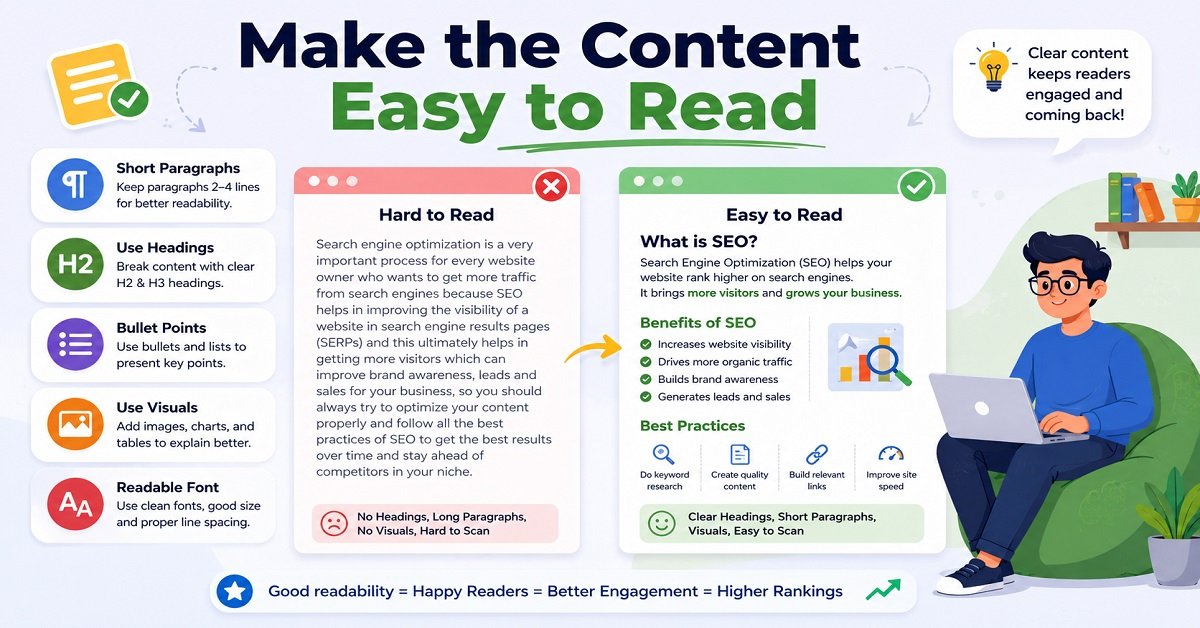
Good on-page SEO is not only about search engines. Your article also needs to be comfortable for a real person to read.
Even if your information is excellent, readers may leave quickly if the page looks like a wall of text.
Before publishing, check the following:
- Keep paragraphs reasonably short.
- Use headings to divide major topics.
- Use bullet points when listing several items.
- Use tables when a comparison is easier to understand in table form.
- Highlight important points with bold text where appropriate.
- Avoid unnecessarily long sentences.
- Explain technical terms in simple language.
- Remove repetitive sentences and filler.
For example, instead of writing one 250-word paragraph explaining five different SEO factors, create five small subsections.
This makes the article easier to scan, especially on mobile phones.
Don’t make every paragraph artificially short
There is also no need to turn every sentence into its own paragraph just because you heard that “short paragraphs are good for SEO.”
Readability should come first.
If two or three sentences naturally belong together, keep them together.
The goal is easy reading, not a page full of one-sentence paragraphs.
15. Optimize Your Images
Images can make a blog post much more useful, especially when they explain something that is difficult to understand from text alone.
But simply uploading an image is not enough.
Check these items before publishing:
| Image SEO check | What to do |
|---|---|
| File name | Use a meaningful name instead of IMG1234.jpg |
| File size | Compress unnecessarily large images |
| Format | Use an appropriate modern or widely supported format |
| Alt text | Describe the image accurately when alt text is useful |
| Dimensions | Avoid uploading an image much larger than needed |
| Relevance | Use images that actually help the reader |
| Placement | Put images close to the content they illustrate |
For example, if you have a screenshot showing where to find a WordPress setting, an alt text such as “WordPress reading settings screen” is more useful than “SEO image.”
Don’t stuff keywords into alt text.
Alt text should describe the image for people who cannot see it, while also helping search engines understand the image in context.
Google’s image guidance specifically recommends descriptive filenames and alt text rather than using vague or keyword-stuffed descriptions.
Don’t add images just to make the article look longer
This is another common mistake.
If a screenshot, diagram, comparison image or original photograph helps explain something, use it.
If an image doesn’t add anything, you don’t need one.
A useful screenshot is better than five decorative stock images.
16. Optimize Your Featured Image
Your featured image deserves a separate check because it may appear in several places on your website and can also be used when your article is shared.
Before publishing, check:
- Does the image clearly relate to the article?
- Is the text on the image readable on a mobile screen?
- Is the image unnecessarily large?
- Does it look good when cropped?
- Does it represent the topic accurately?
- Does it use a consistent style with the rest of your website?
For an article titled On-Page SEO Checklist, a useful featured image could communicate ideas such as SEO, a checklist, a website page or content optimization.
It doesn’t need to contain a dozen SEO-related words.
A clean and relevant visual is usually better than a crowded design.
17. Add Relevant Internal Links
Internal links connect one page on your website to another page on the same website.
They are useful for both readers and website structure.
Imagine a reader is reading your article about on-page SEO and you mention that choosing the right hosting can affect the overall website experience.
If you already have a useful article about hosting, you can naturally link to Best Hosting for Beginners.
The reader can explore the topic further without having to search your website manually.
For OrbitElf, internal linking can be particularly useful because your content covers connected subjects such as blogging, SEO, websites, hosting and website building.
Don’t add internal links just because you have them
Every internal link should have a reason.
Ask:
“Would the reader find this other article useful at this point?”
If the answer is yes, add the link.
If you are adding a link simply because you want another internal link on the page, skip it.
Use descriptive anchor text
Compare these two examples:
Click here to read our hosting guide.
and:
Learn more about Best Hosting for Beginners.
The second one tells the reader what they are going to find after clicking.
Descriptive anchor text is generally more useful than vague phrases such as “click here.”
Google’s documentation has also emphasized making anchor text more descriptive and accessible.
Internal linking should feel natural
Don’t write awkward sentences just to insert a link.
For example:
SEO is important. Best Hosting for Beginners is our hosting article. You should read Best Hosting for Beginners for hosting.
That feels forced.
Instead:
If you’re still deciding where to host your new website, our guide to Best Hosting for Beginners can help you compare the main options.
One natural link is enough.
18. Don’t Forget Older Articles
Internal linking works in both directions.
When you publish a new article, don’t only think about links from the new article to older articles.
Also consider whether some older, relevant articles should link back to the new article.
For example, after publishing this on-page SEO checklist, you may later find older OrbitElf articles discussing blogging, keyword research, content writing or website optimization where this checklist would be genuinely useful.
Updating those older articles with a relevant internal link can help readers discover the new resource.
This also gives you an opportunity to review older content and improve it.
A simple internal-linking routine
After publishing a new article:
- Identify 3 to 5 older articles that are closely related.
- Open those articles.
- Look for natural places where the new article would help.
- Add the link where it makes sense.
- Don’t force a link into every article.
This is often easier and more useful than trying to build a complicated internal-linking system from day one.
19. Use External Links When They Help
External links take readers from your website to another website.
Some bloggers avoid external links because they think sending visitors away is always bad.
That’s not a good reason to avoid useful references.
If an authoritative source provides important information, linking to it can make your article more useful.
For example, when explaining Google’s search guidance, linking readers to the relevant Google Search Central documentation gives them a way to verify the information and explore the topic further.
External links can also be useful when:
- You are referencing an original study.
- You are quoting official documentation.
- You are discussing a product’s specifications.
- You need to cite a statistic.
- You want readers to access an official source.
- A third-party resource provides additional information that genuinely helps.
The important point is relevance and trust, not the number of external links.
20. Don’t Use External Links for SEO Manipulation
Avoid creating links simply because you believe more links automatically mean better SEO.
Google’s spam policies include link spam practices intended primarily to manipulate search rankings.
For normal editorial links, think about the reader first.
If the link makes the information clearer or more trustworthy, it probably has a reason to exist.
If you can’t explain why the reader would need it, you probably don’t need the link.
21. Check Your Affiliate Links
This is especially important for bloggers who monetize their content with affiliate programs.
Adding affiliate links to an article does not automatically make the article useful.
The reader should receive meaningful information before being asked to make a purchase.
For example, instead of writing:
Buy this hosting plan because it is the best.
Explain:
- Who it is suitable for
- What you get
- What it costs
- Important limitations
- What type of user should consider it
- What alternatives exist
- What you personally found useful or problematic, if you have first-hand experience
Then give the reader the opportunity to visit the provider.
This approach creates a much better experience than filling the page with affiliate buttons.
Make sponsored and affiliate relationships clear
If a link is paid or sponsored, use the appropriate link attributes where applicable.
Google specifically provides guidance around qualifying paid links with attributes such as rel="sponsored" or rel="nofollow".
Also follow the disclosure requirements that apply to your location, audience and affiliate programs.
The exact disclosure wording can vary, so don’t copy a generic disclosure without checking what applies to your website.
22. Check Your Page on Mobile
A page can look perfect on your desktop monitor and still be frustrating on a phone.
Before publishing, open the actual page on a mobile device or use your browser’s mobile preview.
Check:
- Is the text comfortable to read?
- Are paragraphs too wide or crowded?
- Are tables usable?
- Are buttons easy to tap?
- Are images overflowing the screen?
- Are headings wrapping awkwardly?
- Are ads or pop-ups covering the content?
- Is there excessive empty space?
- Can readers easily find the information they need?
This matters particularly for blogs because many readers will encounter your content on a phone.
Don’t optimize only the editor preview.
Check the published page itself.
23. Check Page Speed and Heavy Elements
A slow page can create a poor experience.
Large images, unnecessary scripts, excessive advertising, video embeds and poorly optimized themes or plugins can all contribute to a heavier page.
You don’t need to become a web developer to perform a basic check.
Ask yourself:
- Is the main image unnecessarily large?
- Have I embedded something that isn’t necessary?
- Are there too many pop-ups?
- Are videos loading automatically when they don’t need to?
- Are there unnecessary plugins or widgets?
- Does the page feel slow when loaded on a normal connection?
Don’t remove useful functionality just to chase a perfect speed score.
Instead, look for obvious sources of unnecessary weight.
24. Check for Broken Links
Before publishing, click the important links in the article.
Pay particular attention to:
- Internal links
- Affiliate links
- Product links
- External references
- Download links
- Buttons
A link that worked when you wrote the article may later become unavailable.
This is another reason why older content needs occasional maintenance.
If a reader clicks a link expecting a useful resource and reaches an error page instead, it creates a poor experience.
25. Check Your Page’s Indexing Settings
This is one of the technical checks that bloggers should not overlook.
You can spend hours creating a great article, only to discover that the page has accidentally been configured not to appear in search.
Before publishing, check the important indexing settings in your SEO plugin and website configuration.
Look for things such as:
- Is the page set to index?
- Is the correct canonical URL being used?
- Is the page accidentally marked
noindex? - Is the URL accessible?
- Is the page blocked from crawling by mistake?
You don’t need to change technical settings unless you understand why you’re changing them.
If your website is already configured correctly, simply verify that the new article hasn’t inherited an incorrect setting.
Be careful when changing URLs
Don’t change an existing article’s URL simply because you discovered a slightly better keyword.
If an established page already has links, traffic or search visibility, changing its URL creates additional work.
When URLs genuinely need to change, proper redirects and URL mapping become important. Google’s site-move documentation recommends mapping old URLs to their corresponding new URLs and redirecting them appropriately.
For a new article, the easiest approach is usually to choose a clean, descriptive URL from the beginning.
26. Add Structured Data When It Actually Applies
Structured data is a way of providing search engines with additional information about the content on a page.
You may hear about things such as:
- Article structured data
- Breadcrumb structured data
- Product structured data
- Review structured data
- Recipe structured data
- FAQ structured data
But don’t add structured data simply because someone told you that “more schema equals better SEO.”
The markup needs to accurately represent the page and follow the relevant guidelines.
For most bloggers using WordPress and a capable SEO plugin, much of the basic structured-data implementation may already be handled by the theme or plugin.
Your job is mainly to make sure it is accurate and not misleading.
27. Make the Page Trustworthy
SEO isn’t only about keywords and technical settings.
Ask yourself whether a new reader would trust the information on the page.
This is especially important when you are discussing:
- Money
- Products
- Hosting
- Software
- Business decisions
- Security
- Technical instructions
Where appropriate, consider adding:
- Author information
- Relevant experience
- Sources
- Dates or update information
- Clear affiliate disclosures
- Original testing or observations
- Accurate product information
- Contact/about information elsewhere on the website
For example, if you recommend a hosting provider based on your own testing, explain what you actually tested rather than making vague claims such as “we tested everything.”
Be specific about what you know and how you know it.
That is a much stronger way to demonstrate experience and build reader trust.
Quick Checklist: Content, Links and Technical SEO
Before moving to the final stages, your article should now pass these checks:
| Check | Done? |
|---|---|
| Content is easy to read | ☐ |
| Paragraphs are reasonably short | ☐ |
| Images are relevant | ☐ |
| Images are properly sized/compressed | ☐ |
| Alt text is descriptive where needed | ☐ |
| Featured image is optimized | ☐ |
| Relevant internal links added | ☐ |
| Anchor text is descriptive | ☐ |
| Older related articles considered | ☐ |
| Useful external references added | ☐ |
| Affiliate links reviewed | ☐ |
| Affiliate/sponsored disclosures handled properly | ☐ |
| Mobile version checked | ☐ |
| Page speed reviewed | ☐ |
| Important links tested | ☐ |
| Indexing settings checked | ☐ |
| Canonical URL checked where appropriate | ☐ |
| Structured data is accurate where used | ☐ |
| Trust signals are present | ☐ |
At this point, your article may look well optimized on the surface.
But there is one more important question to answer:
Is this actually a better page than the alternatives already available to the reader?
That brings us to experience, originality, affiliate content, the final pre-publish review, and what you should do after the article goes live.
28. Add Original Value That Other Articles Don’t Have
This is one of the most important checks in the entire On-Page SEO Checklist.
Before publishing, don’t just ask:
“Did I include all the keywords?”
Ask:
“What does my article give the reader that a dozen other articles don’t?”
Search results are already full of articles covering the same basic topics. If your page simply rearranges information that readers can find everywhere else, there may be little reason for someone to prefer your article.
Google’s guidance encourages creating helpful, reliable, people-first content and adding something useful from your own experience rather than simply reproducing information that already exists online.
Your original value could come from:
- Your own testing
- Personal experience
- Screenshots
- Original examples
- Comparisons
- Data you collected
- Mistakes you discovered
- Step-by-step instructions
- Practical recommendations
- Explanations written in simpler language
- A useful checklist
- A better way of organizing complicated information
For example, don’t just tell readers that “internal links are important.”
Show them where an internal link would naturally fit inside a real paragraph.
Don’t just say “optimize images.”
Explain what you actually check before uploading an image.
These small details can make an article much more useful.
A simple originality test
Before publishing, ask yourself:
“If someone removed my website name from this article, would there still be something here that feels uniquely useful?”
If the answer is no, look for opportunities to add your own experience, examples or useful analysis.
29. Don’t Chase a Specific Word Count
You may have noticed that this article has a 2,000+ word target.
That’s a requirement for this particular content project, but it doesn’t mean every article needs to be 2,000 words.
There is no magic article length that guarantees better Google rankings.
If a topic can be properly answered in 1,200 words, adding another 800 words of repetition doesn’t make it better.
Likewise, if a complicated topic genuinely requires 3,000 words, stopping at 1,500 just to keep the article short isn’t helpful.
The right question is:
“How much information does the reader need to solve the problem?”
That is a much better approach than writing until you reach an arbitrary number.
Avoid padding an article
Watch for sentences that exist only to increase the word count.
For example:
SEO is important for bloggers. Bloggers should understand SEO because SEO is an important part of blogging. Therefore, understanding SEO is important for bloggers who want to succeed.
This is technically content, but it doesn’t teach the reader anything new.
Replace it with useful information:
Before publishing, review your title, search intent, headings, links and images. These checks can catch problems that are easy to miss while you’re focused on writing the article itself.
One useful paragraph is better than three repetitive paragraphs.
30. Make Your Content Demonstrate Experience
Experience is particularly valuable when the topic involves something you can actually test or use.
Suppose you’re writing a review of a hosting service.
Instead of repeating the provider’s marketing claims, you could discuss things you actually observed:
- How easy the setup was
- What the dashboard looked like
- How long a task took
- What features were easy or difficult to find
- What type of user would benefit from it
- What limitations you noticed
The same principle applies to software, blogging tools, website builders, plugins and other products.
If you have first-hand experience, make that experience useful to the reader.
But don’t pretend to have tested something you haven’t.
Trust is more valuable than making an impressive-sounding claim.
31. Review Your Affiliate Content Carefully
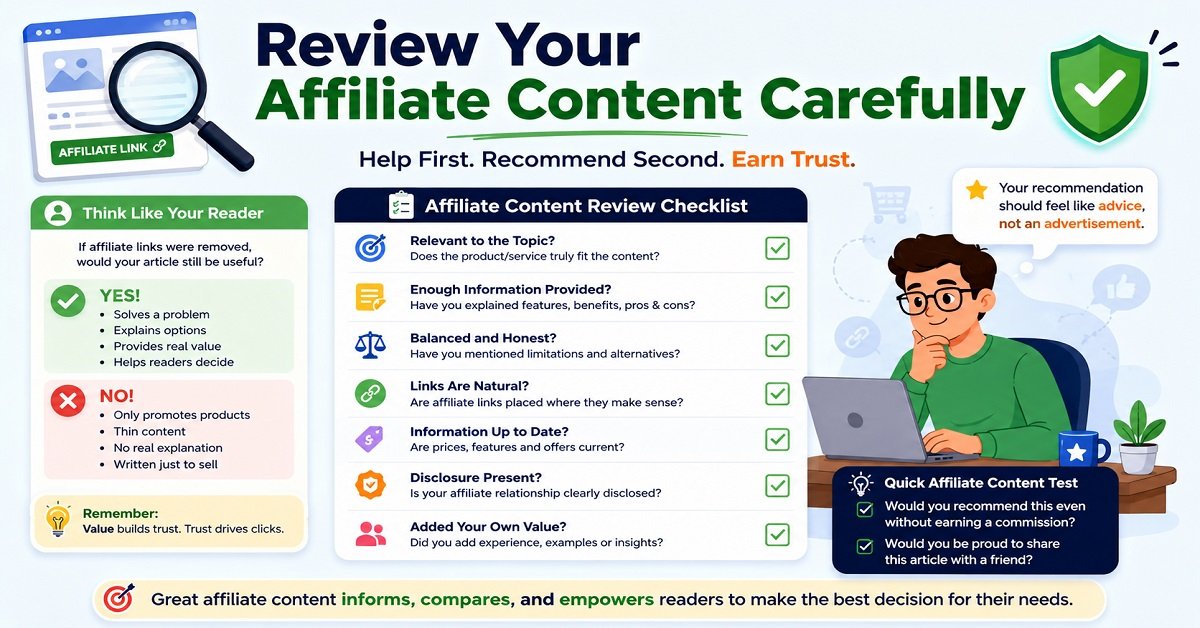
If your article contains affiliate links, perform one additional review.
Imagine that all the affiliate links disappeared from the page.
Would the article still be useful?
If the answer is yes, that’s a good sign.
If removing the affiliate links makes the article almost empty, the page probably needs more useful information.
For example, an article comparing hosting services should not simply contain:
| Hosting provider | Price | Affiliate link |
|---|---|---|
| Provider A | ₹X | Check price |
| Provider B | ₹X | Check price |
| Provider C | ₹X | Check price |
That is not much help to someone trying to choose.
A better comparison might explain:
| Option | Best for | Main advantage | Important limitation |
|---|---|---|---|
| Provider A | Beginners | Easy setup | Limited advanced controls |
| Provider B | Growing websites | More resources | Higher cost |
| Provider C | Budget users | Lower starting price | Fewer premium features |
Now the reader has information that helps them make a decision.
The affiliate link becomes an optional next step, rather than the main purpose of the article.
Google’s spam policies distinguish useful affiliate content that adds meaningful value from low-value content created mainly to manipulate search results.
32. Check Your Calls to Action
A call to action, or CTA, tells the reader what they can do next.
For example:
- Compare hosting plans
- Read the detailed review
- Download the checklist
- Try the tool
- Read the related guide
CTAs can be useful, particularly on affiliate articles.
But don’t put a sales pitch after every paragraph.
Imagine a reader is trying to understand which hosting type they need.
You explain shared hosting.
Then immediately:
Buy hosting now!
Then you explain VPS hosting.
Another:
Get the best hosting today!
Then you explain cloud hosting.
Another:
Start your website now!
This can make the article feel like an advertisement.
Instead, explain the information first.
Then give the reader a clear next step when it naturally fits.
Help first. Ask for the action second.
33. Make Your Affiliate Links Feel Natural
Affiliate links should be placed where the reader would reasonably expect to find them.
For example:
If you have decided that shared hosting is enough for your new website, you can compare the current plans before choosing one.
That feels natural.
A large button immediately after every two sentences does not.
Also check whether your affiliate links still work.
Affiliate programs change.
Products are discontinued.
Prices change.
Landing pages move.
A link that worked six months ago may no longer lead to the page you intended.
This is one reason affiliate articles need periodic maintenance.
34. Check the Article’s Trust Signals
Before publishing, look at the page from the perspective of someone who has never heard of your website.
Would they know:
- Who wrote the article?
- What the website is about?
- Why they should trust the information?
- Whether recommendations are based on experience or research?
- Whether affiliate relationships exist?
- When information may have been updated?
You don’t need to add a huge biography to every article.
But your website should make it reasonably easy for readers to understand who is behind the content.
For product reviews and recommendations, be particularly careful with claims.
Instead of:
This is the best hosting service for everyone.
Say something more useful and realistic:
This option is a good fit for beginners who want simple WordPress setup and don’t need advanced server controls.
The second statement is specific and gives the reader a reason to decide whether it applies to them.
35. Don’t Hide Content Just to Manipulate Search Rankings
Avoid tactics designed to make search engines see content that isn’t genuinely intended for visitors.
Examples include hidden text, hidden links and keyword blocks that are not meant to be useful to people.
Google’s spam policies specifically identify hidden text and keyword stuffing as abusive practices when they are used to manipulate search rankings.
There is an important distinction, though.
Normal interface elements such as expandable sections, tabs, tooltips and accordions can be perfectly legitimate when they improve usability.
So don’t worry that every piece of collapsible content is automatically an SEO problem.
The question is why the content is hidden and whether the interface is useful to visitors.
36. Don’t Obsess Over Your SEO Plugin Score
If you use an SEO plugin such as Rank Math, you may see a score telling you how well the article is optimized.
Treat it as a checklist assistant, not a search-ranking score.
For example, a plugin may remind you to:
- Add a focus keyword
- Write a meta description
- Add internal links
- Include the keyword in the title
- Add images
Those reminders can be useful.
But the plugin cannot fully determine whether:
- You understood the searcher’s actual problem
- Your advice is accurate
- Your examples are useful
- Your article is better than competing content
- Your recommendation is trustworthy
- Your writing is enjoyable
- Your affiliate content genuinely helps people
You could have a 100/100 plugin score and still publish a mediocre article.
You could also have a slightly lower score because you intentionally avoided an unnatural keyword insertion and still have a very useful page.
Don’t optimize the score. Optimize the page.
37. Check for Duplicate or Overlapping Content on Your Own Website
As your website grows, you may accidentally publish several articles targeting almost the same topic.
For example, imagine you have:
- Best SEO Tools for Bloggers
- SEO Tools Every Blogger Needs
- Top SEO Tools for Beginners
- Best SEO Tools for Small Websites
If these articles cover nearly identical information and target the same search intent, your website can become unnecessarily confusing.
Before publishing a new article, search your own website for similar content.
Ask:
“Do I really need another article about this topic?”
Sometimes the better solution is to improve an existing article rather than publish another one.
This can also make your internal linking and content organization much cleaner.
38. Review the Page for Cannibalization
Keyword cannibalization is a term commonly used when multiple pages on the same website compete for similar search intent.
Don’t assume that simply having two pages using the same word is automatically a problem.
The real question is whether the pages serve different purposes.
For example:
Page 1: Best Hosting for Beginners
Page 2: Shared Hosting vs VPS Hosting
Both may mention “hosting,” but they answer different questions.
That’s perfectly reasonable.
On the other hand, if two pages are essentially answering the same question in almost the same way, consider whether they should be combined, redirected or repositioned.
The goal is to make your website’s content structure clear.
39. Check Your Canonical URL When Necessary
A canonical URL tells search engines which URL you consider the main version when similar or duplicate content exists.
This becomes more important when a website has multiple URLs that can show substantially similar content.
Google explains that when it finds multiple pages that are duplicates or very similar, it groups them and selects a canonical version based on various signals.
For a normal WordPress blog post with one clean URL, you usually don’t need to manually modify the canonical setting every time you publish.
But if you’re dealing with:
- Duplicate URLs
- URL parameters
- Multiple versions of a page
- Content available in different locations
- Site migrations
then canonicalization deserves closer attention.
Don’t change canonical settings simply because you think doing so will improve rankings.
40. Do a Final “Reader Test”
Before you click Publish, forget SEO for a few minutes.
Read the article as if you are the person who searched for the topic.
Ask:
Did I get the answer quickly?
Are the explanations clear?
Is anything important missing?
Are there sections that feel repetitive?
Do the links actually help me?
Can I understand this without being an SEO expert?
Would I trust this website enough to follow its recommendation?
Does anything feel like it was written only for Google?
This final test can reveal problems that an SEO plugin won’t catch.
41. Do a Final Search-Result Preview
Before publishing, look at your title and meta description together.
Imagine they appear like this:
On-Page SEO Checklist: 25+ Things to Check Before Publishing
Use this on-page SEO checklist to optimize titles, headings, URLs, content, images, links, and more before publishing.
Now ask:
Would I understand what this page offers?
Does it match what the article actually contains?
Would I consider clicking it if I saw it in a search result?
Don’t make exaggerated promises simply to increase clicks.
A high-click title that doesn’t satisfy the visitor can create a poor experience.
The better goal is a qualified click, meaning someone clicks because the result accurately describes what they need.
42. Check the Published Page, Not Just the Editor
This is an easy step to forget.
After publishing, open the actual URL.
Don’t rely only on the WordPress editor or preview.
Check the live page for:
- Formatting problems
- Missing images
- Broken buttons
- Incorrect links
- Mobile layout problems
- Unexpected spacing
- Heading errors
- Affiliate link problems
- Table overflow
- Pop-ups covering content
- Incorrect metadata
- Accidental draft text
Sometimes everything looks fine inside the editor but behaves differently on the published page.
A two-minute live-page inspection can save you from leaving an obvious mistake online for weeks.
43. What Should You Do After Publishing?
Your on-page SEO work doesn’t necessarily end when you click Publish.
A new article needs time to be discovered, crawled and processed.
Don’t panic if you don’t see immediate rankings.
Instead, give the page time and then look at actual performance data.
Google Search Console can help you understand things such as:
- Impressions
- Clicks
- Click-through rate
- Search queries
- Average position
- Pages receiving search traffic
This information can reveal opportunities for improvement.
For example, suppose your article receives many impressions but very few clicks.
That may be a reason to review your title and search-result presentation.
If the article gets clicks but visitors don’t find the information useful, the problem may be the content itself.
Data should help you decide what to improve rather than encouraging you to constantly change everything.
44. Don’t Keep Editing a New Article Every Day
This is an important habit for beginners to avoid.
You publish an article.
The next morning you check Google.
It’s not ranking.
You change the title.
The next day you change the introduction.
Then you add five keywords.
Then you remove three keywords.
Then you change the URL.
Then you change the title again.
This creates unnecessary confusion.
Search visibility can fluctuate for many reasons, and a new page may need time before you have enough information to evaluate its performance properly.
Make meaningful improvements when you have a reason.
Don’t make random changes simply because the article hasn’t ranked immediately.
45. Update Articles When the Information Changes
SEO is not a one-time activity.
Some articles naturally become outdated.
This is particularly true for content about:
- Hosting prices
- Software features
- WordPress
- SEO practices
- AI tools
- Product specifications
- Affiliate programs
- Technology
- Online services
If an article says something that was true in 2025 but is no longer true in 2026, update it.
Don’t simply change the date and leave the old information untouched.
The actual content should be reviewed.
What to check during an update
- Are the facts still correct?
- Are prices current?
- Do links still work?
- Are screenshots outdated?
- Are recommended products still available?
- Are there better alternatives now?
- Has Google changed its guidance?
- Can any section be explained more clearly?
- Are there new questions readers are asking?
This is one of the best ways to maintain the usefulness of an established content library.
46. Don’t Change the URL During a Normal Content Update
If you are updating an existing article, you usually don’t need to change the URL just because the article was updated.
For example:
/on-page-seo-checklist/
can remain the same when you update the article for new information.
This keeps the page’s existing URL intact.
If you genuinely need to change an established URL, handle the migration properly with redirects and URL mapping. Google recommends maintaining redirects for moved URLs and updating internal links to point to the new locations.
For most ordinary content updates, however, update the content and keep the URL.
The Final 60-Second On-Page SEO Check
Before you publish, run through this quick version:
| Question | Yes/No |
|---|---|
| Does the article satisfy the search intent? | ☐ |
| Is the main topic immediately clear? | ☐ |
| Is the title descriptive and appealing? | ☐ |
| Is the meta description useful? | ☐ |
| Is the URL clean? | ☐ |
| Is there one clear H1? | ☐ |
| Are H2 and H3 headings logical? | ☐ |
| Is the keyword used naturally? | ☐ |
| Does the content provide original value? | ☐ |
| Are unnecessary sections removed? | ☐ |
| Are images useful and optimized? | ☐ |
| Are relevant internal links included? | ☐ |
| Are external references useful and trustworthy? | ☐ |
| Are affiliate links natural and properly disclosed? | ☐ |
| Does the page work well on mobile? | ☐ |
| Are important links working? | ☐ |
| Is the page indexable? | ☐ |
| Does the article demonstrate appropriate trust and experience? | ☐ |
| Have you checked the actual published page? | ☐ |
If you can answer “yes” to most of these questions, you’re in a much better position than simply publishing an article because your SEO plugin shows a high score.
And there is one final thing worth remembering:
On-page SEO is not about making a page look optimized. It is about making the page genuinely useful, clear, accessible and relevant to the person who searched for it.
That should be the standard you use before publishing every article on your website.
On-Page SEO Checklist You Can Use Before Every Blog Post
At this point, you have covered the main on-page elements, from search intent and keywords to content, images, links, mobile usability and technical checks.
Now let’s turn everything into a simple workflow you can actually use.
You don’t need to remember dozens of SEO rules every time you publish an article.
Instead, use the following checklist as your final review.
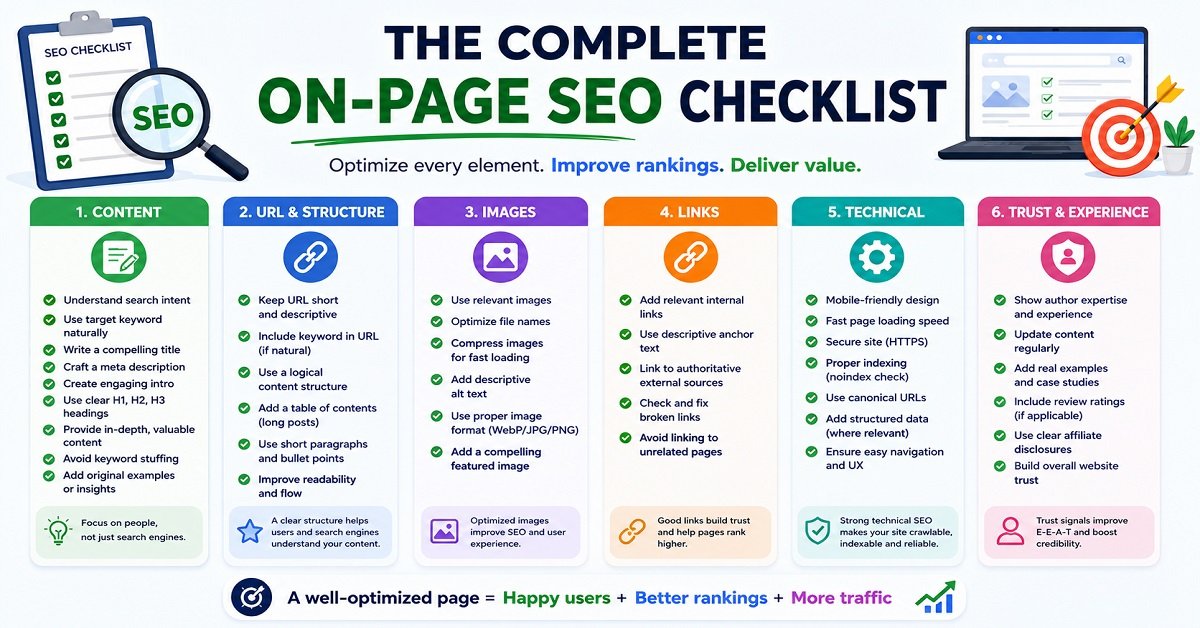
The Complete On-Page SEO Checklist
Before You Start Writing
☐ Understand the search intent behind your target query.
☐ Identify the main question or problem the reader wants to solve.
☐ Choose one primary focus keyword.
☐ Identify closely related topics and questions worth covering.
☐ Check your existing website content for articles covering the same search intent.
☐ Decide what original value you can add through experience, examples, testing, comparisons or better explanations.
While Writing
☐ Write for the reader rather than trying to satisfy an SEO plugin.
☐ Use the focus keyword naturally.
☐ Include relevant related terms where they genuinely fit.
☐ Create a clear H1 heading.
☐ Organize the article using logical H2 and H3 headings.
☐ Keep paragraphs easy to read.
☐ Explain technical concepts in simple language.
☐ Add examples where they make an explanation easier.
☐ Remove unnecessary repetition and filler.
☐ Answer the main question completely.
☐ Add useful information that competing articles may not provide.
Before Publishing
☐ Write a descriptive SEO title.
☐ Write a useful meta description.
☐ Keep the URL short and descriptive.
☐ Check the introduction.
☐ Check your headings.
☐ Optimize images.
☐ Add useful alt text where appropriate.
☐ Compress unnecessarily large images.
☐ Add relevant internal links.
☐ Use descriptive anchor text.
☐ Add external links when they genuinely help.
☐ Check affiliate links and disclosures.
☐ Check product information and pricing if applicable.
☐ Review the page on mobile.
☐ Check important links.
☐ Check indexing and canonical settings where appropriate.
☐ Make sure the page is accessible and readable.
☐ Check that the article demonstrates appropriate experience and trust.
After Publishing
☐ Open and check the live page.
☐ Make sure images, links, tables and formatting work correctly.
☐ Monitor the page in Google Search Console.
☐ Look for useful search queries that start generating impressions.
☐ Review CTR when enough data is available.
☐ Update the article when important information changes.
This checklist may look long, but you won’t need to spend the same amount of time on every item.
For a simple informational article, some checks take only a few seconds.
For an important affiliate guide or product comparison, you should spend more time checking facts, links, recommendations and disclosures.
A Simple On-Page SEO Workflow for Bloggers
If the full checklist feels overwhelming, use this five-step process.
Step 1: Understand
First, understand what the reader wants.
Don’t start by asking:
“Where should I put my keyword?”
Start with:
“What does this person actually want to know?”
Step 2: Create
Write the best useful answer you can.
Use your own experience and examples whenever possible.
Don’t worry about inserting the keyword every few sentences.
Step 3: Optimize
After writing, review the SEO elements:
- Title
- Meta description
- URL
- Headings
- Keywords
- Images
- Internal links
- External links
This is much easier than trying to write and optimize every sentence simultaneously.
Step 4: Test
Look at the page as a visitor.
Check it on desktop and mobile.
Click the links.
Look at the images.
Read the introduction.
Scan the headings.
Make sure nothing feels confusing or broken.
Step 5: Improve
After the article has been published and collected some data, look for opportunities to improve it.
This could mean improving the title, answering a newly discovered question, updating outdated information or adding a useful example.
That is a much more sustainable SEO process than constantly making random changes.
On-Page SEO Checklist for Affiliate Articles
Because affiliate content is an important part of many blogs, it deserves a separate checklist.
Before publishing an affiliate article, ask yourself these questions:
| Question | What you should look for |
|---|---|
| Does the article help the reader make a decision? | Useful comparisons, explanations and recommendations |
| Are affiliate links relevant? | Links should appear where they make sense |
| Is there enough information before the CTA? | Reader should understand the product/service first |
| Are claims supported? | Avoid exaggerated or unsupported statements |
| Are prices accurate? | Check current pricing before publishing |
| Are limitations mentioned? | Don’t hide important drawbacks |
| Is the affiliate relationship disclosed? | Use an appropriate disclosure |
| Are alternatives discussed? | Help readers choose rather than forcing one option |
| Are links working? | Test important affiliate links |
| Does the article add original value? | Experience, testing, analysis or useful comparisons |
This last question is particularly important.
If your affiliate article could be replaced by the manufacturer’s product description without losing much information, it probably needs more original value.
What On-Page SEO Cannot Do
It is important to keep expectations realistic.
Even if you complete every item on this checklist, there is no guarantee that your page will rank in Google’s top position.
Search rankings depend on many factors, including the overall quality and relevance of search results, competition, your website’s authority and reputation, crawling and indexing, links and many other signals.
On-page SEO is therefore not a formula like:
25 checklist items = first-page ranking
Instead, think of it as removing avoidable problems and making your page as useful and understandable as possible.
You are improving the page.
You are not controlling Google.
This distinction can save you a lot of frustration.
Common On-Page SEO Mistakes to Avoid
Even after learning SEO, bloggers often make the same mistakes.
Keyword stuffing
Repeating the same keyword again and again does not make an article better.
If a sentence sounds strange when you read it aloud, rewrite it.
Writing for the SEO plugin
A green score isn’t the goal.
A useful article is the goal.
Ignoring search intent
An article can be perfectly optimized around a keyword and still fail because it doesn’t answer what the searcher actually wanted.
Making the introduction too long
Readers usually want the answer, not a long explanation about why the topic is important.
Get to the point.
Adding irrelevant internal links
More internal links aren’t automatically better.
Link when the other page genuinely helps.
Using vague anchor text
“Click here” tells the reader very little.
Use descriptive anchor text when possible.
Publishing without checking the live page
Your editor preview isn’t the final product.
Always look at the published page.
Updating only the date
Changing “Updated August 2025” to “Updated September 2026” without reviewing the content isn’t a meaningful update.
Update the information itself.
Changing URLs unnecessarily
Don’t change an established URL simply because you found a slightly different keyword.
URL changes should have a genuine reason and should be handled properly.
Adding content just to increase word count
Longer doesn’t automatically mean better.
Every section should earn its place by helping the reader.
How Often Should You Perform an On-Page SEO Audit?
There is no single schedule that works for every website.
A better approach is to prioritize pages based on their importance and how quickly their information changes.
For example:
New articles: Check before publishing and immediately after publishing.
Important traffic pages: Review periodically and whenever performance changes significantly.
Affiliate articles: Review when products, prices, features or affiliate links change.
Evergreen informational articles: Review when you discover outdated information or new information that materially improves the article.
Time-sensitive articles: Review more frequently.
You don’t need to completely rewrite an article every few months.
Sometimes a useful update might only require:
- Replacing an outdated screenshot
- Fixing a broken link
- Updating a price
- Adding a newly relevant question
- Correcting an outdated fact
- Improving a confusing section
- Adding a better internal link
The objective is to keep the article useful, not to change it simply to make it look “fresh.”
Frequently Asked Questions About On-Page SEO
What is an on-page SEO checklist?
An on-page SEO checklist is a set of checks you can perform on a webpage to make sure its content and important page elements are properly optimized.
It can include the title, headings, URL, content, keywords, images, internal links, external links, mobile experience and technical settings.
What are the most important on-page SEO factors?
There isn’t one official list of factors that guarantees rankings.
For a blogger, the most important practical areas are understanding search intent, creating genuinely useful content, using clear titles and headings, making the page easy to read, maintaining accurate information, using relevant internal links and ensuring the page works properly for visitors.
How many times should I use my focus keyword?
There is no universal number of times you need to use a keyword.
Use it naturally where it makes sense.
Don’t add the keyword repeatedly just to reach a particular keyword density.
If the article clearly discusses the topic, you don’t need to force the exact phrase into every section.
Should the focus keyword be in the title?
It can be useful when it naturally fits the title and accurately describes the page.
For example:
On-Page SEO Checklist: 25+ Things to Check Before Publishing
Here, the focus keyword fits naturally.
But don’t create an awkward title just to insert an exact-match keyword.
Is internal linking part of on-page SEO?
Yes.
Internal links connect pages on the same website and can help readers discover related information.
They can also help search engines understand the relationships between pages on your site.
The important thing is relevance. Don’t add links just to increase the number of internal links.
Is a 100/100 Rank Math score necessary?
No.
An SEO plugin can be useful for checking basic optimization items, but its score is not a Google ranking score.
A page with a perfect plugin score can still be unhelpful.
Focus on satisfying the reader and covering the topic properly.
Does article length affect Google rankings?
There is no universal word count that guarantees better rankings.
Write enough to properly satisfy the search intent.
A simple question may need a short answer, while a complicated guide may require thousands of words.
Don’t add unnecessary content simply to make an article longer.
Should I update old blog posts?
Yes, when there is a genuine reason.
Update articles when information becomes outdated, important links stop working, prices change, products change, or you discover useful information that should be added.
Don’t update an article merely to change its date.
Can beginners do on-page SEO themselves?
Yes.
Most basic on-page SEO tasks do not require advanced technical knowledge.
A beginner can learn to optimize titles, headings, URLs, content, images, internal links and other basic elements.
More complicated technical SEO issues may require additional knowledge or professional help.
Does on-page SEO guarantee higher rankings?
No.
On-page SEO can help make your content clearer and more useful, but it cannot guarantee a particular ranking position.
Search results depend on many factors outside your direct control.
Pros and Cons of Using an On-Page SEO Checklist
The last point is worth remembering.
Use the checklist as a guide, not a rulebook.
If a checklist recommendation makes your article worse for the reader, stop and reconsider it.
Your One-Page On-Page SEO Checklist
If you want the shortest version to keep beside you while publishing, use this:
Before writing
- Understand search intent.
- Choose the primary keyword.
- Research related questions.
- Check existing articles on your website.
- Decide what original value you can provide.
While writing
- Answer the reader’s question.
- Use keywords naturally.
- Create clear H1, H2 and H3 headings.
- Keep the content easy to scan.
- Add useful examples.
- Remove filler.
- Provide original information where possible.
Before publishing
- Write a strong title.
- Write a useful meta description.
- Keep the URL clean.
- Optimize images.
- Add descriptive alt text where appropriate.
- Add relevant internal links.
- Add useful external references.
- Check affiliate links and disclosures.
- Check mobile appearance.
- Check important technical settings.
- Test the page.
After publishing
- Check the live page.
- Monitor Search Console data.
- Look for opportunities to improve.
- Fix broken links.
- Update outdated information.
- Don’t make random changes based on short-term ranking fluctuations.
Final Thoughts
On-page SEO doesn’t have to be complicated.
You don’t need to memorize hundreds of SEO rules or spend hours trying to make an SEO plugin display a perfect score.
Start with the most important question:
Does this page genuinely help the person who searched for this topic?
Then make that answer clear.
Understand the search intent. Write useful content. Use a descriptive title. Organize the page properly. Make your images and links useful. Check the mobile experience. Keep important information accurate. Be transparent when you use affiliate links. And review the live page before considering the job finished.
Most importantly, don’t treat SEO as something you do instead of creating good content.
Good on-page SEO should support good content.
When the two work together, you end up with a page that isn’t only easier for search engines to understand, but is also genuinely useful to the person who clicked on it.
And that is the standard worth aiming for with every article you publish on OrbitElf.