
You can write an excellent article, publish it on a well-designed website, and still struggle to get Google traffic.
One common reason is simple: you may be creating content around topics that people are not searching for, or you may be targeting keywords that are far too competitive for your website.
That is where keyword research comes in.
The good news is that you don’t need to spend hundreds of dollars every month just to start researching keywords. There are free tools that can help you discover keyword ideas, understand search demand, and identify topics worth covering. Google Keyword Planner, for example, can generate keyword ideas and provide estimates of monthly searches.
At the same time, paid SEO platforms such as Ahrefs and Semrush can go much deeper, offering competitor research, keyword difficulty analysis, SERP data, content research and other SEO features.
So, which keyword research tool should you actually use?
There isn’t one tool that is perfect for everyone.
A beginner starting a small blog has different needs from an SEO professional managing dozens of websites. A niche-site owner looking for low-competition keywords may also want a different tool from an ecommerce business researching commercial keywords.
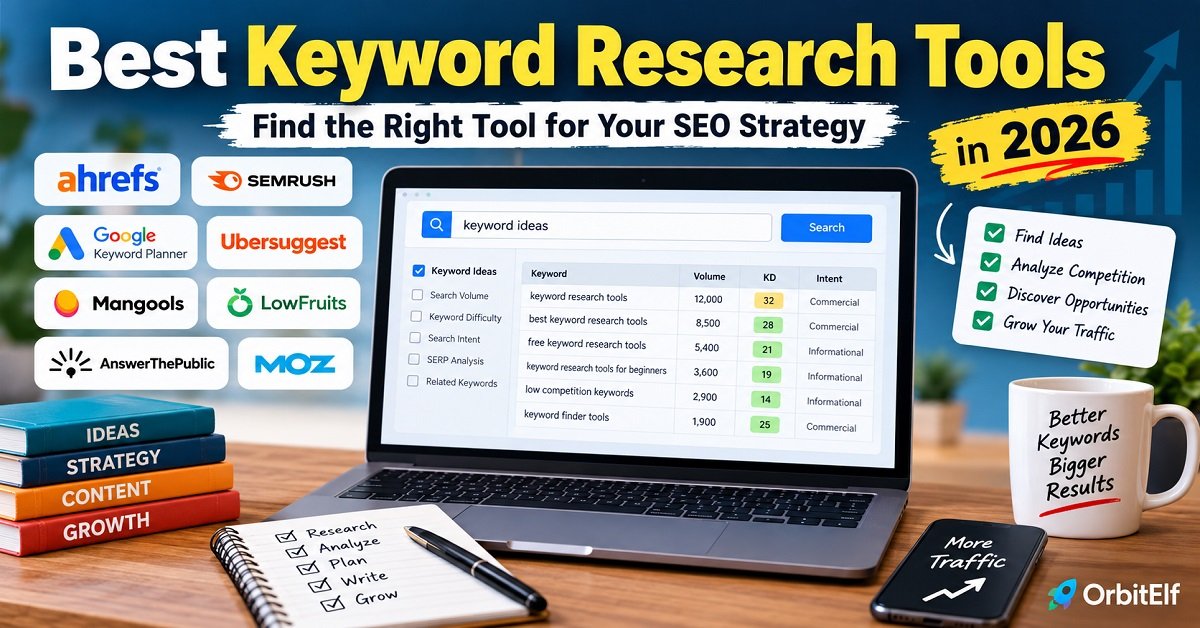
This guide compares the best keyword research tools in 2026, explains what each one is good at, points out their limitations, and shows you how to choose the right one without wasting money on features you don’t need.
Best Keyword Research Tools at a Glance
If you just want the quick answer, here’s how I would categorize the major options:
| Keyword Research Tool | Best For | Free Option | Main Strength |
|---|---|---|---|
| Google Keyword Planner | Beginners and basic keyword research | Yes | Google keyword data and search estimates |
| Google Trends | Trends and changing search interest | Yes | Identifying rising or declining topics |
| Ahrefs | Advanced SEO and competitor research | Limited | Deep keyword and backlink research |
| Semrush | All-in-one SEO research | Limited | Keywords, competitors, content and SEO |
| Ubersuggest | Beginners and budget-conscious users | Limited | Simple keyword and website research |
| LowFruits | Low-competition keywords | Limited | Finding potentially easier SERPs |
| KWFinder | Bloggers and small websites | Limited | Simple keyword research interface |
| AnswerThePublic | Question-based content ideas | Limited | Finding questions people ask |
| KeywordTool.io | Keyword variations | Limited | Expanding keyword ideas |
| Moz Keyword Explorer | SEO beginners and intermediate users | Limited | Keyword suggestions and difficulty analysis |
Don’t interpret this table as a ranking from best to worst.
For example, Google Trends isn’t a replacement for Ahrefs or Semrush. It solves a different problem. Google Trends is useful when you want to understand how search interest changes over time, while a full SEO platform can provide much deeper keyword and competitor data.
The right choice depends on what you are trying to accomplish.
What Is Keyword Research?
Keyword research is the process of finding and evaluating the words and phrases people use when searching for information, products, services or solutions on search engines.
For example, imagine you want to write an article about starting a blog.
You might initially think about targeting:
“blogging”
But that’s extremely broad.
During keyword research, you might discover more specific searches such as:
- how to start a blog
- how to start a blog for free
- how much does it cost to start a blog
- best blogging platform for beginners
- how to make money from a blog
- how to choose a blogging niche
- best hosting for a WordPress blog
These searches tell you much more about what people actually want to know.
Instead of creating one huge article simply targeting “blogging,” you can use keyword research to understand the different questions and topics your audience cares about.
That’s the real purpose of keyword research.
It isn’t just about finding keywords with high search volume.
It’s about finding the right opportunities for your website.
Why Is Keyword Research Important for SEO?
Search engines have billions of pages to choose from when responding to a search query.
If you want your website to receive organic traffic, you need to understand what your potential readers are searching for and create content that genuinely satisfies those searches.
Keyword research can help you:
- Discover topics your audience is interested in
- Find specific questions people are asking
- Identify long-tail keywords
- Understand search intent
- Estimate search demand
- Analyze the competition
- Find content opportunities
- Plan future articles
- Build related content around an important topic
However, there is an important point that many beginner SEO guides overlook.
Keyword research does not guarantee rankings.
A keyword tool might tell you that a particular phrase receives thousands of searches every month. That doesn’t mean your new article will automatically rank for it.
Your website’s authority, the quality and usefulness of your content, competition, backlinks, technical SEO, search intent and many other factors can influence how well a page performs.
So use keyword tools as research and decision-making tools, not as ranking prediction machines.
Search Volume Isn’t the Only Thing That Matters
This is probably the most important lesson to understand before using any keyword research tool.
Suppose a keyword tool gives you these two options:
| Keyword | Monthly Searches | Difficulty |
|---|---|---|
| best blogging tools | 20,000 | Very High |
| best blogging tools for beginners | 700 | Low |
At first glance, the first keyword looks much more attractive.
20,000 searches sounds better than 700.
But if your website is relatively new and the search results are dominated by highly authoritative websites, ranking for the 20,000-search keyword could be extremely difficult.
The 700-search keyword may be a much more realistic opportunity.
And there’s another advantage.
Someone searching for “best blogging tools for beginners“ has already provided more information about what they want.
That makes it easier to create a focused article that matches their intent.
This is why experienced SEOs don’t simply sort a keyword list by search volume and pick the biggest number.
They look at the whole picture.
What Is Search Intent?
Search intent is the reason behind a person’s search.
In simple terms:
What does the person actually want when they type that query into Google?
Consider these searches:
“what is WordPress hosting”
The person probably wants an explanation.
“best WordPress hosting”
The person is probably comparing options.
“buy WordPress hosting”
The person has stronger commercial or transactional intent.
These searches are related, but they don’t necessarily need the same type of content.
If someone searches for “what is WordPress hosting” and lands on a page that immediately pushes them toward a purchase without explaining the concept, the page may not satisfy their intent very well.
That’s why keyword research and content strategy should work together.
Before choosing a keyword, ask:
What would a person expect to see after searching this phrase?
Then look at the current Google results.
If most results are detailed guides, don’t create a thin product page.
If Google is showing product comparisons, don’t assume a basic 500-word informational article will be the ideal format.
The search results themselves can provide useful clues about intent.
What Should You Look for in a Keyword Research Tool?
Not every keyword research tool offers the same features.
Before paying for one, think about what you actually need.
Keyword Suggestions
The most basic function is discovering new keyword ideas from a seed topic.
For example, you enter:
“WordPress hosting”
A useful tool might return related phrases covering informational, commercial and long-tail searches.
Google Keyword Planner can generate keyword ideas from keywords or even from a website, which makes it useful for expanding an initial topic into a larger list of ideas.
Search Volume
Search volume gives you an estimate of how frequently people search for a keyword.
It’s useful, but don’t treat it as an exact prediction of how much traffic your article will receive.
A keyword with 1,000 monthly searches doesn’t mean your page will receive 1,000 visitors.
You may rank below the first result, the SERP may contain ads or other search features, and users may click different results.
Keyword Difficulty
Keyword difficulty is an estimate of how difficult it may be to rank for a keyword.
Different tools calculate this metric differently.
This is important because a keyword difficulty score is not a universal Google ranking score.
For example, a keyword marked as “easy” by one tool could be rated differently by another.
Use the metric as a starting point, then manually inspect the search results.
Search Intent
Some tools increasingly try to classify keywords by intent.
This can save time, especially when you’re working with thousands of keywords.
But don’t blindly trust the label.
Open Google and search for the keyword yourself when the decision is important.
SERP Analysis
SERP analysis shows you what currently ranks for a keyword.
This is one of the most useful features in advanced keyword research.
You can examine:
- The websites ranking on page one
- Their page types
- Content depth
- Domain strength
- Backlinks
- Search features
- Potential weaknesses in the existing results
This helps answer a much more useful question:
“Can my website realistically create something better or more useful than what’s already ranking?”
Competitor Research
Some tools allow you to enter a competing website and discover keywords that it ranks for.
This can be extremely useful for content planning.
Instead of starting every article from scratch, you can study successful competitors, identify topics they cover, and then look for gaps where your website can provide something better or more specific.
Long-Tail Keyword Discovery
Long-tail keywords are usually more specific searches.
For example:
“hosting”
is broad.
“best WordPress hosting for a small business”
is much more specific.
Long-tail searches can be particularly useful for smaller websites because they often reveal a clearer search intent and can provide more realistic content opportunities.
That doesn’t mean every long-tail keyword is easy to rank for. You still need to evaluate the actual SERP.
Don’t Forget Google Search Itself
Here’s something you should not overlook.
You don’t always need an expensive SEO tool to start keyword research.
Google itself can give you useful clues.
Start typing a topic into Google and look at the autocomplete suggestions.
Then search the topic and examine:
- Related searches
- “People also ask” questions
- The wording used in page titles
- The types of pages ranking
- Common subtopics covered by competing pages
This can reveal what Google users are searching for and what types of content are currently being surfaced.
You can then use a keyword research tool to validate and expand those ideas.
This combination is often much better than relying entirely on a tool’s automatically generated keyword list.
Google Keyword Planner: A Useful Starting Point
One of the first tools worth knowing is Google Keyword Planner.
It is Google’s own keyword research tool, primarily designed for Google Ads. It can help you discover keyword ideas, see estimated monthly search volumes and explore advertising-related keyword information.
That doesn’t make it a complete replacement for dedicated SEO platforms.
For example, if you’re primarily interested in detailed organic competitor analysis, backlink data or advanced SERP analysis, you’ll likely need another tool.
But for someone starting out with keyword research, Google Keyword Planner can be a useful part of the process.
One thing to remember is that Google requires you to complete account setup, including billing information, to access basic keyword-idea functionality in Keyword Planner.
So while Keyword Planner can be accessed without buying a separate premium SEO subscription, “free” doesn’t necessarily mean there are no account requirements.
Google Trends: The Tool You Shouldn’t Ignore
Another free Google tool worth adding to your research process is Google Trends.
Google Trends is particularly useful when you want to understand whether interest in a topic is growing, declining, seasonal or changing over time.
Imagine you’re deciding between two topics.
A traditional keyword tool might show similar search-volume numbers for both.
Google Trends could reveal that one topic has been steadily growing while the other has been declining.
That additional context can influence which topic you choose.
Google Trends can also help you compare different terms and explore what people are searching for in specific locations.
For bloggers and publishers, this makes it a useful companion to keyword research, rather than a replacement for a dedicated keyword database.
The Biggest Mistake to Avoid
The biggest mistake beginners make is thinking:
“I found a keyword with good search volume. Now I’ll write an article around it.”
That’s only the beginning.
Before creating the article, you should ask:
- Is this keyword relevant to my website?
- What is the searcher’s intent?
- What type of pages currently rank?
- How competitive is the SERP?
- Can my website realistically compete?
- What information is missing from the current results?
- Can I create something more useful?
- Does this keyword have value for my audience or business?
If you can answer those questions, your keyword research becomes much more useful.
And that’s exactly why choosing a keyword research tool shouldn’t be based only on which platform has the biggest keyword database.
What Comes Next in This Guide
The tools themselves are only useful when you understand what problem each one solves.
We’ll also separate the tools into practical categories, so you don’t have to spend money on an expensive SEO platform when a free or lower-cost tool may be enough for your website.
Best Keyword Research Tools in 2026
There is no single keyword research tool that is perfect for every website.
A beginner may only need a simple tool to discover keyword ideas and check search demand. A growing blog may need competitor research and keyword difficulty data. An SEO professional may need a much larger database, SERP analysis, rank tracking and content research in the same platform.
So instead of simply declaring one tool the “best,” let’s look at what each option is actually good at.
1. Ahrefs
Best for: Advanced SEO, competitor research and detailed keyword analysis
Ahrefs is one of the most comprehensive SEO platforms available, and its Keywords Explorer is particularly useful for serious keyword research.
You can enter a seed keyword and discover matching terms, related terms, questions and search suggestions. Ahrefs also provides metrics such as search volume, keyword difficulty, traffic potential and SERP information.
One particularly useful feature is Traffic Potential.
Instead of looking only at the search volume of a keyword, Ahrefs estimates the amount of traffic the current top-ranking page receives from that keyword and related searches. This can give you a better idea of the potential value of a topic.
Ahrefs also lets you research competitors.
You can examine the keywords for which another website ranks and use that information to discover potential content opportunities for your own site.
What Ahrefs is good at:
- Detailed keyword research
- Competitor keyword analysis
- Keyword difficulty analysis
- Search volume and click-related data
- SERP analysis
- Long-tail keyword discovery
- Traffic potential analysis
- Backlink research
- Finding content opportunities
Pros
- Very deep SEO data
- Excellent competitor research
- Strong keyword discovery
- Useful SERP analysis
- Good for advanced SEO work
Cons
- Can be expensive for casual bloggers
- Many features may be unnecessary for a small website
- Beginners can initially find the platform overwhelming
My verdict:
If SEO is an important part of your business and you need detailed competitor and keyword research, Ahrefs is one of the strongest options to consider.
However, a beginner publishing a few articles a month probably doesn’t need to start with a premium platform like Ahrefs.
2. Semrush
Best for: All-in-one SEO and keyword research
Semrush is another major SEO platform that goes far beyond basic keyword research.
Its Keyword Magic Tool is designed to help you start with a seed keyword and expand it into a large collection of related searches. The tool organizes keywords into topical groups and allows you to filter results by metrics such as search volume, keyword difficulty, search intent, CPC and SERP features.
This makes Semrush particularly useful when you’re building a larger content strategy.
For example, instead of researching one keyword such as “WordPress hosting,” you can explore related groups covering:
- WordPress hosting
- WordPress hosting for beginners
- cheap WordPress hosting
- managed WordPress hosting
- WordPress hosting comparison
- WordPress hosting for small business
You can then organize those opportunities into a broader content plan.
Semrush also provides competitor research and ranking-related features, making it more than just a keyword finder. Its current keyword platform includes a large keyword database and supports research across many regional databases.
What Semrush is good at:
- Keyword discovery
- Keyword grouping
- Search intent analysis
- Competitor research
- SERP feature analysis
- Content planning
- Rank tracking
- SEO audits
- PPC keyword research
Pros
- Comprehensive SEO platform
- Excellent keyword discovery
- Strong filtering and organization
- Useful competitor research
- Good choice for larger SEO campaigns
Cons
- Expensive compared with basic keyword tools
- Can feel overwhelming to beginners
- You may pay for features you don’t use
My verdict:
Semrush is a strong choice if you want an SEO platform that can handle keyword research alongside broader SEO and marketing work.
For someone running a serious content website, the ability to keep keyword research, competitor research and other SEO tasks in one platform can be valuable.
3. Google Keyword Planner
Best for: Beginners and free keyword research
If you’re new to SEO, don’t assume you need an expensive subscription immediately.
Google Keyword Planner is still one of the most useful places to start.
It is Google’s own keyword research tool and can generate keyword ideas based on a keyword or website. It also provides estimated search-volume information and advertising-related metrics.
For example, you could enter:
“blogging tools”
and use the suggestions to discover related topics.
The important thing is to remember that Keyword Planner was designed primarily for Google Ads, so it isn’t a complete organic SEO research platform.
You won’t get the same depth of competitor analysis, backlink data or SERP analysis that you get from platforms such as Ahrefs or Semrush.
But that doesn’t make it useless.
For a beginner who wants to understand keyword demand without immediately paying for an expensive SEO platform, it can be an excellent starting point.
Pros
- Google’s own keyword research ecosystem
- Useful keyword suggestions
- Search-volume estimates
- Useful for discovering related terms
- Good starting point for beginners
Cons
- Designed primarily for Google Ads
- Not a complete organic SEO platform
- Limited competitor research compared with dedicated SEO suites
- Some account/setup requirements apply
My verdict:
Start here if you’re new to keyword research and don’t have a budget for a premium SEO tool.
You can combine Keyword Planner with Google Search and Google Trends to perform surprisingly useful research without paying for an expensive subscription.
4. Ubersuggest
Best for: Beginners and budget-conscious bloggers
Ubersuggest is designed to make SEO research easier to understand without requiring users to learn a complicated enterprise SEO platform.
The platform provides keyword ideas, search volume and intent information, along with competitor analysis, SERP analysis, content gap research and other SEO features.
This makes it a useful middle ground.
You get more SEO-oriented functionality than you might get from a basic free keyword tool, but the interface is generally easier for beginners to approach than some of the larger professional platforms.
Ubersuggest can also be useful for looking at competing websites and identifying content that performs well for them.
Pros
- Beginner-friendly
- Keyword research and competitor research in one place
- Useful for content ideas
- More affordable than major enterprise SEO platforms
- Includes additional SEO tools
Cons
- Data depth is not comparable to every premium platform
- Usage limits depend on the plan
- Advanced SEO users may eventually need a more comprehensive platform
My verdict:
If you’re running a small blog and want more than basic keyword suggestions without immediately committing to a high-priced SEO suite, Ubersuggest is worth considering.
5. Mangools KWFinder
Best for: Bloggers who want a simple keyword research experience
KWFinder is part of the Mangools SEO toolset and focuses heavily on making keyword research easy to understand.
This is one of its biggest advantages.
You don’t necessarily need to be an experienced SEO professional to understand the basic workflow.
You can enter a seed keyword, explore related terms, examine search volume and difficulty, and identify long-tail opportunities.
This makes KWFinder particularly attractive to:
- New bloggers
- Small websites
- Freelancers
- Niche-site owners
- Small businesses
Its focus is narrower than a huge platform such as Semrush, which can actually be an advantage if your main objective is keyword research.
Pros
- Easy-to-understand interface
- Good for long-tail keyword discovery
- Beginner-friendly
- Useful keyword difficulty information
- Less overwhelming than large SEO suites
Cons
- Not as comprehensive as Ahrefs or Semrush
- Advanced users may need additional tools
- Usage limits depend on the plan
My verdict:
If you find large SEO platforms unnecessarily complicated, KWFinder is worth considering.
It is particularly suitable for people who want to spend more time researching keywords and less time learning a complicated dashboard.
6. LowFruits
Best for: Finding potentially low-competition keywords
LowFruits takes a slightly different approach to keyword research.
Instead of simply giving you a large list of keywords, its focus is on helping identify potentially easier ranking opportunities.
This can be particularly useful for newer websites.
Imagine that you find a keyword with reasonable search demand.
The next question should be:
“Can my relatively small website actually compete with the pages currently ranking?”
A tool focused on identifying weak spots in the SERP can help answer that question.
This is important because traditional keyword difficulty scores don’t always tell the whole story.
A keyword can have moderate difficulty but still have opportunities if the current results include smaller or less authoritative websites.
LowFruits is therefore particularly interesting for niche websites and smaller publishers that don’t want to compete directly with huge websites for every topic.
Pros
- Focuses on realistic ranking opportunities
- Useful for smaller websites
- Helpful for long-tail keyword research
- Can complement a broader SEO tool
Cons
- More specialized than an all-in-one SEO platform
- Not intended to replace every SEO tool
- May be unnecessary if your primary need is basic keyword discovery
My verdict:
If your biggest problem isn’t finding keyword ideas but finding keywords you have a realistic chance of ranking for, a specialized tool like LowFruits can be worth exploring.
7. AnswerThePublic
Best for: Finding questions and content ideas
Sometimes the biggest challenge isn’t finding a keyword.
It’s figuring out what people actually want to know about a topic.
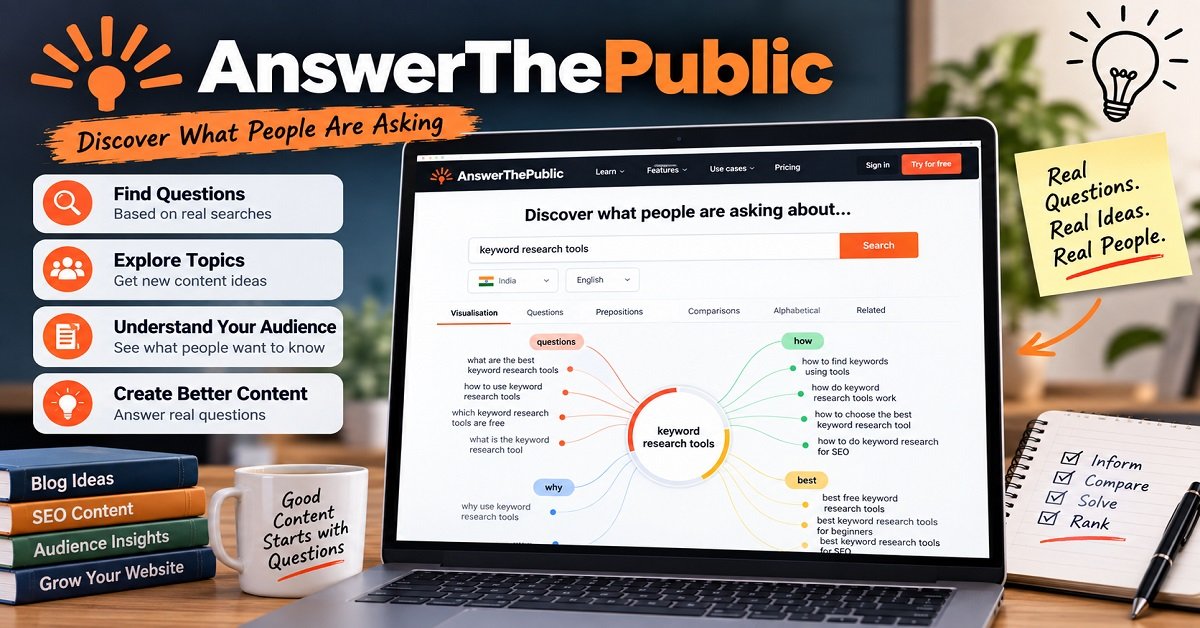
That’s where AnswerThePublic can be useful.
It focuses heavily on questions and search phrases people use around a topic.
For example, if you’re researching “web hosting,” you might discover content angles around:
- what is web hosting
- how does web hosting work
- how much web hosting costs
- which web hosting is best
- how to choose web hosting
These questions can help you build:
- Blog posts
- FAQs
- Supporting sections
- YouTube videos
- Social media content
- Content clusters
Pros
- Excellent for content ideation
- Useful for question-based searches
- Good source of long-tail ideas
- Easy to understand
Cons
- Not a complete SEO platform
- Doesn’t replace detailed SERP and competitor analysis
- Better for discovering ideas than making final keyword decisions
My verdict:
Use AnswerThePublic when you’re stuck for content ideas or want to understand the different questions surrounding a topic.
Don’t use it as your only keyword research tool.
8. KeywordTool.io
Best for: Generating lots of keyword variations
KeywordTool.io focuses on keyword suggestions and can help expand a seed topic into many related searches.
This can be particularly useful when you want to discover variations that might not appear in your initial brainstorming.
For example, instead of only researching:
“best blogging tools”
you can explore variations involving different modifiers, questions and specific use cases.
The biggest value here is idea generation.
You can then take the best ideas and validate them using another tool or directly through Google.
Pros
- Large number of keyword variations
- Useful for long-tail research
- Simple concept
- Good for brainstorming
Cons
- Detailed SEO metrics may require a paid plan
- Not a replacement for a full SEO platform
- Keyword suggestions still need validation
My verdict:
A useful tool when your problem is generating keyword ideas rather than performing advanced competitor analysis.
9. Moz Keyword Explorer
Best for: Beginners and intermediate SEO users
Moz is one of the established names in the SEO industry, and its Keyword Explorer provides keyword suggestions and metrics designed to help users evaluate potential targets.
One useful concept in Moz is its Priority approach, which attempts to combine different keyword metrics into a more practical way of evaluating opportunities.
This can be helpful when you’re looking at a large keyword list and need to prioritize what deserves attention first.
Pros
- Established SEO platform
- Useful keyword suggestions
- Keyword difficulty information
- Beginner-friendly compared with some advanced platforms
- Useful prioritization concepts
Cons
- Premium plans may be unnecessary for casual bloggers
- Other platforms may offer deeper data in certain areas
- Not every website needs a full SEO suite
My verdict:
Moz Keyword Explorer is a solid option if you want a recognized SEO platform with a relatively approachable workflow.
Which Keyword Research Tool Is Best for You?
After looking at all these tools, you might still be wondering which one you should actually use.
Here’s the simpler answer:
| Your Situation | Tool to Consider |
|---|---|
| Completely new to keyword research | Google Keyword Planner |
| Want free tools | Google Keyword Planner + Google Trends |
| Small blog with a limited budget | Ubersuggest or KWFinder |
| Want an easy interface | KWFinder |
| Need competitor research | Ahrefs or Semrush |
| Need advanced SEO research | Ahrefs |
| Want an all-in-one SEO platform | Semrush |
| Looking specifically for easier keywords | LowFruits |
| Need lots of questions and content ideas | AnswerThePublic |
| Need many keyword variations | KeywordTool.io |
| Want an established SEO platform | Moz |
This table shouldn’t be treated as an absolute ranking.
Your requirements matter more than the tool’s popularity.
A tool that is excellent for an SEO agency could be completely unnecessary for someone who publishes four blog posts a month.
Do You Need a Paid Keyword Research Tool?
Not necessarily.
This is one of the most important things I would tell someone starting a new website.
You don’t need to subscribe to Ahrefs or Semrush on day one just because other SEO professionals use them.
If your website is new, you can start with:
Google Search + Google Keyword Planner + Google Trends + Google Search Console
and learn how keyword research works.
As your website grows, you may reach a point where manual research becomes too slow.
That’s when a paid tool becomes more valuable.
For example, you might eventually want to:
- Analyze hundreds of keywords quickly
- Find competitor keywords
- Discover content gaps
- Analyze backlinks
- Monitor rankings
- Study SERPs in more detail
- Build large content clusters
- Compare competitors systematically
At that point, paying for a professional SEO platform can make sense.
The goal shouldn’t be:
“How many SEO tools can I subscribe to?”
The goal should be:
“Which tool saves me time and helps me make better content decisions?”
A Simple Keyword Research Stack for Beginners
If you’re starting a new blog today, I wouldn’t recommend buying five different SEO subscriptions.
Instead, start with a simple workflow.
Step 1: Start with Google Search
Think of a broad topic your audience cares about.
For example:
WordPress hosting
Search it on Google.
Look at autocomplete suggestions, related searches and the questions appearing in the results.
Step 2: Use Google Keyword Planner
Enter your topic into Keyword Planner and collect related keyword ideas.
Don’t immediately choose the keyword with the highest search volume.
Create a shortlist.
Step 3: Check Google Trends
Compare your shortlisted topics in Google Trends.
Look for seasonal patterns and changes in interest.
This can help you avoid investing heavily in a topic whose popularity is declining.
Step 4: Examine the SERP
Search the keyword yourself.
Look at the first page.
Ask:
- Who is ranking?
- Are they huge websites?
- Are smaller websites also ranking?
- What type of content appears?
- Is the content outdated?
- Are there important questions that aren’t being answered?
Step 5: Choose the Best Opportunity
Now choose the keyword based on relevance + intent + competition + usefulness, rather than search volume alone.
That’s a much stronger approach than simply choosing the biggest number in a keyword tool.
One Tool Isn’t Always Enough
This is another point worth remembering.
You don’t necessarily have to choose one tool and use it for everything.
A very practical combination could be:
Google Keyword Planner for keyword ideas and search estimates.
Google Trends for trend information.
Google Search for understanding actual search results.
Google Search Console for discovering keywords your existing pages already appear for.
Then, if your site grows, you can add a paid platform such as Ahrefs, Semrush, Ubersuggest or another specialist tool.
The tools complement each other.
And that brings us to the next important question:
How do you actually evaluate a keyword once you find it?
Finding 1,000 keyword ideas is easy.
Choosing the right 10 is the skill that matters.
How to Choose the Right Keywords for Your Website
Finding keyword ideas is only the first step.
The harder part is deciding which keywords are actually worth targeting.
A keyword can have thousands of monthly searches and still be a poor choice for your website. Another keyword may have only a few hundred searches but bring highly relevant visitors who are much more likely to read your content, click an affiliate link, subscribe to your email list, or buy something.
That’s why good keyword research isn’t about collecting the biggest possible list.
It’s about finding relevant search opportunities that match your audience and your ability to compete.
Start With Search Intent
Before looking at keyword difficulty or search volume, understand what the searcher wants.
Search intent generally falls into four broad categories.
| Search Intent | What the Searcher Wants | Example Keyword |
|---|---|---|
| Informational | Learn something | what is web hosting |
| Commercial | Compare or research options | best web hosting for beginners |
| Transactional | Buy or take action | buy WordPress hosting |
| Navigational | Find a specific website/page | Bluehost login |
These categories aren’t always perfectly separated, but they provide a useful starting point.
Informational Keywords
These searches are usually questions or requests for information.
Examples:
- what is keyword research
- how does WordPress work
- what is web hosting
- how to start a blog
For these searches, a helpful guide, tutorial or explanation is usually more appropriate.
Commercial Keywords
The person is researching before making a decision.
Examples:
- best keyword research tools
- best web hosting for bloggers
- Ahrefs vs Semrush
- best WordPress plugins
These keywords can be particularly interesting for affiliate websites because the visitor may be closer to making a purchasing decision.
However, your article still needs to genuinely help the reader compare options.
Simply placing affiliate links next to every product isn’t enough.
Transactional Keywords
These searches show a stronger intention to take action.
Examples include:
- buy WordPress hosting
- Ahrefs pricing
- Semrush free trial
- download WordPress
The appropriate page could be a product page, pricing page, signup page or another action-oriented page.
Navigational Keywords
Here the searcher already has a particular website or brand in mind.
For example:
- Google Search Console
- Ahrefs login
- WordPress.org
- Semrush
Trying to create an article to rank for another company’s navigational keyword may not make much sense unless you have a specific reason to target it.
Don’t Ignore the Google SERP
Keyword tools give you useful data.
But when you’re serious about targeting a keyword, search the keyword on Google yourself.
This is one of the simplest and most valuable steps in keyword research.
Suppose a tool tells you that:
“best blogging tools”
has reasonable search volume and moderate difficulty.
Before creating the article, search for it.
Look at the first page.
Are the results mostly:
- Large authority websites?
- Individual blogs?
- Product pages?
- Comparison articles?
- Reddit discussions?
- YouTube videos?
- Forums?
- Very old articles?
The answer can tell you a lot about the opportunity.
Look for Weaknesses in the Existing Results
You don’t necessarily need every result on page one to be bad.
You’re looking for opportunities.
For example, perhaps the current results:
- Don’t cover the topic thoroughly
- Are several years old
- Have poor organization
- Don’t answer important questions
- Ignore beginners
- Don’t provide practical examples
- Have outdated recommendations
- Don’t address the reader’s actual search intent
If you can genuinely improve on those weaknesses, the keyword may be worth considering.
Don’t create an article simply because you found a weakness, though.
The new content still needs to be useful and accurate.
Keyword Difficulty Is Only an Estimate
Most SEO platforms provide a keyword difficulty score.
This is useful.
But don’t make your entire content strategy based on it.
Different SEO tools calculate keyword difficulty using their own data and formulas.
So a keyword with a difficulty score of 20 in one platform may not look exactly the same in another.
More importantly, the score isn’t a guarantee that you’ll rank.
Think of keyword difficulty as a screening metric.
It can help you decide which keywords deserve further investigation.
Then check the SERP yourself.
A Better Way to Think About Difficulty
Instead of asking:
“Does this keyword have a low difficulty score?”
ask:
“Do I have a realistic opportunity to create a page that deserves to rank for this search?”
That question is much more useful.
Search Volume Can Be Misleading
Search volume is another metric that beginners often overvalue.
Imagine you find these keywords:
| Keyword | Search Volume | Difficulty | Intent |
|---|---|---|---|
| blogging | Very high | Very high | Broad |
| how to start a blog | High | High | Informational |
| how to start a blog for beginners | Lower | Lower | Informational |
| best blogging tools for beginners | Lower | Moderate | Commercial |
The first keyword may look attractive because of its enormous audience.
But it is also extremely broad.
What exactly does someone searching for “blogging” want?
You don’t know.
Someone searching for “best blogging tools for beginners” has given you much more information.
They probably want recommendations.
That makes the content direction clearer.
This is one reason long-tail keywords can be valuable.
What Are Long-Tail Keywords?
Long-tail keywords are more specific search queries, often consisting of several words.
For example:
Shorter keyword:keyword research tools
More specific keyword:best free keyword research tools for bloggers
The second phrase tells you more about the searcher’s needs.
Long-tail keywords can be valuable because they often have:
- More specific intent
- A clearly defined audience
- More focused content opportunities
- Potentially lower competition
However, don’t assume that every long-tail keyword is easy to rank for.
Some specific searches can still be highly competitive.
Always check the actual results.
Don’t Create Separate Articles for Every Keyword Variation
Here’s another common mistake.
Imagine you discover these keywords:
- best keyword research tools
- best keyword research tools for SEO
- best SEO keyword tools
- top keyword research tools
- keyword research software
- best keyword finder tools
A beginner might create six separate articles.
That could be a mistake.
These searches have very similar intent.
Instead, one comprehensive article could potentially address the main topic and naturally cover related variations.
That’s much better for the reader than creating several thin pages that repeat almost the same information.
The objective isn’t to create more URLs.
It’s to create the right content.
Use Related Keywords Naturally
Once you’ve selected your primary keyword, identify related topics and questions.
For this article, for example, related concepts include:
- keyword difficulty
- search volume
- search intent
- long-tail keywords
- SERP analysis
- competitor keywords
- keyword suggestions
- low-competition keywords
- SEO tools
- content strategy
You don’t need to force every phrase into the article.
Write naturally and cover the subject comprehensively.
Google’s systems can understand relationships between concepts, so your article doesn’t need to repeat the same keyword dozens of times.
Avoid Keyword Stuffing
Keyword stuffing means unnaturally repeating keywords in an attempt to manipulate search rankings.
For example:
“The best keyword research tools are the best tools for keyword research because the best keyword research tools help with keyword research.”
Nobody wants to read that.
Instead, use natural language.
Your primary keyword should appear where it makes sense:
- Title
- Introduction
- Relevant headings
- Body content
- Conclusion
- SEO metadata where appropriate
Then use variations naturally.
Write for people first.
How to Find Low-Competition Keywords
If your website is new or doesn’t yet have strong authority, you may want to focus more heavily on realistic opportunities.
Here’s a practical process.
Step 1: Start With a Broad Topic
Let’s say your website is about blogging.
Start with:
blogging
Don’t try to rank for that word immediately.
Use it as your starting point.
Step 2: Generate More Specific Ideas
Use a keyword research tool to find related searches.
You might discover:
- blogging for beginners
- how to start a blog
- blog niche ideas
- blog post ideas
- blogging tools
- how to write a blog post
- how to get traffic to a blog
Step 3: Narrow the Topic
Now go one level deeper.
For example:
blogging tools
could lead to:
- best blogging tools for beginners
- free blogging tools
- SEO tools for bloggers
- keyword research tools for bloggers
- blog writing tools
- blog image tools
Now you have more specific opportunities.
Step 4: Check the SERP
Search each promising keyword.
Look at who ranks.
If page one consists entirely of extremely authoritative websites with massive backlink profiles, you may want to find a more realistic variation.
If you see smaller websites ranking alongside larger sites, investigate further.
Step 5: Check Business or Content Value
A keyword should not only be easy to rank for.
It should also be worth targeting.
For example, a keyword might have low competition but attract visitors who have absolutely no interest in what your website offers.
That traffic isn’t particularly valuable.
Ask:
Does this audience fit my website?
If the answer is no, move on.
Keyword Relevance Is More Important Than Volume
Imagine you run a website about website building and blogging.
You discover a keyword about a celebrity that receives 100,000 searches per month.
It might be tempting to write about it.
But if the topic has nothing to do with your website, you’re unlikely to build a valuable audience from that traffic.
Now imagine another keyword receives only 500 searches per month but is directly related to something your audience needs.
The second keyword could be far more valuable.
This is especially important for affiliate websites.
Relevant traffic is usually more useful than random traffic.
A smaller audience with strong intent can be more valuable than a huge audience that has no reason to take action.
Consider Business Intent When Choosing Keywords
Not every keyword needs to directly contain words such as “buy” or “best.”
A visitor searching:
may not be ready to purchase immediately.
But after learning how hosting works, that person may start comparing hosting providers.
This is where content strategy becomes important.
You can create a series of useful articles that help the reader throughout their journey.
For example:
Informational:
What Is Web Hosting?
↓
Research:
How to Choose Web Hosting
↓
Commercial:
Best Web Hosting for Beginners
↓
Comparison:
Host A vs Host B
↓
Action:
How to Set Up WordPress Hosting
This approach can turn keyword research into a broader content funnel.
Use Keyword Research to Build Topic Clusters
Don’t think of keywords only as individual articles.
Think about how multiple pieces of content can support each other.
Suppose your main topic is:
Starting a Blog
You could create supporting articles such as:
- How to Choose a Blogging Niche
- Best Blogging Platforms
- How Much Does It Cost to Start a Blog?
- Best Web Hosting for Beginners
- How to Choose a Domain Name
- Best Keyword Research Tools
- How to Do SEO for a New Blog
- How to Write Your First Blog Post
These pages can be internally linked where appropriate.
This helps readers move naturally from one useful resource to another.
For readers who are still planning their website, an article such as How Much Does It Cost to Start a Blog? can provide useful context before they start spending money on hosting, domains and tools.
Similarly, readers who are ready to build their site may benefit from How to Build a WordPress Website from Scratch.
The important thing is not to add internal links just for the sake of SEO.
Every internal link should help the reader.
How Many Keywords Should You Target in One Article?
There isn’t a magic number.
You should generally have one primary topic or keyword and then cover closely related searches naturally within the same piece of content.
For example, this article’s main topic is:
best keyword research tools
It can naturally discuss:
- free keyword research tools
- keyword tools for beginners
- keyword tools for bloggers
- low-competition keyword research
- keyword difficulty
- long-tail keywords
- search intent
Those topics are closely related.
But if you start discussing completely different subjects, such as email marketing or social media advertising in great depth, the article loses focus.
Think in terms of one clear search intent, not a fixed keyword count.

How to Validate a Keyword Before Writing
Here’s a simple checklist you can save.
Before choosing a keyword, ask:
1. Is it relevant?
Does the topic fit your website and audience?
2. What is the search intent?
What does the searcher expect to find?
3. Is there enough demand?
Does the topic appear to have meaningful search interest?
4. How competitive is it?
Can your website realistically compete?
5. What does Google currently rank?
Study the first page.
6. Can you make something better?
Do you have a genuine reason to create this content?
7. Does it support your overall strategy?
Can it connect naturally with your other articles?
8. Does it have value beyond traffic?
Could it attract subscribers, customers or affiliate conversions?
If most answers are positive, you’ve probably found a stronger opportunity.
A Practical Keyword Research Example
Let’s put everything together.
Imagine you run a new website about blogging.
You want to create an article about SEO tools.
You start with:
SEO tools
That’s too broad.
You enter it into a keyword research tool and find:
keyword research tools
That’s more focused.
You then discover:
best keyword research tools for beginners
This looks interesting because it has a clearly defined audience.
Next, you search it on Google.
You notice that the results include detailed comparison articles, tool pages and SEO websites.
Now ask:
Can my article provide something genuinely useful that the current results don’t?
Perhaps you can create a beginner-friendly comparison explaining:
- What each tool actually does
- Which tools are free
- Which tools are affordable
- Which tool is easiest to use
- Which tool is suitable for a new website
- How to use each tool
- What the limitations are
- When upgrading to a paid tool makes sense
Now you have a content plan.
That’s much stronger than simply writing 2,000 words because a keyword tool showed you a search-volume number.
Don’t Trust Any Keyword Tool Blindly
Every keyword research platform has limitations.
Search-volume numbers are estimates.
Keyword difficulty scores are estimates.
Traffic potential is an estimate.
Intent classifications can sometimes be imperfect.
Even competitor data can be incomplete.
That’s why you shouldn’t build an entire SEO strategy around one dashboard.
Use keyword tools to reduce uncertainty, not eliminate it.
Combine tool data with:
- Google Search
- Google Trends
- Google Search Console
- Your own website analytics
- Competitor research
- Your understanding of your audience
This gives you a much more realistic picture.
Your Existing Website Can Tell You What to Target Next
If your website already receives organic traffic, Google Search Console can become one of your most useful keyword research sources.
Look at the queries for which your existing pages receive impressions.
You may find keywords that you didn’t intentionally target.
For example, an article might rank around position 15 for a useful related query.
That could represent an opportunity.
You might be able to improve the existing article by:
- Answering the query more clearly
- Adding missing information
- Improving the structure
- Adding relevant examples
- Updating outdated information
- Improving internal linking
In some cases, improving an existing page can be more efficient than starting an entirely new article.
Don’t Chase Every New Keyword
Keyword research can become addictive.
You can keep generating hundreds or thousands of keyword ideas.
But eventually you need to stop researching and start creating.
A useful workflow is:
Research → Filter → Validate → Prioritize → Create → Measure → Improve
The final two steps are important.
After publishing an article, watch how it performs.
If it begins ranking for related queries, those results can provide new keyword ideas.
Your keyword research doesn’t necessarily end when the article is published.
What Makes a Keyword Worth Targeting?
At this point, we can reduce the whole process to five questions.
Relevance
Does the keyword fit your website and audience?
Intent
Can you create the type of content the searcher expects?
Opportunity
Is there a realistic way for your website to compete?
Value
Will the traffic actually be useful?
Content Potential
Can you create a genuinely helpful, trustworthy resource?
If the answer is yes to all five, you have a much stronger keyword target.
Common Keyword Research Mistakes to Avoid
Before moving on, let’s quickly cover the mistakes that can waste a lot of time.
Choosing Only High-Volume Keywords
High volume doesn’t automatically mean high value.
Ignoring Search Intent
A keyword may look perfect in a tool but be completely wrong for the type of content you want to create.
Trusting Keyword Difficulty Completely
Use difficulty as a guide, not a guarantee.
Ignoring the SERP
The actual Google results can tell you things that a keyword database cannot.
Targeting Every Keyword Separately
Closely related searches can often be covered by one strong article.
Writing for Search Engines Instead of People
Keywords should help you understand the topic.
They shouldn’t make your writing unnatural.
Forgetting Commercial Value
Traffic isn’t always the goal.
For a business or affiliate website, the quality and intent of the visitor can matter much more than raw traffic numbers.
Never Updating Your Keyword Strategy
Search behavior changes.
Competitors publish new content.
Your own website gains authority.
A keyword that wasn’t realistic six months ago might become a good opportunity later.
The Best Keyword Research Strategy Is Not About the Tool
This is perhaps the biggest takeaway from this guide.
A premium keyword research platform can give you thousands of keyword ideas.
But it can’t decide exactly what your audience needs.
You still need to understand the topic, study the search results and create something genuinely useful.
Think of keyword research tools as research assistants.
They help you discover opportunities and organize information.
You make the final decision.
That mindset will help you avoid one of the biggest SEO traps: believing that a keyword score alone can tell you whether an article will succeed.
Final Checklist Before You Hit Publish
Before publishing an article targeting a keyword, run through this quick checklist:
- The keyword is relevant to my audience
- I understand the search intent
- I checked the current Google results
- I considered the competition
- I identified the primary topic
- I found relevant supporting keywords
- I avoided unnecessary keyword repetition
- The article answers the searcher’s main question
- I added useful examples or original insights
- I added relevant internal links
- I didn’t create a separate page for a nearly identical keyword
- The content has a clear purpose for my website
- The article is genuinely better or more useful than a basic answer
If you can check most of these boxes, your keyword research is doing its job.
Are Paid Keyword Research Tools Worth It?
One of the first questions many bloggers ask after discovering SEO tools is:
“Do I really need to pay for a keyword research tool?”
The short answer is no, not necessarily.
If you’re starting a new website, you can do useful keyword research with free resources such as Google Keyword Planner, Google Trends, Google Search and Google Search Console.
But as your website grows, the amount of data you need to analyze also grows.
That’s where paid tools become more useful.
A professional SEO platform can save you hours by putting keyword suggestions, competitor research, SERP analysis and other SEO data in one place.
The key is to pay for a tool when it solves a problem you actually have.
Don’t subscribe simply because an SEO YouTuber recommends it.
Free vs Paid Keyword Research Tools
Here’s a simple comparison:
| Feature | Free Tools | Paid Tools |
|---|---|---|
| Keyword ideas | Yes | Yes |
| Search-volume data | Usually | Yes |
| Long-tail keywords | Yes | Yes |
| Search intent | Limited | Usually better |
| Keyword difficulty | Limited/varies | Usually available |
| Competitor keyword research | Limited | Strong |
| SERP analysis | Basic | Advanced |
| Content gap research | Limited | Advanced |
| Backlink research | Limited | Usually available |
| Historical data | Limited | Usually available |
| Large-scale research | Limited | Much better |
| Best for | Beginners | Growing/established websites |
For a small website, free tools can be more than enough.
For a growing website where SEO is directly connected to traffic and revenue, the time saved by a paid platform can make the subscription worthwhile.
When Should You Start Paying for an SEO Tool?
There isn’t a specific traffic number at which you suddenly need a paid tool.
Instead, look for these signs.
You’re Spending Too Much Time on Manual Research
If you’re opening dozens of Google searches just to compare keywords and competitors, a dedicated platform can make the process much faster.
You Need Competitor Data
If you want to know which keywords competing websites rank for, paid platforms can provide much deeper research capabilities.
You’re Publishing Content Regularly
If you’re publishing several articles every week, manually researching every topic becomes inefficient.
A good SEO platform can help you build and prioritize a larger keyword database.
Your Website Makes Money From Organic Traffic
This is an especially important consideration.
If organic traffic contributes directly to affiliate revenue, product sales, leads or advertising income, spending money on better research tools can become an investment rather than simply another software expense.
But always compare the cost with the value you’re actually receiving.
Which Keyword Research Tool Should Beginners Use?
If you’re completely new to SEO, don’t make things complicated.
Start with:
Google Search + Google Keyword Planner + Google Trends
This combination allows you to:
- Discover keyword ideas
- Understand search demand
- Compare topics
- Identify trends
- Study the current search results
Once you understand those fundamentals, you can consider adding a dedicated SEO platform.
If you want a simpler paid tool rather than jumping directly into a large SEO suite, platforms such as Ubersuggest or KWFinder may be easier places to start.
The most important thing is learning how to evaluate keywords, not learning every feature inside an SEO dashboard.
Which Keyword Research Tool Is Best for Bloggers?
Bloggers usually need a different balance of features from an SEO agency.
You may care more about:
- Long-tail keywords
- Low-competition topics
- Search intent
- Content ideas
- Competitor research
- Simple keyword metrics
- Affordable pricing
You probably don’t need every advanced enterprise feature.
For a new blogger, I would start with free tools and Google Search.
As the site grows, Ubersuggest, KWFinder or LowFruits can be considered depending on your specific needs.
If your website becomes heavily dependent on organic search traffic, moving to a more comprehensive platform such as Ahrefs or Semrush can make sense.
Which Tool Is Best for Finding Low-Competition Keywords?
If your priority is finding keywords where smaller websites may have a realistic opportunity, look beyond traditional keyword difficulty.
LowFruits is particularly interesting for this use case because its approach focuses on identifying weaker competition in search results.
However, you should still inspect the SERP yourself.
A tool might identify an apparently easy keyword, but the search results could tell a different story.
For example, perhaps the top-ranking pages have relatively weak domain metrics but are exceptionally relevant and comprehensive.
That can still make the keyword difficult.
So the best approach is:
Keyword tool → difficulty/opportunity data → Google SERP → manual evaluation
Don’t stop at the first number you see.
Which Tool Is Best for Competitor Keyword Research?
If competitor research is your priority, Ahrefs and Semrush are among the strongest choices.
You can enter a competing website and investigate the organic keywords associated with it.
This can reveal:
- Topics competitors are ranking for
- Pages bringing them organic traffic
- Keyword opportunities
- Content gaps
- Potential topics you haven’t considered
But don’t simply copy your competitor’s content strategy.
Use competitor data to find opportunities, then create something that is genuinely useful and appropriate for your own audience.
Your competitor’s strategy isn’t automatically the right strategy for your website.
A Simple Keyword Research Workflow You Can Use
If you don’t want to overcomplicate the process, use this workflow.
1. Start With a Topic
Choose a broad topic relevant to your website.
For example:
WordPress
2. Find Related Searches
Use Google Search and a keyword research tool to generate ideas.
You might discover:
- WordPress hosting
- WordPress themes
- WordPress plugins
- WordPress SEO
- WordPress security
- WordPress tutorials
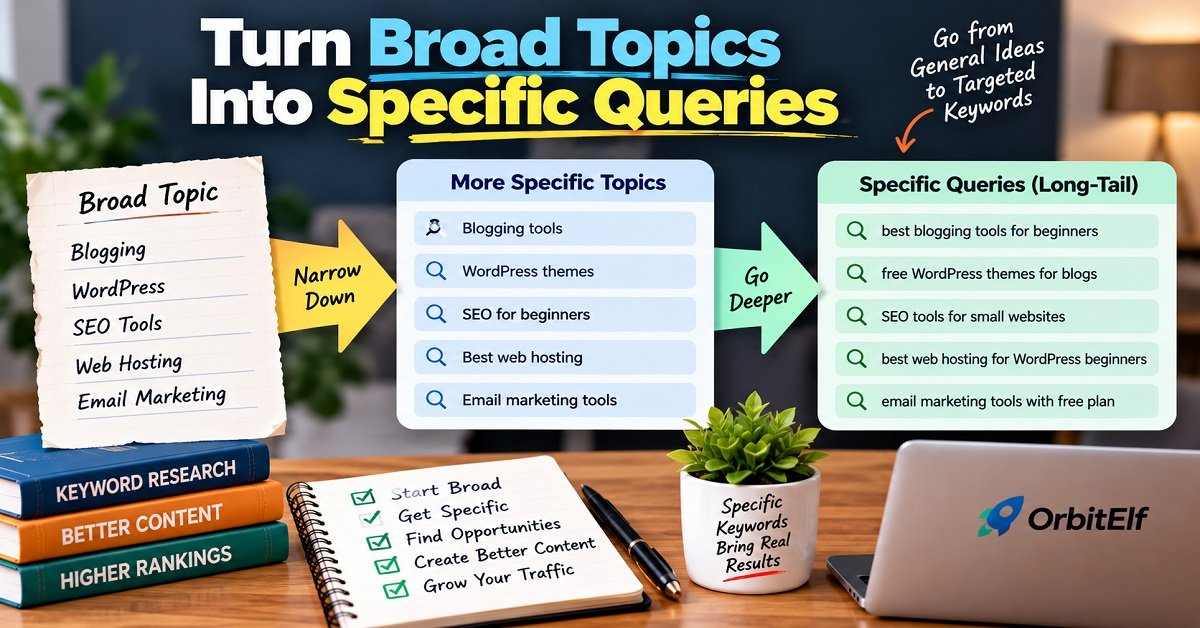
3. Turn Broad Topics Into Specific Queries
Instead of targeting “WordPress,” narrow your research.
For example:
best WordPress plugins for beginners
Now the audience and intent are much clearer.
4. Check Search Intent
Ask what the searcher wants.
Do they want:
- A guide?
- A comparison?
- A review?
- A product?
- A tutorial?
Create the type of page that actually satisfies the query.
5. Check Competition
Use your keyword tool to get an initial difficulty estimate.
Then manually inspect Google.
6. Look for SERP Opportunities
Check whether smaller websites are ranking.
Look for outdated or incomplete content.
Look for questions that aren’t being answered properly.
7. Evaluate the Value
Ask whether the keyword is relevant to your audience and website goals.
8. Create the Best Useful Resource You Can
Don’t write 2,000 words just because your competitor wrote 2,000 words.
Write as much as necessary to solve the reader’s problem properly.
9. Monitor the Results
After publishing, use Google Search Console and your analytics data to see which queries your page starts appearing for.
These new queries can become opportunities for future updates or supporting content.
Don’t Forget Google Search Console
Google Search Console isn’t usually considered a traditional keyword research tool, but it can become extremely valuable once your website starts receiving search impressions.
Why?
Because you’re no longer working entirely with estimates.
You can see actual search queries for which Google showed your pages.
Suppose you publish an article targeting:
best blogging tools
A few weeks later, Search Console might show that your page is also receiving impressions for:
- best blogging tools for beginners
- tools every blogger needs
- blogging tools for SEO
- free tools for bloggers
Those queries can tell you what Google users are actually associating with your content.
You can use this information to improve the existing article or plan related content.
This is one reason SEO should be treated as an ongoing process rather than something you finish when you click Publish.
Keyword Research Mistakes That Can Hurt Your Content Strategy
Even the best keyword research tool won’t help if you use the data incorrectly.
Here are some mistakes worth avoiding.
1. Choosing Keywords Only Because of Search Volume
A large number doesn’t guarantee traffic or conversions.
2. Ignoring Search Intent
If your content doesn’t match what the searcher wants, ranking can be difficult even if your keyword research looks perfect.
3. Trusting Keyword Difficulty Too Much
Difficulty is an estimate.
Always look at the actual SERP.
4. Targeting Extremely Broad Keywords
Broad keywords often have huge competition and vague intent.
More specific searches can sometimes provide better opportunities.
5. Creating Thin Articles for Every Keyword Variation
Several closely related keywords can often be covered by one comprehensive resource.
6. Stuffing Keywords Into Your Content
Using a keyword repeatedly doesn’t make an article more relevant.
Write naturally and cover the subject thoroughly.
7. Ignoring Existing Content
Sometimes your best SEO opportunity is improving an article you already have rather than publishing another one.
8. Forgetting the Reader
SEO should help people find useful content.
It shouldn’t become an excuse to write content that feels unnatural or repetitive.
How to Use Keyword Research for Affiliate Content
Keyword research becomes especially interesting when your website earns money through affiliate marketing.
Not every keyword has the same commercial value.
Compare:
“what is a wireless earbud?”
with:
“best wireless earbuds under ₹5,000”
The first search is primarily informational.
The second shows stronger commercial investigation.
Someone searching for the second query is likely comparing products before making a purchase.
That doesn’t mean informational content is useless.
Informational articles can introduce readers to your website and help establish topical authority.
You can then naturally connect relevant informational content to commercial resources when it genuinely helps the reader.
For example:
What Is ANC in Earbuds?
could naturally link to:
Best ANC Earbuds Under ₹5,000
The important word is naturally.
Don’t turn every article into a sales page.
Readers should be able to get the information they came for without feeling pressured to buy something.
Keyword Research Should Influence Your Content Strategy
One of the biggest benefits of keyword research is that it can help you decide what to write next.
Instead of asking:
“What should I publish this week?”
you can build a list of potential topics based on:
- Audience needs
- Search demand
- Competition
- Existing content
- Business value
- Content gaps
You can then prioritize them.
For example:
| Topic | Search Demand | Competition | Audience Relevance | Priority |
|---|---|---|---|---|
| Broad SEO | High | Very High | High | Low |
| SEO for beginners | High | High | High | Medium |
| SEO checklist for new blogs | Moderate | Lower | Very High | High |
| Free SEO tools for bloggers | Moderate | Moderate | Very High | High |
These aren’t universal metrics. They’re simply an example of how you can think about prioritization.
The best keyword isn’t necessarily the one with the largest search volume.
It’s often the one where demand, relevance, competition and usefulness overlap.
Pros and Cons of Using Keyword Research Tools
Pros
- Help you discover new content ideas
- Make keyword research faster
- Show estimated search demand
- Help identify long-tail keywords
- Make competitor research easier
- Help organize large keyword lists
- Can reveal content gaps
- Help you build a more focused content strategy
Cons
- Search-volume data is estimated
- Different tools can show different numbers
- Keyword difficulty isn’t a guarantee of ranking
- Premium tools can be expensive
- Large amounts of data can become overwhelming
- Tools cannot fully understand your audience for you
- They cannot guarantee traffic or conversions
The biggest advantage of these tools is better decision-making.
The biggest mistake is treating their metrics as absolute truth.
Frequently Asked Questions
What is the best keyword research tool?
There isn’t one universal winner.
Google Keyword Planner is a good starting point for beginners, while Ahrefs and Semrush are better suited to advanced SEO and competitor research. Ubersuggest and KWFinder can be useful for bloggers who want a simpler experience, while LowFruits is worth considering when low-competition opportunities are the main priority.
What is the best free keyword research tool?
Google Keyword Planner and Google Trends are two of the most useful free resources to start with.
You can also use Google Search itself to examine autocomplete suggestions, related searches, questions and the current SERP.
If your website already receives organic traffic, Google Search Console is another valuable source of keyword data.
Is Google Keyword Planner good for SEO?
Yes, but remember that Google Keyword Planner was designed primarily for Google Ads.
It can be useful for discovering keyword ideas and understanding estimated search demand, but it isn’t a complete organic SEO platform.
For detailed competitor research, backlink analysis and SERP research, you may need a dedicated SEO tool.
Are paid keyword research tools worth it?
They can be, particularly when your website depends heavily on organic traffic or you spend a lot of time doing keyword and competitor research manually.
For a brand-new website, however, you may be able to get started with free tools.
The right time to upgrade is when the additional data and time savings justify the cost.
How do I find low-competition keywords?
Start with a broad topic, generate specific keyword ideas, check keyword difficulty and then manually inspect the Google search results.
Look for relevant queries where smaller websites rank and where existing results have weaknesses you can genuinely improve upon.
Specialized tools such as LowFruits can also help identify potential low-competition opportunities.
How many keywords should I target in one article?
There is no fixed number.
Choose one main topic or primary keyword and naturally cover closely related questions and subtopics.
Don’t create an article around a specific keyword count.
Create the most useful page for the searcher’s intent.
Should every keyword have its own article?
No.
If several keywords have almost identical search intent, one comprehensive article may be better than several thin articles.
Before creating a new page, check whether an existing article on your website could satisfy that search.
Can I do keyword research without paying for a tool?
Yes.
A combination of Google Search, Google Keyword Planner, Google Trends and Google Search Console can provide a strong starting point.
Paid tools mainly become valuable when you need more data, automation, competitor research and efficiency.
Our Recommended Keyword Research Approach
If you’re building a new website, here’s the approach I’d recommend.
Start free.
Learn the fundamentals with Google Search, Keyword Planner, Trends and Search Console.
Once you understand search intent and SERP analysis, consider adding a dedicated tool based on your needs.
If you want advanced competitor and SEO research, look at Ahrefs or Semrush.
If you’re a blogger looking for a simpler approach, consider Ubersuggest or KWFinder.
If finding low-competition opportunities is your biggest challenge, LowFruits is worth investigating.
And if your biggest problem is generating questions and content ideas, AnswerThePublic can complement your main keyword tool.
You don’t need all of them.
In fact, subscribing to several overlapping SEO platforms can be a waste of money.
Choose the tool that solves your biggest SEO problem.
Final Verdict: Which Keyword Research Tool Should You Choose?
The best keyword research tool isn’t necessarily the one with the largest database or the most features.
It’s the one that helps you make better content decisions.
If you’re a beginner, start with free Google tools and learn how keyword research actually works.
If you’re running a growing blog, a simpler paid platform such as Ubersuggest or KWFinder may provide a good balance between features and ease of use.
If SEO is a major part of your business and you need detailed competitor, keyword and SERP research, Ahrefs or Semrush are stronger choices.
And if your primary goal is finding realistic opportunities for a smaller website, a specialist tool such as LowFruits can be particularly useful.
But whichever tool you choose, remember this:
A keyword tool can find opportunities. It cannot create a successful article for you.
The real advantage comes from combining keyword data with search intent, SERP analysis, your knowledge of the audience and genuinely helpful content.
That’s what turns keyword research into an SEO strategy.
The Simple Formula to Remember
Find the keyword → Understand the intent → Check the competition → Study Google → Create something genuinely useful → Measure → Improve
You don’t need to chase every keyword.
You don’t need the most expensive SEO subscription.
And you don’t need to publish hundreds of articles.
You need to find the right topics for the right audience and create content that deserves to be found.
For a new blogger, that can be enough to build a solid SEO foundation and gradually turn search traffic into a valuable audience.
Quick Takeaway
If you only remember a few things from this guide, remember these:
- Google Keyword Planner is a good starting point for keyword ideas.
- Google Trends helps you understand changing search interest.
- Ahrefs is a strong option for advanced keyword and competitor research.
- Semrush is useful when you want an all-in-one SEO platform.
- Ubersuggest is worth considering for beginners and budget-conscious users.
- KWFinder is useful if you prefer a simple keyword research experience.
- LowFruits can help when finding low-competition opportunities is your priority.
- AnswerThePublic is useful for discovering questions and content ideas.
- Don’t choose keywords based only on search volume.
- Always consider search intent and the actual Google SERP.
- A low keyword difficulty score does not guarantee rankings.
- You don’t need to pay for an expensive tool when you’re just starting.
- The best keyword research strategy combines tool data with human judgment.
Your keyword research tool is only as good as the decisions you make with its data.