
SEO for beginners can feel confusing at first, especially when you come across terms like keywords, search intent, crawling, indexing, backlinks, technical SEO and Core Web Vitals.
You don’t.
SEO becomes much easier when you understand what Google is trying to do and what your website needs to do in response.
In this complete SEO guide for beginners, we’ll start from the basics and gradually move into practical SEO. You’ll learn how Google discovers and ranks pages, how to choose keywords, create useful content, optimize your pages, build internal links, understand technical SEO, use Google Search Console and measure whether your efforts are actually working.
Most importantly, you’ll learn what you should focus on first and what you don’t need to worry about yet.
If you’re completely new to SEO, let’s start with the most basic question.
If you’re also new to websites themselves, our web hosting guide for beginners explains domains, servers, hosting and how a website actually works.
What Is SEO?
SEO stands for Search Engine Optimization.
Google also provides its own SEO Starter Guide covering the fundamentals of making websites easier for search engines to crawl, index and understand.
In simple terms, SEO is the process of improving your website and its content so that search engines can understand it and people can discover it when they search for information related to your topic.
Let’s say you have a website about web hosting.
You publish an article called:
“Shared vs VPS vs Cloud Hosting: Which Is Best for You?”
Someone searches Google for:
“shared vs VPS vs cloud hosting”
Google has to decide which pages are relevant and useful enough to show for that search.
SEO helps Google understand what your page is about and helps your page provide a good experience for the person who clicks on it.
But there is an important distinction.
SEO is not about tricking Google into ranking your website.
Good SEO starts with creating something genuinely useful for the person searching.
Google’s current guidance describes SEO as useful when it is applied to people-first content rather than content created primarily to manipulate search rankings. Its systems are designed to prioritize helpful, reliable information created for people.
Think of SEO as helping three things work together:
Your content → Search engine → Searcher
Your content needs to answer the searcher’s question.
Google needs to understand that content.
And the searcher needs to recognize that your result is relevant enough to click.
That is the basic idea behind SEO.
Why Does SEO Matter?
You can have an excellent website and still receive very little traffic if people don’t discover it.
Imagine that you have spent weeks writing a detailed article about choosing web hosting.
The article is accurate.
It is easy to read.
It contains useful examples.
You even created attractive images for it.
But if nobody can find it, very few people will benefit from it.
This is where search engines become important.
People use Google every day to find:
- Answers to questions
- Products
- Services
- Reviews
- Tutorials
- Comparisons
- Businesses
- Recipes
- News
- Courses
- Software
- Hosting providers
- Solutions to problems
If your website appears when someone searches for a topic you cover, you have an opportunity to bring that person to your website.
And unlike advertising, you don’t normally pay Google for each organic click.
That doesn’t mean SEO is free. You still spend time, money or both creating content, improving your website, researching topics and maintaining it.
But organic search can become a valuable source of visitors over the long term.
How Does Google Search Work?
Before learning individual SEO techniques, you should understand what Google actually does with a webpage.
Google describes Search as a three-stage process:
Crawling → Indexing → Serving search results
Not every page necessarily makes it through every stage.
Let’s make those terms simple.
1. Crawling
Google uses automated programs called crawlers to discover pages on the web.
Google’s crawler is commonly known as Googlebot.
It can discover a page through links from other pages, sitemaps and other ways of finding URLs.
For example, imagine you publish:
example.com/best-web-hosting-for-beginners/
Google may discover that URL through:
- A link from another page on your website
- A link from another website
- Your XML sitemap
- Other known URLs or signals
The crawler then visits the page and retrieves its content.
2. Indexing
After Google crawls a page, it analyzes the content and other information it can access.
If Google determines that the page is eligible for indexing, information about it can be stored in Google’s index.
Think of the index as a massive library catalog.
Google doesn’t need to search the entire internet from scratch every time someone enters a query.
It can use information it has already discovered and stored.
However, being indexed doesn’t guarantee that your page will rank highly.
This is a very important distinction for beginners.
You can have a page that is:
Published → Crawled → Indexed
and still receive very few clicks from Google.
3. Serving Search Results
When someone enters a search query, Google looks at its available information and tries to return relevant results.
For example, if someone searches:
“what is VPS hosting?”
Google needs to identify pages that can answer that question.
A page explaining VPS hosting clearly is likely to be more relevant to that query than a page selling unrelated headphones.
This sounds obvious, but it leads to one of the most important principles in SEO:
You need to understand what the searcher is actually trying to accomplish.
We’ll explore that concept in detail when we discuss search intent.
Does Google Automatically Find Every New Website?
No.
Google automatically discovers a huge number of pages, and you generally don’t need to manually submit every URL. But Google also says that it cannot guarantee that every page will be crawled, indexed or served in search results.
This is why technical SEO matters.
If Google cannot properly access or understand your website, even excellent content can have difficulty getting visibility.
For a normal website, you don’t need to become an expert in crawling systems.
You simply need to make sure that important pages are accessible and that you haven’t accidentally blocked search engines from reaching them.
We’ll cover this later in the technical SEO section.
SEO vs Google Ads: What’s the Difference?
SEO and paid search can both bring visitors from Google, but they work differently.
SEO
With SEO, you work to earn visibility in Google’s organic search results.
You create useful content, improve your website, understand what people search for and build your site’s overall usefulness and credibility.
You don’t pay Google for every organic click.
But SEO usually requires time and ongoing effort.
Google Ads
With Google Ads, you pay to advertise your products, services or pages through Google’s advertising system.
You can potentially get visibility much faster, but advertising costs money as you run campaigns.
If you stop paying for the campaign, the paid traffic generally stops as well.
Which Is Better?
Neither is automatically better.
They serve different purposes.
For example, a new business might use paid advertising to get immediate visibility while building its organic search presence over time.
A blogger may focus primarily on SEO because their goal is to build long-term organic traffic.
An online store might use both.
The important thing is to understand that SEO is not a replacement for every other marketing channel.
It is one part of a broader traffic strategy.
How Long Does SEO Take to Work?
This is probably one of the first questions every SEO beginner asks.
“If I publish an article today, when will it rank?”
There is no universal answer.
Some pages may start appearing in search results relatively quickly.
Others may take much longer.
Google itself says that when improvements are made to a website, some changes can be reflected within days, while other changes can take several months for its systems to recognize and assess. There is also no guarantee that a particular SEO change will produce a noticeable ranking improvement.
Several things can affect how quickly a page gains visibility.
Your Website’s History
A completely new website generally has less history and fewer established signals than a website that has been publishing useful content for years.
That doesn’t mean a new website cannot rank.
It simply means you shouldn’t expect a new domain to behave like an established site immediately.
Competition
If you’re targeting a search where thousands of strong pages already exist, it can be difficult to gain visibility.
If you’re answering a specific question that is poorly covered, your opportunity may be better.
Search Intent
If your article doesn’t satisfy what the searcher wants, having the keyword in the title won’t save it.
For example, someone searching:
“best VPS hosting for beginners”
probably wants recommendations and comparisons.
Giving them a 2,000-word technical explanation of how virtualization works may not satisfy their intent.
Content Quality
Google’s people-first guidance encourages content that provides substantial, complete and original value rather than content produced primarily to attract search traffic.
This doesn’t mean every article needs to be extremely long.
It means the article should be as complete as necessary to solve the reader’s problem.
Your Website’s Overall Quality
A single excellent article can rank, but SEO is not always about individual pages.
Your site’s structure, technical health, internal linking, content quality and overall trust can also matter.
This is why SEO should be treated as an ongoing process rather than a one-time optimization task.
SEO Is Not a One-Time Task
One of the biggest misconceptions beginners have is that SEO works like this:
Research keyword → write article → add keyword → publish → rank forever.
Real websites don’t work that way.
Search results change.
Competitors publish new content.
Existing articles get updated.
People’s search behavior changes.
Products and services change.
Google’s systems evolve.
An article that performs well today may need improvement later.
That doesn’t mean you should constantly rewrite everything.
It means you should monitor your important pages and improve them when there is a genuine reason to do so.
For example, suppose you publish an article about the best hosting plans.
Six months later:
- Some hosting plans have changed
- Prices are different
- New competitors have appeared
- Your article is receiving impressions but fewer clicks
- Google Search Console shows new queries you weren’t targeting
That’s a legitimate reason to review and improve the article.
Changing the publication date without substantially improving the content isn’t the same thing as keeping an article genuinely up to date. Google’s guidance specifically warns against changing dates merely to make content appear fresh.
What SEO Can and Cannot Do
It’s important to set realistic expectations before you spend months learning SEO.
SEO Can Help You:
- Make your content easier for search engines to understand
- Help relevant users discover your pages
- Improve the structure of your website
- Build organic search visibility
- Bring targeted visitors to useful content
- Support business, affiliate and e-commerce goals
- Build long-term visibility around topics you cover well
SEO Cannot Guarantee:
- First position on Google
- A specific number of visitors
- Immediate rankings
- Guaranteed indexing
- Guaranteed sales
- Guaranteed affiliate commissions
- Permanent rankings
There is no secret SEO setting that guarantees a number-one position.
Google explicitly says it doesn’t guarantee that pages will be crawled, indexed or served in search results, even when websites follow its Search Essentials guidance.
This is actually good news.
It means you don’t need to chase some mythical “perfect SEO score.”
Your goal should be to build the best useful page you reasonably can for the person searching.
What Does “People-First SEO” Mean?
You may have noticed that Google repeatedly uses the phrase people-first content.
Google explains its people-first approach in more detail in its guide to creating helpful, reliable, people-first content.
What does that actually mean?
Imagine two websites.
Website A
The owner finds keywords with high search volume and produces hundreds of articles mainly because those keywords appear profitable.
The articles repeat information already available elsewhere.
They contain lots of keywords but little original value.
The main goal is getting search traffic.
Website B
The owner has a clear audience.
They understand the subjects they cover.
They research topics people genuinely need help with.
They add original explanations, examples, experience and useful information.
They improve articles when information changes.
They create content because their audience would find it useful even if Google didn’t exist.
Website B is following a much more people-first approach.
Google’s current guidance asks creators to consider whether they have an intended audience, whether their content demonstrates first-hand expertise and depth, whether the site has a clear purpose, and whether readers leave feeling they learned enough to achieve their goal.
That gives us a useful rule:
Create something worth reading first. Optimize it for search second.
SEO and people-first content aren’t opposites.
Good SEO should help the right people find genuinely useful content.
What Is E-E-A-T?
You will come across the term E-E-A-T frequently when learning SEO.
It stands for:
Experience
Expertise
Authoritativeness
Trustworthiness
Google explains that E-E-A-T is not itself a single ranking factor. Instead, Google’s systems use a mix of signals that can help identify content demonstrating these qualities. Google also says that trust is the most important part, while experience, expertise and authoritativeness contribute to trust.
Let’s make each term simple.
Experience
Have you actually experienced or used what you’re talking about?
For example, someone reviewing a web hosting service after actually using it can provide first-hand observations that a person who has only copied specifications cannot.
For a tutorial, experience might mean actually going through the process yourself.
Expertise
Do you understand the subject?
You don’t necessarily need a formal degree for every topic.
Expertise can come from knowledge, experience, research and demonstrated understanding.
Authoritativeness
Is there evidence that the author or website is a reliable source on the subject?
A site that consistently produces useful, accurate content about a particular topic can build authority over time.
Trustworthiness
Can the reader trust what you’re telling them?
This is particularly important.
Trust can be supported by things such as:
- Clear authorship
- Accurate information
- Transparent sources
- First-hand experience where appropriate
- Clear contact information
- An About page
- Honest affiliate disclosures
- Correcting errors
- Avoiding exaggerated claims
For websites dealing with topics that can significantly affect people’s health, finances or safety, Google says its systems place even more weight on strong E-E-A-T.
Who, How and Why Matter
Google’s current people-first guidance gives a useful way to evaluate your content:
Who created it?
How was it created?
Why was it created?
Who Created the Content?
Make it reasonably clear who wrote or reviewed the article.
A byline and useful author information can help readers understand who is behind the content. Google specifically recommends accurate authorship information where readers would expect it.
How Was It Created?
For some content, explaining the process can build trust.
For example, a product review might explain:
- Whether the product was actually tested
- How it was tested
- What was measured
- How long it was used
- What evidence supports the conclusions
For informational content, the process might involve research, practical experience and checking information against reliable sources.
Why Was It Created?
This may be the most important question.
Why did you publish the article?
If the answer is:
“Because my readers need this information.”
that’s a strong starting point.
If the answer is:
“Because this keyword has 10,000 searches per month and I want traffic.”
you should take a step back.
Search demand can absolutely help you decide what to write about.
But the reason for creating the content should ultimately be to provide value to the reader, not simply to manufacture pages for search engines. Google’s guidance makes this distinction explicitly.
Is SEO Difficult for Beginners?
SEO has a lot of terminology, but the underlying ideas are easier than they first appear.
At a high level, you need to understand five things:
1. What are people searching for?
That’s keyword research and search intent.
2. Can you create something genuinely useful for that search?
That’s content quality.
3. Can Google access and understand your page?
That’s technical SEO.
4. Can people and search engines understand how your pages relate to each other?
That’s site structure and internal linking.
5. Are people finding and responding to your content?
That’s where Search Console, Analytics and other measurement tools become useful.
You don’t need to master all five on your first day.
Start with the basics and improve gradually.
The SEO Journey We’ll Follow
From here, we’ll build your understanding step by step.
First, we’ll look at keywords and search intent, because you need to understand what people are looking for before creating content.
Then we’ll move into creating SEO-friendly content.
After that, we’ll cover on-page SEO, including titles, headings, URLs, images and internal links.
Then we’ll move into technical SEO, where we’ll explain crawling, indexing, sitemaps, robots.txt, HTTPS, page speed and other technical concepts without drowning you in unnecessary jargon.
Finally, we’ll cover off-page SEO, Google Search Console, SEO measurement, content updates, E-E-A-T, AI and SEO, useful tools and a practical SEO checklist.
By the end, you should have something much more valuable than a collection of SEO definitions.
You’ll have a practical framework you can use whenever you publish or improve a page.
And the next step is one of the most important parts of that framework:
Before you write an article, you need to understand what people are actually searching for and what they expect to find.
That’s where keyword research and search intent come in.
Keyword Research and Search Intent
Now that you understand what SEO is and how Google discovers and processes webpages, we can move to one of the most important parts of SEO:
Understanding what people actually search for.
You can write the most detailed article on the internet, but if you don’t understand what your potential reader is looking for, you may end up creating the wrong content.
For example, imagine you want to write about web hosting.
You could publish an article titled:
“Everything You Need to Know About Servers”
But someone searching for:
“best hosting for beginners”
is probably not looking for a technical explanation of how servers work.
They want to know which hosting option they should choose.
This difference is called search intent.
And before we get into search intent, let’s understand keywords.
What Is a Keyword?
A keyword is a word or phrase that people enter into a search engine when they are looking for something.
For example:
- web hosting
- best web hosting for beginners
- what is VPS hosting
- how to start a blog
- SEO tools for beginners
- how to optimize a WordPress website
These are all search terms that can be considered keywords.
The word “keyword” can make it sound like you need to find one magical phrase and put it into your article repeatedly.
That’s not how modern SEO should work.
A better way to think about a keyword is:
A keyword represents what someone is looking for.
Your job is to understand the need behind that search.
Short Keywords vs Long-Tail Keywords
Keywords can be broad or very specific.
Broad Keywords
Examples:
- SEO
- hosting
- headphones
- smartphones
- blogging
These searches can have a large amount of demand, but they are often extremely broad.
Someone searching for “SEO” could be looking for:
- An SEO definition
- SEO tools
- SEO courses
- SEO services
- SEO news
- An SEO checklist
- Technical SEO information
You don’t know exactly what they want.
Long-Tail Keywords
Long-tail keywords are generally more specific search phrases.
Examples:
- SEO for beginners
- how to do SEO for a new website
- best SEO tools for beginners
- shared vs VPS vs cloud hosting
- best shared hosting for WordPress beginners
These searches may have less search volume than extremely broad terms, but they can provide much clearer information about what the searcher wants.
For a new website, specific topics can often be easier to target than extremely broad keywords.
But don’t make the mistake of assuming that every long keyword is automatically easy to rank for.
Competition and search intent still matter.
What Is Search Intent?
Search intent is the reason behind a person’s search.
When someone types something into Google, what are they actually trying to accomplish?
Understanding that is one of the most important skills in SEO.
Let’s take the search:
“VPS hosting”
The person might simply want to know what VPS hosting means.
Or they might be looking for hosting providers.
Or they might be ready to buy.
The phrase alone doesn’t always tell you enough.
Now compare it with:
“what is VPS hosting?”
The intent is much clearer.
The person probably wants an explanation.
Compare that with:
“best VPS hosting for beginners”
Now the person is probably comparing options.
And:
“buy VPS hosting”
shows much stronger transactional intent.
The keyword changes slightly, but the expected content changes significantly.
The Four Common Types of Search Intent
Search intent is often grouped into four broad categories.
1. Informational Intent
The person wants to learn something.
Examples:
- What is SEO?
- How does VPS hosting work?
- What is an XML sitemap?
- How does Google Search work?
- How to compress images for a website
These searches are usually best answered with:
- Guides
- Tutorials
- Explanations
- How-to articles
- Educational content
For example, someone searching:
“what is shared hosting?”
probably doesn’t want a product comparison table at the beginning.
They first want an understandable explanation.
2. Commercial Investigation
The person is researching options before making a decision.
Examples:
- Best hosting for beginners
- Shared vs VPS hosting
- Best SEO tools
- Ahrefs vs Semrush
- Best WordPress hosting
- Best headphones under ₹5,000
This type of search is extremely important for affiliate websites.
The reader isn’t necessarily ready to buy immediately, but they are evaluating options.
A useful article might include:
- Comparisons
- Pros and cons
- Pricing
- Features
- Who each option is suitable for
- Real-world considerations
- Alternatives
- Buying advice
3. Transactional Intent
The person is ready to take an action.
Examples:
- Buy VPS hosting
- Buy domain name
- Semrush pricing
- Purchase WordPress hosting
- Download SEO software
These searches often lead to:
- Product pages
- Pricing pages
- Service pages
- Signup pages
Trying to satisfy a transactional search with a generic 3,000-word informational article may not be the best approach.
4. Navigational Intent
The person is trying to reach a particular website, page or service.
Examples:
- Google Search Console
- Amazon
- YouTube
- OpenAI login
- Hostinger login
If someone searches for a specific website or service, they may already know where they want to go.
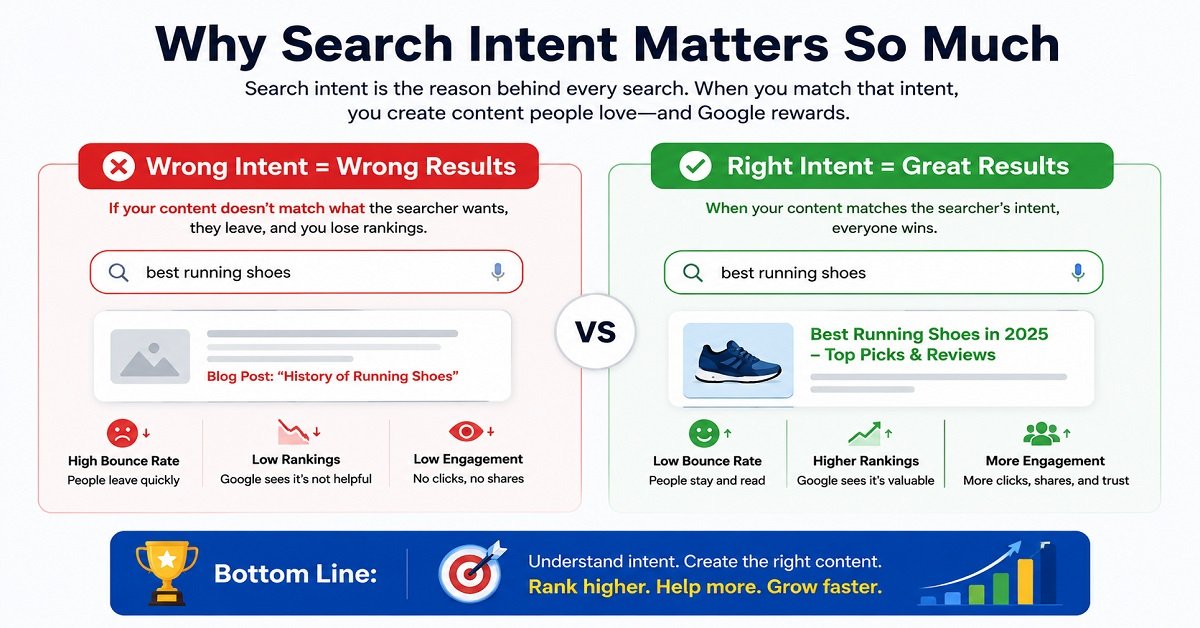
Why Search Intent Matters So Much
Imagine you search:
“best SEO tools for beginners”
You click the first result.
Instead of seeing a comparison of SEO tools, the page starts with 2,500 words explaining what SEO means.
You probably won’t stay.
The article may technically contain the words “best SEO tools for beginners.”
But it doesn’t satisfy your reason for searching.
That’s the problem with optimizing only for keywords.
The keyword tells you what someone typed. Search intent helps you understand what they wanted.
A strong SEO strategy considers both.
How to Identify Search Intent
You don’t always need expensive SEO software to understand intent.
One of the simplest methods is:
Search Google yourself.
Take the keyword you’re considering and look at the results.
For example, suppose you want to target:
“best hosting for bloggers”
Search that phrase.
Look at the first page.
Are most results:
- Listicles?
- Reviews?
- Comparison articles?
- Product pages?
- Tutorials?
- Definitions?
The search results themselves provide useful clues about what Google believes searchers are looking for.
If the first page is dominated by comparison and recommendation articles, creating a simple definition article probably won’t match the dominant intent very well.
If the first page consists mostly of detailed guides, a product-focused page may not be appropriate.
Study the Top Results, But Don’t Copy Them
Looking at competing pages is useful.
But there’s an important difference between researching the search results and copying the search results.
Study them to understand:
- What questions they answer
- How they structure their content
- What topics are commonly covered
- What information readers seem to need
- Where the existing results may be weak
Then create something genuinely useful in your own way.
The goal isn’t:
“How can I rewrite the top result?”
The better question is:
“What does someone searching this topic actually need, and how can I provide that clearly?”
What Is Keyword Research?
Keyword research is the process of finding and evaluating search terms that are relevant to your website and audience.
It helps you discover:
- What people are searching for
- How they phrase their questions
- Which topics have demand
- How competitive a topic may be
- What search intent exists behind a query
- Which topics could bring valuable visitors to your website
But keyword research shouldn’t become a numbers game.
You aren’t trying to collect thousands of keywords.
You’re trying to identify useful topics that are worth creating content about.
How to Do Keyword Research as a Beginner
You can start without paying for an expensive SEO platform.
Here’s a simple process.
Step 1: Start With a Broad Topic
Suppose your website is about blogging and websites.
You might start with:
SEO
That’s too broad to immediately turn into one article.
So you explore related questions and topics.
You might find:
- SEO for beginners
- keyword research
- on-page SEO
- technical SEO
- internal linking
- Google Search Console
- SEO content writing
Now you have several potential topics.
Step 2: Use Google Search Suggestions
Start typing a phrase into Google.
For example:
SEO for
Google may suggest searches such as:
- SEO for beginners
- SEO for small business
- SEO for WordPress
- SEO for bloggers
These suggestions can give you ideas based on actual search behavior.
They’re not a complete keyword research strategy, but they’re a useful starting point.
Step 3: Look at Related Searches
After searching Google, look for related searches.
These can reveal additional ways people search for the same general topic.
For example, someone interested in SEO for beginners may also be interested in:
- how SEO works
- how to do SEO
- SEO checklist
- SEO tools
- keyword research
You can use these ideas to build a broader content plan.
Step 4: Study the Search Results
Look at the pages ranking for your target phrase.
Ask:
What type of content is ranking?
What questions are those pages answering?
Are the results mostly beginner-friendly or highly technical?
Do searchers appear to want information, comparisons or products?
This is where keyword research and search-intent research overlap.
Step 5: Check Search Demand
Keyword tools can show estimated search volume.
For example, tools such as Google Keyword Planner, Google Trends, Ahrefs, Semrush and Ubersuggest can provide different types of keyword data.
But don’t treat the search-volume number as a guarantee of traffic.
A keyword showing 10,000 searches per month doesn’t mean your page will receive 10,000 visits.
You may rank below the top results.
People may click other results.
Searches may produce features that answer the question directly.
And search volume estimates themselves aren’t exact measurements of future traffic.
Use the number as one piece of information, not as the entire decision.
Search Volume Isn’t Everything
This is one of the biggest lessons beginners need to learn.
Suppose you have two keyword ideas:
Keyword A: 20,000 monthly searches
Keyword B: 500 monthly searches
At first glance, Keyword A looks much better.
But imagine that Keyword A is extremely competitive and your website has little chance of ranking near the top.
Keyword B may be much more specific and closely related to what your website offers.
If you rank well for Keyword B and the visitors are highly relevant, those 500 searches could be more valuable to your website.
For example:
“SEO”
is extremely broad.
But:
“SEO checklist for a new WordPress blog”
is much more specific.
A smaller audience with a strong need can be more useful than a huge audience with unclear intent.
Search Volume vs Traffic Potential
These aren’t exactly the same thing.
A page can rank for dozens or even hundreds of related searches.
For example, an article targeting:
“SEO for beginners”
might also appear for searches such as:
- SEO basics
- beginner SEO guide
- how to start SEO
- SEO guide for beginners
- how to do SEO
That’s why you shouldn’t obsess over targeting every variation separately.
A comprehensive page can naturally rank for many related queries when it genuinely covers the subject.
What Is a Primary Keyword?
Your primary keyword is the main search phrase or topic you’re targeting with a page.
For example:
Primary keyword: SEO for beginners
The article can naturally cover related concepts such as:
- SEO basics
- how SEO works
- keyword research
- search intent
- on-page SEO
- technical SEO
You don’t need to create a separate article for every tiny variation.
The primary keyword gives the page a clear central topic.
What Are Secondary Keywords?
Secondary keywords are closely related terms, questions and subtopics that help you cover the main subject comprehensively.
For our SEO guide, examples might include:
- what is SEO
- SEO basics
- how SEO works
- beginner SEO guide
- on-page SEO
- technical SEO
- SEO keywords
- search intent
- SEO checklist
Notice something important.
We aren’t trying to force all of these phrases into every paragraph.
They naturally appear because they are relevant to the subject.
That’s the right way to think about related keywords.
Should You Use the Exact Keyword Everywhere?
No.
This is one of the most common beginner mistakes.
Imagine an article targeting:
“best hosting for beginners”
A beginner might write:
Best hosting for beginners is important because the best hosting for beginners should provide the best hosting for beginners features.
It sounds unnatural.
Nobody wants to read it.
Instead, write naturally:
If you’re building your first website, look for hosting that is affordable, easy to manage and gives you enough resources to get started.
Google doesn’t need you to repeat the exact phrase dozens of times to understand the topic.
Your readers certainly don’t want that.
What Is Keyword Stuffing?
Keyword stuffing means excessively adding keywords to a page in an attempt to manipulate search rankings.
For example:
“Our best web hosting is the best web hosting for beginners because this best web hosting for beginners plan is the best hosting for beginner websites.”
It makes the writing terrible.
Google considers keyword stuffing a spam practice. Its Search Essentials specifically advises against keyword stuffing and other tactics intended to manipulate rankings. (developers.google.com)
The solution is simple:
Write naturally.
Use your primary topic where it makes sense.
Use related terms when they genuinely help explain the subject.
Don’t count how many times you’ve used the keyword.
How Many Keywords Should You Use in an Article?
There is no magic number.
You don’t need:
“Use the keyword exactly 11 times.”
That isn’t how you should approach modern SEO.
Instead, ask:
Have I clearly covered the topic and answered the questions the searcher is likely to have?
If yes, your keyword usage will usually happen naturally.
For a 2,000-word article, the number of times a keyword appears is far less important than whether the article actually satisfies the searcher’s needs.
How to Choose the Right Keyword
When choosing a keyword, consider at least these six things.
1. Relevance
Does the topic genuinely relate to your website?
If your website is about web hosting, writing an article about celebrity gossip simply because it has high search volume isn’t a sensible SEO strategy.
2. Search Intent
Can you create the type of content the searcher expects?
If people want a comparison and you create a dictionary-style definition, you’re starting with a mismatch.
3. Competition
How strong are the pages currently ranking?
Look at:
- Content quality
- Website authority
- Topic coverage
- Backlinks where relevant
- Search intent
- Freshness
- First-hand experience
Don’t assume a high-authority website automatically makes a keyword impossible.
Look for weaknesses in the current results.
4. Search Demand
Are enough people searching for the topic to make it worthwhile?
The answer doesn’t always need to be a huge number.
A small but highly relevant audience can still be valuable.
5. Business Value
Could the visitor eventually help you achieve your website’s goal?
For an affiliate website, that might mean someone researching a product.
For a software website, it could be someone looking for a solution.
For a blog, it might simply be building a loyal audience.
6. Your Ability to Add Value
This is often forgotten.
Ask:
Can I create something genuinely better or more useful than what’s already available?
If the answer is no, don’t automatically create the page just because the keyword has search volume.
Maybe the better opportunity is to approach the topic from a different angle.
Don’t Build Your Entire Website Around Keywords
Keywords are useful.
But your website shouldn’t become a collection of isolated keyword-targeted pages.
Imagine this structure:
- Best hosting
- Best hosting India
- Best hosting for beginners
- Best hosting for blogs
- Best hosting for WordPress
- Best hosting for small businesses
- Best affordable hosting
Some of these may deserve separate pages.
Others may be variations that could be handled within a stronger, more comprehensive article.
Creating separate pages for every tiny variation can lead to unnecessary duplication and thin content.
Instead, think in terms of topics and audiences.
What Is a Topic Cluster?
A topic cluster is a group of related articles that collectively cover a broad subject.
For example, OrbitElf could have:
Pillar article
SEO for Beginners: Complete Guide
Then supporting articles:
- Keyword Research for Beginners
- Search Intent Explained
- On-Page SEO Guide
- Technical SEO for Beginners
- Internal Linking Guide
- Google Search Console for Beginners
- SEO Content Writing Guide
- SEO Audit Guide
- Best SEO Tools for Beginners
These pages can link to one another naturally.
The pillar page introduces the broad subject.
The supporting pages go deeper into specific areas.
This helps readers move from basic concepts to more detailed information.
It also creates a clear structure for your website.
How to Turn Keyword Research Into a Content Plan
Let’s say you’ve identified these potential topics:
- SEO for beginners
- keyword research
- on-page SEO
- technical SEO
- Google Search Console
- internal linking
Don’t publish them randomly.
Instead, organize them.
Pillar Topic
SEO for Beginners
Supporting Topics
Keyword Research
Explain how to find and evaluate keywords.
Search Intent
Explain why people search and how to match content with their needs.
On-Page SEO
Explain titles, headings, URLs, images and content optimization.
Technical SEO
Explain crawling, indexing, sitemaps, robots.txt and website accessibility.
Google Search Console
Explain how to monitor search performance.
Internal Linking
Explain how pages on your website should connect.
Now you have the beginning of a content ecosystem rather than six unrelated articles.
Create Content for People, Not Just Search Queries
Here’s a simple test you can use before publishing.
Ask yourself:
If Google didn’t exist, would this article still be useful to someone who needs this information?
If the answer is yes, you’re probably heading in the right direction.
If the answer is:
“Not really, but it has the keyword…”
that’s a warning sign.
Search engines are important.
But your reader is the person who ultimately matters.
If someone clicks your result and immediately thinks:
“This doesn’t answer my question.”
you haven’t really succeeded.
How to Create an SEO-Friendly Article
Once you’ve chosen a topic and understood the search intent, start by planning the reader’s journey.
For example, someone searching:
“shared vs VPS vs cloud hosting”
probably wants to know:
- What are the three hosting types?
- How are they different?
- Which is cheapest?
- Which performs better?
- Which is easier to manage?
- Which is more secure?
- Which should I choose?
- When should I upgrade?
Those questions become the structure of the article.
Instead of asking:
“How many keywords can I put into this article?”
ask:
“What does this person need to know before they can make a decision?”
That’s a much stronger SEO mindset.
Write the Answer, Then Add the Explanation
For many informational searches, don’t make readers work through 500 words before getting the basic answer.
Give them the key information early.
For example:
For most beginners, shared hosting is enough. VPS becomes useful when you need more resources or control, while cloud hosting is generally better suited to applications that need flexible scaling.
Then explain why.
This approach improves readability because someone in a hurry can get the main answer immediately, while someone who wants more detail can continue reading.
Use Headings to Make Long Articles Easier to Read
Headings aren’t just decoration.
They help readers scan a page.
Instead of creating a wall of text, divide the article into meaningful sections.
For example:
What Is Search Intent?
The Four Types of Search Intent
How to Identify Search Intent
How to Choose a Keyword
This allows readers to quickly find the part they need.
It also gives search engines a clearer understanding of the page’s structure.
Use Examples Whenever a Concept Is Difficult
SEO contains many abstract ideas.
Examples make them easier to understand.
Instead of saying:
“Search intent refers to the underlying purpose of a query.”
say:
If someone searches “what is VPS hosting?”, they probably want an explanation. If they search “best VPS hosting for beginners,” they are probably comparing options.
The second explanation is much easier for a beginner to understand.
This is one of the simplest ways to make SEO content more useful.
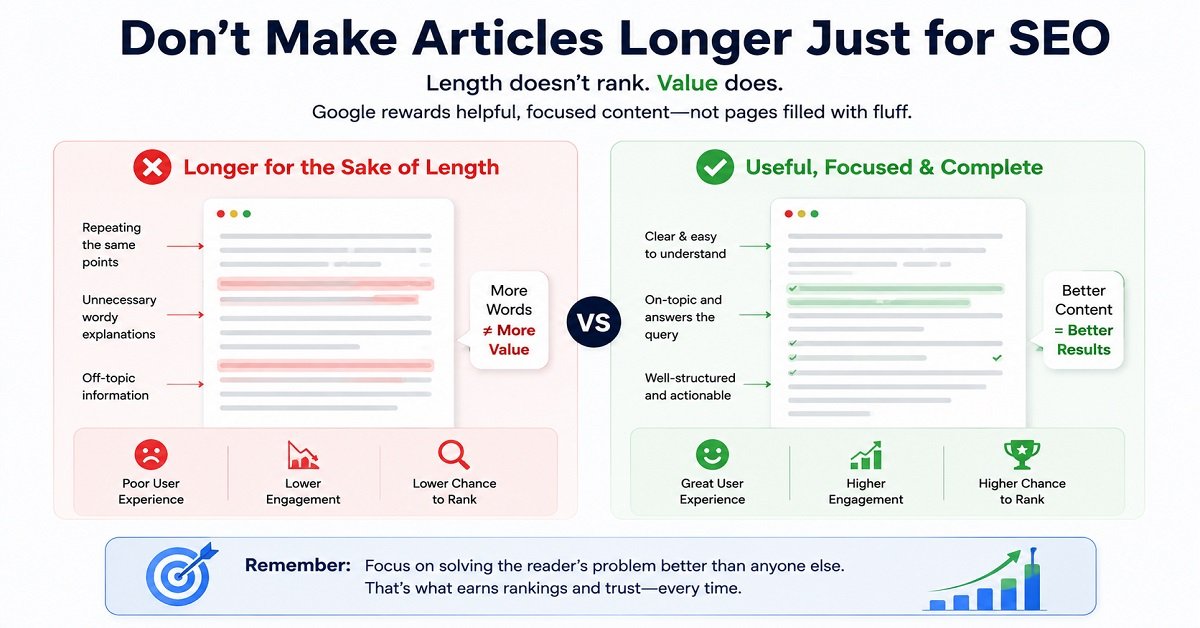
Don’t Make Articles Longer Just for SEO
A common misconception is:
“Google likes long articles.”
That’s too simplistic.
There is no magical word count that makes Google rank a page.
A 1,000-word article that completely answers a simple question can be better than a 4,000-word article padded with repetition.
Likewise, a complex subject may genuinely require 3,000 words or more.
The goal should be:
Use as many words as necessary to satisfy the reader, and no more than necessary.
For a broad topic like “SEO for Beginners,” a long guide is reasonable because there are many concepts that genuinely need explanation.
For a simple question such as “What is an XML sitemap?”, a much shorter article may be enough.
What Makes Content More Helpful?
Before publishing, ask yourself:
Does it answer the actual question?
If someone searches for a comparison, provide a comparison.
If they search for a tutorial, provide steps.
If they search for a definition, explain the concept clearly.
Does it add something useful?
That could be:
- First-hand experience
- Original examples
- Testing
- Data
- Clear explanations
- Screenshots
- Comparisons
- Practical advice
- Expert review
Is anything important missing?
Read the article as if you were the visitor.
After finishing it, would you still have to search Google five more times to understand the topic?
If yes, the article may need additional useful sections.
Is the article easy to read?
Use:
- Short paragraphs
- Clear headings
- Lists where appropriate
- Tables when comparisons are useful
- Examples
- Simple language
Good SEO content doesn’t need to sound complicated.
A Simple Keyword-to-Article Workflow
Here’s the process you can use whenever you’re planning a new article.
Step 1: Choose a broad topic.
Step 2: Find the phrases people use to search for that topic.
Step 3: Identify the main search intent.
Step 4: Study the current search results.
Step 5: Choose the primary topic or keyword.
Step 6: Identify related questions and subtopics.
Step 7: Plan the article around the reader’s needs.
Step 8: Write the article naturally.
Step 9: Optimize important on-page elements.
Step 10: Publish and monitor the page.
Step 11: Use actual search data to improve it later.
That last step is important.
Keyword research isn’t finished when you publish.
Your own Search Console data can eventually show you queries you didn’t initially think about.
Those queries can help you understand what Google users actually associate with your page.
What If Your Article Starts Ranking for Unexpected Keywords?
That’s a good thing.
Imagine you publish an article targeting:
“SEO for beginners”
After a few months, Search Console shows that the article is receiving impressions for:
- SEO basics
- SEO for new websites
- how to start SEO
- beginner SEO checklist
Those queries give you useful information.
They tell you how Google and searchers are interpreting your content.
You can then decide whether the article already covers those topics adequately or whether adding a useful section would improve it.
This is much better than blindly adding keywords because a tool tells you to.
Your Keyword Is a Starting Point, Not the Destination
This is probably the most important lesson from this section.
A keyword should help you understand what to create.
It should not dictate every sentence you write.
The real goal is:
Search query → Search intent → Useful content → Good user experience
When those four things line up, SEO becomes much more logical.
You aren’t trying to convince Google that your article is relevant by repeating a phrase 20 times.
You’re creating a page that genuinely answers what the searcher wanted to know.
And once you’ve chosen the right topic and created the content, the next question is:
How do you optimize the actual webpage so that both readers and search engines can understand it easily?
That’s where on-page SEO comes in.
On-Page SEO, Technical SEO and Links
Now you know how to choose a topic, understand keywords and identify search intent.
The next step is to optimize the actual page.
This is where on-page SEO and technical SEO come in.
Don’t let those terms make SEO sound more complicated than it is.
On-page SEO is largely about making your page clear and useful.
Technical SEO is about making sure search engines can access, crawl, understand and process your website properly.
You don’t need to become a developer to understand the basics.
Let’s go step by step.
What Is On-Page SEO?
On-page SEO refers to the improvements you make on the webpage itself to help search engines and readers understand the content.
This includes things such as:
- Page title
- Main heading
- Subheadings
- Content
- URLs
- Images
- Internal links
- Meta description
- Structured data where appropriate
The goal isn’t to insert keywords everywhere.
The goal is to make the page clear, useful, well-structured and relevant to the searcher’s needs.
How to Write an SEO-Friendly Title
The title is one of the first things a searcher sees in Google.
For example:
SEO for Beginners: Complete Guide to Ranking Higher
is much more useful than:
SEO Guide
The first title tells the reader what the page is about and who it is for.
Google uses several sources to generate title links in search results, including the page’s <title>, main visual title, headings, prominent text, links pointing to the page and other signals. This means the title you provide is important, but Google can choose a different title link when it believes another version better represents the page.
Good SEO Title Practices
Try to make your title:
Descriptive
The reader should understand what the page is about.
Concise
Don’t fill the title with unnecessary words.
Relevant
It should accurately represent the page.
Unique
Different pages should have different titles.
Natural
Don’t repeat the same keyword several times.
For example:
Good:
Shared vs VPS vs Cloud Hosting: Which Is Best for You?
Bad:
Shared Hosting vs VPS Hosting vs Cloud Hosting | Best Shared VPS Cloud Hosting
The second version looks like it was written for a search engine rather than a person.
Google specifically recommends descriptive, concise titles and warns against keyword stuffing and repetitive boilerplate titles.
Your SEO Title and H1 Don’t Have to Be Identical
This confuses many beginners.
The SEO title is the title you provide for search engines and browser contexts.
The H1 is the main visible heading on the webpage.
They can be the same, and often that’s perfectly fine.
But they don’t have to be identical.
For example:
SEO title:
SEO for Beginners: Complete Guide to Ranking Higher
H1:
SEO for Beginners: Complete Guide
Both clearly describe the same article.
What matters most is that the page’s title and main heading accurately represent the content.
Google also looks at the prominent visual title and headings when generating title links, so having a clear main title helps avoid confusion.
What Is a Meta Description?
A meta description is a short description associated with a webpage.
It can appear beneath the title in Google’s search results.
For example:
Learn SEO from scratch with this beginner-friendly guide covering keywords, on-page SEO, technical SEO, links, content, Google Search Console and more.
But there’s an important detail.
Google doesn’t guarantee that it will display your meta description.
Google primarily generates snippets from the actual page content. It may use your meta description when it believes that description is a better match for the searcher’s query.
So don’t think of the meta description as a direct ranking switch.
Think of it as a short sales pitch for the page.
How to Write a Good Meta Description
A good meta description should:
- Accurately describe the page
- Explain what the reader will learn
- Be specific
- Be written naturally
- Encourage the right reader to click
Avoid turning it into a list of keywords.
For example:
Poor:
SEO, SEO guide, SEO beginners, SEO tips, SEO tools, SEO ranking, SEO keywords.
Better:
Learn SEO from scratch with this beginner-friendly guide covering keyword research, on-page SEO, technical SEO, links, Search Console and more.
Google recommends creating unique, relevant descriptions for individual pages and avoiding descriptions that are simply long strings of keywords.
How to Create an SEO-Friendly URL
Your URL should be simple enough for a person to understand.
For example:
Good:
orbitelf.com/seo-for-beginners/
Less useful:
orbitelf.com/p=4728/
Or:
orbitelf.com/category/2026/08/seo-guide-for-beginners-complete-guide/
A clean URL gives both users and search engines a clearer idea of the page.
Google recommends logical, crawlable URL structures.
Keep URLs Simple
When creating a new article, try to:
- Use relevant words
- Keep the URL reasonably short
- Avoid unnecessary parameters
- Avoid strange strings of numbers
- Use a consistent site structure
- Avoid changing the URL unnecessarily after publication
For our article, this is perfectly reasonable:
orbitelf.com/seo-for-beginners/
What Are H1, H2 and H3 Headings?
Headings organize your content.
Think of them like the chapters and subchapters of a book.
H1
The main heading of the page.
For example:
SEO for Beginners: Complete Guide
Normally, a page should have a clear main heading representing its primary topic.
H2
Major sections within the article.
For example:
What Is SEO?
How Does Google Search Work?
What Is Keyword Research?
H3
Subsections inside an H2.
For example:
What Is Search Intent?
Then:
Informational Intent
Commercial Investigation
Transactional Intent
Navigational Intent
The exact HTML heading structure isn’t a magic ranking formula.
The main benefit is that headings make your content easier to understand and navigate.
Don’t Use Headings Just to Insert Keywords
Suppose your article is about:
Best Web Hosting for Beginners
You don’t need headings such as:
Best Web Hosting for Beginners
Best Web Hosting for Beginners Features
Best Web Hosting for Beginners Price
Best Web Hosting for Beginners Benefits
This quickly becomes unnatural.
Instead:
What Should Beginners Look for in Hosting?
How Much Does Beginner-Friendly Hosting Cost?
What Features Actually Matter?
These headings are clearer for readers while still communicating the subject.
Keyword Placement: Where Should Your Keyword Go?
Your main topic should naturally appear in important parts of the page.
Depending on the article, this can include:
- SEO title
- Main heading
- Introduction
- Relevant subheadings
- Body content
- URL
- Image alt text when appropriate
But don’t treat this as a checklist where every item must contain an exact-match keyword.
For example, if your focus keyword is:
SEO for beginners
you don’t need to write:
“SEO for beginners” in every heading.
Natural language is better.
What About Keyword Density?
You may see SEO tools telling you that a keyword should appear a certain number of times.
Don’t obsess over this.
There is no universal keyword-density percentage that guarantees rankings.
If your article genuinely covers a topic, related terms and concepts will naturally appear.
For example, an article about SEO will naturally mention:
- Search engines
- Keywords
- Search intent
- Google Search Console
- Rankings
- Crawling
- Indexing
- Internal links
You don’t need to force these words into the article.
Image SEO
Images can make an article much easier to understand and more enjoyable to read.
For example, a comparison article can benefit from:
- Comparison graphics
- Screenshots
- Diagrams
- Product images
- Charts
- Process illustrations
But images also need to be handled properly.
Use Descriptive Image File Names
Instead of:
IMG_2387.jpg
use something descriptive such as:
shared-vs-vps-vs-cloud-hosting.jpg
The filename isn’t a major ranking trick, but it gives Google useful context about the image.
Google recommends using short, descriptive filenames rather than generic names such as IMG00023.JPG.
Write Useful Alt Text
Alt text describes an image.
For example:
alt="Comparison of shared, VPS and cloud hosting"
is useful if the image actually shows that comparison.
Don’t write:
alt="shared hosting VPS cloud hosting best hosting web hosting VPS hosting cloud hosting"
That’s keyword stuffing.
Google says alt text helps it understand images and also improves accessibility for people who can’t see the images. It specifically recommends useful, contextually appropriate alt text rather than keyword stuffing.
Don’t Describe Decorative Images Unnecessarily
Not every decorative image needs a long alt description.
If an image doesn’t add meaningful information and is purely decorative, its accessibility treatment can be different.
The important principle is:
Describe useful images accurately. Don’t turn alt text into an SEO keyword box.
Optimize Image Size
Large images can slow down a page.
Before uploading an image, consider:
- Image dimensions
- File format
- Compression
- Whether the image needs to be that large
- Whether responsive versions are being served
Google’s image guidance also recommends responsive images and standard HTML image elements so crawlers can discover and process images properly.
Internal Linking: One of the Most Useful SEO Practices
Internal links are links from one page on your website to another page on the same website.
For example, in this SEO guide, we might mention:
If you’re new to hosting, our web hosting guide for beginners explains how domains, servers and hosting work.
That link connects two related pages.
Internal links help readers discover more useful information.
They also help search engines understand the relationship between pages on your website.
Google’s current guidance recommends linking important pages from relevant pages and using concise, descriptive anchor text. Google also says there is no magical ideal number of internal links for a page.
How to Write Good Internal Link Anchor Text
Anchor text is the clickable text.
Weak anchor text
Click here
Better
Learn more about web hosting
Stronger
web hosting guide for beginners
The third option immediately tells the reader what they will find after clicking.
Google recommends descriptive, concise and relevant anchor text and specifically advises against generic phrases such as “click here” or “read more” when a more useful description is possible.
Don’t Force Internal Links
You don’t need to link every sentence.
If you have 20 articles and every article contains 30 internal links, the page can become difficult to read.
Instead, ask:
Would this link genuinely help someone who is reading this sentence?
If yes, add it.
If not, leave it out.
Build Topic Clusters With Internal Links
A useful structure for a website can look like this:
Pillar article: SEO for Beginners
↓
Keyword Research
↓
Search Intent
↓
On-Page SEO
↓
Technical SEO
↓
Google Search Console
↓
SEO Tools
Each supporting article can link back to the pillar article where appropriate.
This gives readers a natural way to move deeper into the subject.
It also helps search engines discover and understand important pages.
Google says every page you care about should be linked from another page on your site, and that internal links can help Google discover pages and understand their relevance.
What Is Technical SEO?
Technical SEO sounds intimidating, but the basic idea is simple.
Google also maintains Search Essentials, which outlines the basic requirements and practices that can help a website become eligible to appear in Google Search.
Technical SEO is about making sure your website can be accessed, crawled, understood and processed properly by search engines.
It can involve:
- Crawling
- Indexing
- Sitemaps
- Robots.txt
- HTTPS
- Mobile usability
- Page performance
- Canonical URLs
- Redirects
- Structured data
- JavaScript rendering
- Website architecture
You don’t need to master every technical concept immediately.
Start by understanding the basics.
Crawling vs Indexing
These two terms are often confused.
Crawling
Google discovers and accesses a page.
Indexing
Google processes and stores information about that page in its index.
Think of it like a library.
Crawling: The librarian finds a new book.
Indexing: The librarian catalogs the book so it can be found later.
If Google can’t crawl your page, it may not be able to properly process its content.
But even if Google crawls the page, indexing isn’t guaranteed.
And even if the page is indexed, ranking isn’t guaranteed.
These are separate steps.
What Is an XML Sitemap?
An XML sitemap is a file that helps search engines discover URLs on your website.
It can be particularly useful for:
- New websites
- Large websites
- Websites with many pages
- Sites where some pages are difficult to discover through internal links
- Frequently updated sites
A sitemap isn’t a guarantee that Google will index every URL inside it.
Think of it as a list of pages you want Google to know about, not a command saying:
“Rank all of these pages.”
Google’s crawling and indexing documentation describes sitemaps as a way to tell Google about pages that are new or updated.
If you’re using WordPress with an SEO plugin, your sitemap may already be generated automatically.
You can usually find it at something like:
example.com/sitemap_index.xml
or:
example.com/sitemap.xml
The exact URL depends on your setup.
What Is Robots.txt?
A robots.txt file gives crawlers instructions about which URLs or paths they can request.
For example, a website might use it to prevent crawlers from accessing certain areas that don’t need to be crawled.
But beginners need to be careful.
Robots.txt is not the same thing as “remove this page from Google.”
Google’s documentation notes that blocking crawling with robots.txt may not always prevent a URL from being indexed if Google discovers that URL elsewhere.
If you specifically need to prevent an eligible page from appearing in search, a noindex directive is generally the more appropriate tool.
Don’t edit robots.txt randomly just because an SEO tutorial tells you to.
A small mistake can prevent search engines from accessing important resources.
What Is HTTPS?
HTTPS encrypts the connection between a user’s browser and your website.
You’ll recognize it when your website starts with:
https://
rather than:
http://
HTTPS is important for security and user trust.
Google recommends using HTTPS, and browsers can warn users when websites aren’t securely served.
For a modern website, HTTPS should be considered a basic requirement rather than an optional SEO trick.
Most reputable hosting providers and website platforms make SSL/TLS certificates available, often through automated systems.
Does Website Speed Matter for SEO?
Yes, but don’t oversimplify this.
A fast website provides a better experience than a painfully slow one.
Google says good user experience should be a site’s top goal and points website owners toward tools such as the Core Web Vitals report and PageSpeed Insights for measuring performance.
However:
Making your website faster doesn’t mean Google automatically moves it to position one.
Performance is one part of the broader picture.
Your content still needs to be relevant and useful.
Common Causes of Slow Websites
A slow website can be caused by:
- Huge images
- Too many plugins
- Poor hosting
- Unoptimized code
- Slow database queries
- Excessive JavaScript
- Too many third-party scripts
- Poor caching
- Incorrectly configured CDN
- Heavy themes or page builders
This is why simply buying a more expensive hosting plan isn’t always the correct solution.
If you’re unsure how different hosting environments compare, our guide to shared vs VPS vs cloud hosting explains the differences in resources, control, scalability and management.
Find the bottleneck first.
What Are Core Web Vitals?
Core Web Vitals are a set of metrics used to measure aspects of real-world page experience.
They focus on areas such as:
- Loading performance
- Responsiveness
- Visual stability
For a beginner, you don’t need to memorize every technical detail immediately.
What matters is understanding that a page shouldn’t just be useful.
It should also provide a reasonably good experience when someone visits it.
You can use Google’s tools to identify performance issues and then decide whether they are worth fixing.
Mobile SEO
A large portion of web browsing happens on mobile devices.
So your website needs to work properly on smaller screens.
Check whether:
- Text is readable
- Buttons are easy to tap
- Images fit the screen
- Menus work properly
- Content isn’t hidden off-screen
- Pop-ups don’t make the page difficult to use
- Important information appears correctly
Google’s documentation recommends making websites mobile-friendly and notes the importance of mobile usability.
A page that looks excellent on a desktop but is frustrating on a phone isn’t providing a good user experience.
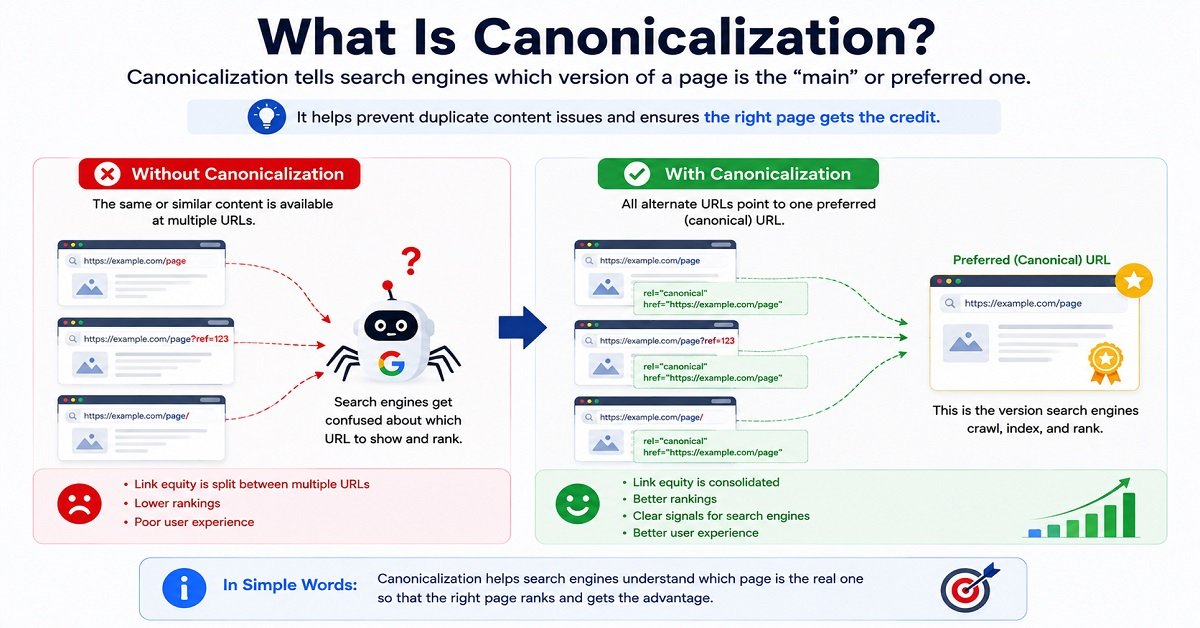
What Is Canonicalization?
This is one of the more technical SEO concepts, but it’s worth understanding.
Sometimes the same or very similar content can be accessible through multiple URLs.
For example:
example.com/product
and:
example.com/product?ref=123
might show essentially the same content.
Google needs to determine which URL should be treated as the primary version.
That process is called canonicalization.
You can use a rel="canonical" link element to indicate your preferred URL.
Google describes canonicalization as selecting the representative URL from a group of duplicate or very similar pages.
Does Every Website Need to Manually Set Canonicals?
Not necessarily.
Google says that specifying a canonical preference isn’t required for every site, because Google can choose a canonical itself. But explicit canonical signals can be useful when there are duplicate or very similar URLs.
If you’re using WordPress and an SEO plugin, canonical tags are often handled automatically.
The important thing for a beginner is to understand why they exist, rather than manually editing them without knowing what you’re doing.
What Is Duplicate Content?
Duplicate content means substantially similar or identical content appears at multiple URLs.
Some duplication is normal.
For example, an e-commerce website may have different URLs created by sorting or filtering.
Google says duplicate content on a site isn’t automatically a violation of its spam policies. However, having many versions of essentially the same content can create problems with URL management and make it harder to determine which version should appear in search.
The goal isn’t to panic whenever you find two similar pages.
Instead, ask:
Do these pages serve different user needs, or are they unnecessarily competing with each other?
What Is Structured Data?
Structured data is additional information you can provide in a standardized format to help search engines understand the content of a page.
For example, depending on the page type, structured data can describe:
- Articles
- Products
- Events
- Organizations
- Breadcrumbs
- Software
- Recipes
- Courses
- Local businesses
Google supports several structured-data features and documents which types can make pages eligible for certain enhanced search appearances.
But here’s an important warning:
Structured data isn’t a magic ranking boost.
Adding schema doesn’t guarantee that Google will show a rich result.
It needs to accurately represent the visible content and follow Google’s guidelines.
Off-Page SEO: What Happens Outside Your Website?
So far, we’ve mostly discussed what you can do on your own website.
Off-page SEO is about signals and activities beyond your website.
The most commonly discussed example is backlinks.
A backlink is a link from another website to yours.
For example:
A technology website publishes an article about SEO tools and links to your SEO guide.
That is a backlink.
Are Backlinks Still Important?
Links remain useful for discovery and as signals that Google can use when evaluating pages.
But don’t reduce SEO to:
“Get as many backlinks as possible.”
That’s dangerous advice.
Ten relevant, genuine links can be more valuable than hundreds of random links from low-quality websites.
For example, a respected website in your industry linking to a genuinely useful guide can make much more sense than receiving hundreds of links from unrelated directories.
Google also uses links to discover pages and evaluate relevance, which is why internal and external links both have a role in search.
How Do You Earn Backlinks Naturally?
Instead of thinking:
“How can I get 100 backlinks?”
think:
“What could I publish that another website would genuinely want to reference?”
That might be:
- Original research
- Useful statistics
- Detailed guides
- Free tools
- Templates
- Original comparisons
- Helpful calculators
- First-hand testing
- Industry resources
- Unique data
You can also build relationships with relevant websites and promote genuinely useful resources.
The important part is that the link should make sense.
Should You Buy Backlinks?
Be very careful.
Buying links specifically to manipulate search rankings can put you on the wrong side of Google’s spam policies.
If you’re paying for a placement or advertisement, the link should be appropriately qualified. Google recommends using rel="sponsored" for paid links, while nofollow remains an acceptable alternative in certain situations.
This doesn’t mean you can’t pay for advertising.
It means you shouldn’t treat paid links designed to manipulate rankings as a shortcut to SEO success.
External Links: Should You Link to Other Websites?
Yes.
Some website owners are afraid to link externally because they think sending visitors away will hurt SEO.
That’s not a good reason to avoid useful references.
If an external source helps the reader understand or verify something, linking to it can improve the article.
For example, in this guide, linking to Google’s own Search Central documentation gives readers a way to verify important SEO guidance.
Google’s link guidance explicitly says external links can help establish trustworthiness when they make sense, such as when citing sources.
The rule is simple:
Link because the reader benefits, not because you’re trying to create an SEO signal.
On-Page SEO + Technical SEO + Links Work Together
It’s tempting to treat these as completely separate parts of SEO.
They’re not.
Imagine you’ve created an excellent article.
The content is useful.
The keyword research is good.
The search intent is correct.
But:
- Google can’t crawl the page
- The page loads extremely slowly
- The URL is confusing
- The page has no internal links
- Important images aren’t accessible
- The site isn’t mobile-friendly
You’ve created a good article but given it a poor technical environment.
Now imagine the opposite.
Your website is technically perfect.
But the article doesn’t answer the searcher’s question.
That’s also a problem.
Good SEO brings these pieces together:
Useful content
Clear on-page optimization
Accessible technical foundation
Logical internal linking
Relevant external signals
The result is a website that is easier for both people and search engines to understand.
A Simple On-Page SEO Checklist
Before publishing an important page, ask:
- Is the search intent clear?
- Does the title accurately describe the page?
- Is there a clear main heading?
- Are the sections organized logically?
- Is the primary topic naturally covered?
- Does the introduction quickly tell readers what they’ll get?
- Is the URL clean and descriptive?
- Is the meta description useful?
- Are images relevant and optimized?
- Does useful image alt text exist where appropriate?
- Are relevant internal links included?
- Are important external sources linked where useful?
- Does the page work well on mobile?
- Is HTTPS enabled?
- Can search engines crawl the page?
- Is the page intended to be indexed?
- Are there unnecessary duplicate versions of the URL?
- Is the page reasonably fast?
You don’t need to get every item perfect before publishing.
But this checklist gives you a practical way to catch obvious problems.
The Bigger Picture
At this stage, you have learned how to:
Choose a topic
→
Understand keywords
→
Identify search intent
→
Create useful content
→
Optimize the page
→
Make the technical foundation accessible
→
Connect related pages with internal links
→
Use external links and backlinks appropriately
But there’s one more major piece.
SEO isn’t finished when you press Publish.
You need to know whether people are actually finding the page, what searches they’re using, whether they’re clicking your result, and where opportunities for improvement exist.
That’s where Google Search Console, Google Analytics and ongoing SEO measurement become important.
Measuring SEO, Building a Strategy and Growing Your Website
You now know how to research keywords, understand search intent, create useful content, optimize individual pages and maintain a technically accessible website.
But there is one final piece that separates a website that simply does SEO from a website that actually learns from SEO.
You need to measure what happens after you publish.
A page that receives no clicks isn’t necessarily a failure.
A page ranking on page two may be an opportunity.
A page getting lots of impressions but very few clicks may have a title or search-result presentation that needs improvement.
And sometimes the most useful information comes from queries you weren’t even targeting when you wrote the article.
This is why measurement matters.
What Is Google Search Console?
Google Search Console is Google’s free service for website owners.
Google provides Search Console free of charge to help website owners understand how their sites perform in Google Search and identify search-related issues.
It helps you understand how your website performs in Google Search and provides tools for monitoring indexing and other search-related issues.
For an SEO beginner, Search Console should become one of your most important tools.
You don’t need to check it every hour.
But you should learn how to read its data.
The Four Search Console Metrics You Should Understand
The Performance report provides four particularly useful metrics:
Clicks
How many times people clicked your website from Google Search.
Impressions
How many times your website appeared in Google’s search results.
CTR
The percentage of impressions that resulted in clicks.
Average position
The average position of your result for the queries and pages being measured. (developers.google.com)
Let’s see how these numbers can help you.
Impressions Without Many Clicks
Suppose an article received:
10,000 impressions
but only:
100 clicks
That’s a 1% CTR.
The page is getting visibility, but relatively few people are clicking.
That doesn’t automatically mean something is wrong.
Search position, query type, competition and search-result features can all affect CTR.
But it gives you something worth investigating.
You might look at:
- The queries generating impressions
- Your average position
- Your title
- Your meta description
- Whether the page actually matches the searches
- Whether competitors are offering a more compelling result
Low Impressions
Now suppose an article receives:
100 impressions
and:
5 clicks
The CTR isn’t necessarily terrible, but the page has very little visibility.
In that situation, improving the title alone probably isn’t the biggest opportunity.
You may need to investigate:
- Whether the page is indexed
- Whether the topic has enough search demand
- Whether search intent is satisfied
- How competitive the query is
- Whether the article needs better coverage
- Whether internal links could be improved
This is why SEO data needs context.
Don’t look at one metric in isolation.
Don’t Obsess Over Average Position
Average position can be useful, but beginners sometimes treat it as the only SEO metric that matters.
For example:
“My average position is 8, so I’m doing well.”
But what does that actually mean?
Position 8 for one highly valuable keyword can be excellent.
Position 8 across hundreds of unrelated low-value queries may tell you something very different.
Also, average position is an aggregate metric, not a guarantee that every user will see your page at exactly that position.
Use it alongside:
- Clicks
- Impressions
- CTR
- Queries
- Pages
- Conversions
Google’s Search Console data can be analyzed by dimensions such as queries, pages, countries, devices and search appearances. (developers.google.com)
What Is Google Analytics?
Google Analytics is another important tool, but it answers a different question.
Search Console helps you understand what happens in Google Search.
Analytics helps you understand what happens after people arrive at your website.
For example:
Search Console might tell you:
500 people clicked your article from Google.
Analytics can help you understand what happened afterward.
Did they:
- Read another article?
- Visit a product page?
- Sign up for something?
- Click an affiliate link?
- Leave immediately?
- Return later?
Google’s own documentation explains that Search Console and Analytics measure different aspects of the visitor journey, so using them together gives you a more complete picture. (developers.google.com)
SEO Traffic Isn’t the Final Goal
This is an important mindset shift.
Imagine you get:
10,000 organic visitors
but none of them:
- Buy anything
- Sign up
- Contact you
- Read another article
- Return to your website
That’s not necessarily a successful business outcome.
Now imagine another article receives:
1,000 visitors
but those visitors are highly relevant and generate sales or leads.
That page could be much more valuable.
This is why your SEO strategy should eventually connect:
Search visibility → Traffic → User action → Business result
For an affiliate website, the final result might be affiliate clicks and commissions.
For a service business, it might be enquiries.
For a blog, it could be email subscribers or returning readers.
For an online store, it could be purchases.
How Do You Know If SEO Is Working?
Look at trends rather than individual days.
SEO traffic can fluctuate.
One bad day doesn’t necessarily mean your strategy has failed.
Instead, monitor things such as:
- Organic clicks
- Organic impressions
- CTR
- Average position
- Ranking queries
- Pages gaining traffic
- Pages losing traffic
- Conversions
- Revenue where applicable
You can compare:
Last 28 days vs previous 28 days
or:
Last 3 months vs previous 3 months
Longer periods can help reduce the noise from daily fluctuations.
Pay Attention to Pages That Are Improving
Suppose you have 100 articles.
Five of them suddenly start getting significantly more impressions.
Don’t just celebrate the traffic.
Study them.
Ask:
- What topics are they about?
- What search intent do they satisfy?
- Which queries are bringing impressions?
- What internal links do they have?
- How are they structured?
- Do they demonstrate first-hand experience?
- Are they targeting a specific audience?
These successful pages can teach you what your audience is responding to.
Pay Attention to Pages That Are Losing Traffic
A traffic decline isn’t automatically caused by an SEO problem.
It could be:
- Seasonal demand
- A change in search behavior
- New competitors
- Outdated information
- A Google algorithm change
- Technical problems
- A change in your site’s content
- A temporary fluctuation
Don’t immediately rewrite an article just because traffic fell for a few days.
Look for a meaningful pattern first.
If the decline persists, investigate.
Google itself recommends examining which pages and types of searches were affected when evaluating traffic drops rather than assuming one universal cause. (developers.google.com)
What Should a New Website Do for SEO?
If you’re deciding how to build your WordPress website, you may also want to understand the difference between WordPress.com and WordPress.org before choosing a platform.
If you’re starting a website today, don’t try to do everything simultaneously.
If you’re starting from zero, our complete guide to starting a blog walks through the process of getting a blog off the ground.
Build your SEO foundation in stages.
Stage 1: Set Up the Website Properly
If you’re planning to build your site with WordPress, our guide on how to build a WordPress website from scratch takes you through the process step by step.
Before publishing dozens of articles, make sure the basics are in place.
Check:
- HTTPS
- Mobile usability
- Clean navigation
- Logical categories
- Search Console
- Analytics
- XML sitemap
- Basic SEO settings
- Clear About page
- Contact page
- Privacy policy and other appropriate legal pages
You don’t need a perfect website.
You need a functional foundation.
Stage 2: Understand Your Audience
Ask:
Who is this website actually for?
For example:
“People who are completely new to blogging and want simple explanations of hosting, websites, SEO and online tools.”
That’s much more useful than:
“Anyone interested in the internet.”
The clearer your audience, the easier it becomes to choose topics.
Stage 3: Build Your First Topic Cluster
Don’t publish 30 unrelated articles.
Start with one important subject.
For example:
Pillar: SEO for Beginners
Supporting articles:
- Keyword Research
- Search Intent
- On-Page SEO
- Technical SEO
- Internal Linking
- Google Search Console
- SEO Tools
Then move to another major subject.
This creates topical depth rather than a random collection of pages.
Stage 4: Publish Useful Content Consistently
Consistency doesn’t mean publishing seven mediocre articles every week.
One genuinely useful article can be more valuable than several pages created simply to hit a publishing target.
Ask:
Can I publish this article because my audience actually needs it?
If yes, publish it.
If you’re only publishing because you haven’t posted anything for three days, rethink the topic.
Stage 5: Build Internal Links
As your website grows, connect related pages.
Your new article should link to relevant older articles.
Older articles should also link to newer articles where appropriate.
This creates a connected website rather than isolated pages.
Stage 6: Start Measuring
Once you have enough content and search data, Search Console becomes increasingly useful.
Look for:
- Pages getting impressions
- Queries you didn’t expect
- Pages ranking around positions 5-20
- Articles with good impressions but weak CTR
- Topics generating increasing interest
These are opportunities.
What Should You Do With a Page Ranking on Page Two?
This is one of the most useful SEO opportunities for a growing website.
Suppose your article is ranking around positions:
11-20
That means Google already considers the page relevant enough to show relatively prominently for some searches.
Instead of immediately creating another article targeting the same topic, investigate the existing page.
Ask:
Does the article completely satisfy the search intent?
If not, improve it.
Is important information missing?
Add useful sections.
Is the title attractive and accurate?
Improve it if necessary.
Are internal links relevant?
Add them where they help readers.
Are there outdated claims?
Update them.
Are competitors answering questions you haven’t addressed?
Consider adding useful information if it genuinely improves the article.
Don’t simply add 1,000 words because a competitor has 4,000.
Add information because readers need it.
Don’t Re-Optimize Everything at Once
This is another common mistake.
If you have 100 articles, you don’t need to rewrite all 100 next week.
Prioritize.
A useful order can be:
High impressions + low CTR
These pages may have an opportunity to improve search-result performance.
Positions 5-20
These pages may have an opportunity to move higher.
Pages with declining traffic
Investigate whether they are outdated or losing relevance.
Pages with strong traffic but weak conversions
Improve the user journey and commercial elements.
This turns SEO into a data-driven process rather than random editing.
When Should You Update an Old Article?
Update an article when there is a genuine reason.
Good reasons include:
- Important information has changed
- Prices have changed
- Products are discontinued
- Links no longer work
- Search intent has evolved
- Competitors provide useful information you are missing
- Your own experience has added something new
- Search Console reveals useful new queries
- The article is losing relevant visibility
Don’t update an article simply because the calendar says six months have passed.
And don’t change the publication date just to make an old article look new.
Google’s people-first guidance specifically warns against changing dates simply to make content appear fresh when the substance hasn’t meaningfully changed. (developers.google.com)
How to Re-Optimize an Existing Article
A useful re-optimization process looks like this:
Step 1: Check Current Performance
Look at:
- Clicks
- Impressions
- CTR
- Average position
- Search queries
Step 2: Identify What Google Already Understands
Look at the queries generating impressions.
You may discover that Google already associates the page with topics you didn’t originally target.
Step 3: Compare Search Intent
Search your main query again.
Look at what the current results are offering.
Has the intent changed?
Step 4: Improve the Content
Add or change information where it genuinely helps.
Step 5: Improve the Search Result Presentation
Review:
- Title
- Meta description
- URL if there is a compelling reason to change it
- Main heading
Don’t change everything simultaneously if you want to understand which improvement made a difference.
Step 6: Strengthen Internal Links
Look for relevant newer and older articles.
Connect them naturally.
Step 7: Wait and Measure
SEO changes need time to be evaluated.
Don’t decide that an optimization “failed” after two days.
Give the page enough time to generate meaningful data.
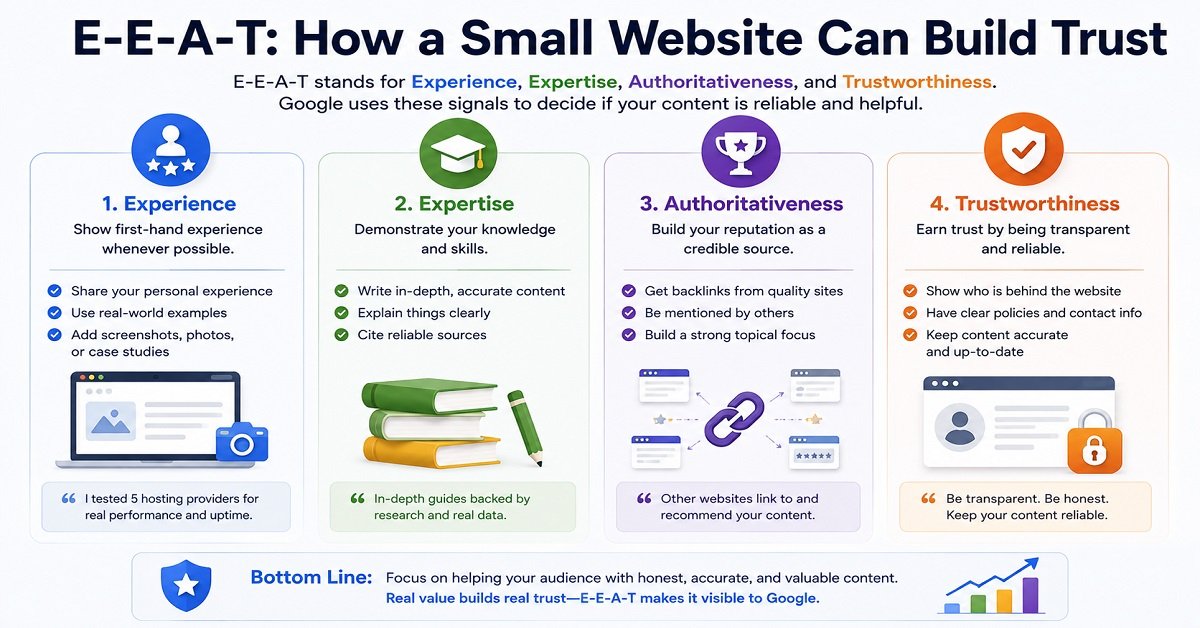
E-E-A-T: How a Small Website Can Build Trust
You don’t need to be a huge company to demonstrate credibility.
Start with the basics.
Show Who Is Behind the Website
Have a clear author or contributor identity where appropriate.
Give readers a way to understand the author’s relevant experience.
Explain First-Hand Experience
If you’ve personally used a product, tested a hosting service or completed a process, explain what you actually did.
Don’t claim:
“We tested 20 hosting providers”
if you didn’t.
Trust is more valuable than an impressive-sounding sentence.
Cite Reliable Sources
When making factual claims, especially claims involving technical specifications, official policies or statistics, link to reliable sources.
Primary sources are often preferable.
For example:
- Official Google documentation
- Government websites
- Manufacturer documentation
- Official product documentation
- Original research
Be Transparent About Affiliate Links
If you earn a commission when someone purchases through your link, tell the reader.
Affiliate relationships aren’t something you need to hide.
Transparency can increase trust.
Correct Mistakes
Every website eventually makes a mistake.
If you discover one, correct it.
Being willing to update and correct information is much more trustworthy than pretending your content has always been perfect.
Is AI Content Bad for SEO?
This is a very relevant question for modern website owners.
The short answer is:
AI itself is not automatically bad for SEO.
Google’s current guidance says generative AI can be useful for research and structuring original content. The problem occurs when AI or other automation is used to produce many pages without adding value, particularly when the primary purpose is manipulating search rankings. (developers.google.com)
So the important question isn’t:
“Was AI involved?”
The more useful questions are:
Is the content accurate?
Is it original?
Does it add value?
Has it been reviewed?
Does it actually help the reader?
Was it created primarily to help people?
Google’s guidance explicitly says that using AI doesn’t give content any special ranking advantage. Useful, original content can perform well regardless of how it was produced, while low-quality content doesn’t become valuable simply because it was generated by AI. (developers.google.com)
How to Use AI Responsibly
AI can be useful for:
- Brainstorming
- Research assistance
- Creating outlines
- Explaining complicated concepts
- Finding gaps in your draft
- Improving readability
- Generating ideas for examples
- Organizing information
But don’t simply generate an article and publish it without checking it.
You remain responsible for:
- Accuracy
- Originality
- Factual claims
- Sources
- Experience
- Quality
- The final result
If AI is substantially involved in creating content, Google recommends considering whether readers would reasonably want context about how the content was produced and whether a disclosure makes sense for that situation. (developers.google.com)
SEO for AI Search Experiences
Search is also evolving.
Google now has AI-powered search experiences, including AI Overviews and AI Mode, and Google has published guidance specifically for appearing in these experiences.
The encouraging part is that the fundamentals haven’t suddenly changed.
Google’s current guidance emphasizes creating unique, valuable, non-commodity content that is helpful and satisfying for people. It also says that creating many pages for every possible query variation primarily to manipulate rankings or AI responses can fall under scaled content abuse. (developers.google.com)
So don’t create:
100 nearly identical articles because you think AI search needs a separate page for every wording of a question.
Instead:
Create genuinely useful content that covers a topic well.
That approach is much more sustainable.
SEO Tools Beginners Actually Need
You don’t need 25 SEO tools when you’re starting.
Begin with a small toolkit.
Google Search Console
Use it to understand:
- Search queries
- Clicks
- Impressions
- CTR
- Average position
- Indexing issues
- Search performance
This should be one of your first tools.
Google Analytics
Use it to understand:
- Visitors
- Traffic sources
- User behavior
- Engagement
- Conversions
Google Trends
Useful for comparing interest in topics over time and understanding whether interest is growing, declining or seasonal.
Google Search
Don’t underestimate the search engine itself.
Searching your target topic manually can reveal:
- Search intent
- Competitor content
- Related questions
- Search-result features
- Common terminology
Keyword Research Platforms
As your website grows, tools such as:
- Ahrefs
- Semrush
- Ubersuggest
can provide deeper keyword and competitor information.
But don’t assume that paying for a tool automatically makes you better at SEO.
A tool provides data.
You still need to know what the data means.
Common SEO Mistakes Beginners Should Avoid
1. Keyword Stuffing
Repeating keywords unnaturally doesn’t make an article better.
2. Writing Only for Search Engines
If your article sounds like it was written for a robot, readers won’t enjoy it.
3. Copying Competitors
Competitor research is useful.
Copying their content isn’t.
4. Publishing Thin Articles
Don’t create a separate page for every tiny keyword variation if the information could be covered properly in one useful article.
5. Buying Spammy Backlinks
Cheap backlink packages can create more problems than they solve.
6. Obsessing Over SEO Plugin Scores
An SEO plugin can help you catch basic issues.
But a score of 95/100 doesn’t guarantee rankings.
7. Chasing Every SEO Trend
SEO changes over time.
But not every new trick deserves your attention.
Build around fundamentals.
8. Ignoring Search Intent
This is one of the biggest mistakes.
A perfectly optimized article that answers the wrong question is still the wrong article.
9. Expecting Immediate Results
SEO usually requires patience.
Don’t abandon a sensible strategy because an article didn’t rank in a week.
10. Publishing Huge Amounts of Low-Value Content
More pages don’t automatically mean a better website.
Google’s current spam policies specifically address scaled content abuse, including generating large numbers of unoriginal pages with little or no value to users. (developers.google.com)
11. Ignoring Existing Content
Your old articles can be valuable assets.
Sometimes improving an existing page is more useful than constantly creating new ones.
12. Forgetting the Business Goal
Traffic is useful.
But traffic without a purpose isn’t necessarily success.
Think about what you want visitors to do after they arrive.
SEO Pros and Cons
SEO has many advantages, but it isn’t a perfect traffic source.
The biggest advantage of SEO is also one of its biggest challenges:
It can compound over time, but it usually doesn’t happen overnight.
A Simple SEO Roadmap for Beginners
If everything we’ve discussed feels like a lot, don’t worry.
You don’t need to implement everything today.
Follow this sequence.
Step 1: Understand Your Audience
Know who you’re trying to help.
Step 2: Choose a Clear Topic
Don’t start with a random keyword.
Start with a problem your audience has.
Step 3: Research Search Intent
Search Google and understand what people expect to find.
Step 4: Research Keywords
Find the phrases people use to search for the topic.
Step 5: Create the Best Useful Page You Can
Answer the question completely.
Add examples, experience, research and useful information where appropriate.
Step 6: Optimize the Page
Review:
- Title
- Main heading
- URL
- Meta description
- Subheadings
- Images
- Internal links
Step 7: Check the Technical Basics
Make sure:
- The page is accessible
- HTTPS works
- Mobile experience is good
- Important resources aren’t blocked
- The page is intended to be indexed
- The website isn’t suffering from obvious technical problems
Step 8: Publish
Don’t wait forever for perfection.
Publish when the article is genuinely useful and ready.
Step 9: Measure
Use Search Console and Analytics.
Look for:
- Impressions
- Clicks
- CTR
- Queries
- Traffic
- Conversions
Step 10: Improve
Use real data to decide what deserves attention.
That’s SEO.
Not one trick.
Not one plugin.
Not one keyword.
A continuous process of understanding what people need, creating something useful and improving your website based on evidence.
SEO Checklist for Beginners
Before publishing an important article, run through this checklist.
Content
- I understand the searcher’s intent
- The article directly answers the main question
- The content provides useful information
- I added examples where they make difficult concepts easier
- The article isn’t padded with unnecessary words
- Claims are accurate and supported where appropriate
- The article provides something useful beyond simply repeating other pages
On-Page SEO
- The title accurately describes the article
- There is a clear main heading
- Headings organize the article logically
- The main topic is naturally covered
- The URL is clean
- The meta description is useful
- Images are relevant
- Useful images have appropriate alt text
- Relevant internal links are included
- External sources are linked when they genuinely help
Technical SEO
- HTTPS works
- The page works properly on mobile
- Important pages can be crawled
- The page isn’t accidentally set to noindex
- XML sitemap is working
- There are no obvious broken links
- Images aren’t unnecessarily large
- The page loads reasonably well
- Duplicate URLs are handled appropriately
After Publishing
- Search Console is connected
- I monitor impressions and clicks
- I look at the queries generating visibility
- I watch important pages over time
- I update content when there is a genuine reason
- I improve pages based on evidence rather than guesses
Frequently Asked Questions About SEO
What is SEO in simple words?
SEO is the process of improving your website and content so that search engines can understand it and people can discover it when searching for relevant information. Good SEO starts with creating useful content for people rather than trying to manipulate search rankings.
Is SEO free?
There is no mandatory fee to Google for appearing in organic search results, but SEO isn’t completely free. You may spend time creating content, researching topics, improving your website or paying for tools, writers, developers or other services.
Can I do SEO myself?
Yes. A beginner can learn and implement many parts of SEO themselves, including keyword research, search-intent analysis, content optimization, internal linking and Search Console monitoring. More technical issues may require a developer or SEO professional.
How long does SEO take to work?
There is no fixed timeline. Some pages can gain visibility relatively quickly, while others can take considerably longer. Competition, website history, content quality, search intent and technical factors can all influence the process.
How many keywords should I use in an article?
There is no ideal keyword count. Focus on covering the topic naturally and answering the searcher’s questions. Repeating a keyword unnecessarily can make content difficult to read and can become keyword stuffing.
Are backlinks still important for SEO?
Links remain an important part of how search engines discover and understand websites, but SEO shouldn’t be reduced to collecting as many backlinks as possible. Relevant, natural links from useful websites are much more meaningful than large numbers of unrelated or manipulative links.
Do I need an SEO plugin for WordPress?
No. An SEO plugin can make certain tasks easier, such as managing titles, meta descriptions, sitemaps and other settings, but installing a plugin doesn’t automatically optimize your website or guarantee rankings.
Is AI-generated content bad for SEO?
AI-generated content isn’t automatically bad for SEO. Google says AI can be useful for research and content creation, but generating many pages with little original value primarily to manipulate search rankings can violate its spam policies. The final content should be accurate, useful, original and created primarily for people. (developers.google.com)
Can a new website rank on Google?
Yes. New websites can appear in Google Search, but there is no guarantee of a particular ranking or timeline. A new website should focus on a clear audience, useful content, good technical foundations and realistic topic selection.
Should I focus on search volume when choosing keywords?
Search volume is useful, but it shouldn’t be the only factor. Relevance, search intent, competition and the value of the resulting visitor are also important. A smaller, highly relevant search can sometimes be more valuable than a broad keyword with much greater search volume.
Does website speed guarantee better rankings?
No. Website performance is important for user experience, but making a site faster doesn’t guarantee a particular ranking. Content relevance, quality, search intent and many other factors also matter.
Does publishing more articles improve SEO?
Not automatically. Publishing more useful content can expand your search visibility, but large amounts of low-value or repetitive content don’t automatically make a website better. Google’s current guidance emphasizes helpful, reliable, people-first content rather than publishing volume for its own sake. (developers.google.com)
Final Verdict: What Should a Beginner Actually Do?
SEO can seem complicated because there are hundreds of individual concepts, tools and recommendations.
But you don’t need to master all of them before starting.
If you remember only a few things from this guide, remember these:
Understand what your audience wants.
Research the topic and search intent before writing.
Create genuinely useful content.
Make the page easy for readers and search engines to understand.
Keep your website technically accessible.
Connect related pages with useful internal links.
Use reliable sources and demonstrate real experience where appropriate.
Measure what happens after publishing.
Improve existing content when the data gives you a reason to do so.
And most importantly:
Don’t create content just because Google might send you traffic. Create content that is worth finding.
Google’s current guidance continues to emphasize original, useful, people-first content, including as search evolves toward AI-powered experiences. (developers.google.com)
That doesn’t mean you should ignore SEO.
It means you should understand what SEO is supposed to accomplish.
The best SEO strategy isn’t:
“How do I make Google rank this page?”
It’s:
“How do I create the page that best helps someone who searched for this?”
Then make sure Google can discover, understand and access it.
That is a much more sustainable approach to SEO.
And if you’re building a new website, don’t feel pressured to do everything at once.
Start with one useful topic.
Create one excellent page.
Build another relevant page around it.
Connect them.
Measure what happens.
Improve what needs improvement.
Then repeat.
That’s how SEO becomes a process you can actually manage rather than a collection of confusing tricks.