
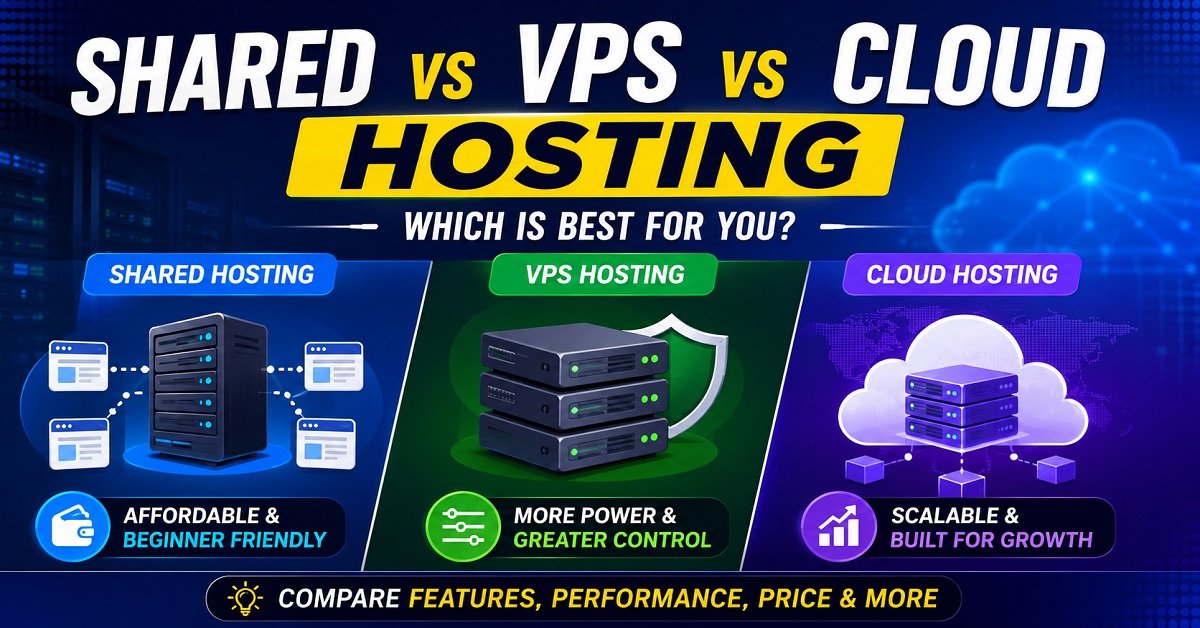
Choosing web hosting can feel confusing when every hosting company seems to offer different plans, prices, and technical terms. Shared hosting is cheap and beginner-friendly, VPS hosting promises more power and control, while cloud hosting is often presented as the solution for websites that need to scale.
If you’re completely new to web hosting, our web hosting guide for beginners explains the basics of domains, servers, hosting and how a website works before you choose a hosting plan.
But does a beginner really need VPS or cloud hosting? Is shared hosting too limited for a growing website? And is cloud hosting actually better than VPS?
The answer depends on what you are building, how much traffic you expect, how much control you need, and how comfortable you are with managing a server.
In this guide, we’ll compare shared, VPS, and cloud hosting in simple terms. You’ll learn how each type works, what you get for your money, where each option makes sense, and when it may be time to move from one type of hosting to another.
Affiliate Disclosure: Some links in this article are affiliate links. If you purchase a product through one of these links, we may earn a commission at no additional cost to you.
What Is Shared Hosting?
If you’re completely new to web hosting, our web hosting guide for beginners explains the basics of domains, servers, hosting and how a website works before you choose a hosting plan.
Shared hosting is the simplest and usually the most affordable type of web hosting.
As the name suggests, multiple websites share the resources of the same physical server. The server has a certain amount of CPU, RAM, storage, and other resources, and those resources are used by all the websites hosted on that server.
Think of it like living in an apartment building.
You have your own apartment, but you share the building’s basic infrastructure with other residents. Everyone has their own space, but the building’s resources and facilities are shared.
A shared hosting account works in a similar way.
Your website has its own files, database, domain and hosting account, but the underlying server is also hosting websites belonging to other customers.
How Does Shared Hosting Work?
When you purchase a shared hosting plan, the hosting provider places your website on a server that already hosts many other websites.
The provider normally takes care of most of the technical work, such as:
- Server maintenance
- Operating system management
- Basic security
- Hardware maintenance
- Network connectivity
- Server software
- Control panel
- Some backups and monitoring, depending on the plan
You generally don’t need to know how to administer a Linux server to launch a website.
For a WordPress website, for example, you may simply purchase a hosting plan, connect your domain, install WordPress, choose a theme, and start publishing content.
That’s one of the biggest reasons shared hosting is so popular with beginners.
Why Is Shared Hosting So Cheap?
The main reason is resource sharing.
Suppose a physical server costs the hosting company a significant amount of money to purchase, operate, maintain, and connect to the internet.
Instead of giving that entire server to one customer, the company can host many customers on it.
The cost of operating the server is therefore spread across many hosting accounts.
That’s why you can often find shared hosting plans for a relatively low introductory price.
However, there is a trade-off.
You don’t get the same level of control or resource isolation that you would normally get with a VPS or a more advanced cloud setup.
What Happens When Another Website Uses Too Many Resources?
This is one of the most important things to understand about shared hosting.
The server’s resources are shared.
Hosting companies generally have systems in place to prevent one website from consuming everything, but there are still practical limits.
Imagine a shared server with hundreds of websites.
Most websites may use very little CPU and RAM most of the time. But if one website suddenly receives a large traffic spike or runs a resource-heavy application, the hosting provider may need to limit that account’s resource usage.
This is why shared hosting plans often have resource limits or fair-use policies.
It doesn’t necessarily mean shared hosting is slow or unreliable.
A well-managed shared hosting server can perform perfectly well for a small or medium-sized website.
The important point is that you don’t have complete control over the server’s resources.
Is Shared Hosting Good for WordPress?
For many new WordPress websites, yes.
If you’re starting a blog, portfolio, small business website, personal website, or a small affiliate site, shared hosting can be more than enough.
For example, imagine you’re starting a new website and publishing your first 20 or 30 articles.
You may have very little traffic initially.
Paying significantly more for a powerful VPS at this stage may not give you any meaningful benefit.
A properly configured shared hosting plan can comfortably handle the website while keeping your costs low.
As your website grows, you can reassess your hosting needs.
Advantages of Shared Hosting
Affordable: It is generally the cheapest of the three options.
Beginner-friendly: You don’t need advanced server administration knowledge.
Easy to manage: Hosting companies usually provide a control panel and handle much of the server maintenance.
Good for small websites: Blogs, portfolios, small business websites and early-stage affiliate sites often don’t need more expensive infrastructure.
Less technical responsibility: The hosting provider handles much of the server-level work.
Disadvantages of Shared Hosting
Resources are shared: You don’t have the same level of resource isolation as a VPS.
Limited server control: You generally cannot customize the server environment to the same extent as a VPS.
Can have resource limits: Your plan may restrict CPU, RAM, processes, storage, or other resources.
Less suitable for demanding applications: Large databases, busy e-commerce stores, custom applications and resource-intensive workloads may eventually outgrow shared hosting.
Performance can depend on the hosting environment: The quality of the hosting provider and how the server is configured matters greatly.
So, shared hosting isn’t “bad hosting.”
It is simply designed for a particular type of customer.
For a new website, its low cost and simplicity can actually be advantages.
What Is VPS Hosting?
VPS stands for Virtual Private Server.
A VPS is a virtual server created on a physical server using virtualization technology.
Virtualization allows a physical server to be divided into separate virtual environments, which is the basic idea behind VPS hosting. Google Cloud provides a useful overview of different server-hosting approaches and how virtualized environments fit into modern hosting infrastructure.
Instead of putting many customers into one shared hosting environment with limited control, the physical server is divided into separate virtual environments.
Think of the difference like this:
With shared hosting, you’re renting a room in a shared house.
With a VPS, you’re renting your own apartment within a larger building.
You still share the underlying physical building with other customers, but your environment is much more isolated and you have considerably more control.
How Does VPS Hosting Work?
A physical server can use virtualization software to create multiple virtual servers.
Each VPS operates as its own environment with its own operating system and allocated resources.
Depending on the provider and plan, you may receive resources such as:
- Dedicated or allocated CPU resources
- RAM
- SSD or NVMe storage
- Operating system
- Private IP options
- Root or administrator access
- SSH access
- Custom server configurations
The exact level of resource isolation depends on the provider and the VPS architecture, so you shouldn’t assume every VPS product works in exactly the same way.
This is an important distinction.
The word VPS tells you that you’re getting a virtual private server environment. It doesn’t automatically tell you how powerful, well-configured, or well-managed that VPS will be.
Why Choose a VPS?
The biggest reason to move to a VPS is more control and more predictable resources.
Suppose your website has grown significantly.
You’re running a database-heavy application, receiving more traffic, or installing software that isn’t available in your shared hosting environment.
You may need:
- More CPU
- More RAM
- Greater control over the server
- Custom software
- Specific PHP or database configurations
- SSH access
- More control over security settings
A VPS can provide that flexibility.
For example, a developer running a custom web application may need to install specific packages and configure the server in a way that isn’t possible on ordinary shared hosting.
A VPS makes that possible.
Managed vs Unmanaged VPS
This is something beginners often overlook.
Not all VPS hosting is equally easy to manage.
A managed VPS means the hosting provider handles some or much of the server administration for you.
Depending on the provider, this may include:
- Server updates
- Security configuration
- Monitoring
- Backups
- Technical support
- Server software management
An unmanaged VPS gives you much more responsibility.
You may need to handle:
- Operating system updates
- Security configuration
- Firewall setup
- Server software
- Backups
- Performance tuning
- Troubleshooting
This is why a cheap unmanaged VPS can sometimes be a poor choice for a beginner.
You may save money on hosting but spend a lot of time learning how to administer a server.
Is VPS Hosting Faster Than Shared Hosting?
It can be, but don’t treat “VPS” as an automatic guarantee of better speed.
A VPS generally gives you more control and better resource isolation than typical shared hosting. But actual website performance depends on many things.
For example:
- CPU performance
- Amount of RAM
- Storage technology
- Server configuration
- Database performance
- Caching
- Content delivery network
- Website code
- WordPress plugins
- Image optimization
- Traffic patterns
A poorly configured VPS can perform worse than a well-optimized website on good shared hosting.
So when comparing hosting, don’t simply ask:
“Is VPS faster?”
Ask:
“Does this hosting environment provide enough resources and the right configuration for my website?”
That’s a much better question.
Advantages of VPS Hosting
More control: You can configure the server environment to a much greater extent.
Better resource isolation: Your environment is more separated from other customers than on typical shared hosting.
Scalable: You can often upgrade CPU, RAM and storage as your needs grow.
Suitable for custom applications: Developers can install software and configure the server for specific workloads.
Better suited to growing websites: A VPS can make sense when a website has outgrown shared hosting.
Disadvantages of VPS Hosting
More expensive: VPS plans generally cost more than entry-level shared hosting.
More technical: Especially when using an unmanaged VPS.
More responsibility: Server administration, security and backups may become your responsibility.
Can be unnecessary: A small blog with modest traffic may gain little from moving to a VPS.
What Is Cloud Hosting?
Cloud hosting is where things become a little more complicated.
The broader concept is based on cloud computing, where computing resources can be provisioned and used through networked infrastructure rather than relying only on a single traditional server.
The term cloud hosting is used by hosting companies to describe different types of infrastructure and products, so you shouldn’t assume that every cloud hosting plan works in exactly the same way.
At a basic level, cloud infrastructure uses a network or cluster of servers and computing resources rather than relying on a single traditional physical server in the same way as conventional hosting.
One of the major advantages is the ability to provide flexible resources and scale workloads according to demand.
Think about a traditional shop.
If the shop has a fixed size, it can only serve a certain number of customers comfortably at one time.
Now imagine a business that can temporarily use additional space, staff, and equipment when customer demand increases.
That flexibility is one of the ideas behind cloud infrastructure.
How Does Cloud Hosting Work?
Instead of relying on one physical machine for everything, cloud platforms can use pools of computing resources across multiple servers.
Depending on the specific service, your website or application may be able to use resources such as:
- Virtual CPUs
- RAM
- Cloud storage
- Databases
- Load balancers
- Networking services
- Backup systems
- Content delivery services
The exact architecture varies significantly between providers.
This is why cloud hosting isn’t simply another word for VPS hosting.
A VPS is a type of virtual server.
Cloud hosting generally refers to hosting infrastructure built around cloud computing resources, although cloud providers can also offer VPS-like virtual machines.
For a beginner, the important thing isn’t memorizing the technical architecture.
The important question is:
Do I actually need the flexibility and scalability that cloud infrastructure provides?
Why Is Cloud Hosting Popular?
Scalability is one of its biggest attractions.
Imagine an online store normally receives 500 visitors a day.
Then a product becomes popular on social media and traffic suddenly jumps to 20,000 visitors.
A hosting environment designed for flexible scaling may be better suited to handling such changes than a small fixed hosting plan.
Cloud infrastructure can also be useful for applications that need multiple services working together.
For example, a growing web application might use:
- One service for the application
- Another for the database
- Object storage for files
- A CDN for static content
- A load balancer for incoming traffic
You don’t need this architecture for a simple blog.
But for a growing application or business, this flexibility can become extremely valuable.
Does Cloud Hosting Mean Unlimited Resources?
No.
This is an important misconception.
Cloud hosting is not the same as unlimited hosting.
Cloud platforms still have resource limits, pricing rules, technical restrictions and configuration requirements.
In many cloud environments, you pay according to the resources or services you use.
That can be useful because you aren’t necessarily paying for a huge fixed server from day one.
But it can also make your bill less predictable.
For example, a sudden traffic spike may increase resource usage and therefore increase your hosting costs, depending on the service and pricing model.
That’s why cloud hosting needs to be chosen carefully.
Advantages of Cloud Hosting
Strong scalability: Resources can often be adjusted as your workload changes.
Flexible infrastructure: You can combine different computing, storage and networking services.
Good for changing workloads: Useful when traffic or computing requirements can vary significantly.
Suitable for complex applications: Cloud platforms can support architectures that would be difficult to build on basic shared hosting.
Wide range of services: Depending on the provider, you can access databases, storage, networking, monitoring and other infrastructure services.
Disadvantages of Cloud Hosting
Can be complicated: Cloud platforms can have a much steeper learning curve.
Pricing can be difficult to predict: Usage-based services can make costs change from month to month.
More technical responsibility: Depending on the service, you may need to manage much more of the infrastructure yourself.
Overkill for simple websites: A small blog doesn’t automatically benefit from using a complex cloud architecture.
Provider differences matter: “Cloud hosting” isn’t one standardized product, so you need to examine exactly what a provider is offering.
Shared vs VPS vs Cloud Hosting: The Basic Difference
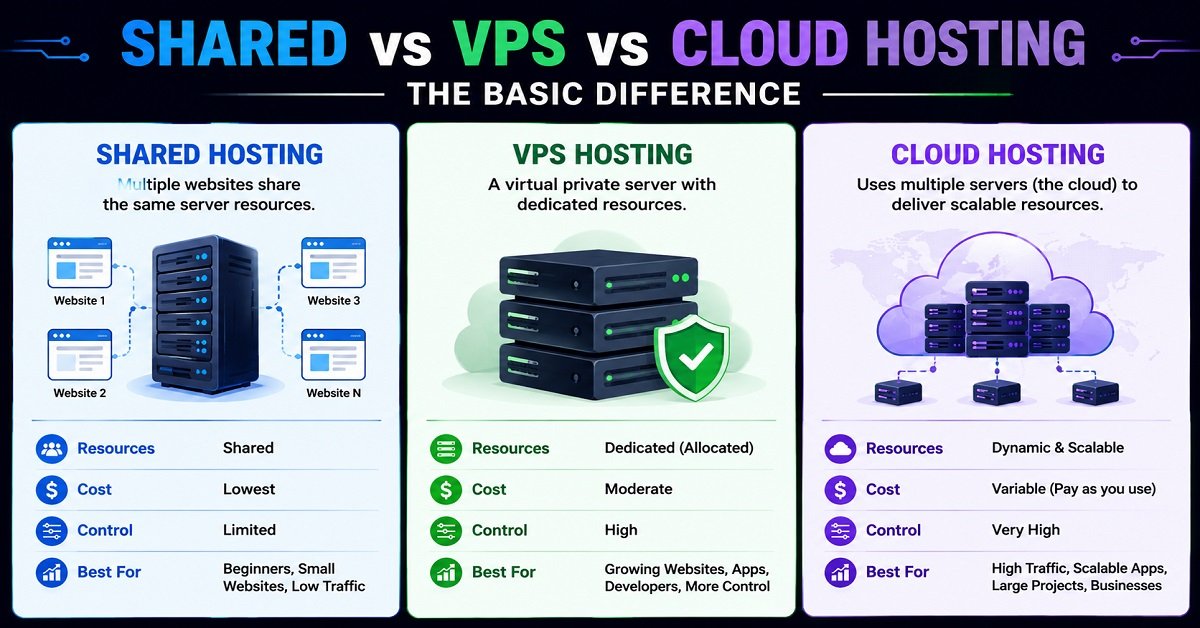
At this point, the simplest way to remember the three options is:
Shared hosting: You share a server environment with other websites and get simplicity at a low cost.
VPS hosting: You get a virtual server environment with more control and resource isolation.
Cloud hosting: You use cloud infrastructure designed to provide flexible computing resources and scalability.
None of these is universally the best.
The right choice depends on your website.
Shared vs VPS vs Cloud Hosting: How Do They Compare?
Understanding what shared, VPS, and cloud hosting mean is useful, but definitions alone don’t help much when you’re actually trying to choose a hosting plan.
The more important question is how these hosting types differ in performance, price, security, scalability, control, and ease of management.
A small WordPress blog and a busy online store may both technically run on shared hosting, but their requirements can be very different. Likewise, moving to a VPS or cloud hosting simply because it sounds more powerful doesn’t automatically make sense.
Let’s compare them one factor at a time.
Shared vs VPS vs Cloud Hosting: Quick Comparison
Here is a simple overview before we look at each factor in detail.
| Feature | Shared Hosting | VPS Hosting | Cloud Hosting |
|---|---|---|---|
| Typical cost | Low | Medium | Varies |
| Performance | Good for smaller websites | Generally more consistent | Can scale significantly |
| Resource sharing | High | More isolated | Depends on architecture |
| Server control | Low | High | High, depending on service |
| Scalability | Limited | Good | Excellent in many setups |
| Technical knowledge | Low | Medium to high | Medium to high |
| Server management | Usually easy | Managed or self-managed | Depends on provider |
| Best suited for | Beginners and small websites | Growing websites and applications | Scalable websites and applications |
| Pricing predictability | Usually high | Usually high | Can vary with usage |
| Customization | Limited | High | High |
| Best starting point | Yes, for many beginners | Usually not | Usually not |
This table gives you the general picture, but there are some important details behind each difference.
1. Performance: Which Hosting Type Is Faster?
Performance is probably the first thing people think about when comparing hosting.
You may see claims such as:
“VPS is faster than shared hosting.”
Or:
“Cloud hosting is the fastest.”
The reality is more complicated.
Hosting type matters, but it is not the only thing that determines website speed.
Your website’s performance also depends on:
Website performance also involves more than the hosting server itself. Google uses several page-experience signals, including Core Web Vitals, to assess aspects of how users experience a page.
- CPU performance
- Available RAM
- Storage technology
- Server configuration
- Database performance
- Caching
- Content delivery network
- Website code
- Images and other media
- WordPress plugins
- Number of simultaneous visitors
- How efficiently your website is built
A well-optimized website on good shared hosting can perform better than a poorly configured website on an expensive VPS.
Shared Hosting Performance
Shared hosting can perform very well for small and moderately busy websites.
Imagine a new blog with a few hundred visitors a day.
It may not need a dedicated CPU or a large amount of RAM. A good shared hosting environment can provide enough resources for the website to load quickly.
The problem can appear as the website grows.
If the server is heavily loaded or your website starts consuming a large amount of CPU or RAM, you may encounter resource limitations.
This is one reason why shared hosting performance can become less predictable as your website grows.
VPS Performance
A VPS generally gives you more control over the resources available to your virtual server.
This can make performance more predictable, particularly when your website has outgrown shared hosting.
For example, if your WordPress website is running a larger database, receiving significantly more traffic, or using resource-intensive plugins, having additional RAM and CPU resources can help.
But remember:
A VPS doesn’t automatically make a website fast.
If your website has poorly optimized images, excessive plugins, inefficient code, or a slow database, moving to a VPS may not solve the underlying problem.
Cloud Hosting Performance
Cloud infrastructure can be particularly useful when workloads change over time.
For example, imagine an online store that normally gets moderate traffic but experiences large spikes during a sale.
A cloud-based architecture can be designed to provide additional computing resources when demand increases.
This is one of the major advantages of cloud infrastructure.
However, the actual performance depends on how the cloud environment is configured. Simply choosing a product labelled “cloud hosting” doesn’t guarantee better performance.
Performance winner
There isn’t a universal winner.
For a small website:
Good shared hosting can be enough.
For a growing website needing more predictable resources:
VPS can be a better fit.
For applications that need flexible scaling:
Cloud can make more sense.
2. Price: Which Hosting Type Is Cheapest?
If you’re starting a website, price matters.
There is little point paying for resources you aren’t going to use.
Shared Hosting Price
Shared hosting is usually the least expensive option because the cost of the physical infrastructure is distributed among many customers.
This makes it attractive for:
- New bloggers
- Personal websites
- Small business websites
- Portfolio websites
- Small affiliate websites
- Websites with limited traffic
For someone starting their first website, keeping hosting costs low can be a sensible decision.
VPS Hosting Price
VPS hosting generally costs more than basic shared hosting.
You’re paying for a more isolated environment and greater control.
The price can also vary considerably depending on:
- CPU
- RAM
- Storage
- Managed vs unmanaged service
- Backup options
- Support
- Server location
- Provider
A managed VPS will generally cost more than an unmanaged VPS because you’re also paying for server administration and support.
Cloud Hosting Price
Cloud hosting is harder to compare based purely on the monthly advertised price.
Some cloud services use usage-based pricing.
That means your monthly bill can depend on things such as:
- CPU usage
- Memory
- Storage
- Data transfer
- Database usage
- Number of requests
- Additional cloud services
This can be an advantage because you may be able to scale resources according to your needs.
But it can also create an unexpected problem.
A sudden increase in traffic can sometimes result in increased resource usage and therefore a higher bill.
Don’t Compare Only the Introductory Price
This is one of the most important things to check before buying hosting.
A hosting company may advertise a very low introductory price for the first term.
But the renewal price can be considerably higher.
Before choosing a plan, check:
First-term price + renewal price + important extras = actual hosting cost
Also check whether backups, email, CDN services, migrations, staging, security tools or other features are included or sold separately.
Price winner
For most beginners:
Shared hosting wins.
VPS is justified when you actually need additional resources or control.
Cloud hosting can provide excellent flexibility, but its total cost needs to be understood before you commit.
3. Security: Which Hosting Type Is More Secure?
Security is another area where hosting comparisons often become misleading.
You may hear:
“VPS is more secure than shared hosting.”
Or:
“Cloud hosting is the most secure.”
Neither statement should be treated as an absolute rule.
Security depends on the infrastructure, configuration, software, provider and how the website is managed.
Shared Hosting Security
With shared hosting, multiple websites operate on the same underlying server environment.
The hosting provider is responsible for securing the server infrastructure, while you are generally responsible for securing your own website.
For a WordPress website, that means keeping:
- WordPress updated
- Themes updated
- Plugins updated
- Strong passwords enabled
- Unnecessary plugins removed
- Admin accounts protected
- Backups maintained
A good hosting provider should also have server-level security measures in place.
The fact that you use shared hosting doesn’t mean your website is automatically insecure.
VPS Security
A VPS gives you greater control, but greater control also means greater responsibility.
If you’re using an unmanaged VPS, you may need to configure and maintain:
- Firewall rules
- Operating system updates
- Server software
- User permissions
- SSH access
- Malware protection
- Backups
- Security monitoring
This creates an interesting situation:
A VPS can give you more control over security, but a poorly managed VPS can also create more security risks.
If you don’t know how to secure a server, a managed VPS may be a much better choice than an unmanaged one.
Cloud Security
Cloud platforms can provide extensive security controls and infrastructure-level protection.
However, cloud security is a shared responsibility.
The provider secures certain parts of the infrastructure, while you may be responsible for configuring your virtual machines, applications, databases, permissions and access controls.
The more complex the cloud environment becomes, the more important proper configuration becomes.
Security winner
There isn’t a simple winner.
For beginners:
Good shared hosting + properly secured website can be perfectly reasonable.
For experienced users:
VPS provides more security control.
For businesses and complex applications:
Cloud platforms can provide powerful security capabilities, provided they are configured correctly.
4. Scalability: What Happens When Your Website Grows?
Scalability is where the differences between the three options become more obvious.
Imagine you start with 100 visitors a day.
After a year, your website gets 5,000 visitors a day.
Later, one article goes viral and traffic jumps to 50,000 visitors in a short period.
Your hosting needs may change significantly during that journey.
Shared Hosting Scalability
Shared hosting plans usually offer different levels.
You may be able to move from a basic plan to a larger shared plan, but eventually you can reach the limits of the shared environment.
At that point, you may need to move to a VPS, cloud hosting or another higher-capacity solution.
For a small website, this isn’t necessarily a problem.
You don’t need to plan for massive traffic before you’ve even published your first article.
VPS Scalability
VPS hosting generally gives you more room to grow.
If your website needs more RAM, CPU or storage, you may be able to upgrade the VPS plan.
This makes VPS a useful middle ground.
You get more resources and control than shared hosting without necessarily moving into a complex cloud architecture.
However, scaling a VPS is not always as simple as clicking one button and forgetting about it. Depending on the provider and architecture, you may need to plan upgrades, configuration changes or even migrations.
Cloud Scalability
Scalability is one of the biggest reasons businesses choose cloud infrastructure.
Cloud environments can allow applications to use additional resources when needed.
Depending on the architecture, you may be able to scale:
- Computing resources
- Storage
- Databases
- Network capacity
- Application instances
For example, an online store preparing for a major sale may increase its infrastructure capacity before the event and reduce it later.
That flexibility can be difficult to achieve with basic shared hosting.
Scalability winner
For basic websites:
Shared hosting is often sufficient.
For steadily growing websites:
VPS offers a useful upgrade path.
For applications with highly variable or large workloads:
Cloud usually offers the greatest flexibility.
5. Control and Customization
Another major difference is how much control you have over the hosting environment.
Shared Hosting
Shared hosting is intentionally limited.
That’s partly why it is easy to use.
The provider manages the server environment, and you typically work through a control panel.
You don’t need to worry about configuring the operating system or maintaining the server.
For a blogger, this can actually be a benefit.
You can spend your time writing content instead of managing servers.
VPS Hosting
VPS hosting gives you much more control.
Depending on the plan, you may have root or administrator access and can configure the environment to suit your application.
You can potentially choose:
- Operating system
- Server software
- PHP versions
- Database configuration
- Security settings
- Application software
- Custom services
This is useful for developers and technically experienced website owners.
But again, control comes with responsibility.
Cloud Hosting
Cloud environments can provide an even wider range of configuration options.
You may be able to combine multiple services to create an architecture specifically suited to your application.
This is powerful, but it also makes cloud hosting more complicated.
If all you want is a WordPress blog, having dozens of infrastructure options may not make your life easier.
Control winner
Shared: easiest, least control.
VPS: strong balance between control and complexity.
Cloud: potentially the greatest flexibility, but also greater complexity.
6. Ease of Management
This is an important factor that beginners often ignore.
More powerful hosting isn’t necessarily better if you don’t know how to manage it.
Shared Hosting
Shared hosting is usually the easiest.
The provider handles most server-level maintenance.
You can generally use a control panel to:
- Create email accounts
- Install WordPress
- Manage domains
- Create databases
- Manage files
- Set up SSL
- Configure basic hosting settings
You can focus primarily on your website.
Managed VPS
A managed VPS can offer a middle ground.
You get more server resources and control while the provider handles some of the technical work.
This can be a good option for a business owner who has outgrown shared hosting but doesn’t want to become a full-time server administrator.
Unmanaged VPS
An unmanaged VPS is very different.
You may be responsible for almost everything happening inside your server.
If something breaks at 2 a.m., you may need to diagnose it yourself or hire someone who can.
That’s why beginners should be cautious about choosing an unmanaged VPS simply because it looks cheap.
Cloud Hosting
Cloud hosting can range from relatively simple managed products to highly technical infrastructure platforms.
A beginner-friendly cloud hosting product and a developer-oriented cloud platform can feel like completely different services.
So don’t judge cloud hosting only by the word “cloud.”
Look at exactly what the provider manages for you.
Ease-of-management winner
For beginners:
Shared hosting
For people who want more control without managing everything:
Managed VPS
For developers and technical teams:
VPS or cloud, depending on the application
7. Resource Isolation
This is one of the technical differences worth understanding.
With shared hosting, several websites use the same underlying server environment.
The hosting provider usually places limits on each account so that one customer cannot consume unlimited resources.
With VPS hosting, the customer gets a separate virtual server environment with allocated resources.
This generally provides better isolation and control.
Cloud infrastructure can provide different forms of isolation depending on how the service is designed.
The important thing to understand is that “resource isolation” doesn’t mean “you automatically get unlimited resources.”
Every hosting environment has limits.
The difference is how those resources are allocated, controlled and scaled.
8. Which Hosting Type Gives You More Predictable Costs?
This is worth discussing separately because the cheapest hosting option isn’t always the easiest to budget for.
Shared Hosting
Shared hosting usually has a relatively predictable monthly or annual price.
You pay for the plan and know approximately what the hosting bill will be.
Additional services may still cost extra, of course.
VPS Hosting
VPS hosting is also generally predictable.
If you purchase a VPS with a fixed monthly price and fixed resources, your hosting bill is usually easier to estimate.
Additional services such as backups, licenses or management may increase the cost.
Cloud Hosting
Cloud pricing can be more variable.
If you’re paying based on resource consumption, a change in traffic or usage can affect the bill.
This doesn’t make cloud hosting bad.
It simply means you should understand the pricing model before using it.
For businesses, cost monitoring and usage limits can become an important part of cloud management.
9. Shared vs VPS vs Cloud for Different Website Types
The best hosting choice becomes much easier to understand when we look at actual examples.
New Personal Blog
Best starting point: Shared hosting
A new personal blog normally doesn’t need a VPS or cloud infrastructure.
Starting with shared hosting keeps costs low and allows you to concentrate on publishing content.
Small Affiliate Website
Best starting point: Shared hosting
A new affiliate website generally doesn’t need expensive infrastructure.
If traffic grows significantly and the site starts hitting resource limits, you can consider upgrading later.
Small Business Website
Best starting point: Shared hosting or managed VPS
A simple company website with a few pages may work perfectly well on shared hosting.
A business that depends heavily on its website or needs additional server control may benefit from managed VPS hosting.
Growing WordPress Website
Possible choice: Shared hosting or VPS
If the site is still performing well on shared hosting, there is no reason to upgrade just because it has reached a particular number of visitors.
But if you’re seeing resource-limit warnings, performance problems or other hosting restrictions, VPS becomes worth considering.
WooCommerce Store
Possible choice: VPS or cloud
An online store can have more demanding requirements because it handles databases, product pages, customer sessions, orders and payment-related processes.
A small store may still work on good shared hosting.
As the store grows, VPS or cloud infrastructure may become more appropriate.
Web Application
Usually: VPS or cloud
A custom web application may require specific software, server configurations, databases and background processes.
Shared hosting can be restrictive for this type of project.
A VPS can provide the control needed for smaller applications, while cloud infrastructure may make more sense as the application becomes larger or more complex.
The Most Important Point: Don’t Upgrade Just Because You Can
There is a common mistake in hosting discussions.
People sometimes assume that if their website is growing, they should immediately move from shared hosting to VPS and then to cloud hosting.
That’s not necessary.
Suppose your shared hosting plan costs ₹3,000 per year and your website works perfectly.
You have no resource warnings.
Your pages load well.
Your website isn’t experiencing downtime.
You don’t need special server software.
Why would you suddenly spend several times more on a VPS?
You wouldn’t.
Upgrade when your website has a genuine reason to need the additional resources, control or scalability.
This keeps your hosting costs aligned with your actual needs.
And that brings us to the next question:
How do you know when your current hosting is no longer enough?
Shared vs VPS vs Cloud Hosting: Which One Should You Choose?
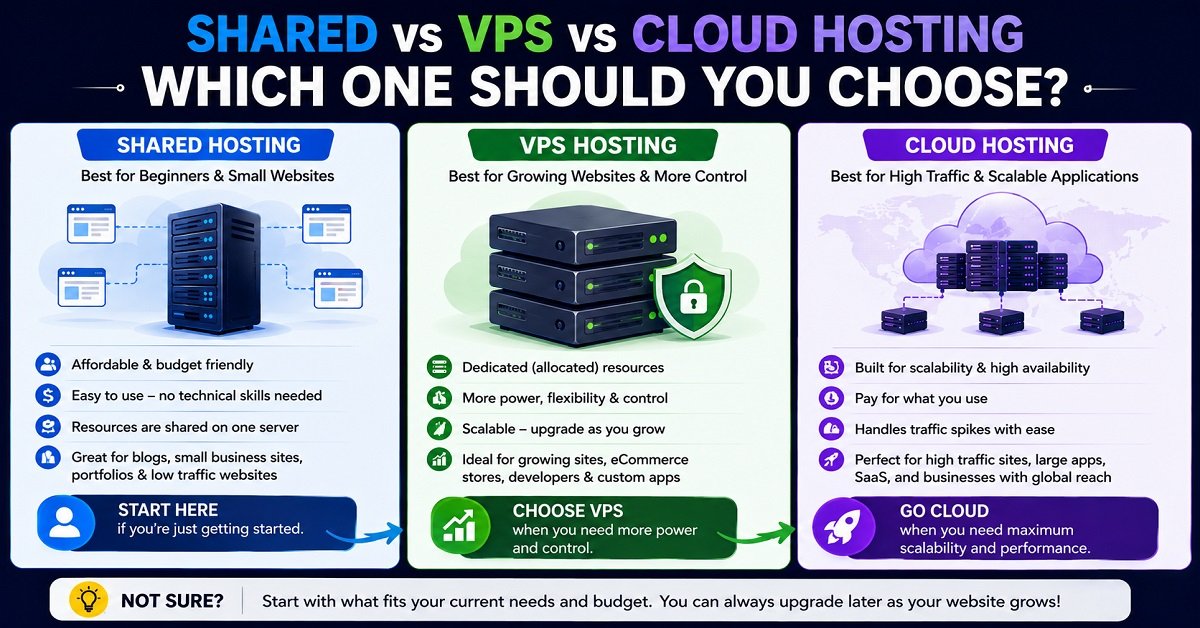
Now that we’ve compared shared, VPS and cloud hosting on performance, price, security, scalability and management, the next question is the one that matters most:
Which one should you actually choose for your website?
There is no single answer for everyone.
A beginner starting a small blog has very different hosting needs from a developer building a web application. Similarly, an online store that receives unpredictable traffic may need a different setup from a portfolio website that gets a few hundred visitors a month.
The good news is that you don’t need to guess.
Your website’s size, traffic, technical requirements, budget and growth plans can tell you quite a lot about which hosting type makes sense.
Shared Hosting Is Best If You’re Starting a New Website
For most beginners, shared hosting is the sensible place to start.
This is especially true if you’re building:
- A new blog
- A personal website
- A portfolio
- A small business website
- A new affiliate website
- A simple WordPress website
- A small informational website
When a website is new, traffic is usually the least of your problems.
You may spend months creating content before traffic becomes large enough to put meaningful pressure on the server.
In that situation, paying for a VPS or cloud infrastructure may simply increase your expenses without providing a noticeable benefit.
Example: A New Blogger
Imagine you want to start a website about smartphones.
You purchase a domain, install WordPress and publish your first 20 articles.
During the first few months, perhaps only a few dozen or a few hundred people visit the website each day.
A good shared hosting plan should be more than enough for this type of website.
You can spend your money on:
- Better content
- Images
- Design
- SEO tools
- Promotion
- Other website expenses
rather than paying for server resources you aren’t using.
When Shared Hosting Makes the Most Sense
Shared hosting is particularly attractive when:
You want to keep costs low.
You are just starting and don’t have a large hosting budget.
You don’t want to manage a server.
You would rather focus on your website than learn Linux administration, firewalls and server configuration.
Your website has modest resource requirements.
A basic WordPress site doesn’t normally require a powerful server.
You don’t need special software.
If everything you need is available through the hosting provider’s normal environment, there is little reason to pay for additional control.
For these situations, shared hosting isn’t a compromise you should feel bad about.
It is often the appropriate tool for the job.
VPS Hosting Is Best When Your Website Has Outgrown Shared Hosting
A VPS becomes more interesting when your website has a genuine reason to need more resources or control.
You might consider a VPS when:
- Your website regularly reaches shared hosting resource limits
- Traffic has increased significantly
- Your application needs more CPU or RAM
- You need custom server configurations
- You need software that your shared host doesn’t support
- You need more control over the server environment
- You are running multiple websites or applications
- You are comfortable with server administration or willing to pay for managed support
The important part is that you don’t need to move to a VPS simply because your website is growing.
Move when your current hosting environment is becoming a limitation.
Warning Sign 1: You Keep Hitting Resource Limits
This is one of the clearest reasons to investigate an upgrade.
Your hosting provider may show warnings about things such as:
- CPU usage
- RAM usage
- Entry processes
- Concurrent processes
- Database resources
- Inodes
- Other account-level limits
Don’t immediately assume that a warning means you need a VPS.
First investigate why the resources are being consumed.
A poorly optimized plugin, inefficient script, malware infection, traffic spike or badly configured application could be responsible.
If you’ve optimized the website and the resource usage is still consistently too high, then upgrading may make sense.
Warning Sign 2: Your Website Regularly Struggles During Traffic Spikes
Suppose your website normally works perfectly.
Then you publish an article that suddenly becomes popular.
Traffic increases several times over the normal level and your website becomes slow or unavailable.
If this happens repeatedly, your hosting environment may not be able to handle your traffic pattern comfortably.
A VPS can provide more resources and greater control.
But if traffic spikes are unpredictable and potentially very large, cloud infrastructure may eventually be worth considering instead.
Warning Sign 3: You Need More Server Control
Sometimes the problem isn’t traffic.
It’s what you need to run.
For example, a developer may want to:
- Install specific software
- Configure a custom web server
- Run background processes
- Change server-level settings
- Use SSH
- Configure databases differently
- Deploy a custom application
Shared hosting may restrict these activities.
A VPS can provide the additional access required.
Warning Sign 4: You’re Running More Than a Simple Website
A simple WordPress blog is one thing.
A web application with a database, background jobs, APIs and other services is another.
As the architecture becomes more complicated, shared hosting can become restrictive.
A VPS gives you a more flexible environment where you can configure the server according to the application’s requirements.
Cloud Hosting Is Best When Scalability and Flexibility Matter
Cloud hosting starts making more sense when your website or application has requirements that go beyond a simple fixed server environment.
This can include:
- Large or unpredictable traffic
- Applications that need to scale
- High availability requirements
- Multiple application services
- Large databases
- Developer-controlled infrastructure
- Businesses that need flexible computing resources
Again, cloud hosting isn’t automatically better.
It is better for specific types of workloads.
Example: An Online Store During a Sale
Imagine an online store normally receives 2,000 visitors per day.
During a major sale, it suddenly receives 30,000 visitors.
The store needs to handle:
- More page requests
- More database queries
- More customer sessions
- More checkout activity
- More background processing
A scalable cloud architecture can be designed to handle changing workloads much more flexibly.
For a small store with 50 visitors a day, however, that architecture may be unnecessary.
What Should a Beginner Choose?
If you’re completely new to websites and hosting, here’s my practical recommendation:
Start with shared hosting unless you have a specific reason to choose something else.
If you’re planning to build your site with WordPress, you may also want to understand How to Build a WordPress Website from Scratch before choosing a plan.
You probably don’t need a VPS just because someone on YouTube says VPS hosting is “faster.”
You probably don’t need cloud hosting just because it sounds more modern.
Start with a good shared hosting plan if:
- You’re building your first website
- Your traffic is low
- You’re using WordPress normally
- You don’t need special server configurations
- You want simple management
- Your budget is limited
Then monitor how the website performs.
If you eventually reach a genuine limitation, upgrade.
This approach has another advantage.
You learn what your website actually needs before spending more money on infrastructure.
What Should a Growing Blog Choose?
For a growing blog, the decision is usually between staying on shared hosting and moving to a VPS.
Don’t use a specific visitor number as your automatic upgrade point.
For example, saying:
“Move to VPS after 10,000 visitors per month.”
is too simplistic.
Two websites with the same traffic can use completely different amounts of server resources.
A lightweight blog with optimized pages may use relatively little server capacity.
A website with complex database queries, membership features, search functions and many dynamic pages can consume much more.
Signs Your Blog May Need a VPS
Consider investigating a VPS if:
- Your hosting provider repeatedly reports high resource usage
- Your website slows down as traffic increases
- You have optimized the website but performance remains limited by hosting
- You need more server-level control
- Your website runs resource-intensive applications
- You regularly experience problems during traffic spikes
If none of these is happening, there may be no reason to upgrade.
What Should an Online Store Choose?
Online stores require more careful consideration because the website isn’t just publishing information.
It is handling products, databases, customer accounts, carts, orders and potentially large numbers of simultaneous visitors.
Small Online Store
A small WooCommerce store may be perfectly fine on quality shared hosting if:
- Product count is modest
- Traffic is relatively low
- The hosting environment supports the required software
- The website is properly optimized
- There are no resource issues
There’s no rule saying every WooCommerce store needs a VPS.
Growing Online Store
A VPS may become useful when:
- Database activity increases
- Traffic grows
- More customers are active at the same time
- You need greater control
- Shared hosting resource limits become a problem
Large or Highly Variable Store
Cloud infrastructure may make more sense when the store has:
- Large traffic spikes
- Significant seasonal demand
- Complex application architecture
- Strong availability requirements
- A technical team capable of managing cloud infrastructure
The right choice depends on the store’s architecture, not simply the fact that it uses WooCommerce.
What Should a Developer Choose?
Developers often have different requirements from ordinary website owners.
If you’re building a custom application, you may need:
- SSH access
- Specific runtime versions
- Custom packages
- Database configuration
- Background workers
- Scheduled jobs
- Custom security rules
- Deployment tools
- Server-level configuration
Shared hosting can be restrictive for these requirements.
A VPS can provide a useful environment for smaller applications.
Cloud infrastructure becomes more attractive when the application needs multiple services, flexible scaling, distributed architecture or other advanced capabilities.
Managed or Unmanaged?
This is another important decision.
If you’re a developer who knows server administration, an unmanaged VPS may give you the control you want.
If you’re a business owner who simply wants the application to run without becoming responsible for server maintenance, a managed VPS may be a better choice.
Don’t confuse more control with less work.
More control usually means more responsibility.
What If You Don’t Want to Manage a Server?
This question can change the answer considerably.
Suppose you’ve outgrown shared hosting.
You need more resources, but you don’t want to spend your time dealing with:
- Server updates
- Firewall rules
- Security configuration
- Backups
- Server monitoring
- Troubleshooting
In that case, look for managed VPS hosting rather than immediately choosing an unmanaged VPS.
You’re paying the provider to take care of some of the technical responsibilities.
The same principle applies to cloud hosting.
A cloud platform can give you enormous flexibility, but if you don’t have the technical knowledge or resources to manage it properly, that flexibility may become a burden.
Is Cloud Hosting Better Than VPS?
Not necessarily.
This is one of the biggest misconceptions in hosting.
Cloud hosting and VPS hosting solve somewhat different problems.
A VPS can be an excellent choice when you want:
- More control than shared hosting
- Predictable resources
- A relatively straightforward server environment
- Custom software
- A manageable upgrade path
Cloud hosting can be a better choice when you need:
- Flexible scaling
- More complex infrastructure
- Multiple services
- Variable workloads
- Higher levels of architectural flexibility
Think about it this way:
A VPS can be like renting your own apartment.
Cloud infrastructure can be more like having access to a flexible network of buildings and services that can be arranged according to your needs.
If you simply need a comfortable apartment, you don’t need an entire network of buildings.
Can You Start With Shared Hosting and Move Later?
Yes, and this is what many website owners should do.
You don’t need to predict exactly how large your website will become on day one.
You can start with shared hosting, learn what your website needs, grow your traffic and then move when necessary.
A common progression might look like this:
New website → Shared hosting
↓
Growing website → Larger shared plan or VPS
↓
Higher resource requirements → Managed or unmanaged VPS
↓
Complex or highly scalable application → Cloud infrastructure
But this is not a mandatory path.
Some websites can remain on shared hosting for years.
Some applications may start directly on a VPS.
Some businesses may choose cloud infrastructure from the beginning because their application requires it.
The correct path depends on the project.
When Should You Upgrade From Shared Hosting to VPS?
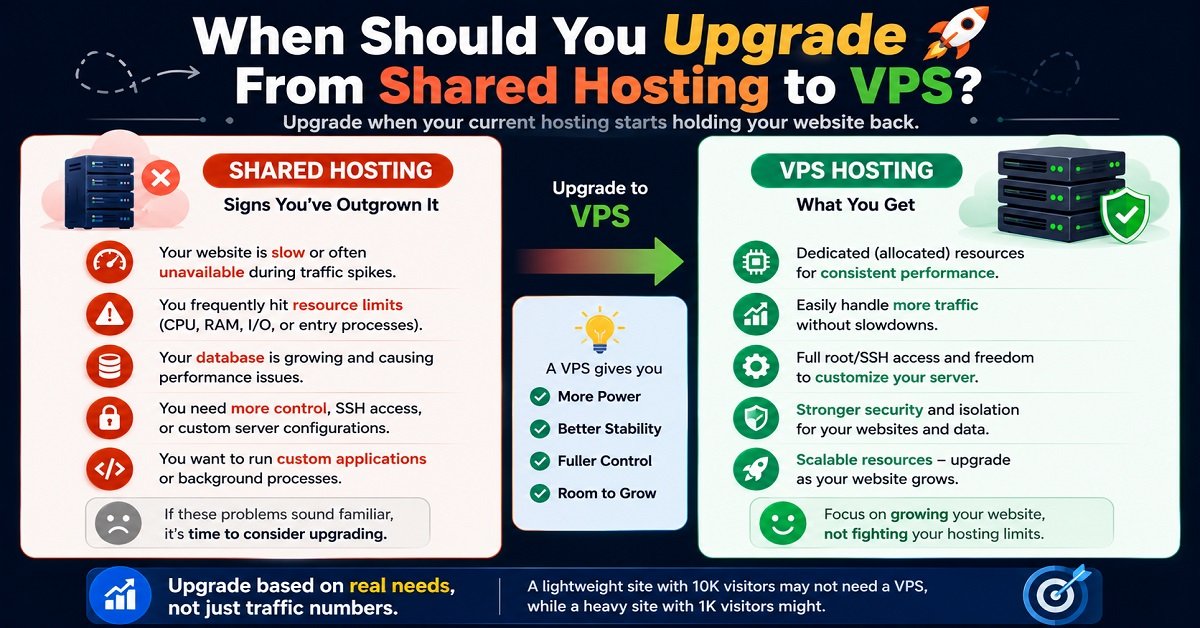
Don’t upgrade because a particular number of visitors sounds impressive.
Instead, look for actual evidence that your current hosting environment is becoming a problem.
Here are the strongest signals.
1. Your Hosting Account Regularly Hits Resource Limits
If you’re repeatedly receiving resource warnings, investigate them.
If the website itself is responsible and optimization doesn’t solve the issue, a VPS may be appropriate.
2. Your Website Has Outgrown the Available Configuration
Perhaps you need a software version, server setting or application that your shared host doesn’t allow.
That’s a legitimate reason to move.
3. Performance Problems Are Hosting-Related
First rule out:
- Poorly optimized images
- Too many plugins
- Bad code
- Database issues
- Missing caching
- DNS problems
- CDN configuration
- Third-party scripts
If you’ve addressed these and the hosting environment remains the bottleneck, an upgrade may be justified.
4. Your Business Depends Heavily on the Website
If your website generates significant revenue, the cost of better infrastructure may be easier to justify.
A small increase in hosting cost can be worthwhile if it reduces the chance of performance problems that affect customers.
5. You Need More Control
Sometimes resource usage isn’t the issue.
You simply need server access that shared hosting doesn’t provide.
In that situation, VPS can be the logical next step.
When Should You Choose Cloud Instead of VPS?
Choose cloud infrastructure when the architecture or workload calls for it.
Good reasons can include:
- Traffic changes dramatically
- Your application needs to scale horizontally
- You need multiple servers or services
- High availability is important
- Your application uses several cloud services
- You have a technical team capable of managing the environment
- The business needs infrastructure that can grow with demand
If your only reason is:
“Cloud is newer than VPS.”
that’s not enough.
A simple website doesn’t become better simply because it is moved to cloud infrastructure.
A Simple Decision Guide
If you’re still unsure, use this basic decision process.
Are you starting a small website?
Choose shared hosting.
Is your website growing but still relatively simple?
Stay on shared hosting if it performs well.
If you’re regularly hitting resource limits, consider a VPS.
Do you need custom server software or more control?
Choose VPS.
Consider managed VPS if you don’t want to handle server administration yourself.
Does your application have unpredictable traffic or complex infrastructure?
Consider cloud hosting.
Are you a beginner with no server administration experience?
Avoid choosing an unmanaged VPS or complex cloud setup simply because it sounds more powerful.
Start with a managed solution that matches your actual needs.
The Most Important Question to Ask Before Upgrading
Before spending more money, ask:
What problem am I trying to solve?
If the answer is:
“My website is slow.”
don’t immediately buy a VPS.
First find out why it is slow.
If the problem is oversized images, moving to a VPS won’t fix it.
If the problem is a badly configured WordPress plugin, a more powerful server won’t necessarily fix it.
If the problem is that your shared hosting account is consistently running out of CPU or RAM despite proper optimization, then a VPS may be the right solution.
This distinction can save you a lot of money.
What Should You Check Before Buying Any Hosting?
Regardless of whether you choose shared, VPS or cloud hosting, don’t make your decision based only on the advertised price.
Check these things first:
Renewal Price
The introductory price may be much lower than the renewal price.
Resource Limits
Find out what CPU, RAM, storage, bandwidth, processes and other limits apply.
Backups
Understand how often backups are created, how long they are retained and whether restoring them costs extra.
Never assume the word “backup” means you have a complete disaster-recovery solution.
Support
Check whether support is available when you actually need it and whether the provider helps with server-level problems.
Server Location
Choose a data center reasonably close to your primary audience when possible, while remembering that a CDN and overall site optimization also affect performance.
Migration Support
If you’re moving an existing website, check whether the provider offers migration assistance.
Management
For VPS and cloud hosting, clearly understand what the provider manages and what you are expected to manage.
Refund Policy
Check the refund terms before purchasing.
Upgrade Options
Your hosting provider should ideally give you a sensible path to move to a larger plan or different infrastructure when your website grows.
The most important takeaway from this comparison is simple:
Don’t buy the most powerful hosting you can afford. Buy the hosting that solves your current problem while giving you a sensible path to grow.
For many beginners, that means shared hosting.
For a growing website that needs more control or resources, VPS can be the right middle ground.
For applications with complex architecture or highly variable workloads, cloud hosting can provide the flexibility needed.
Shared vs VPS vs Cloud Hosting: Which One Should You Choose?
Shared vs VPS vs Cloud Hosting: Pros and Cons
Before making your final decision, it helps to see the strengths and weaknesses of each hosting type side by side.
Shared Hosting
VPS Hosting
Cloud Hosting
Which Hosting Is Best for WordPress?
For most new WordPress websites, shared hosting is a sensible starting point.
WordPress itself doesn’t require a VPS or cloud server simply because it is WordPress.
A new blog with a relatively small audience can often run comfortably on a good shared hosting plan.
The situation changes as the website grows.
If your WordPress website starts experiencing resource limitations, needs more server control or runs resource-intensive features, a VPS can become a better option.
Cloud hosting may make sense for larger WordPress installations with unusual traffic patterns, complex infrastructure or higher scalability requirements.
So the question shouldn’t be:
“Which hosting is best for WordPress?”
A better question is:
“Which hosting is appropriate for the size and requirements of my WordPress website?”
For a new WordPress blog:
Shared hosting
For a growing WordPress website with increasing resource requirements:
VPS
For a large or complex setup that needs flexible infrastructure:
Cloud hosting
Which Hosting Is Best for a Small Business Website?
For a basic business website containing pages such as:
- Home
- About
- Services
- Contact
- Blog
shared hosting is usually enough.
You don’t need a VPS simply because the website belongs to a business.
If the website becomes an important part of your business and starts receiving significant traffic or running applications that need more resources, then VPS or cloud hosting may become appropriate.
For a small business owner, managed hosting can also be valuable because it reduces the amount of technical work you need to handle yourself.
Which Hosting Is Best for an Affiliate Website or Blog?
For most new affiliate websites and content-focused blogs, I would start with shared hosting.
The main reason is simple.
Your biggest challenge at the beginning is usually not server capacity.
It is creating useful content, getting the website indexed, building an audience and improving the website over time.
Spending a large amount on hosting before the website has meaningful traffic doesn’t necessarily improve those things.
A good shared hosting plan can give a new blog enough resources to get started.
Once the website grows and there is evidence that hosting has become a limitation, you can upgrade.
This is a much more sensible approach than paying for a powerful VPS from day one.
Which Hosting Is Best for an Online Store?
For a small online store, shared hosting can still be sufficient if the hosting environment supports the store’s software and the website isn’t consuming excessive resources.
As the store grows, VPS hosting can provide more resources and control.
Cloud infrastructure becomes more attractive when the store has:
- Large traffic spikes
- Significant seasonal demand
- Complex infrastructure
- Multiple services
- High availability requirements
- A technical team capable of managing the environment
The important point is that an online store doesn’t automatically require cloud hosting.
The hosting should match the store’s actual workload.
Which Hosting Is Best for Developers?
For developers, the choice depends heavily on the application.
If you need server-level access and custom configuration, a VPS can be an excellent choice.
For example, you may need to install a particular runtime, configure a database, run background workers or deploy a custom application.
Cloud hosting becomes more attractive when the application needs multiple services or has to scale dynamically.
A developer building a small application may be perfectly happy with a VPS.
A development team building a large application with multiple components may benefit much more from cloud infrastructure.
Can You Move From Shared Hosting to VPS Later?
Yes.
In fact, starting with shared hosting and upgrading later is often the most sensible approach for a new website.
You don’t have to predict your website’s future perfectly when you buy hosting.
You can start small and move when your requirements change.
A typical path might look like:
New website → Shared hosting → Larger shared plan or VPS → Cloud or other advanced infrastructure
But remember that this isn’t a fixed rule.
Some websites never need a VPS.
Some businesses start with VPS hosting.
Some applications need cloud infrastructure from the beginning.
Your hosting journey should be based on your actual requirements.
When Is Shared Hosting No Longer Enough?
There isn’t one universal traffic number that tells you when to leave shared hosting.
Instead, look for these signs:
Your hosting provider repeatedly reports resource limits
If your account regularly reaches CPU, RAM, process or other limits, investigate the cause.
If optimization doesn’t solve the problem, you may need more resources.
Your website has consistent performance problems
If your website is slow even after you’ve addressed common issues such as image optimization, caching, plugins and database performance, your hosting environment could be part of the problem.
You need server-level control
If you need custom software or configurations that shared hosting doesn’t permit, VPS may be the logical next step.
Your website is becoming more important to your business
If downtime or poor performance can directly affect revenue, investing in more appropriate infrastructure may make financial sense.
Your application has outgrown the shared environment
A custom application or resource-intensive website may eventually need more control and resources than shared hosting can provide.
When Is VPS No Longer Enough?
The same principle applies when moving beyond VPS.
You might consider cloud infrastructure when:
- Traffic becomes highly unpredictable
- Your application needs to scale dynamically
- You need multiple servers or services
- Your architecture is becoming more complex
- High availability is important
- You need flexible computing resources
- Your development team can manage cloud infrastructure effectively
Again, don’t move to cloud hosting just because your website has reached a particular visitor count.
A well-performing VPS can continue to serve a website for a long time.
What Should You Check Before Buying Hosting?
Whether you’re buying shared, VPS or cloud hosting, don’t make your decision based solely on the monthly price.
Here is a practical checklist.
1. Check the Renewal Price
Hosting companies often advertise an attractive introductory price.
The renewal price may be considerably higher.
Always check what you’ll pay after the initial promotional period.
2. Check the Resource Limits
Look beyond phrases such as:
“Unlimited”
Find out what the plan actually allows.
Check CPU usage, RAM, storage, bandwidth, processes, databases and other relevant restrictions.
3. Check Backups
Find out:
- How frequently backups are taken
- How long they are retained
- Whether backups are automatic
- Whether you can restore them yourself
- Whether restoration costs extra
Don’t assume that a hosting provider’s backup system replaces your own backup strategy.
For an important website, maintaining an independent backup is still a good idea.
4. Check What the Hosting Provider Manages
This is particularly important with VPS and cloud hosting.
Find out exactly who is responsible for:
- Operating system updates
- Security
- Firewall
- Server software
- Backups
- Monitoring
- Troubleshooting
A cheap unmanaged VPS may look attractive until you realize how much administration it requires.
5. Check Support
Good support can be extremely valuable when something goes wrong.
Look at:
- Support channels
- Availability
- Response times
- What the support team actually handles
- Whether server-level assistance is included
Don’t assume that every hosting provider offers the same level of support.
6. Check Server Locations
Choose a server location that makes sense for your primary audience where possible.
For example, if most of your visitors are in India, a hosting location reasonably close to that audience can be useful.
However, server location isn’t the only factor affecting website speed.
Caching, CDN usage, website optimization and the hosting infrastructure itself also matter.
7. Check Migration Assistance
If you already have a website, find out whether the new hosting company offers migration assistance.
A smooth migration can save considerable time and reduce the risk of mistakes.
8. Check Upgrade Options
Your hosting provider should give you a sensible way to grow.
Ideally, you should be able to move from a basic plan to a larger plan or another hosting type without rebuilding your entire website from scratch.
9. Check the Refund Policy
Before purchasing, understand the refund terms.
This is particularly useful when you’re trying a new hosting provider.
10. Don’t Pay for Features You Don’t Need
This is perhaps the simplest buying rule.
If you are running a basic blog, you probably don’t need a complex cloud architecture.
If you are running a large application, however, choosing the cheapest shared hosting simply because it costs less can create problems later.
Buy according to your requirements, not according to the biggest feature list.
Shared vs VPS vs Cloud Hosting: The Final Decision
So, which one should you choose?
Here’s the simplest way to decide.
Choose Shared Hosting If:
- You’re starting a new website
- You’re running a small blog
- You have a portfolio or personal website
- You run a small business website
- You’re starting an affiliate website
- Your traffic is still relatively low
- You want simple management
- You don’t need server-level customization
- You want to keep hosting costs low
For most beginners, shared hosting is the best place to start.
Choose VPS Hosting If:
- Your website has outgrown shared hosting
- You’re consistently hitting resource limits
- You need more control
- You need custom server configurations
- You’re running a growing application
- You want better resource isolation
- You’re comfortable managing a server or willing to pay for managed VPS hosting
VPS is often the best middle ground between simplicity and control.
Choose Cloud Hosting If:
- Your workload changes significantly
- You need strong scalability
- Your application has complex infrastructure
- You need multiple services
- You have high availability requirements
- You have the technical skills or team to manage cloud infrastructure
- Usage-based infrastructure makes sense for your business
Cloud hosting is most valuable when flexibility and scalability are genuine requirements.
Shared vs VPS vs Cloud Hosting: Final Verdict
There is no single winner in the shared vs VPS vs cloud hosting comparison.
Each option exists for a different purpose.
Shared hosting is the best choice for many beginners because it is affordable, simple and easy to manage. A new blog or small website usually doesn’t need anything more complicated.
VPS hosting is a good next step when a website needs more resources, control or customization. It provides a useful balance between cost and flexibility, especially when you choose a managed VPS if you don’t want to handle server administration yourself.
Cloud hosting makes the most sense when scalability, flexibility or complex infrastructure are important. It can be extremely powerful, but that doesn’t mean every website should use it.
The most important rule is this:
Don’t choose hosting based on how powerful it sounds. Choose it based on the problem you need it to solve.
If shared hosting is handling your website well, there is no need to upgrade just for the sake of upgrading.
If you’re consistently hitting resource limits or need more control, consider VPS.
If your application needs flexible scaling or a more complex architecture, cloud hosting may be the better choice.
And if you’re starting from scratch today, starting with affordable shared hosting and upgrading when your website genuinely needs it is often the smartest approach.
Frequently Asked Questions
Is VPS better than shared hosting?
VPS hosting offers more control, resource isolation and customization than typical shared hosting, but that doesn’t mean it is better for every website. Shared hosting is often more suitable for beginners and small websites because it is cheaper and easier to manage. VPS becomes more useful when a website needs additional resources or server-level control.
Is cloud hosting better than VPS?
Not automatically. Cloud hosting can provide greater scalability and infrastructure flexibility, while a VPS can be simpler and more predictable for many websites. The better option depends on your workload, technical requirements, budget and need for scalability.
Which hosting is best for beginners?
Shared hosting is usually the best starting point for beginners who are building a small website or WordPress blog. It is affordable, easier to manage and doesn’t require advanced server administration skills.
Is VPS hosting difficult for beginners?
An unmanaged VPS can be difficult for someone without server administration experience because you may need to manage security, updates, software and backups yourself. A managed VPS is easier because the provider handles some of these responsibilities.
When should I move from shared hosting to VPS?
Consider moving when your website consistently hits hosting resource limits, experiences hosting-related performance problems, needs more server control or requires software and configurations that shared hosting doesn’t support. Don’t upgrade based solely on a particular monthly visitor number.
Is cloud hosting expensive?
It depends on the provider, resources and pricing model. Some cloud services use usage-based pricing, so costs can increase as resource consumption increases. Before choosing cloud hosting, understand how computing, storage, bandwidth and additional services are billed.
Can I start with shared hosting and move to VPS later?
Yes. This is a common approach. You can start with shared hosting when your website is small and move to a VPS when you genuinely need more resources or control. Your hosting provider’s migration options should be considered before you purchase a plan.
Does VPS hosting automatically make my website faster?
No. A VPS can provide more resources and better control, but website speed also depends on caching, images, code, databases, plugins, server configuration, CDN usage and other factors. Moving to a VPS won’t automatically fix a poorly optimized website.
Does cloud hosting mean unlimited resources?
No. Cloud hosting still has resource limits and pricing rules. Cloud infrastructure can make it easier to scale resources, but the exact capabilities depend on the provider and the service you choose.
Should I choose VPS or cloud hosting for an online store?
A small online store may work perfectly well on good shared hosting. As the store grows, a VPS can provide additional resources and control. Cloud hosting becomes more attractive when the store has large traffic spikes, complex infrastructure or significant scalability requirements.
Final Takeaway
If you’re still unsure after reading this guide, don’t overcomplicate the decision.
Starting a small website? Choose shared hosting.
Growing and hitting genuine limitations? Consider VPS.
Building a complex application or dealing with highly variable workloads? Consider cloud hosting.
Your hosting should support your website, not become another problem you have to manage.
And perhaps the best hosting decision you can make is to start with what you actually need today, while making sure you have a sensible path to upgrade tomorrow.