
Starting a blog looks simple from the outside. You choose a domain, install WordPress, write an article, add a few images, and publish it. But once you start working seriously on a website, you quickly realize that blogging involves much more than writing.
You need to research topics, create and edit content, optimize articles for search engines, create images, monitor traffic, improve website speed, protect your site, take backups, manage email subscribers, and eventually turn your traffic into income.
The good news is that you don’t need dozens of expensive subscriptions to do all this.
The right website tools for bloggers can make your work faster, easier, and more organized.
In this guide, we’ll look at the tools that actually solve common blogging problems, including free options where they make sense. You’ll also learn which tools are essential, which ones are optional, and when it makes sense to pay for them.
Most importantly, you don’t need to start with everything on this list. A beginner can build a useful blogging setup with a surprisingly small number of tools and add more as the website grows.
What Are Website Tools for Bloggers?
Website tools for bloggers are software, platforms, services, and online applications that help you create, manage, improve, measure, and grow a blog.
Some tools work directly on your website. Others work behind the scenes.
For example, WordPress helps you create and publish your articles. A keyword research tool can help you understand what people search for. Google Search Console shows how your website performs in Google Search. An image design tool can help you create featured images and social media graphics.
Other tools deal with things that readers never see directly, such as DNS, backups, security, website speed, and server performance.
So when someone searches for website tools for bloggers, they aren’t necessarily looking for one particular type of software.
They are usually looking for a complete toolkit that helps answer questions such as:
- How do I create my website?
- Where should I host it?
- How do I find topics people are searching for?
- How can I write better content?
- How do I optimize my articles for Google?
- How do I create attractive images?
- How do I know whether my blog is getting traffic?
- How can I make my website faster?
- How do I protect my website?
- How do I back up my content?
- How can I grow an audience?
- Which tools are actually worth paying for?
This guide is designed to answer those questions without turning your blogging setup into a collection of tools you barely use.
Do Bloggers Really Need So Many Tools?
Not necessarily.
This is one of the first things a new blogger should understand.
You can easily find articles recommending dozens of blogging tools. One tool promises better writing, another promises better SEO, another promises better keyword research, another promises better images, and another promises to automate almost everything.
After a while, it becomes tempting to think that successful bloggers must have a huge collection of software.
That’s not true.
A blogger with 10 well-chosen tools that are used properly can be much more productive than someone paying for 30 tools that overlap with each other.
Think about it this way.
If you are starting a food blog, you don’t need five different recipe-writing tools just because they exist. You need a good way to research recipes, create useful content, publish it, understand your visitors, and improve the website.
The same principle applies to almost every niche.
Your goal should not be:
“How many blogging tools can I use?”
Your goal should be:
“What problems do I have, and which tool solves each problem well?”
That small change in thinking can save you a lot of money and time.
The Basic Blogging Tool Stack
Before getting into individual tools, it helps to understand the major jobs that need to be done.
A typical blog needs tools for these areas:
| Blogging task | What the tool helps you do |
|---|---|
| Website creation | Build and manage your website |
| Hosting | Store your website and make it available online |
| Domain and DNS | Connect your domain to your website and other services |
| Content creation | Research, write, edit and organize articles |
| AI assistance | Brainstorm, outline, revise and speed up certain tasks |
| SEO | Research keywords and improve search visibility |
| Search monitoring | Understand how Google sees your website |
| Analytics | Understand what visitors do on your website |
| Images | Create and optimize visual content |
| Speed | Find and fix performance problems |
| Security | Protect your website and accounts |
| Backups | Recover your website if something goes wrong |
| Email marketing | Build and communicate with your audience |
| Social media | Promote your content and reach new readers |
You don’t necessarily need a separate product for every row.
In some cases, one platform can handle multiple jobs.
That’s why we’ll focus on functions and problems first, and tools second.
How We Selected These Website Tools
There is no single tool that is the best choice for every blogger.
A professional publisher working with a large team may need software that would be completely unnecessary for someone starting their first blog.
So the tools discussed in this guide are evaluated using practical criteria.
Ease of use
A tool should not require you to become a software engineer just to perform a basic blogging task.
Some advanced tools are powerful but have a steep learning curve. That’s fine when you actually need their advanced features, but a beginner shouldn’t pay for complexity they don’t need.
The problem it solves
A tool should have a clear purpose.
If you cannot explain what a tool helps you accomplish, you probably don’t need it yet.
Cost
Free tools can be extremely useful for beginners.
Google Search Console, for example, can provide valuable search performance information without requiring a paid SEO subscription. It reports metrics such as clicks, impressions and average position.
Paid tools can become worthwhile later when they save enough time, provide better research data, or help you earn more.
Reliability
Your website is an important asset.
For essential services such as hosting, backups, security and analytics, reliability matters more than having a flashy list of features.
Ability to grow with your blog
A tool that works for a beginner may become limiting when the website grows.
On the other hand, buying an expensive professional platform on day one can be a waste of money.
The ideal tool is one that fits your current stage while giving you room to grow.
1. WordPress: Your Website’s Main Platform
If you want to build a traditional content-focused blog, WordPress is one of the most important platforms to understand.
WordPress is a content management system, or CMS.
In simple terms, it gives you a system for creating and managing your website without having to manually build every page with code.
You can write articles, add images, create pages, organize content into categories, manage comments, customize your design, and extend the website with plugins.
WordPress itself describes the platform as an open-source publishing platform and provides themes and plugins for extending what a website can do.
Why WordPress is useful for bloggers
One major advantage is flexibility.
Suppose you start with a simple informational blog.
Later, you may want to add:
- an email signup form
- a contact form
- an SEO plugin
- analytics
- social sharing
- an online store
- digital products
- membership features
- additional security
- performance optimization
WordPress can accommodate many of these requirements through its ecosystem.
The official WordPress plugin directory currently lists tens of thousands of plugins, giving site owners a large range of ways to extend their websites.
But there’s an important warning here.
Don’t install a plugin for everything
More plugins do not automatically mean a better website.
Every plugin adds another piece of software that may need updates, configuration, and compatibility checks.
A beginner may see a plugin that promises to solve a small problem and immediately install it.
Do this repeatedly and your website can become unnecessarily complicated.
Before installing a plugin, ask:
Can I solve this problem without a plugin?
If not:
Is this plugin reliable, maintained, and actually necessary?
A simple WordPress setup is usually easier to manage than a website overloaded with plugins.
WordPress.com vs WordPress.org
This can also confuse beginners.
WordPress.org provides the open-source WordPress software that you can install on your own hosting.
With this approach, you generally have greater control over your hosting, website files, themes, plugins and configuration.
WordPress.com is a hosted service built around WordPress.
Both use the WordPress name, but they are different products and have different levels of control depending on the plan.
If your goal is to build a serious content website where you want maximum control over hosting, plugins, monetization and customization, understanding this difference before starting is important.
2. Web Hosting: Where Your Website Lives
Buying a domain does not create a website by itself.
Your domain is the address people type into their browser.
Your hosting account provides the server where your website’s files, database and other resources are stored.
If you’re completely new to hosting, our guide on web hosting for beginners explains how hosting works, the different types of hosting, and what you should look for before buying a plan.
Think of it like this:
Domain = your website’s address
Hosting = the place where your website lives
For example, if your domain is:
example.com
your hosting server is where the WordPress installation and website data actually reside.
When someone visits your domain, DNS helps direct their request toward the appropriate server.
Why hosting matters to bloggers
Hosting affects more than simply whether your website exists.
It can influence:
- website speed
- uptime
- server resources
- security features
- backup options
- scalability
- customer support
- migration options
- database performance
This is particularly important as your traffic increases.
Imagine publishing an article that suddenly starts receiving thousands of visitors.
If your hosting environment cannot handle the increased workload, visitors may experience slow loading or even errors.
That doesn’t mean you need the most expensive hosting package from day one.
In fact, that can be another beginner mistake.
What should a beginner look for in hosting?
Before buying a hosting plan, look at:
Performance: Does the hosting provide suitable server resources for your website?
Reliability: Does the provider have a good track record for uptime?
Backups: Are backups available, and how often are they created?
Security: What protection is included?
Support: Can you get help when something goes wrong?
Scalability: Can you upgrade if your traffic increases?
Migration: Is it reasonably easy to move your website later?
Price after the introductory period: This is easy to overlook.
A hosting plan might look inexpensive during the first billing period but cost considerably more when it renews.
Always check the renewal price before purchasing.
Don’t choose hosting based only on price
This is particularly important for bloggers.
Saving a small amount of money on hosting isn’t useful if you repeatedly lose time dealing with slow performance, configuration problems, downtime or poor support.
At the same time, paying for a premium enterprise-level server when your blog receives only a few hundred visitors per month isn’t necessarily a smart investment.
Choose according to your current needs and upgrade when the website actually requires it.
3. Domain and DNS Tools: The Part Beginners Often Ignore
Domain names and DNS are easy to ignore when everything is working.
You type your domain into the browser, your website appears, and you never think about what happens behind the scenes.
Then one day you change hosting, connect a new service, move your email, or modify your DNS records.
Suddenly terms such as A record, CNAME, nameserver and DNS propagation become very important.
What is DNS?
DNS stands for Domain Name System.
In simple terms, DNS helps translate a human-readable domain such as example.com into information that computers use to locate the appropriate server.
Cloudflare describes DNS as the system that translates domain names into IP addresses, while DNS records provide information about where website and other domain services are located.
You can think of DNS as the Internet’s address directory.
Your domain might be registered with one company, while your website is hosted somewhere else and your DNS is managed by another service.
These don’t necessarily have to be the same company.
Common DNS records bloggers should know
You don’t need to become a DNS expert, but understanding a few common records can save you from a lot of confusion.
A record: Usually points a domain or hostname to an IPv4 address.
CNAME: Points one hostname to another hostname.
MX record: Helps direct email for your domain to the appropriate mail server.
TXT record: Can be used for verification and email-related configurations, among other purposes.
For example, when connecting a domain to a new hosting provider, you may be asked to change an A record or CNAME record.
When setting up email, you may need to add MX and TXT records.
Cloudflare as a DNS and website management tool
Cloudflare is another useful service that many bloggers encounter as their websites grow.
Its DNS service can manage the DNS records for your domain, and Cloudflare also provides services related to security and website performance.
One important point is that DNS management and hosting are not the same thing.
You can have:
- domain registration with Company A
- DNS management with Cloudflare
- website hosting with Company B
- email with Company C
That may sound complicated initially, but it’s actually quite common.
A simple example
Imagine you register:
myblog.com
with a domain registrar.
You then host WordPress with a hosting company.
Later, you decide to use Cloudflare for DNS and additional website services.
Your domain registrar doesn’t necessarily need to change.
Instead, you may change the domain’s nameservers so that Cloudflare becomes the authoritative DNS provider.
Cloudflare’s documentation specifically warns users to review their DNS records before changing nameservers because incorrect DNS records can make a domain unreachable.
This is why DNS is an essential website management skill for bloggers, even if you never become technically advanced.
You don’t need to edit DNS records every day.
You simply need to understand what you’re changing before you change it.
4. AI Tools: A Helpful Assistant, Not Your Entire Blog
AI tools have changed how many bloggers approach content creation.
They can help you brainstorm topics, create outlines, explain complicated concepts, improve drafts, summarize information you provide, generate ideas for headlines, and make repetitive writing tasks faster.
But there’s an important difference between using AI to help create better content and letting AI create an entire website with little human involvement.
Google’s current guidance emphasizes people-first content and asks creators whether their content demonstrates original information, research, analysis, expertise and substantial value beyond simply rewriting what already exists. It also says content should be created primarily to help people rather than primarily to attract search traffic.
That distinction matters.
A poor way to use AI for blogging
You enter:
“Write a 2,500-word article about the best laptops.”
Then publish the output without checking the specifications, prices, availability, claims, or whether the article actually helps the intended reader.
The article may look polished.
It may even contain the correct keywords.
But it doesn’t necessarily contain anything genuinely useful or original.
A better way to use AI
Suppose you have personally researched five laptops.
You know their important differences.
You have notes about performance, battery life, display quality and limitations.
You can use AI to help organize your notes, identify gaps, simplify explanations, create an outline, or improve readability.
Now the AI is helping you communicate your knowledge more effectively.
That’s a much stronger workflow.
AI can help with tasks such as:
- brainstorming article ideas
- building content outlines
- finding questions readers may have
- improving sentence clarity
- simplifying technical explanations
- generating headline variations
- creating content briefs
- identifying sections you may have missed
- proofreading
- repurposing your own content
- creating social media post drafts
But you should still verify important facts yourself.
This is especially important for:
- prices
- product specifications
- software features
- laws and regulations
- medical information
- financial information
- current events
- statistics
- company policies
AI can make mistakes, and a confident-sounding answer is not proof that something is correct.
The best question to ask before using AI
Don’t ask:
“How can I use AI to write everything faster?”
Ask:
“Which part of my blogging workflow is slowing me down, and can AI help with that part?”
That produces a much healthier relationship with AI.
Your experience, judgment, research and final editorial decisions should remain important parts of the process.
What You Actually Need at the Beginning
If you’re launching your first blog, you don’t need to buy everything mentioned above.
A basic setup could be:
Domain + reliable hosting + WordPress + a lightweight theme + essential plugins + an AI assistant + Google Search Console + Google Analytics + an image/design tool + a backup solution.
That’s already enough to build and operate a serious beginner blog.
As your website grows, you can add specialized SEO tools, email marketing software, advanced analytics, automation tools and other services when they solve a real problem.
The important thing is to build the tool stack around your blog, not build the blog around the tools.
One More Thing: Your Tools Should Work Together
This is an easy point to overlook.
A good blogging system isn’t just a collection of excellent individual tools.
The tools should work together.
For example:
AI tool → helps you organize an article idea
↓
SEO tool → helps you understand search intent and optimize the article
↓
WordPress → publishes the article
↓
Image tool → creates the supporting visual
↓
Search Console → shows how the article performs in Google Search
↓
Analytics → helps you understand what visitors do after arriving
↓
Your own analysis → tells you what should be improved
That’s a workflow.
And a workflow is much more valuable than a random list of software.
Research, SEO, Analytics, and Visual Content Tools
In Part 1, we covered the foundation of a blogging toolkit, including WordPress, web hosting, domains, DNS, and AI tools.
Now we can move to the tools that directly influence your content quality, search visibility, traffic, and growth.
This is where many bloggers either become too dependent on tools or don’t use them at all.
Both approaches can cause problems.
You don’t need to check 15 SEO reports every time you publish an article. But you also shouldn’t publish hundreds of articles without looking at what people are searching for or how your existing content is performing.
The goal is to use tools to make better decisions, not to let tools make every decision for you.
5. Keyword Research Tools: Find What People Actually Search For
One of the biggest mistakes new bloggers make is choosing topics based entirely on what they personally want to write about.
Your interests matter, but your readers’ questions matter too.
Suppose you want to write about headphones.
You might think:
“I will write an article about Bluetooth headphones.”
That’s a very broad topic.
But after researching your audience, you may discover more specific searches such as:
- best Bluetooth headphones under ₹5,000
- headphones for office meetings
- best headphones for calling
- Bluetooth headphones with long battery life
- ANC headphones under ₹3,000
These are much more specific problems.
That’s where keyword research tools become useful.
What is keyword research?
Keyword research is the process of discovering the words and phrases people use when searching for information online.
A keyword doesn’t necessarily have to be one word.
For example:
“headphones”
is a keyword.
So is:
“best wireless headphones under 5000 in India.”
The second one gives you much more information about what the searcher wants.
They are probably looking for recommendations, they have a price limit, and they are interested in wireless headphones available in India.
That’s valuable information before you even start writing.
Google Keyword Planner
Google Keyword Planner is one of the keyword research tools available from Google.
It was designed primarily for advertisers, but bloggers can also use it to discover keyword ideas and see estimated monthly search information. Google says Keyword Planner can generate new keyword ideas from words or a website and provide estimates of monthly searches.
For example, you could enter:
website tools
and explore related keyword ideas.
You might discover phrases such as:
- website tools for bloggers
- blogging tools
- SEO tools
- website management tools
- tools for content creators
The important thing is not to choose a keyword simply because it has a large search number.
A keyword with 10,000 monthly searches can be less useful to you than a keyword with 300 searches if the smaller keyword has a much stronger connection to your website and audience.
Google Trends
Google Trends is another excellent research tool.
It helps you understand how interest in a search term changes over time and across locations. You can compare terms, examine regional interest, and discover related searches.
This is particularly useful for bloggers covering topics that change over time.
Imagine you’re choosing between:
AI writing tools
and
AI image generators
You can compare the two in Google Trends and see how search interest has changed.
You can also check whether a topic is becoming more popular or losing interest.
Google’s current Trends system also provides a “Trending now” section that can show recently rising searches and refreshes frequently.
Don’t confuse search volume with search intent
This is one of the most important lessons in keyword research.
Consider these two searches:
“what is web hosting”
and
“best web hosting for bloggers”
The first person is probably learning.
The second person may be comparing options and getting closer to making a purchase.
Both searches can be valuable, but they have different intentions.
Your article should match that intention.
If someone searches for a beginner explanation, don’t immediately give them a giant list of affiliate products.
If someone searches for the best hosting services, don’t give them 2,000 words explaining what a server is without helping them choose.
Good keyword research starts with understanding the person behind the search.
6. SEO Tools: Help Search Engines Understand Your Content
Once you’ve chosen a topic, you need to optimize your article.
This is where SEO tools can help.
SEO stands for Search Engine Optimization.
In simple terms, SEO involves making your website and content easier for search engines to understand while providing a useful experience for readers.
If you’re still learning the basics of SEO, read our SEO for Beginners guide to understand how search engines discover, understand, and rank web pages.
An SEO plugin can help with things such as:
- SEO titles
- meta descriptions
- URL structure
- XML sitemaps
- canonical URLs
- basic on-page recommendations
- schema markup
- internal linking opportunities
- indexing-related settings
Rank Math and Yoast SEO
For WordPress users, Rank Math and Yoast SEO are two well-known SEO plugins.
You don’t need both.
Choose one and learn how to use it properly.
An SEO plugin should be treated as a helper rather than a scoring machine.
For example, suppose an SEO plugin gives your article a score of 92 out of 100.
That does not mean Google will automatically rank the article above a competitor with a score of 70.
Google doesn’t use your plugin’s score as a ranking score.
The plugin is simply giving you recommendations based on its own system.
A genuinely useful article with a slightly lower plugin score can outperform an article that was written mainly to satisfy a checklist.
What should you actually optimize?
Instead of obsessing over an SEO score, pay attention to:
Search intent: Does the article answer what the searcher actually wants?
Title: Does it clearly communicate what the reader will get?
Introduction: Does it quickly confirm that the reader is in the right place?
Headings: Can readers easily scan the article?
Internal links: Does the article naturally connect to other useful pages on your site?
Images: Are they relevant, useful, and properly optimized?
URL: Is the URL short and descriptive?
Content depth: Does the article cover the important questions a reader would reasonably have?
Trust: Are important claims supported, accurate, and presented honestly?
These things matter far more than turning every SEO indicator green.
Google’s guidance emphasizes original, useful, reliable and people-first content rather than content created mainly to manipulate search rankings.
7. Google Search Console: One of the Most Important Free Tools
If you have a blog and you’re serious about Google Search, Google Search Console should be one of the first tools you set up.
And the best part is that you don’t have to pay for it.
Search Console gives you information about how your website performs in Google Search.
You can see metrics including:
- clicks
- impressions
- click-through rate
- average position
- search queries
- pages appearing in search
- indexing information
- Core Web Vitals
- some search-related issues
Google explains that Search Console’s Performance report shows clicks, impressions, CTR and average position, along with the queries and pages associated with your search visibility.
Why Search Console is so valuable for bloggers
Imagine you publish an article targeting:
best website tools for bloggers
After several weeks, Search Console might show that your article is appearing for related searches you never specifically targeted.
For example:
- blogging tools for beginners
- tools every blogger needs
- best tools for website owners
- blogging software tools
This is extremely useful.
You now know that Google is associating your article with those topics.
You can examine the queries and determine whether the article should be improved to answer those related questions more clearly.
Search Console can also reveal CTR opportunities
Suppose a page has:
10,000 impressions
but only:
100 clicks
That’s a 1% CTR.
The page is being seen, but relatively few people are clicking.
If the page is already ranking reasonably well, you may have an opportunity to improve the title and description.
But don’t change titles blindly.
Look at:
- the actual queries
- the current ranking position
- competing results
- search intent
- whether your title accurately represents the article
A better title should attract the right click, not simply create curiosity.
Don’t panic over daily fluctuations
Search traffic naturally moves up and down.
A page might receive 20 clicks one day and 8 the next.
That doesn’t automatically mean something is wrong.
Look at longer periods and meaningful trends.
Google itself notes that the newest Search Console data can sometimes be preliminary and may change as the data is processed.
This is another reason not to make major SEO decisions based on one day’s numbers.
8. Google Analytics: Understand What Happens After the Click
Search Console tells you what happens around Google Search.
Google Analytics helps you understand what happens after visitors reach your website.
Google Analytics collects website and app data and provides reports that help you monitor traffic, investigate data, and understand user activity.
This distinction is important.
Suppose Google Search Console tells you:
1,000 people clicked your article.
That’s useful.
But what did those visitors do after arriving?
Did they:
- read the article?
- visit another page?
- click an affiliate link?
- sign up for your email list?
- leave immediately?
- return later?
Analytics can help you investigate questions like these.
What bloggers should monitor
You don’t need to become a data analyst.
Start with simple questions.
Which articles attract visitors?
These are potential winners.
Where do visitors come from?
Search, direct traffic, social media, referrals and other channels can behave differently.
Which pages lead visitors to other pages?
These can be excellent internal-linking hubs.
Which devices do visitors use?
If most of your visitors use smartphones, your mobile experience deserves serious attention.
Google Analytics can also provide technology information such as browsers, devices and screen resolutions.
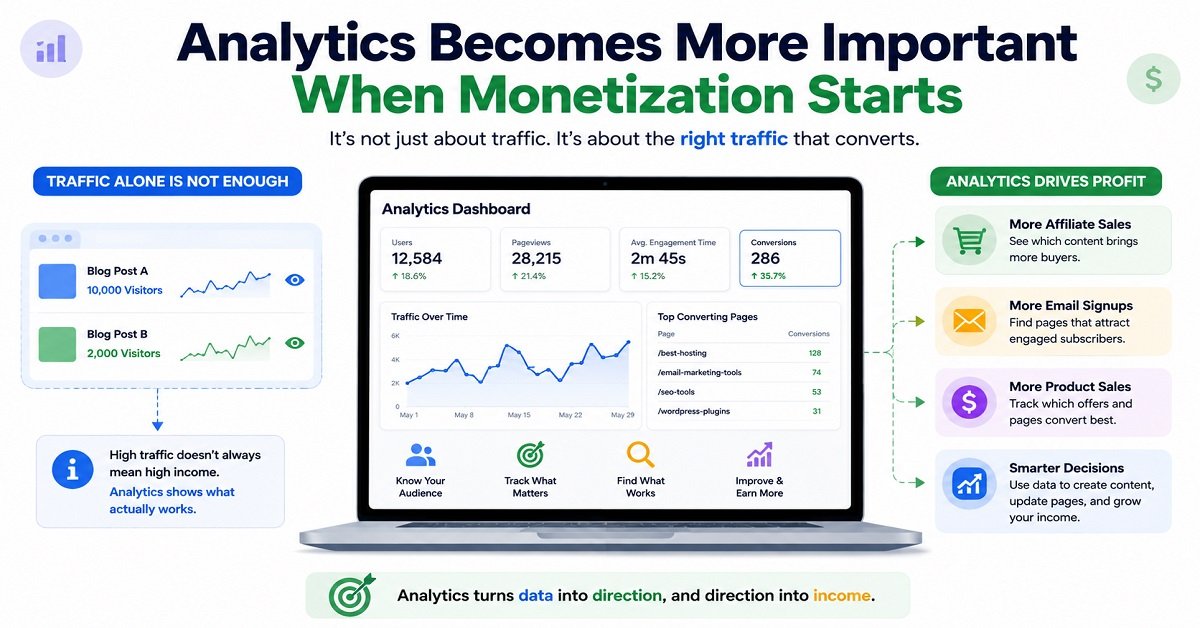
Analytics becomes more important when monetization starts
Suppose you have 10,000 monthly visitors.
You might assume that your most visited article is your most valuable article.
Not necessarily.
An article with 2,000 visitors might generate more affiliate clicks than another article with 10,000 visitors.
Why?
Because the first article may attract people who are ready to make a purchase.
This is why bloggers should eventually think beyond traffic.
Traffic is useful, but the quality and intent of that traffic matter too.
9. Image Creation Tools: Make Your Content Easier to Understand
Blogging is no longer just about paragraphs of text.
Good visual content can make an article easier to scan and understand.
Depending on your niche, you may need:
- featured images
- comparison graphics
- diagrams
- screenshots
- social media graphics
- charts
- infographics
- product images
- instructional visuals
You don’t need to become a professional graphic designer.
Tools such as Canva make it easier to create designs using templates and visual editing features.
But remember that a pretty image is not automatically a useful image.
Use images because they serve a purpose
Imagine an article explaining:
How DNS works
A decorative stock photo of a laptop doesn’t add much.
A simple diagram showing:
Visitor → DNS → Server → Website
could help the reader understand the concept much faster.
That’s a useful image.
Likewise, if you’re writing a product comparison, a simple comparison graphic can help readers understand the differences before they read the detailed explanation.
AI image tools can also help
AI image generation can be useful when you need an original visual concept that would be difficult to create manually.
For example, an article about:
How a website works
could use a custom illustration showing a browser connecting to a server and database.
But don’t use AI-generated images simply because you can.
For product reviews, screenshots, original photographs and genuine product visuals can often provide more value because they show the reader something real.
Your image strategy should support the content, not distract from it.
10. Image Optimization Tools: Don’t Let Images Slow Down Your Blog
There’s another side to images that beginners often overlook.
Large images can increase page weight and make a website slower.
Imagine uploading a 5 MB photograph directly from your camera to your blog.
It may look beautiful.
But your reader might be accessing your article from a mobile phone using a slower connection.
If the page has several oversized images, loading can take longer than necessary.
What image optimization does
Image optimization can reduce file size while keeping the image quality suitable for the web.
Common approaches include:
- resizing oversized images
- compressing images
- using modern formats such as WebP or AVIF where appropriate
- serving appropriately sized images
- removing unnecessary metadata
You can use WordPress plugins or external image optimization services to automate some of this work.
The exact tool matters less than the result.
Your goal is simple:
Use the smallest image file that still provides the quality the reader needs.
Don’t upload a 4,000-pixel-wide image when the content area only displays it at 800 pixels.
11. PageSpeed Tools: Check Whether Your Website Is Actually Fast
A website can feel fast on your own computer while being slow for someone else.
Your browser may have cached files.
You may have a fast Internet connection.
Your server may be geographically close to you.
That’s why you should test your website using a proper performance tool.
Google PageSpeed Insights can help you examine the performance of individual web pages and provides recommendations for improving performance.
You can use it to identify problems related to things such as:
- loading performance
- images
- JavaScript
- CSS
- caching
- layout stability
- responsiveness
But don’t make the mistake of treating the PageSpeed score as the entire goal.
A score of 100 is nice.
It is not the purpose of your website.
Your real goal is to make the website fast and pleasant for actual visitors.
If a particular optimization makes your website technically score slightly higher but breaks an important feature, it may not be worth doing.
12. Website Monitoring Tools: Know When Something Goes Wrong
Imagine publishing an article that suddenly starts ranking well.
You go to sleep.
During the night, something breaks on your website.
The next morning, visitors can’t access your pages.
You may not know until several hours later.
That’s where website monitoring can help.
Monitoring services can check your website periodically and alert you when it becomes unavailable.
For a small blog, you don’t necessarily need an expensive monitoring platform.
A simple uptime monitoring service may be enough.
What should you monitor?
At minimum, consider monitoring:
Website availability: Is the website responding?
Important pages: Are key pages accessible?
SSL/HTTPS: Is the secure connection working correctly?
Server errors: Are visitors receiving 5xx errors?
As your website becomes more important, monitoring becomes more valuable.
If your blog earns money through advertising, affiliate marketing, digital products or services, even a few hours of downtime can matter.
13. Don’t Forget Backups
This is one of the most important tools in your entire blogging setup.
And unfortunately, many bloggers think about backups only after something goes wrong.
A backup is a copy of your website that you can use to restore your site if necessary.
Your backup strategy should ideally protect both:
Website files
and
Database
For a WordPress website, the database is particularly important because it contains much of your site’s content and settings.
What can go wrong?
A website can break because of:
- a bad plugin update
- a theme conflict
- incorrect configuration
- malware
- accidental deletion
- server problems
- failed migration
- human error
Having a recent backup can turn a major disaster into a manageable problem.
One backup is not always enough
If possible, don’t rely entirely on a backup stored in the same location as your website.
For example, if your website and its only backup are stored on the same server and that server has a serious problem, you may lose access to both.
A better approach is to keep copies in a separate location.
And periodically test whether your backups can actually be restored.
A backup that cannot be restored when you need it isn’t much help.
A Simple Tool Stack for a Growing Blogger
At this point, the list may look large.
But you still don’t need to use everything.
A practical setup could look like this:
| Task | Tool type |
|---|---|
| Website | WordPress |
| Hosting | Managed WordPress hosting |
| DNS | Registrar DNS or Cloudflare |
| Content research | Google Search + Google Trends |
| Keyword research | Keyword Planner or dedicated SEO tool |
| AI assistance | AI writing/research assistant |
| On-page SEO | Rank Math or Yoast SEO |
| Search performance | Google Search Console |
| Visitor analytics | Google Analytics |
| Images | Canva or similar design tool |
| Image compression | Image optimization plugin/service |
| Speed testing | PageSpeed Insights |
| Backups | Hosting backup + independent backup |
| Uptime | Website monitoring service |
This is already a powerful setup.
You can start small and add specialized tools only when your website reaches the point where they provide a real benefit.
The Biggest Mistake: Buying Tools Before You Have a Problem
Let’s say you have just launched a blog.
You have 15 articles.
You receive 50 visitors per day.
You don’t yet understand keyword research, Search Console or internal linking.
Then you buy a $100-per-month SEO platform because someone on YouTube says every serious blogger needs it.
That’s probably not the best use of your money.
You may have access to hundreds of reports but not know what to do with them.
Instead, learn the fundamentals first.
Use free or inexpensive tools.
Publish useful content.
Study your Search Console data.
Understand your audience.
Improve your articles.
Then, when you reach a point where a paid tool can save significant time or give you data you genuinely need, consider upgrading.
The best blogging tool is not always the most powerful tool. It’s the tool you understand well enough to use effectively.
Takeaway
The most important tools for bloggers aren’t necessarily the ones with the longest feature lists.
The most useful tools help you answer important questions.
Keyword research tools help you understand what people are searching for.
SEO tools help you organize and optimize your content.
Google Search Console shows how your pages perform in Google Search.
Google Analytics helps you understand what visitors do after arriving.
Image tools help you create useful visual content.
Performance tools help you identify website speed problems.
Backup and monitoring tools help protect the work you’ve spent months or years creating.
And there’s one principle that should connect all of them:
Use tools to improve your decisions, not to replace your judgment.
That becomes particularly important as your blog grows.
Audience Growth, Monetization, Security, and Productivity Tools
So far, we have covered the tools that help you build your website, research topics, create content, optimize for search, understand traffic, create images, improve speed, and protect your content with backups.
But a blog eventually needs to do more than publish articles.
You need to build an audience, bring visitors back, manage links, protect your website, measure conversions, and make your daily work more efficient.
This is where the next group of website tools for bloggers becomes useful.
The important thing is that you should add these tools according to your stage.
A new blog does not need a complicated marketing system.
A growing blog may need several of these tools.
A blog that earns money may need even more careful tracking.
14. Email Marketing Tools: Turn One-Time Visitors Into Returning Readers
Search traffic is valuable, but there is one weakness you should remember.
When someone visits your blog from Google, they may read your article and leave.
You don’t control when they come back.
You could rank well today and receive traffic from Google, but search traffic can change over time.
An email list gives you another way to communicate with people who have chosen to hear from you.
How email marketing works for a blog
Imagine you publish an article:
“10 Essential Website Tools Every Blogger Needs.”
At the end of the article, you offer a useful free resource:
“Download the Beginner Blogger Tool Checklist.”
A reader enters their email address to receive it.
Now you have permission to send useful emails to that subscriber.
Later, when you publish:
- a new blogging guide
- a useful tutorial
- a website-building resource
- a digital product
- a detailed comparison
you can tell your subscribers about it.
This is much better than hoping the same person happens to find your website through Google again.
What should an email marketing tool provide?
For a beginner, look for:
- signup forms
- subscriber management
- automated emails
- newsletters
- basic analytics
- email templates
- unsubscribe management
- integrations with your website
You don’t need an enterprise email platform when you have 50 subscribers.
Start simple.
As your list grows, you can choose a platform with better automation and segmentation.
Don’t treat your email list as an advertising list
This is another common mistake.
If someone subscribes because you promised a useful blogging checklist, don’t immediately send them five promotional emails.
Give them something valuable.
For example:
Monday: One useful blogging tip
Wednesday: A practical tutorial
Friday: A new article or useful resource
Occasionally, you can recommend a relevant product or service.
The relationship should feel useful rather than purely promotional.
15. Social Media Tools: Give Your Content More Chances to Be Seen
You don’t have to build a huge social media presence on every platform.
Choose platforms where your target readers actually spend time.
For example:
- Pinterest can be useful for visual and informational content.
- Facebook can work well for communities and discussions.
- X can be useful for certain technology, business and creator audiences.
- Instagram can work well for visual content and short-form educational posts.
- LinkedIn can be useful for professional and business-related blogs.
The important point is that social media should support your blog, not become a second full-time job.
Social media scheduling tools
If you’re publishing regularly, scheduling tools can save time.
Instead of creating a post every day manually, you can prepare several posts at once and schedule them.
This can be particularly useful when you have:
- multiple articles
- multiple social platforms
- different posting schedules
- several versions of promotional content
But automation should not mean posting the exact same message everywhere.
A Pinterest description, Facebook post and X post have different audiences and formats.
Create platform-appropriate versions.
Don’t chase followers for their own sake
A social account with 20,000 followers isn’t necessarily more valuable than one with 2,000 followers.
Ask:
Are these people actually interested in what I publish?
If your blog is about website building, 2,000 people interested in blogging and online business may be far more useful than 20,000 random followers.
The same principle applies to website traffic.
Relevant attention is more valuable than meaningless numbers.
16. Link Management Tools: Keep Your Links Organized
As your blog grows, you can end up with hundreds or even thousands of links.
Some may point to:
- your own articles
- external resources
- affiliate products
- social profiles
- tools
- downloads
- partner websites
Managing these manually can become difficult.
Why link management matters
Suppose you recommend a particular service in 25 articles.
Six months later, the affiliate URL changes.
Without a central system, you may need to search through 25 articles and change each link manually.
A link management system can make this easier.
Depending on the tool, you may be able to create a short internal link such as:
yourblog.com/go/tool
and redirect it to the current destination.
If the destination changes later, you can update it in one place.
Link management can also help with tracking
You may want to know how many people click a particular recommendation.
A suitable link management or analytics system can help you distinguish between:
- visitors who see a recommendation
- visitors who click it
- visitors who eventually convert
This is particularly useful for affiliate websites.
But don’t turn every normal internal link into a complicated tracking URL.
Use link management where it genuinely solves a problem.
17. Affiliate Marketing Tools: Turn Useful Recommendations Into Revenue
For many bloggers, affiliate marketing becomes one of the first ways to monetize content.
The basic idea is simple.
You recommend a product or service.
The reader clicks your special affiliate link.
If they make a qualifying purchase or complete another qualifying action, you may receive a commission according to the affiliate program’s terms.
This can work particularly well for content with commercial intent.
For example:
- best web hosting for bloggers
- best SEO tools
- best website builders
- best email marketing services
- best blogging tools
- WordPress hosting comparison
These readers aren’t simply looking for information.
Some are evaluating what to buy.
But affiliate content needs trust
Imagine two articles.
Article A says:
“This is the best hosting service. Buy it now!”
Article B explains:
“This hosting plan is suitable for beginners because it is easy to manage. However, its renewal price is higher, so check the renewal cost before purchasing.”
Which one would you trust more?
Probably Article B.
Good affiliate content should explain:
- who the product is suitable for
- who should avoid it
- important features
- limitations
- pricing considerations
- alternatives
- real-world use cases
- your basis for recommending it
If you have personally used something, explain what you experienced.
If you haven’t used it, don’t pretend that you have.
That is especially important for reviews.
The FTC’s endorsement guidance says endorsements should be truthful and not misleading, and people shouldn’t claim personal experience with a product they haven’t actually tried. It also recommends clear disclosure when there is a material relationship with the seller.
Affiliate disclosure is not optional decoration
If you receive a commission when readers purchase through your links, tell them.
A simple statement such as:
“Some links on this page are affiliate links. If you make a purchase through them, we may earn a commission at no additional cost to you.”
makes the relationship clearer.
The FTC specifically recommends that affiliate relationships be disclosed clearly and conspicuously, with the disclosure placed close enough to the recommendation or link that readers can understand the connection.
Your local laws, advertising rules, and affiliate-program terms may also apply, so check them rather than assuming one disclosure automatically satisfies every requirement.
Don’t let affiliate commissions decide your recommendations
This is one of the biggest tests of an affiliate blog.
Suppose Product A pays you ₹500.
Product B pays you ₹100.
If Product B is better for your reader, recommending Product A simply because it pays more can damage trust.
In the short term, you might earn more.
In the long term, readers may stop trusting your recommendations.
A strong affiliate website should make the reader think:
“This site is trying to help me choose.”
Not:
“This site is trying to make me buy something.”
18. Conversion Tracking Tools: Find Out What Actually Makes Money
Traffic is not the same as income.
You need to understand this before building a monetized blog.
Imagine you have two articles.
Article A
10,000 visitors
50 affiliate clicks
2 purchases
Article B
2,000 visitors
150 affiliate clicks
12 purchases
Article A gets five times more traffic.
But Article B may be much more valuable to your business.
This is why conversion tracking becomes important as your website grows.
What can you track?
Depending on your monetization model, you may track:
- affiliate link clicks
- email signups
- contact form submissions
- digital product purchases
- downloads
- outbound clicks
- button clicks
- registrations
You can then ask:
Which articles are producing the results I actually want?
This information can change your content strategy.
You may discover that a low-traffic article is a much stronger commercial page than your most visited informational article.
That can influence:
- internal linking
- content updates
- promotional efforts
- keyword targeting
- conversion optimization
19. Website Security Tools: Protect Your Work
Security is one of those subjects that many bloggers ignore until something happens.
A website that took you two years to build can be damaged much faster.
Common security risks include:
- stolen passwords
- outdated software
- vulnerable plugins
- malicious code
- unauthorized access
- brute-force attacks
- compromised administrator accounts
WordPress itself recommends keeping software updated and following basic security practices because outdated software can create security risks.
Start with the basics
You don’t need a complicated security system on day one.
Start with:
Strong passwords
Don’t use the same password for your WordPress administrator account and your email account.
Two-factor authentication
If your important accounts support 2FA, consider enabling it.
Regular updates
Keep WordPress, themes and plugins updated.
Limited administrator access
Don’t give administrator privileges to everyone who needs to write an article.
Reliable backups
Keep backups that you can restore.
Secure hosting
Choose a hosting provider that takes website security seriously.
Don’t install five security plugins
This is similar to the plugin problem we discussed earlier.
More security plugins don’t automatically mean more security.
Two poorly configured security plugins can even create conflicts.
Understand what protection your hosting provider and WordPress setup already provide before adding another layer.
20. Password Managers: A Small Tool With a Big Benefit
A password manager may not sound like a blogging tool, but for website owners it can be extremely useful.
Think about how many accounts a blogger may eventually have:
- domain registrar
- hosting provider
- WordPress
- Google account
- Search Console
- Analytics
- email marketing
- affiliate networks
- social media
- image tools
- SEO tools
- payment services
Using the same password everywhere is dangerous.
A password manager lets you create and store unique passwords for different services.
That means if one website suffers a password breach, the attacker doesn’t automatically have the password you use for your hosting account.
For a blogger running a business website, this is a simple security improvement worth taking seriously.
21. Content Calendar Tools: Stop Publishing Randomly
Once you have several content ideas, it becomes difficult to remember everything.
You may have ideas for:
- beginner guides
- comparisons
- tutorials
- reviews
- pillar articles
- supporting articles
- seasonal content
- social media posts
A content calendar helps you organize them.
You can use something as simple as:
- Google Sheets
- Notion
- Trello
- a WordPress editorial calendar
- another project management tool
You don’t need an expensive editorial platform.
A simple content calendar
You could create columns such as:
| Topic | Keyword | Search intent | Type | Status | Target date |
|---|---|---|---|---|---|
| Website Tools for Bloggers | website tools for bloggers | Informational | Pillar | Published | Aug 2026 |
| Best Hosting for Beginners | best hosting for beginners | Commercial | Buyer guide | Draft | Aug 2026 |
| How to Start a Blog | how to start a blog | Informational | Guide | Research | Sep 2026 |
You can add more columns as your workflow develops.
For example:
- writer
- editor
- featured image
- internal links
- affiliate links
- update date
- Search Console performance
- conversion data
The important thing is to keep the system simple enough that you actually use it.
22. Note-Taking Tools: Build Your Own Knowledge Base
Bloggers research a lot.
If you don’t save useful information, you’ll repeatedly research the same things.
A simple note-taking system can store:
- article ideas
- statistics
- sources
- quotes
- expert comments
- product specifications
- content outlines
- reader questions
- competitor observations
- future article ideas
This becomes particularly valuable when you write about technical subjects.
Suppose you spend two hours researching DNS today.
Six months later, you write another article about website migration.
If you saved your useful notes and sources, you may already have part of the research ready.
Your notes become a personal knowledge base.
Don’t turn your notes into a dumping ground
A thousand unorganized notes aren’t particularly useful.
Use simple categories.
For example:
Ideas
Research
Sources
Published content
Future updates
Useful examples
The simpler the system, the more likely you’ll maintain it.
23. Productivity and Automation Tools: Reduce Repetitive Work
As your blog grows, you’ll notice that some tasks repeat constantly.
For example:
- Publish an article.
- Create a social media post.
- Create a featured image.
- Add the article to your content tracker.
- Submit or monitor the URL.
- Check performance later.
- Update your social promotion.
- Add internal links from older articles.
Some of these tasks can be automated.
What should you automate?
Good candidates include repetitive, predictable tasks.
For example:
- moving completed tasks between boards
- creating a content record after publication
- sending an internal notification
- scheduling social posts
- adding new subscribers to an email sequence
- generating reports
- reminding yourself to review older articles
What should you not automate completely?
Don’t automate the things that require judgment.
For example:
Don’t automatically publish AI-generated articles without human review.
Don’t automatically recommend products without checking whether they’re still available.
Don’t automatically rewrite every old article just because a tool says it needs updating.
Don’t automatically change SEO titles without understanding why performance changed.
Automation should remove repetitive work.
It shouldn’t remove responsibility.
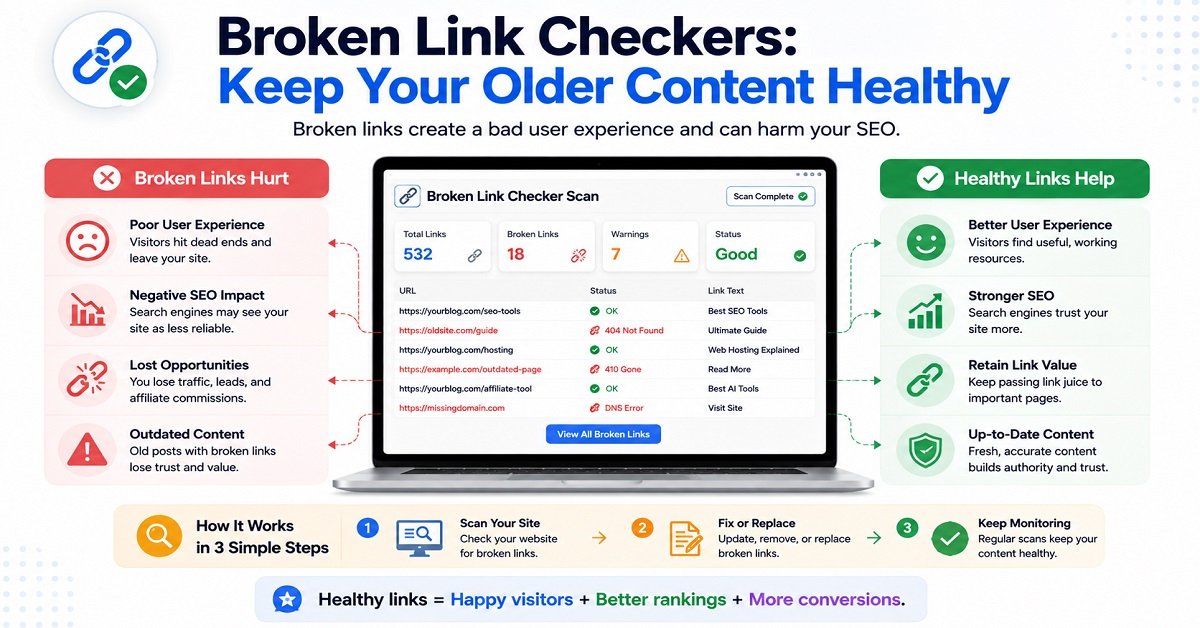
24. Broken Link Checkers: Keep Your Older Content Healthy
A blog with 500 articles may contain thousands of links.
Some external websites will eventually:
- change URLs
- remove pages
- shut down
- redirect to different content
- change products
- discontinue services
That means an old article can gradually develop broken links.
Broken links aren’t just annoying for readers.
They can also reduce the usefulness and trustworthiness of an article.
A link-checking tool can help you identify problematic URLs.
But don’t automatically replace every broken link with the first alternative you find.
Check the replacement manually.
The new destination should actually provide the information the reader expected.
25. Website Accessibility Tools: Make Your Blog Usable by More People
Accessibility is often overlooked when bloggers focus heavily on SEO.
But your website is being used by people with different abilities, devices and browsing conditions.
Simple improvements can make your site easier for more people to use.
For example:
- use descriptive link text
- provide meaningful alternative text for important images
- maintain readable font sizes
- use sufficient color contrast
- make buttons easy to identify
- structure articles with proper headings
- don’t communicate important information through color alone
Accessibility isn’t simply an SEO trick.
It’s about making your content usable.
And many accessibility improvements also improve the experience for ordinary readers.
For example, good headings make an article easier to scan.
Descriptive link text makes navigation clearer.
Alt text helps when an image doesn’t load and can assist people using screen readers.
26. Website Legal and Trust Pages
These aren’t technically “tools” in the same way as an SEO platform or analytics service.
But they are an essential part of a professional blog.
Depending on your website and location, you may need pages such as:
- About
- Contact
- Privacy Policy
- Terms and Conditions
- Affiliate Disclosure
- Cookie information where applicable
The exact legal requirements depend on your business, audience, location and services.
Don’t simply copy another website’s legal pages and assume they apply to you.
Why trust pages matter
Imagine you discover a website you’ve never seen before.
You read an article recommending a hosting company.
Then you look for information about who operates the website.
If there is no About page, no contact information and no disclosure about affiliate relationships, you may be less comfortable trusting the recommendation.
Clear information about the website and its commercial relationships helps readers understand who they are dealing with.
This is especially important for affiliate websites.
27. Don’t Forget Internal Linking Tools
Internal links are links from one page on your website to another page on the same website.
They’re useful for both readers and website structure.
Imagine you publish this pillar article about website tools.
You later publish:
How to Choose Web Hosting for Your Blog
You can naturally link from this article to that guide.
Then the hosting guide can link back to this pillar article.
You might also have articles about:
- keyword research
- WordPress
- website speed
- blogging mistakes
- email marketing
- SEO
- affiliate marketing
These articles can form a connected content network.
A simple internal linking strategy
When publishing a new article, ask:
Which older articles should this article link to?
Then ask:
Which older articles could naturally link to this new article?
That second question is often forgotten.
You don’t need a special expensive tool to begin.
A simple site search can help you find relevant articles.
As your website becomes larger, dedicated internal-linking tools can help identify opportunities more quickly.
28. Which Tools Should You Actually Pay For?
This is probably the most practical question in the entire guide.
The answer depends on your stage.
Beginner blogger
Prioritize:
- domain
- reliable hosting
- WordPress
- basic SEO plugin
- Google Search Console
- Google Analytics
- basic image tool
- backups
- security basics
Many of these can be free or included with your hosting.
Growing blogger
You may consider paying for:
- advanced keyword research
- better SEO research
- email marketing
- premium image tools
- link management
- automation
- advanced analytics
Only add them when you can clearly explain the benefit.
Monetized blogger
Once the website is generating meaningful revenue, paid tools can become easier to justify.
For example:
If a ₹2,000/month tool helps you identify opportunities that produce an additional ₹10,000/month in revenue, the cost may be reasonable.
But if you’re paying ₹2,000/month for a tool that you open twice a month and barely understand, it probably isn’t.
The Tool Test: Ask These Five Questions Before Paying
Before purchasing a blogging tool, ask yourself:
1. What exact problem does it solve?
If you can’t answer this clearly, don’t buy it.
2. How often will I use it?
A tool used every day can justify a higher cost than one used once a month.
3. Can a free tool do the job?
If yes, start with the free option.
4. Will it save time or improve results?
Ideally, a paid tool should provide at least one meaningful benefit.
5. Can I cancel easily?
Avoid locking yourself into expensive annual subscriptions before you’ve tested the product.
Takeaway
As your blog grows, your tool requirements change.
You may start with only WordPress, hosting, Search Console, Analytics and a few basic tools.
Later, you may add:
- email marketing
- social media scheduling
- affiliate link management
- conversion tracking
- security tools
- password management
- content calendars
- automation
- broken-link monitoring
- accessibility checks
But don’t confuse having more tools with running a better blog.
The best setup is the one that helps you publish useful content consistently, understand your audience, protect your website and gradually increase your results.
And there’s one more area we still need to cover.
A blogger can have excellent tools and still waste a huge amount of time by using them incorrectly.
Build Your Blogger Tool Stack and Use It the Right Way
By now, you have seen that there are many different types of website tools for bloggers.
Some help you build your website. Others help with SEO, content creation, analytics, images, security, email marketing, affiliate links and productivity.
But there is an important question left:
Which tools do you actually need?
You don’t need to subscribe to everything mentioned in this guide.
In fact, buying too many tools too early can make blogging more expensive and more complicated than it needs to be.
The smarter approach is to build your toolkit gradually.
Start with the essentials, learn how to use them properly, and add specialized tools only when your blog reaches the stage where they solve a real problem.
The Essential Website Tools for Bloggers Checklist
Here is a simple way to think about your blogging toolkit.
For a new blogger
You can start with:
- A domain name
- Reliable web hosting
- WordPress
- A lightweight WordPress theme
- One SEO plugin
- Google Search Console
- Google Analytics
- A basic image/design tool
- A backup solution
- Basic website security
- An AI assistant, if useful for your workflow
That’s enough to start publishing and learning.
You don’t need an expensive SEO subscription, five AI tools, a complex automation system and a dozen WordPress plugins before publishing your first article.
For a growing blog
Once your website starts receiving consistent traffic, you can consider adding:
- Dedicated keyword research tools
- Advanced SEO tools
- Email marketing
- Social media scheduling
- Link management
- Conversion tracking
- Website monitoring
- Advanced image tools
- Productivity or project management software
At this stage, the question changes from:
“What tools exist?”
to:
“What is slowing my blog down right now?”
If research is taking too long, look for a research tool.
If you’re struggling to manage subscribers, look at email marketing.
If you’re losing track of hundreds of links, consider link management.
If you don’t know which pages generate affiliate clicks, improve conversion tracking.
The problem should come first.
The tool comes second.
A Practical Website Tools Stack for Different Blogging Stages
Let’s make this even simpler.
Stage 1: Starting your first blog
Your main objective is to publish useful content and learn how blogging works.
A simple stack might include:
Website: WordPress
Hosting: Reliable shared or managed hosting
SEO: Rank Math or Yoast SEO
Search data: Google Search Console
Analytics: Google Analytics
Research: Google Search, Google Trends and a basic keyword research tool
AI assistance: One AI tool
Design: Canva or a similar tool
Backup: Hosting backup plus an independent backup if possible
At this stage, your biggest investment should be your time and learning, not subscriptions.
Stage 2: Your blog starts getting traffic
Once you’re getting consistent search traffic, your priorities change.
You can start looking more closely at:
- which pages receive impressions
- which pages get clicks
- which keywords bring visitors
- which articles need updating
- which pages have commercial intent
- which articles generate conversions
- which topics deserve more coverage
This is where Search Console becomes particularly useful.
For example, suppose one article has:
25,000 impressions
but only:
250 clicks.
You may have an opportunity to improve its search result appearance.
Another article might have only:
3,000 impressions
but:
300 clicks.
That article may have stronger search intent or a more attractive search result.
Don’t automatically assume the article with more impressions is better.
Look at the entire picture.
Stage 3: Your blog starts making money
When your website begins generating meaningful revenue, tools can become investments rather than expenses.
Suppose you pay for:
- an advanced SEO platform
- email marketing
- automation
- conversion tracking
- premium design software
The question isn’t simply:
“Is this expensive?”
Ask:
“Does this help me save time, improve my content, increase conversions, or make better decisions?”
For example, if an SEO tool helps you find several valuable content opportunities that generate significantly more revenue than its monthly cost, it may be worth keeping.
But if you pay for an expensive platform and only use one feature occasionally, downgrade or cancel it.
Your blogging tool stack should evolve with your business.
A Simple Blogging Workflow Using These Tools
Having tools is one thing.
Knowing how to use them together is another.
Here’s a practical workflow you can follow.
Step 1: Find a topic
Start with a problem your audience has.
Use:
- Google Search
- Google Trends
- keyword research tools
- questions from readers
- forums and communities
- your own experience
Don’t start with a keyword just because a tool gives it a high score.
Start with a useful topic.
Step 2: Understand search intent
Before writing, search for the topic yourself.
Look at the results.
Ask:
What type of content does Google currently show?
Are the results:
- guides?
- comparisons?
- reviews?
- lists?
- tutorials?
- product pages?
This gives you clues about what searchers are looking for.
Step 3: Research the subject
Collect reliable information.
Depending on the topic, this might include:
- official documentation
- company websites
- product specifications
- government sources
- expert opinions
- research papers
- your own testing
- first-hand experience
Don’t rely on a single website when accuracy matters.
Step 4: Create an outline
An AI tool can help here.
Give it your research and ask it to identify:
- important questions
- missing sections
- possible article structure
- areas that need clarification
But don’t let the AI decide what your article should say without checking its suggestions.
You are still the editor.
Step 5: Write the article
Focus on the reader.
Explain complicated subjects simply.
Use examples.
Avoid unnecessary repetition.
Don’t write 500 extra words simply to hit a word count.
A 1,500-word article that completely solves the reader’s problem can be more useful than a 3,000-word article filled with repetition.
Step 6: Optimize for SEO
Use your SEO plugin as a checklist.
Check:
- title
- meta description
- URL
- headings
- internal links
- images
- relevant keywords
- schema where appropriate
But don’t turn the article into a keyword-stuffed document.
Google’s guidance specifically recommends creating content primarily for people rather than content created mainly to attract search traffic.
Step 7: Create useful visuals
Create a featured image and supporting visuals where they actually help.
For tutorials, screenshots may be more useful than decorative graphics.
For comparisons, tables and charts can help.
For conceptual explanations, diagrams can be valuable.
Step 8: Publish and check the page
Before announcing the article, check it yourself.
Read it on desktop.
Read it on mobile.
Click the links.
Check the images.
Check the headings.
Make sure the page isn’t displaying an error.
Step 9: Monitor performance
Use:
Search Console for Google Search performance.
Analytics for visitor behavior.
Don’t judge an article after one day.
Give it time to collect data.
Step 10: Improve the article
This is where many bloggers stop too early.
Publishing isn’t necessarily the end of an article’s life.
After you have enough data, you can improve:
- title
- introduction
- outdated information
- missing questions
- internal links
- images
- examples
- conversion elements
An article that performs well can become even more valuable through thoughtful updates.
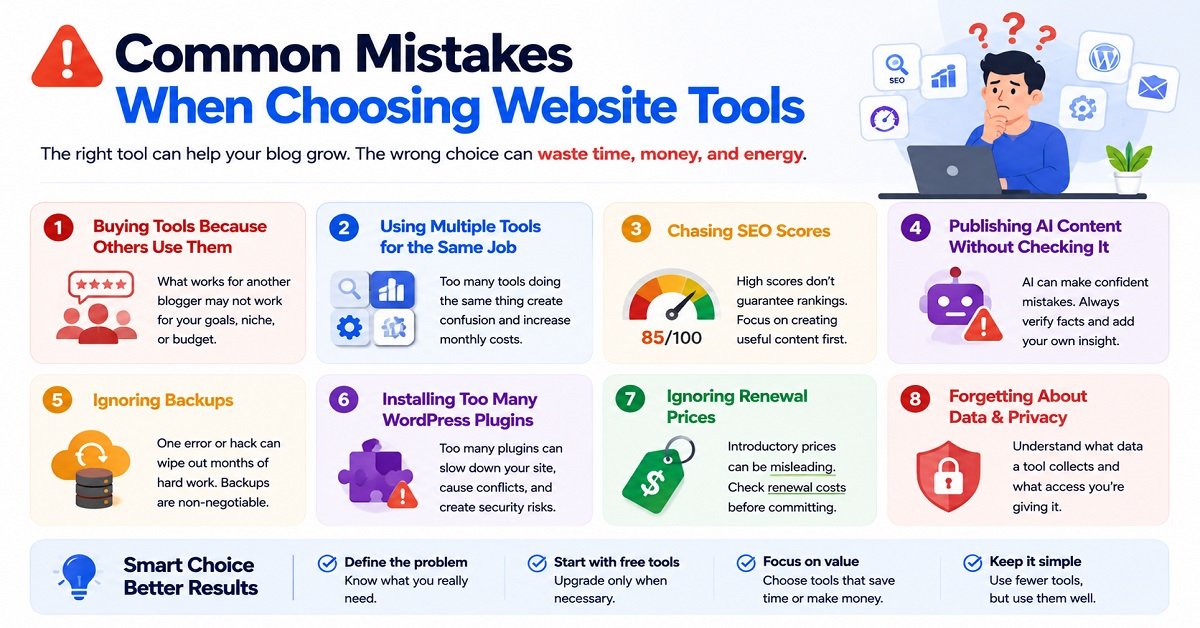
Common Mistakes When Choosing Website Tools
Even good tools can become a problem when used incorrectly.
Here are some of the most common mistakes.
1. Buying tools because other bloggers use them
Someone says:
“Every serious blogger needs this SEO tool.”
That doesn’t necessarily mean you need it.
Their business may be completely different from yours.
Their traffic may be 100 times larger.
Their team may have five people.
Their needs aren’t necessarily your needs.
2. Using multiple tools for the same job
You don’t need three SEO plugins.
You probably don’t need four AI writing assistants.
You may not need three different image editors.
Choose one good tool, learn it, and use it properly.
3. Chasing SEO scores
An SEO plugin gives you 85/100.
You spend another hour trying to reach 100.
Meanwhile, your introduction is confusing and your article doesn’t answer the reader’s main question.
That’s backwards.
SEO tools are assistants.
They aren’t judges deciding whether your article deserves to rank.
4. Publishing AI content without checking it
AI can produce incorrect information very confidently.
Always verify important claims.
This becomes particularly important when writing about products, software, prices, technical specifications, laws or other information that changes over time.
5. Ignoring backups
You can spend months building a website and lose access to it because of one mistake.
Backups aren’t exciting.
They’re still essential.
6. Installing too many WordPress plugins
Every plugin should have a reason to exist.
If you install a plugin for every tiny feature, your website can become harder to maintain.
7. Ignoring renewal prices
A tool may advertise:
₹99/month for the first year
and then charge considerably more at renewal.
Before subscribing, check:
- introductory price
- renewal price
- billing frequency
- cancellation terms
- refund policy
- features included in your plan
8. Forgetting about data and privacy
Before giving a tool access to your website, Google account, email list or other data, understand what access you’re granting.
Ask:
- What information does the tool collect?
- Does it need administrator access?
- Can you revoke access?
- What happens to your data if you cancel?
- Does the service share information with third parties?
You don’t need to become a cybersecurity expert, but don’t give every tool unrestricted access simply because it asks for it.
Before You Sign Up for Any Blogging Tool, Ask These 7 Questions
This simple checklist can save you a surprising amount of money.
1. What problem does this tool solve?
Be specific.
“Improves my blog” isn’t enough.
Try:
“It helps me find keyword opportunities faster.”
That’s a real problem.
2. Do I actually have that problem?
If you publish two articles per month, you may not need a tool designed to manage hundreds of articles.
3. Is there a free alternative?
Try the free option first when possible.
You can upgrade later.
4. Does it work with my current setup?
Check compatibility with your:
- WordPress site
- analytics
- email platform
- hosting
- other important tools
5. What happens if I stop paying?
Will you lose access to:
- your data?
- your links?
- your designs?
- your reports?
- your automations?
Understand this before building an important workflow around a service.
6. Does it save enough time or money to justify its cost?
A ₹1,000/month tool isn’t expensive if it saves you 20 hours every month.
A ₹200/month tool can be expensive if you never use it.
7. Would I still want this tool if it had no affiliate program?
This is a useful question when reading recommendations online.
Sometimes a product is recommended because it pays the publisher a commission.
That doesn’t automatically make the product bad.
But you should evaluate the tool based on whether it is genuinely useful to you.
Frequently Asked Questions About Website Tools for Bloggers
What are the most essential website tools for bloggers?
A beginner generally needs a domain, reliable hosting, WordPress, an SEO solution, Google Search Console, analytics, a backup system, basic security, and a way to create or optimize images. An AI tool can also be useful, but it isn’t mandatory.
You can add advanced keyword research, email marketing, automation and conversion tools as your blog grows.
Do bloggers need paid SEO tools?
No.
A beginner can learn a lot using Google Search, Google Trends, Google Search Console and free features of various SEO tools.
Paid SEO platforms become more useful when you need advanced keyword research, competitor analysis, backlink research, rank tracking or large-scale content planning.
Don’t buy a paid SEO tool simply because other bloggers use one.
Do I need an AI writing tool to start a blog?
No.
You can write a blog without AI.
AI tools can make certain tasks faster, such as brainstorming, outlining, editing and simplifying explanations.
But the quality of your blog should not depend entirely on AI-generated text.
Your research, experience, judgment and editorial decisions still matter.
Is Google Search Console free?
es.
Google Search Console is a free service from Google that provides information about how your website performs in Google Search, including search queries, clicks, impressions, CTR and average position.
Every blogger who wants to understand their organic search performance should consider setting it up.
Do I need Google Analytics if I already use Search Console?
They serve different purposes.
Search Console focuses mainly on your website’s performance in Google Search.
Analytics helps you understand what visitors do after they arrive on your website.
Using both gives you a more complete picture.
How many WordPress plugins should a blogger install?
There is no universal ideal number.
The important question isn’t the number of plugins.
It’s whether each plugin is necessary, reliable, maintained and compatible with your setup.
A website with 20 well-maintained plugins can work perfectly, while another website with five poorly maintained plugins can have problems.
Install plugins because you need their functionality, not because someone recommends them.
Are free blogging tools good enough?
Many are.
Google Search Console, Google Trends, Google Analytics and several other tools can provide significant value without a subscription.
Free tools are particularly useful when you’re starting.
As your blog grows, you can pay for tools when the additional features provide enough value to justify the cost.
Should I pay for hosting or use free hosting?
For a serious blog, paid hosting is generally the better choice.
Free hosting can be useful for experimentation, but you may face limitations involving performance, storage, support, customization or monetization.
If you’re building a website that you expect to grow and eventually monetize, reliable hosting is one of the areas where spending some money can make sense.
What is the best tool for blogging?
There isn’t one tool that is best for every blogger.
WordPress may be an excellent website platform.
Search Console may be the most useful search-performance tool.
An AI assistant may save time during research and editing.
Analytics may be more valuable when you’re trying to understand visitors.
The “best” tool depends on the problem you’re trying to solve.
Should I use AI to write all my blog articles?
It’s better to use AI as an assistant rather than automatically publishing everything it produces.
AI can help with research organization, brainstorming, outlining, editing and other repetitive tasks.
But you should review the output, verify important facts, add your own insight and make sure the finished article genuinely helps the reader.
The Best Tool Stack Is the One You Actually Use
There is a temptation in blogging to keep looking for the next tool.
A new AI platform launches.
A new SEO tool promises better rankings.
A new automation service promises to save hours.
A new plugin claims to solve another problem.
You sign up.
Then another tool appears.
Eventually, you spend more time managing your tools than creating useful content.
Don’t fall into that trap.
A good blogging system can be surprisingly simple.
You need a place to publish.
You need reliable hosting.
You need a way to research and create useful content.
You need to understand how people find your website.
You need to know what visitors do after they arrive.
You need to protect your work.
And when your blog starts generating revenue, you need to understand which activities actually contribute to that revenue.
Everything else is optional.
A Simple Website Tools Checklist
Before you finish setting up your blog, use this checklist.
Website
- Domain registered
- Reliable hosting selected
- WordPress installed
- Lightweight theme configured
- SSL enabled
Content
- Research process established
- Keyword research method selected
- AI assistant chosen if needed
- Content calendar created
- Note-taking system established
SEO
- SEO plugin configured
- Google Search Console connected
- XML sitemap checked
- Internal linking process established
- Search performance reviewed regularly
Analytics
- Google Analytics configured
- Important conversions identified
- Affiliate or outbound clicks tracked where appropriate
Images
- Featured image process established
- Images resized appropriately
- Images compressed
- Useful alt text added where appropriate
Performance
- Page speed tested
- Large images optimized
- Caching configured where appropriate
- Mobile experience checked
Security
- Strong passwords used
- Two-factor authentication enabled where possible
- WordPress and plugins updated
- Administrator access limited
- Backup system working
Growth
- Email signup option considered
- Social promotion process established
- Affiliate disclosures added if applicable
- Important affiliate links tracked
- Conversion performance reviewed
You don’t have to complete every item before publishing your first article.
Use the checklist as your website grows.
Final Thoughts: Start Small, Then Build Your Toolkit
The biggest lesson from all these website tools for bloggers is simple:
You don’t need every tool. You need the right tools for your current problems.
When you’re starting, focus on the fundamentals.
Get your domain and hosting right.
Build a clean WordPress website.
Create genuinely useful content.
Set up Search Console and Analytics.
Take backups.
Keep your website secure.
Use AI when it genuinely makes your work better or faster.
Then watch what happens.
As your blog grows, your data will tell you what you need next.
If keyword research becomes a bottleneck, invest in a better research tool.
If you’re struggling to manage subscribers, improve your email system.
If you’re getting traffic but few conversions, investigate your commercial pages and tracking.
If you’re spending too much time on repetitive tasks, look at automation.
That’s a much better approach than buying tools first and trying to find a reason to use them later.
A successful blog isn’t built by collecting software subscriptions.
It’s built by understanding your audience, publishing useful content, learning from data, improving the website, and using technology where it genuinely helps.
Start with a small toolkit.
Learn each tool properly.
Add new tools only when they solve a real problem.
And remember that the most valuable asset on your website isn’t your collection of plugins, AI subscriptions or SEO software.
It’s the useful content and trust you build with your readers.