
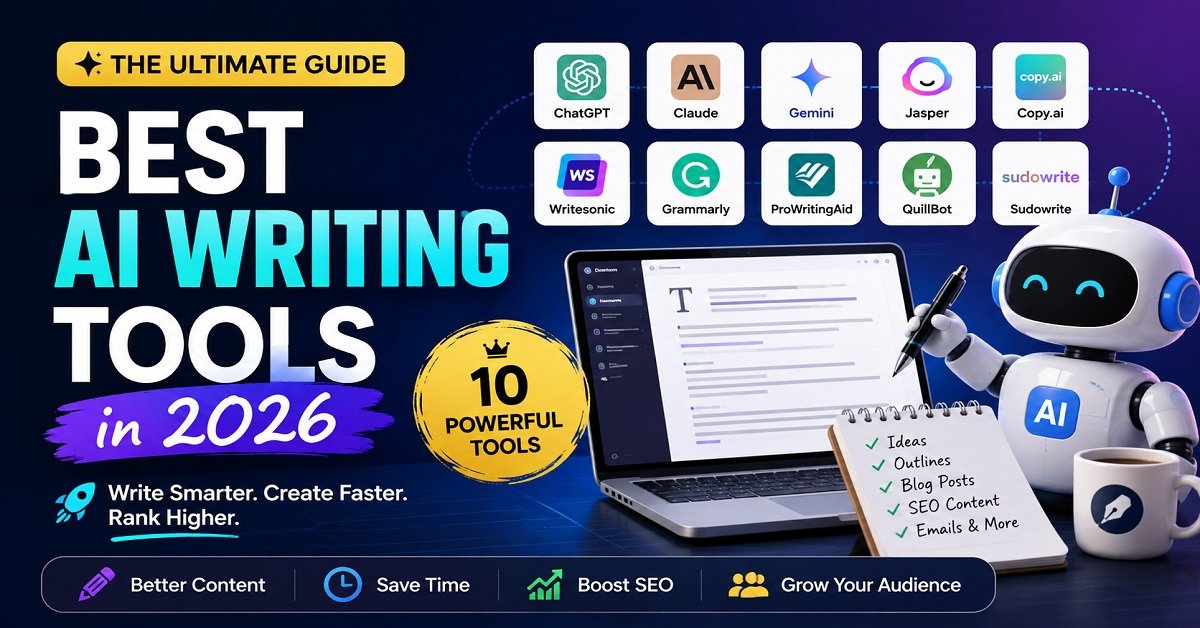
AI has changed the way people write online. A blogger can now turn a rough idea into an outline, rewrite a difficult paragraph, generate headline ideas, improve grammar and even create a first draft in minutes.
But there is a problem.
There are now too many AI writing tools to choose from.
Some tools are excellent for general writing. Others are built specifically for marketing teams, SEO content, editing, rewriting or fiction. And then there are general AI assistants such as ChatGPT, Claude and Gemini that can already handle many writing tasks without being marketed as dedicated “AI writing tools.” Recent 2026 comparisons show the same pattern: general-purpose tools are strong all-rounders, while specialist platforms tend to win when you have a specific workflow.
So, which are the best AI writing tools in 2026?
The answer depends on what you actually want to write.
In this guide, we’ll compare the most useful options for bloggers, content creators, marketers, business owners and other writers. We’ll look at what each tool does well, where it falls short and, most importantly, who should actually use it.
If you are building a website or blog, you may also want to see our Website Tools for Bloggers: Essential Tools Every Blogger Needs guide, where we cover the wider collection of tools needed to run a website.
Best AI Writing Tools at a Glance
Before going into individual tools, here’s a quick comparison.
| AI Writing Tool | Best For | Main Strength | Free Option |
|---|---|---|---|
| ChatGPT | Bloggers and general writing | Versatility | Yes |
| Claude | Long-form writing | Natural writing and editing | Yes |
| Gemini | Google users | Google ecosystem and AI assistance | Yes |
| Jasper | Marketing teams | Brand-focused content | Limited |
| Copy.ai | Business and marketing workflows | Automation and workflows | Limited |
| Writesonic | SEO-focused content | Content and SEO workflows | Limited |
| Grammarly | Editing existing writing | Grammar, clarity and tone | Yes |
| ProWritingAid | Deep editing | Detailed writing feedback | Yes |
| QuillBot | Rewriting and paraphrasing | Paraphrasing | Yes |
| Sudowrite | Fiction writers | Creative storytelling | Trial/paid |
The “best” choice can change dramatically depending on the job.
For example, a blogger who wants to create a 2,000-word article does not necessarily need the same tool as a marketing agency producing hundreds of product descriptions.
That’s why I would not recommend choosing an AI writing tool simply because it appears at the top of somebody else’s list.
What Is an AI Writing Tool?
An AI writing tool is software that uses artificial intelligence to help you create, edit or improve written content.
Depending on the tool, it can help with tasks such as:
- Generating ideas
- Creating outlines
- Writing first drafts
- Rewriting paragraphs
- Changing the tone of an article
- Simplifying complicated sentences
- Correcting grammar
- Creating headlines
- Writing social media posts
- Summarizing long text
- Creating marketing copy
- Improving existing content
For example, imagine you want to write an article about website hosting.
Instead of staring at a blank screen, you could ask an AI tool to suggest the main sections.
You might get an outline containing hosting basics, shared hosting, VPS hosting, WordPress hosting, pricing, performance and security.
You can then research those topics, add your own experience and turn the outline into a useful article.
That is where AI can be genuinely helpful.
AI Should Help You Write, Not Replace Your Judgment
This distinction is important.
AI can produce a fluent paragraph very quickly. That doesn’t mean every statement in that paragraph is accurate.
An AI tool can misunderstand a question, make an outdated claim or confidently provide information that needs verification.
So the best approach is to treat AI as a writing assistant, not as an automatic publishing machine.
For a blogger, the strongest workflow is usually:
Your idea + research + AI assistance + human editing + fact checking
rather than:
AI prompt → publish
This becomes even more important when you’re writing about products, money, technology, health or anything where incorrect information can mislead readers.
AI Writing Tool vs AI Chatbot: What’s the Difference?
This is where things get confusing.
You may see a dedicated AI writing platform promising blog posts, social media content and marketing copy.
At the same time, ChatGPT, Claude and Gemini can also perform many of those tasks.
So why would you need a dedicated writing tool?
The difference is usually workflow rather than basic writing ability.
A general AI assistant gives you a flexible environment where you can ask it to brainstorm, research, write, rewrite, summarize and perform many other tasks.
Dedicated writing platforms often package specific workflows, templates, brand controls, SEO features, publishing tools or team features around the writing process.
For example, ChatGPT now includes writing-focused capabilities such as Canvas, where you can work on a document, select sections and ask for changes to tone, length, clarity or wording. OpenAI describes Canvas as a workspace for creating, editing and refining documents together with ChatGPT.
So a dedicated AI writing platform isn’t automatically better at writing.
It may simply make a particular type of writing workflow more convenient.
How We Should Choose the Best AI Writing Tool
Instead of judging these tools only by how impressive their first paragraph sounds, I would look at several practical factors.
1. Writing quality
Does the output sound natural?
Does it avoid repetitive phrases and generic wording?
Can it follow the tone you want?
2. Editing and rewriting
A good writing assistant should not only generate text.
It should also help you improve text you have already written.
3. Long-form content
Some tools are better suited to short emails and social posts, while others can handle lengthy documents and more complex instructions.
4. Ease of use
A powerful tool isn’t particularly useful if you need to spend hours learning how to use it.
5. Research capabilities
Writers often need current information before they can produce a useful article.
The ability to work with current information, uploaded documents or connected sources can therefore matter as much as the writing itself.
6. SEO features
For bloggers, this can be important.
However, an AI tool having an “SEO” button doesn’t mean it can guarantee search rankings.
Good SEO still requires understanding search intent, creating useful content, choosing appropriate topics and providing information that genuinely helps the reader.
7. Price and value
A $20-per-month tool may be excellent value for someone who writes every day.
It may be a waste of money for someone who writes one article per month.
8. Your actual workflow
This is perhaps the most important factor.
If you already use ChatGPT for research, outlining, drafting and editing, adding another general-purpose AI tool may simply create overlap.
Recent 2026 comparisons also highlight this issue: many AI writing platforms now perform similar basic tasks, so choosing tools based on their unique workflow advantages can be more sensible than collecting multiple subscriptions.
1. ChatGPT
Best for: Bloggers, general writing and all-purpose content work
ChatGPT is one of the easiest places to start if you want one AI tool that can handle many different writing tasks.
It can help with brainstorming, outlining, drafting, rewriting, editing, summarizing and adapting content for different audiences. OpenAI’s current writing guidance specifically positions ChatGPT for drafting from scratch, rewriting and tightening existing text, adjusting tone and turning rough notes into clearer communication.
For bloggers, that flexibility is particularly useful.
You might use it to:
- Find article angles
- Build an outline
- Improve an introduction
- Rewrite a difficult paragraph
- Generate FAQ ideas
- Create social media posts
- Suggest meta descriptions
- Turn notes into a first draft
- Edit an existing article
- Brainstorm internal-link opportunities
ChatGPT for Long-Form Writing
One of the useful features for longer writing projects is Canvas.
Instead of treating the entire article as a normal chat response, Canvas provides a workspace where you can work on a document and make targeted changes.
You can highlight text and ask for a rewrite, adjust the length, change the reading level or polish the writing. OpenAI also describes Canvas as a way to collaborate with ChatGPT on longer writing and revision tasks.
This can be useful when an article has gone through several rounds of editing.
For example, instead of saying:
“Rewrite the whole article.”
you can select one paragraph and ask:
“Make this easier for a beginner to understand without changing the meaning.”
That gives you much more control.
ChatGPT for Bloggers
For a blogger, the biggest advantage is that you don’t have to use it only for writing.
You can use the same tool throughout the content process.
For example:
Topic selection → research → outline → draft → editing → FAQs → social media → content updates
That makes it particularly attractive to solo bloggers who don’t want to subscribe to five different tools.
ChatGPT Projects can also keep related chats, uploaded files and instructions together for an ongoing project, which can be useful when maintaining a content workflow over time.
Where ChatGPT May Not Be the Best Choice
ChatGPT is flexible, but flexibility isn’t always the same as specialization.
A large marketing team may want a dedicated platform with brand controls, campaign workflows and collaboration features.
A novelist may prefer software designed specifically around fiction writing.
A writer who mainly wants grammar correction may not need a general AI assistant at all.
So ChatGPT is best viewed as an excellent general-purpose starting point, rather than the perfect tool for every possible writing job.
Who Should Use ChatGPT?
Choose ChatGPT if you:
- Write blog posts
- Create website content
- Need help brainstorming
- Want one tool for multiple writing tasks
- Frequently rewrite or edit content
- Create social media content
- Work independently
- Want to combine writing with research and other AI tasks
For many individual bloggers, this is the first tool I would investigate before paying for a specialized AI writing platform.
2. Claude
Best for: Long-form writing and natural-sounding content
Claude is another general-purpose AI assistant that has become a serious option for writers.
Its biggest attraction for many writers is the quality of its long-form prose and its ability to work with detailed instructions and large amounts of context.
That can be useful when you don’t simply want an AI to generate 500 words.
For example, imagine you have:
- Your writing guidelines
- An article outline
- Several research notes
- A previous article
- A target audience
- A specific tone
A capable long-context AI can use those instructions together instead of treating each request as an isolated prompt.
Claude for Bloggers
Claude can be useful for:
- Long-form articles
- Rewriting
- Editing
- Content expansion
- Summarization
- Brainstorming
- Creating outlines
- Developing a consistent writing style
One of its biggest advantages for a writer is that you can give it substantial context about what you are trying to accomplish.
That can make it useful for writers who care more about natural prose and thoughtful revision than having a large collection of specialized marketing templates.
Where Claude May Not Be the Best Choice
If your primary requirement is a large collection of marketing workflows, brand-management features or specialized SEO automation, a dedicated platform may be more appropriate.
Claude is a general AI assistant first.
That is both its strength and its limitation.
Who Should Use Claude?
Claude is worth considering if you:
- Write long articles
- Care strongly about natural-sounding prose
- Frequently rewrite existing drafts
- Work with lengthy research material
- Want an AI assistant that can handle detailed instructions
For writers who already have a clear understanding of their topic and mainly need help turning ideas and research into readable prose, Claude can be particularly useful.
3. Gemini
Best for: Writers who already use Google’s ecosystem
Google Gemini is another general-purpose AI assistant that can help with writing, brainstorming, summarization and other content tasks.
Its biggest appeal for many users is not simply the writing itself.
It is the Google ecosystem around it.
If much of your work already happens through Google services, Gemini can fit naturally into that workflow.
For example, a writer might already use:
- Google Docs
- Google Drive
- Gmail
- Google Search
- Google Workspace
That can make an AI assistant connected to the same ecosystem more convenient than moving information between several unrelated services.
Gemini for Content Creators
Gemini can help with tasks such as:
- Brainstorming article ideas
- Creating outlines
- Rewriting content
- Summarizing information
- Drafting emails
- Creating social posts
- Working with documents
- Research assistance
The important point is that you don’t necessarily need to choose Gemini simply because it is from Google.
Choose it when its ecosystem and workflow are genuinely useful to you.
Who Should Use Gemini?
Gemini is worth considering if:
- You already work heavily in Google services
- You use Google Docs regularly
- You want a general-purpose AI assistant
- You need help with research and content planning
- You prefer keeping your writing workflow within the Google ecosystem
The First Three: Which One Should You Choose?
At this point, you might be wondering which of these three general AI tools is actually best.
There isn’t a universal answer.
| Your priority | Better starting point |
|---|---|
| General blogging and content work | ChatGPT |
| Long-form writing and revision | Claude |
| Google ecosystem integration | Gemini |
| Brainstorming | ChatGPT or Claude |
| Editing and rewriting | ChatGPT or Claude |
| One tool for many different tasks | ChatGPT |
The important thing is not to subscribe to all three just because they appear on a “best AI writing tools” list.
Try to identify the type of work you do most often.
If you’re a solo blogger writing a few quality articles every week, one capable general AI assistant may already cover most of your needs.
And that leads to an important question we will come back to later:
Do you really need a dedicated AI writing tool at all?
4. Jasper
Best for: Marketing teams, businesses and brand-focused content
Jasper is quite different from ChatGPT, Claude and Gemini.
Those tools are general-purpose AI assistants. Jasper is much more focused on marketing work.
That distinction matters.
If you are a solo blogger who publishes a few articles every month, Jasper may offer more features than you actually need.
But if you manage content for a business, agency or multiple brands, its brand and workflow features become much more useful.
Jasper currently positions itself as a marketing AI platform with purpose-built agents, content pipelines and a brand intelligence layer called Jasper IQ. Jasper says IQ can hold information such as brand voice, audiences, style guidelines and company knowledge and apply that context across content generation.
What Makes Jasper Different?
Imagine that you manage the content for a company.
You don’t simply want AI to write a blog post.
You want every piece of content to follow the company’s:
- Tone
- Vocabulary
- Brand personality
- Style rules
- Target audience
- Product information
- Marketing guidelines
This is where Jasper becomes more interesting.
Its Brand Voice feature can analyze examples of your existing writing and create a personalized voice from them. Jasper says users can provide text, documents or URLs as examples, and that voice can then be applied to content created in different areas of the platform.
For a company with several writers, this can save a lot of editing time.
Jasper for Marketing Teams
Jasper is particularly suited to tasks such as:
- Blog content
- Product descriptions
- Email marketing
- Social media content
- Advertising copy
- Marketing campaigns
- Content optimization
- Brand messaging
Its current platform also includes purpose-built agents for marketing tasks and structured content pipelines designed to make repeated workflows easier to manage.
For example, an agency managing five different brands could create separate brand voices and audience profiles rather than repeatedly explaining the same requirements to an AI.
That is a meaningful advantage.
Is Jasper Worth It for a Solo Blogger?
This is where I would be careful.
If you are an individual blogger who writes five or ten articles per month, Jasper may not provide enough additional value over a capable general AI assistant to justify another subscription.
You may already be able to do your:
Research → outline → draft → rewrite → editing → social posts
inside one general-purpose AI tool.
Jasper becomes more compelling when your content operation is larger and consistency matters across multiple people and channels.
Who Should Use Jasper?
Choose Jasper if you:
- Manage a marketing team
- Run an agency
- Manage multiple brands
- Need consistent brand voice
- Produce content at scale
- Want structured marketing workflows
- Need team-level content controls
Consider something else if you:
- Are a beginner blogger
- Publish only occasionally
- Mainly need help drafting articles
- Want a simple general-purpose writing assistant
Jasper is powerful, but power is only useful when you actually need it.
5. Copy.ai
Best for: Marketing and business workflows
Copy.ai started with a strong focus on copywriting, but its current platform has moved much further into business and go-to-market workflows.
That makes it another tool where the word “writing” doesn’t tell the whole story.
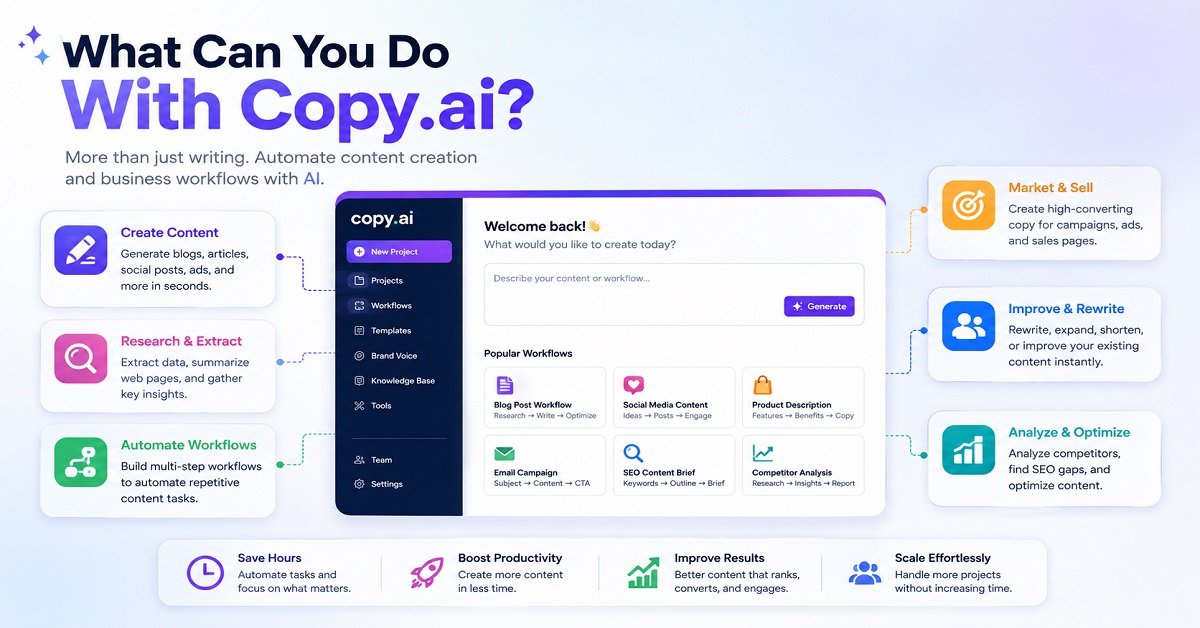
Copy.ai’s workflow builder allows users to connect multiple actions such as text generation, web scraping and research into repeatable processes. Its platform is designed to let non-technical users build multi-step workflows without writing code.
What Can You Do With Copy.ai?
Depending on your workflow, you can use it for things such as:
- Marketing copy
- Content creation
- Research
- Rewriting
- Extracting information
- SEO-related tasks
- Sales content
- Lead-related workflows
- Repetitive business tasks
The important difference is that you’re not limited to asking:
“Write me a blog post.”
You can build a process around the task.
For example:
Collect information → extract key points → generate content → rewrite → analyze → send the result
Copy.ai calls these connected processes workflows.
Its AI Actions can also combine tasks such as writing text, extracting information, analyzing SEO content and rewriting text.
Copy.ai for Bloggers
A blogger can certainly use Copy.ai for content creation.
But I would not choose it simply because you want an AI to write articles.
The bigger benefit comes when you have repeatable tasks.
Imagine you run an affiliate website and every week you need to:
- Collect product information
- Extract specifications
- Create a comparison table
- Generate short product descriptions
- Create social media copy
- Prepare email content
A workflow-based AI platform can become useful here because you can standardize parts of the process.
Copy.ai for Businesses
This is where the platform makes more sense.
Businesses often have repetitive content and sales tasks that happen again and again.
Instead of asking an AI to perform each task from scratch, you can create a repeatable workflow.
That can save more time than simply generating a faster first draft.
Who Should Use Copy.ai?
Good choice for:
- Marketing teams
- Sales teams
- Businesses
- Agencies
- People with repetitive content workflows
- Users who want workflow automation
Less necessary for:
- Casual writers
- Beginners
- People who only need occasional blog drafts
- Someone looking for a simple grammar checker
If your biggest problem is repetitive business work rather than writer’s block, Copy.ai becomes much more interesting.
6. Writesonic
Best for: SEO-focused content creation
Writesonic is one of the more interesting choices for bloggers because it has moved beyond simple AI text generation and built a larger SEO and content workflow around its writing tools.
Its current SEO Suite includes keyword research, competitor analysis, an SEO checker and optimizer, content-gap analysis and keyword clustering.
That makes it particularly relevant if your main goal is:
“I want to create content for my website and make the content process more SEO-focused.”
Writesonic for Blog Writing
Writesonic’s AI Article Writer is designed specifically for long-form content.
Its current Article Writer 6 includes features such as:
- Long-form article generation
- Tone customization
- Internal linking
- Source citations
- FAQ generation
- Calls to action
- Keyword research
- SEO-focused workflows
The exact features available can depend on the plan.
Its newer article-writing system also emphasizes research before drafting, SERP analysis, competitor analysis, citations and multiple review stages.
This is quite different from simply opening a chatbot and typing:
“Write a 2,000-word article about the best laptops.”
Writesonic’s SEO Features
The SEO side is where Writesonic can become useful for website owners.
Its SEO tools can analyze competitor content and provide information such as:
- Keyword opportunities
- Search volume
- Keyword difficulty
- Competitor terms
- Long-tail keywords
- Content gaps
Its SEO Checker and Optimizer can also compare content against competitors and provide a content score with recommendations.
That can reduce the number of separate tools you need for parts of your content workflow.
But Don’t Confuse SEO Features With Guaranteed Rankings
This is important.
An AI writing tool can help you research keywords and identify topics that competitors cover.
It cannot guarantee that your article will rank #1 on Google.
Search rankings depend on many factors, including:
- Search intent
- Content quality
- Competition
- Website authority
- Links
- Technical SEO
- Original information
- User satisfaction
- The overall quality of the website
So I would use Writesonic’s SEO features as decision-support tools, not as a button that magically makes content rank.
Writesonic for Bloggers
Writesonic can be a good fit if you publish content frequently and want more of the SEO workflow inside the same platform.
For example:
Keyword research → competitor analysis → outline → article → internal links → optimization
That can be convenient.
But if you already have a good SEO workflow using tools such as Google Search Console, keyword research tools and your preferred AI assistant, you should compare the additional cost against the time saved.
Who Should Use Writesonic?
Good choice for:
- SEO bloggers
- Content marketers
- Affiliate website owners
- SEO agencies
- People producing many articles
- Writers who want SEO features integrated with content creation
Less necessary for:
- Occasional writers
- People who only need grammar correction
- Bloggers who already have a complete SEO workflow
- People who mainly want creative writing help
For an SEO-focused website owner, Writesonic is one of the dedicated AI writing platforms worth testing.
7. Grammarly
Best for: Editing, rewriting and improving existing writing
Grammarly is a different type of tool from the ones we’ve discussed so far.
You don’t necessarily open Grammarly because you have no idea what to write.
Often, you already have something written.
You want to make it clearer, shorter, more professional or easier to understand.
That is where Grammarly shines.
Its current AI features can help users brainstorm, create drafts, rewrite text and improve existing writing. Grammarly also offers paragraph-level rewriting and suggestions for tone and length.
Grammarly for Bloggers
Suppose you have written this sentence:
“The hosting provider offers a very large number of features which can be useful for people who are interested in starting their first website.”
Grammarly might help you make it more direct:
“The hosting provider offers many useful features for first-time website owners.”
The second version is easier to read.
That’s the kind of improvement where an editing tool can be more useful than generating an entirely new article.
Grammarly Can Also Help With Tone
Different situations require different writing styles.
An email to a customer shouldn’t sound like a casual WhatsApp message.
A blog article shouldn’t sound like a legal document.
A product description shouldn’t sound like an academic paper.
Grammarly’s AI features can help rewrite content for different tones and levels of formality.
This can be particularly useful when English isn’t your first language.
You can write your thoughts naturally first and then use Grammarly to identify areas that need improvement.
Grammarly Is More Than a Grammar Checker Now
The traditional Grammarly experience focused heavily on spelling, grammar and writing suggestions.
The current product has expanded into a broader AI writing assistant.
Grammarly says its AI features can help users brainstorm, draft, rewrite and polish text while also providing traditional writing feedback.
That makes it useful throughout the writing process.
Still, its biggest strength remains improving communication, rather than replacing a complete content strategy.
Who Should Use Grammarly?
Good choice for:
- Bloggers who write their own drafts
- Freelancers
- Students
- Business professionals
- Email-heavy users
- Non-native English writers
- Anyone who wants cleaner writing
Less necessary for:
- Someone who only wants AI-generated articles
- Fiction writers looking for story-specific tools
- Marketing teams needing large-scale campaign workflows
If you already write your own content and simply want another layer of editing, Grammarly can be a very practical addition.
A Quick Comparison: Jasper vs Copy.ai vs Writesonic vs Grammarly
These four tools can all help with content, but they solve different problems.
| Tool | Main purpose | Best user | Biggest strength |
|---|---|---|---|
| Jasper | Marketing content and workflows | Marketing teams | Brand control |
| Copy.ai | Business workflows | Marketing and sales teams | Automation |
| Writesonic | SEO content | Bloggers and SEO professionals | SEO workflow |
| Grammarly | Writing improvement | Individual writers | Editing and clarity |
This is why I don’t like the idea of simply ranking AI writing tools from 1 to 10.
A tool can be number one for one person and almost useless for another.
For example, a blogger may get far more value from Writesonic than Jasper.
A large company managing several brands may get far more value from Jasper than Writesonic.
And a freelance writer who already writes everything manually may get more value from Grammarly than either of them.
Do You Really Need a Dedicated AI Writing Tool?
This is one of the most important questions to ask before buying anything.
If you are just starting a blog, you probably don’t need five AI subscriptions.
In fact, you may not need a dedicated AI writing platform at all.
A capable general-purpose AI assistant can already help with:
- Topic ideas
- Outlines
- Drafts
- Rewriting
- Editing
- FAQs
- Social media posts
- Content planning
Adding another tool only makes sense when it solves a problem that your current workflow does not handle well.
For example:
You need brand consistency across a large marketing team: Consider Jasper.
You have repetitive business workflows: Consider Copy.ai.
You want SEO research and content generation together: Consider Writesonic.
You mainly want to improve your own writing: Consider Grammarly.
You want one flexible AI assistant for many tasks: ChatGPT or Claude may be enough.
This approach can save you money and also make your workflow simpler.
Don’t Build an AI Tool Collection Just Because You Can
There is a temptation when you discover AI tools.
You try one tool for writing.
Another for SEO.
Another for rewriting.
Another for grammar.
Another for research.
Another for social media.
Before long, you are paying for six subscriptions and spending more time moving content between them than actually creating content.
That’s not productivity.
The goal should be to build a small toolset that removes work, not a large collection of tools that creates more work.
For most individual bloggers, I would start with one capable general AI assistant and one editing or SEO tool only if there is a clear need for it.
As your website grows, you can add specialized tools when they solve a specific problem.
What Should Bloggers Look for in an AI Writing Tool?
If you run a blog, don’t judge a tool only by how quickly it can generate 2,000 words.
Look at the entire content workflow.
Research
Can it help you understand the topic and identify important questions?
Outlining
Can it organize the article around search intent instead of producing random headings?
Writing
Can it create a useful first draft without sounding repetitive?
Editing
Can it improve an existing draft rather than simply generate new text?
Originality
Can you add your own experience, examples and observations?
SEO
Can it help with keywords, content structure and search intent without encouraging keyword stuffing?
Fact checking
Can you verify important claims against reliable sources?
Workflow
Does it actually save you time?
That last question matters more than people think.
If a tool produces a draft in five minutes but takes you an hour to correct, it hasn’t really saved you much time.
If another tool produces a simpler first draft that needs only 15 minutes of editing, that tool may be much more valuable.
The Best AI Writing Tool Depends on Your Job
At this stage, we can already see a pattern.
There isn’t one tool that wins every category.
| If you mainly want to… | Start with |
|---|---|
| Write blog posts and general content | ChatGPT |
| Work on long-form drafts | Claude |
| Use Google’s ecosystem | Gemini |
| Manage brand-focused marketing | Jasper |
| Automate business workflows | Copy.ai |
| Create SEO-focused content | Writesonic |
| Improve grammar and clarity | Grammarly |
The remaining tools in our list are more specialized.
ProWritingAid focuses heavily on detailed editing.
QuillBot is particularly useful for rewriting and paraphrasing.
Sudowrite is designed around creative and fiction writing.
And these specialized tools are worth understanding because sometimes a focused tool can do one job much better than a general AI assistant.
8. ProWritingAid
Best for: Deep editing and improving long-form writing
ProWritingAid is worth considering if your main problem is not coming up with ideas, but making your existing writing better.
This is an important difference.
A general AI assistant can write an article from a prompt. ProWritingAid is more focused on analyzing your writing and helping you understand where it can be improved.
It offers detailed writing analysis covering areas such as readability, sentence structure, style, repetition and grammar. It also integrates with writing environments including Word, Google Docs and Scrivener.
What Can ProWritingAid Do?
You can use it to identify things such as:
- Long or complicated sentences
- Repeated words
- Passive constructions
- Readability problems
- Grammar issues
- Weak sentence structures
- Excessive adverbs
- Style problems
- Repetitive phrasing
For example, imagine you have written a 3,000-word tutorial.
The article may be factually correct, but some paragraphs might be unnecessarily long or several sentences may communicate the same idea.
Instead of asking an AI to rewrite everything, a detailed editing tool can help you identify those specific problems.
That can be valuable for writers who want to improve their own writing skills, not simply generate content.
ProWritingAid for Bloggers
For bloggers, I see ProWritingAid as an editing layer.
A useful workflow could be:
Research → write your draft → edit for accuracy → ProWritingAid analysis → human editing → publish
This keeps your own ideas and experience at the centre of the article.
The tool helps polish the writing rather than becoming the source of everything you publish.
Who Should Use ProWritingAid?
It is particularly useful for:
- Long-form bloggers
- Authors
- Freelance writers
- Fiction writers
- People improving their English writing
- Writers who want detailed feedback
If you simply want an AI to generate a blog post from a keyword, this is probably not the first tool I would recommend.
9. QuillBot
Best for: Paraphrasing, rewriting and summarizing
QuillBot takes a more focused approach.
Its best-known use is rewriting existing text.
You provide a sentence or paragraph, choose an appropriate mode and ask the tool to produce another version while retaining the basic meaning.
That can be useful when your first draft sounds repetitive or when you want to express an idea more clearly.
QuillBot currently offers tools for paraphrasing, grammar checking, summarization, translation and other writing tasks.
QuillBot for Bloggers
A blogger might use QuillBot when:
- A paragraph sounds repetitive
- A sentence is too complicated
- An explanation needs simpler wording
- A piece of text needs a different tone
- A long passage needs summarizing
For example, suppose you wrote:
“Website hosting is a service that provides the technology and infrastructure required to make a website accessible to people through the internet.”
You could ask a rewriting tool to make the explanation easier for beginners.
The goal should be clarity, not simply changing words.
That’s an important distinction.
Don’t Use Paraphrasing as a Shortcut
There is a bad way to use a paraphrasing tool.
Someone copies another website’s article, runs it through QuillBot and publishes the rewritten version.
That does not turn copied information into genuinely original expertise.
A better use is to take your own writing and improve the wording.
You can also use it when you have researched a topic from multiple sources and want to express the information in your own clear explanation, while still properly attributing information where necessary.
Who Should Use QuillBot?
QuillBot makes sense for:
- Students
- Bloggers
- Freelancers
- Non-native English writers
- People who frequently rewrite text
- Writers who want quick paraphrasing or summarization
It is less useful if you are looking for a complete content strategy platform.
10. Sudowrite
Best for: Fiction writers and creative storytelling
Sudowrite is probably the most specialized tool on this list.
Instead of focusing mainly on SEO articles, marketing copy or business content, it is designed around creative writing and storytelling.
That makes it particularly interesting for novelists, short-story writers and people working on fiction.
Sudowrite provides tools aimed at tasks such as developing scenes, characters and story ideas rather than simply generating generic articles.
Why Would a Fiction Writer Need a Specialized Tool?
Writing fiction is different from writing a product review.
A product review needs accurate specifications, useful comparisons and a clear buying recommendation.
A novel needs:
- Characters
- Conflict
- Dialogue
- Scenes
- Pacing
- Description
- Emotional development
- Story structure
A general AI assistant can certainly help with these things.
But a tool designed specifically for fiction can organize its features around the creative writing process.
Sudowrite for Writers
A fiction writer might use it to:
- Brainstorm story ideas
- Develop characters
- Expand scenes
- Explore different descriptions
- Overcome writer’s block
- Experiment with dialogue
- Develop plot directions
The important thing is to retain your own creative control.
AI can suggest possibilities, but the writer should decide which characters, ideas and story directions actually belong in the finished work.
Who Should Use Sudowrite?
It is worth considering if you are:
- A novelist
- A short-story writer
- A fiction writer
- A creative writing student
- Someone developing a fictional world
For a typical SEO blogger, however, paying for a fiction-focused tool probably doesn’t make much sense.
Best AI Writing Tools by Use Case
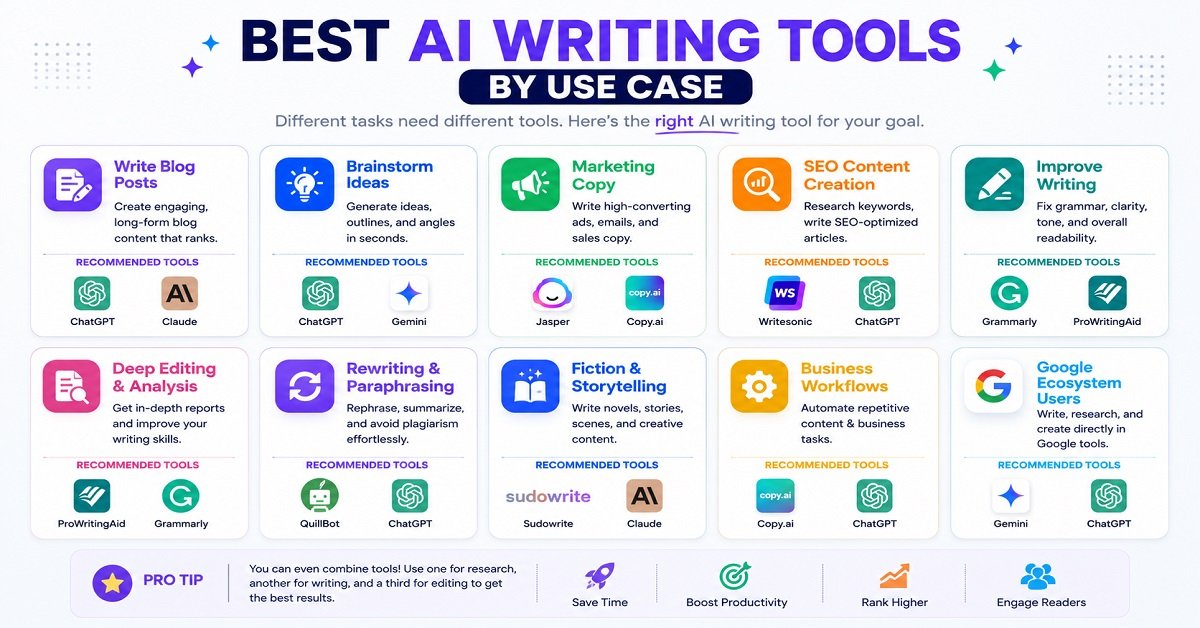
Now that we’ve looked at the major options, it becomes easier to choose based on your actual goal.
| What you want to do | Tool to consider | Why |
|---|---|---|
| General blog writing | ChatGPT | Flexible and versatile |
| Long-form writing | Claude | Strong context and writing workflow |
| Google-focused work | Gemini | Google ecosystem |
| Marketing campaigns | Jasper | Brand and marketing workflows |
| Business automation | Copy.ai | Repeatable workflows |
| SEO content | Writesonic | SEO and content workflow |
| Grammar and clarity | Grammarly | Easy editing |
| Deep writing analysis | ProWritingAid | Detailed feedback |
| Rewriting and paraphrasing | QuillBot | Focused rewriting tools |
| Fiction writing | Sudowrite | Creative writing features |
This table gives you a starting point.
But choosing a tool should also depend on how often you write and how much you are willing to spend.
Best Free AI Writing Tools
You don’t necessarily need to pay for an AI writing tool.
Several of the tools discussed above provide free access or limited free plans, although limits and features can change over time.
For someone starting a blog, this can be enough to get started.
ChatGPT
The free version can be useful for brainstorming, drafting, rewriting and many everyday writing tasks.
If your requirements are relatively simple, you may be able to run a large part of your content workflow without paying for a specialized writing platform.
Claude
Claude also offers free access, making it possible to test its writing capabilities before deciding whether you need a paid plan.
This is useful if long-form writing quality is particularly important to you.
Gemini
Gemini’s free access can be attractive to users already comfortable with Google’s ecosystem.
If you already use Google services heavily, it’s worth trying before paying for another AI writing platform.
Grammarly
Grammarly has a free tier that can provide basic writing assistance.
For someone who writes their own articles but wants help catching common mistakes, this may be enough.
QuillBot
QuillBot also offers free access with limitations.
Its free tools can be useful for occasional paraphrasing and summarization.
The Best Free Tool Is Not Always the Same for Everyone
If you want to generate content, start with a general AI assistant.
If you want to improve your writing, try an editing tool.
If you need SEO research and article workflows, a specialized SEO writing platform may be more useful.
The important thing is not whether a tool is technically free.
Ask:
Can the free version actually handle my workload?
A free tool that limits you after three prompts may be less useful to you than an affordable paid tool that saves several hours every week.
Best AI Writing Tools for Bloggers
Bloggers have a slightly different set of requirements from marketing teams.
A blogger usually needs help across several stages of the content process.
Topic research
You need to understand what people are searching for and what questions they want answered.
Content planning
You need to organize the article logically.
Drafting
You may need help turning research and notes into a first draft.
Editing
The article needs to sound natural and be easy to read.
SEO
You need to understand search intent, keywords, headings and internal links.
Promotion
Once the article is published, you may need social media posts, emails and other promotional content.
No single AI tool necessarily does all of these things perfectly.
That’s why a workflow matters more than a tool.
A Simple Blogger AI Stack
For a beginner blogger, a simple setup could look like this:
General AI assistant: Research assistance, brainstorming, outlining and drafting.
Google Search Console: Understand what your existing content is appearing for.
Editing tool: Improve grammar, readability and clarity.
SEO tool: Keyword research and content analysis when required.
Human judgment: Accuracy, experience, originality and final editing.
Notice something?
You don’t need ten AI subscriptions.
You need a workflow that solves your actual problems.
Best AI Writing Tools for SEO Content
SEO is one of the areas where AI writing tools can be extremely useful, but also extremely easy to misuse.
An AI tool can help you:
- Understand search intent
- Generate topic ideas
- Find questions readers may have
- Organize an outline
- Identify related subtopics
- Suggest title ideas
- Create FAQs
- Improve readability
- Find internal linking opportunities
But SEO is not:
Keyword + AI-generated article = Google ranking
It doesn’t work that way.
A useful article still needs to satisfy the reader.
If someone searches:
“best budget hosting for WordPress”
and your article spends 1,500 words explaining what a domain name is before finally discussing hosting providers, the article may technically contain the keyword but still fail the user’s intent.
AI can help you structure the article.
You still need to understand the reader.
AI and Google’s People-First Approach
Google’s guidance focuses on creating helpful, reliable content for people rather than creating content primarily to manipulate search rankings.
That means the important question isn’t:
“Can AI write 5,000 words?”
The better question is:
“Does this article genuinely help the person who searched for this topic?”
For a blogger, this means adding things AI cannot automatically know about your experience.
For example:
- Your own testing
- Screenshots
- Original photographs
- Personal observations
- Real examples
- Product comparisons
- Mistakes you encountered
- Things you learned while doing the task
These details make an article more useful and give readers a reason to trust it.
Can AI Write a Complete Blog Post?
Yes, technically.
But that doesn’t mean you should publish the output without editing.
Suppose you ask an AI:
“Write a 2,500-word article about starting a blog.”
You may receive a grammatically correct article.
But it could still have problems.
It might:
- Repeat the same idea several times
- Give generic advice
- Miss important beginner questions
- Include outdated information
- Make unsupported claims
- Sound similar to hundreds of other AI-generated articles
The AI solved the writing problem.
It didn’t necessarily solve the reader’s problem.
That’s why good AI-assisted content requires another layer.
How to Use AI Without Making Your Articles Sound Like AI
This is one of the most useful skills a blogger can develop.
Start with your own knowledge
Before asking AI to write, write down what you already know.
Even five or ten bullet points can make a big difference.
Give the AI real context
Instead of:
“Write an article about web hosting.”
Try:
“My audience is beginner bloggers in India. Explain shared hosting using simple examples. Compare the practical differences between shared hosting and VPS hosting. Avoid technical jargon.”
The more useful context you provide, the more useful the output can become.
Don’t publish the first draft
Treat the first AI response as raw material.
Read it.
Question it.
Rewrite it.
Add your own information.
Remove unnecessary sections.
Add real examples
Generic:
“Website speed is important.”
Better:
“Imagine two websites selling the same product. If one takes several seconds longer to load, some visitors may leave before the page even appears.”
Examples make explanations easier to understand.
Add your own experience
If you have actually used a hosting service, plugin or software tool, explain what happened.
AI cannot replace first-hand experience that you genuinely have.
Fact-check important information
This is especially important for:
- Prices
- Product specifications
- Software features
- Legal information
- Financial information
- Statistics
- Current policies
AI tools can make mistakes.
Your readers shouldn’t have to discover those mistakes after publishing.
A Practical AI Writing Workflow for Bloggers
Here’s a simple workflow you can actually use.
Step 1: Choose the topic
Start with a real reader problem.
Step 2: Understand search intent
Ask:
Why is someone searching for this?
Are they trying to learn, compare, buy, troubleshoot or make a decision?
Step 3: Research the topic
Use reliable sources and gather the information you actually need.
Don’t make AI your only source.
Step 4: Create the outline
Use AI to help organize the information.
Then modify the outline based on what your readers actually need.
Step 5: Create the first draft
Let AI help you turn your research and outline into readable content.
Step 6: Add your own value
This is the step many AI-written articles skip.
Add:
- Experience
- Examples
- Original observations
- Screenshots
- Tests
- Comparisons
- Opinions where appropriate
Step 7: Fact-check
Check important claims against reliable sources.
Step 8: Edit for humans
Read the article as if you were the person searching Google.
Ask:
“If I landed on this page, would I get my answer?”
Step 9: Optimize for search
Only after the article is useful should you work on:
- Title
- Headings
- Keywords
- Internal links
- Meta description
- Structured data where appropriate
Step 10: Do a final human review
Read the entire article once before publishing.
You will often find unnecessary sentences, repeated ideas and awkward sections that an automated check won’t catch.
Common Mistakes When Using AI Writing Tools
Publishing whatever the AI generates
This is probably the biggest mistake.
AI output is a starting point.
Using AI to create hundreds of articles
More content isn’t automatically better content.
A website with 500 weak articles isn’t necessarily more useful than a website with 50 excellent ones.
Trusting every fact
AI can be confidently wrong.
Always verify important information.
Making every article sound the same
If every article starts with:
“In today’s digital world…”
your readers will quickly notice the pattern.
Write naturally.
Removing your own personality
Your experience is part of what makes your website different.
Don’t remove it just because AI can produce polished sentences.
Using AI to rewrite other people’s content
Changing the words doesn’t magically create original expertise.
Research the subject, understand it and explain it in your own way.
Buying too many tools
One good tool that you understand well is often more valuable than five tools you barely use.
Can AI Writing Tools Replace Human Writers?
Not completely.
They can replace some repetitive writing tasks.
They can make research and drafting faster.
They can help someone overcome writer’s block.
They can improve grammar and readability.
But good content involves more than putting sentences together.
A useful article needs judgment.
For example, imagine you’re reviewing a product.
An AI can summarize the manufacturer’s specifications.
But it cannot honestly say:
“I used these earbuds for three weeks and the left earbud occasionally lost connection.”
unless that experience actually happened and you provide it.
That’s why human input remains important.
The strongest content is often:
AI efficiency + human experience + reliable research + editorial judgment
rather than AI alone.
Which AI Writing Tool Is Best for You?
At this point, the answer should be much clearer.
| If you are… | Best starting point |
|---|---|
| Beginner blogger | ChatGPT or Claude |
| Frequent long-form writer | Claude or ChatGPT |
| Google ecosystem user | Gemini |
| Marketing professional | Jasper |
| Marketing/sales team | Copy.ai |
| SEO-focused blogger | Writesonic |
| Writer who needs editing | Grammarly |
| Author who wants deep editing | ProWritingAid |
| Someone who frequently rewrites text | QuillBot |
| Fiction writer | Sudowrite |
But there is another factor that matters just as much:
How much are you willing to pay?
If you are starting a blog and your budget is limited, there is little reason to immediately subscribe to multiple expensive AI platforms.
Start small.
Learn your workflow.
Then pay for a specialized tool when it clearly saves you time or improves your results.
Are Paid AI Writing Tools Worth It?
Sometimes yes.
Sometimes no.
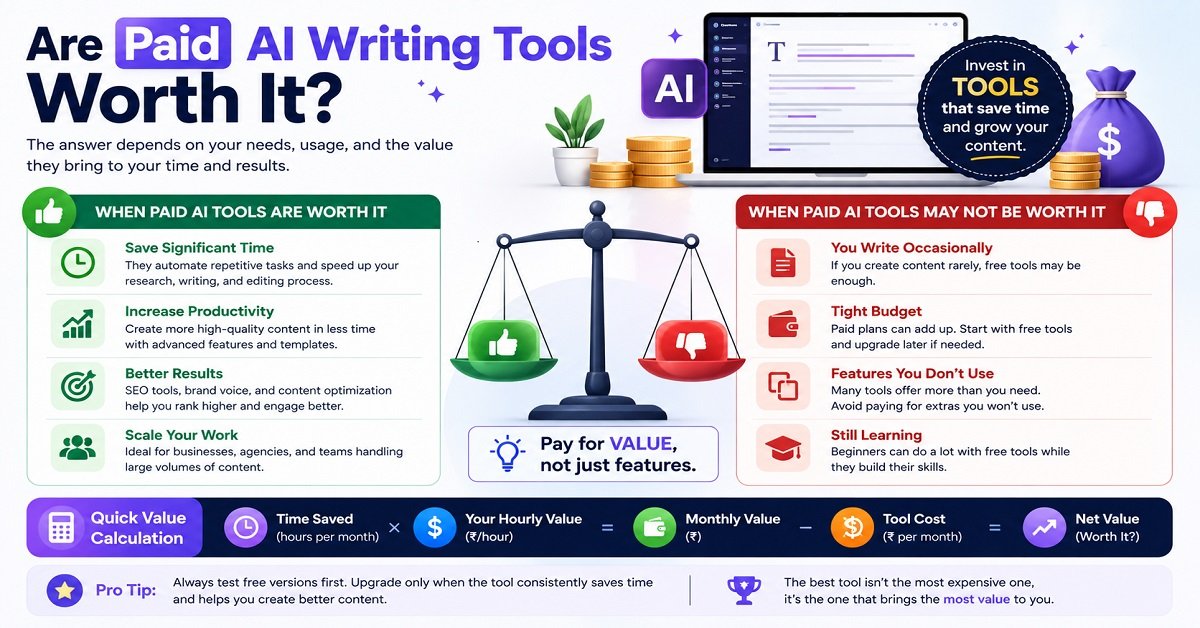
If you write one article every few weeks, a free AI assistant may be perfectly adequate.
If you publish several articles every week, manage multiple websites or run a content agency, paying for a specialized platform can make much more sense.
The easiest way to decide is to calculate the value of the time saved.
Imagine a tool costs ₹2,000 per month.
If it saves you 10 hours of repetitive work every month, you are effectively paying ₹200 per hour for that saved time.
Whether that’s worthwhile depends on what your time is worth.
This is a much better way to evaluate an AI subscription than simply asking whether it has “more features.”
My Practical Recommendation
If you’re new to AI writing tools, don’t start by buying everything.
Start with one general-purpose AI assistant.
Use it for a few weeks.
See where your actual bottlenecks are.
If you discover that editing takes too long, consider Grammarly or ProWritingAid.
If SEO research and article optimization are taking too much time, look at Writesonic or another dedicated SEO platform.
If you manage a marketing team and need consistent brand content, consider Jasper.
If repetitive business workflows are the problem, Copy.ai may be more useful.
This approach keeps your writing workflow simple while still allowing you to add specialized tools when there is a real need.
Best AI Writing Tools: Final Verdict
There is no single AI writing tool that is perfect for everyone.
For most individual bloggers, ChatGPT or Claude are strong places to start because they can handle a wide range of writing tasks without forcing you into a specialized workflow.
Gemini is particularly worth considering if you already work heavily within Google’s ecosystem.
For marketing teams, Jasper can make more sense because of its focus on brand voice and marketing workflows.
For business teams that need repeatable processes, Copy.ai is worth considering.
For SEO-focused bloggers and content marketers, Writesonic offers a more specialized content and SEO workflow.
If you already write your own content and mainly want to improve it, Grammarly or ProWritingAid may provide more value than another article generator.
For rewriting and paraphrasing, QuillBot is a useful specialist.
And for fiction writers, Sudowrite is designed for a completely different type of writing.
The biggest lesson is simple:
Don’t choose an AI writing tool because it claims to be the best. Choose it because it solves your particular writing problem.
And don’t forget the most important part.
AI can help you produce content faster, but your research, experience, judgment and understanding of the reader are what can turn that content into something genuinely useful.
How to Choose an AI Writing Tool Without Wasting Money
Before paying for any AI writing tool, ask yourself these five questions.
1. What do I write most often?
If you mainly write blog posts, you probably need a different tool from someone who writes advertising copy all day.
Think about your most common task:
- Blog posts
- Product descriptions
- Emails
- Social media posts
- Business documents
- SEO content
- Fiction
- Editing
Choose the tool around that task.
2. What is currently taking me the most time?
This is often a better question than “Which AI tool has the most features?”
For example, if writing your first draft takes three hours, a general AI assistant could help.
If your draft is already good but editing takes another two hours, an editing-focused tool may be more useful.
If keyword research and content planning are slowing you down, an SEO-focused platform may make more sense.
3. Do I really need a paid plan?
Try the free version first when one is available.
Use it for real work rather than simply testing it with random questions.
After a week or two, ask yourself:
“Did this tool actually save me time?”
If the answer is no, you probably don’t need the subscription.
4. Does it fit my existing workflow?
A tool should make your work easier.
If you have to copy information between four different platforms just to produce one article, the extra features may not be worth the trouble.
5. Can I still add my own experience?
This is especially important for bloggers.
Your AI writing tool should make it easier to express your knowledge, not encourage you to publish generic content.
AI Writing Tools: Pros and Cons
A Simple AI Writing Setup for a Beginner Blogger
If you’re starting a new blog, you don’t need an expensive collection of AI subscriptions.
A simple setup could be enough.
Start with one general AI assistant
Use ChatGPT, Claude or Gemini for:
- Brainstorming
- Outlines
- Research assistance
- Drafting
- Rewriting
- Content planning
Add an editing tool if you need one
If grammar and readability are a regular problem, consider Grammarly or ProWritingAid.
Add an SEO tool when your website grows
Once you are publishing regularly and need deeper keyword research and content analysis, consider a dedicated SEO platform.
Keep the human part
This is the most important component.
Add your:
- Experience
- Examples
- Opinions
- Testing
- Screenshots
- Original research
- Lessons learned
That is what helps turn an AI-assisted draft into a useful article.
How I Would Build an AI Writing Workflow for a Website
For a website like OrbiElf, I would not use AI to simply generate articles from keywords.
I would use it at different stages.
Before writing
Use AI to brainstorm angles and questions readers may have.
During research
Use it to organize research notes and identify areas that need further checking.
During outlining
Use it to create a logical structure, then modify that structure yourself.
During drafting
Use AI to turn your notes and outline into a first draft.
During editing
Ask AI to identify unclear sections, repetition and difficult sentences.
Before publishing
Fact-check important information and make sure the article genuinely answers the searcher’s question.
After publishing
Use AI to create social media posts, update older content and find ideas for related articles.
This is much more useful than treating AI as a machine that produces finished articles.
Don’t Forget About AI Detection
You may have seen websites advertising AI detectors that claim they can identify whether an article was written by AI.
Don’t build your entire content strategy around trying to “beat” these detectors.
AI detection systems can make mistakes, and the more useful question is not:
“Can a detector identify this?”
It is:
“Is this genuinely useful, accurate and original content?”
If you have researched the subject properly, added your own experience, checked the facts and edited the article for your readers, you are following a much healthier content strategy than simply trying to make AI-generated text appear human.
Does Google Penalize AI-Written Content?
The simple answer is more nuanced than “yes” or “no.”
Google’s guidance has focused on the quality and purpose of content, rather than saying that every piece of content created with AI is automatically unacceptable.
The problem is content created primarily to manipulate search rankings, especially when it is low-quality, repetitive or unhelpful.
That means using AI as part of your writing process isn’t the main issue.
The important question is what you publish.
For example:
AI-generated article with no research, no original value and many factual errors: Poor approach.
Human-researched article using AI for outlining, rewriting and editing, with original information and careful fact-checking: Much better approach.
This is another reason I recommend using AI as an assistant rather than handing your entire publishing process over to it.
AI Writing Tools Are Not a Substitute for Research
This deserves special attention for bloggers.
Imagine you’re writing a review of a product.
An AI tool may know the specifications from information available in its training data or from sources you provide.
But product information can change.
Prices change.
Features change.
Software updates happen.
Products are discontinued.
A company may change its warranty terms.
So if the information matters to the reader, check the original source.
For current information, official websites, documentation and reliable primary sources should be part of your research process.
AI can help you understand the information faster.
It should not become your only source of truth.
Frequently Asked Questions
What is the best AI writing tool in 2026?
There is no single best AI writing tool for everyone. ChatGPT and Claude are strong general-purpose options, while Jasper, Writesonic, Grammarly, ProWritingAid and other tools are better suited to specific writing needs.
Which AI writing tool is best for bloggers?
For most individual bloggers, ChatGPT or Claude are good starting points because they can handle brainstorming, outlining, drafting and rewriting. Writers who need dedicated SEO workflows may prefer a tool such as Writesonic.
What is the best free AI writing tool?
ChatGPT, Claude and Gemini all provide free access with varying limits. The best option depends on what you need to write and how much you use the tool.
Can AI write a complete blog post?
Yes, AI can generate a complete blog post. However, you should research, fact-check, edit and add your own experience before publishing it. AI-generated text should be treated as a starting point rather than automatically publish-ready content.
Which AI tool is best for rewriting?
QuillBot is particularly focused on paraphrasing and rewriting, while ChatGPT and Claude can also rewrite content with detailed instructions about tone, length and reading level.
Which AI tool is best for grammar?
Grammarly is one of the easiest options for grammar, clarity and general writing improvements. ProWritingAid is worth considering if you want more detailed analysis of your writing style and structure.
Is ChatGPT better than Jasper for blogging?
For an individual blogger, ChatGPT may be more practical because it is a flexible general-purpose AI assistant. Jasper becomes more attractive for marketing teams and businesses that need brand voice management and structured marketing workflows.
Is Claude good for blog writing?
Yes. Claude can be useful for long-form articles, rewriting, editing, brainstorming and working with large amounts of context. It is particularly worth considering if natural-sounding long-form writing is important to you.
Is AI-generated content good for SEO?
AI can help with parts of the SEO content process, including research, outlining and editing. However, simply generating an article with AI does not guarantee search rankings. The content still needs to satisfy search intent, be accurate and provide genuine value.
Can AI writing tools replace human writers?
They can automate some writing tasks, but they do not completely replace human writers. Research, experience, judgment, fact-checking, originality and understanding the reader remain important.
Should I pay for multiple AI writing tools?
Usually, you don’t need several subscriptions when you’re starting out. Begin with one tool, identify the biggest problem in your workflow and add another service only when it provides enough value to justify its cost.
Are AI writing tools worth paying for?
They can be, especially if they save you significant time or provide features you actually use. A tool is worth paying for when the time or quality improvement you receive is greater than its subscription cost.
Final Verdict: Which AI Writing Tool Should You Choose?
After looking at all these tools, my recommendation is simple:
Don’t choose an AI writing tool based on the longest feature list. Choose it based on the writing problem you need to solve.
For most individual bloggers and content creators, ChatGPT is a strong place to start because of its flexibility.
If long-form writing and detailed revision are your main priorities, Claude is worth trying.
If you already work heavily with Google’s ecosystem, Gemini can be a convenient choice.
For marketing teams that need brand consistency and dedicated marketing workflows, Jasper is a stronger fit.
For businesses that want repeatable content and sales workflows, Copy.ai is worth considering.
For SEO-focused content creation, Writesonic provides more specialized tools than a general chatbot.
If you mainly want to improve writing you’ve already created, Grammarly is a practical choice.
For deeper writing analysis, ProWritingAid is worth looking at.
For paraphrasing and rewriting, QuillBot is the more focused option.
And if you’re writing fiction, Sudowrite is designed specifically around that type of work.
My Advice for Beginners
If you’re completely new to AI writing tools, don’t subscribe to five services on the same day.
Start with one.
Use it for actual work.
Learn how to give it useful instructions.
Check its output carefully.
Then identify where you still lose time.
That’s the point where you add another tool.
AI should simplify your writing workflow, not turn it into a collection of subscriptions and complicated processes.
The best AI writing workflow is therefore not:
“Let AI write everything for me.”
It is:
Research → AI assistance → human experience → fact-checking → editing → useful content
That approach gives you the speed of AI while keeping the part that matters most to your readers: real value.